การแนะนำ
This manual provides essential information for the proper setup, operation, and maintenance of your Polk Signature Elite ES30 Center Channel Speaker. Designed for home theater systems, the ES30 delivers clear dialogue and dynamic sound. Please read this manual thoroughly before installation and use to ensure optimal performance and longevity of your speaker.
ข้อมูลด้านความปลอดภัย
- การจัดวาง: Ensure the speaker is placed on a stable, level surface or securely mounted to prevent accidental falls. Keep away from heat sources, direct sunlight, and moisture.
- การระบายอากาศ : อย่าปิดกั้นช่องระบายอากาศ การไหลเวียนของอากาศที่เพียงพอเป็นสิ่งจำเป็นเพื่อป้องกันความร้อนสูงเกินไป
- พลัง: This is a passive speaker and requires connection to an amplifier or AV receiver. Ensure the ampควรปิดเครื่องขยายเสียงก่อนทำการเชื่อมต่อใดๆ
- การทำความสะอาด: ใช้ผ้าแห้งนุ่มๆ ในการทำความสะอาด หลีกเลี่ยงการใช้น้ำยาทำความสะอาดหรือสารละลาย
- การบริการ: อย่าพยายามให้บริการผลิตภัณฑ์นี้ด้วยตนเอง ส่งต่อการบริการทั้งหมดไปยังช่างบริการที่ผ่านการรับรอง
เนื้อหาแพ็คเกจ
ตรวจสอบว่าแพ็คเกจของคุณมีรายการต่อไปนี้:
- Polk Signature Elite ES30 Center Channel Speaker
- คู่มือการใช้งาน (เอกสารนี้)
Note: Speaker cables are not included and must be purchased separately.
คุณสมบัติ
The Polk Signature Elite ES30 Center Channel Speaker incorporates several design elements for enhanced audio performance:
- ระบบเสียงแบบสมดุลไดนามิก: Engineered for clear, room-filling sound.
- High-Resolution Terylene Tweeter: A 1-inch tweeter designed for accurate high-frequency reproduction, supporting Hi-Res Audio.
- Mica-Fortified Polypropylene Woofers: Two 5.25-inch woofers provide detailed mid-range and bass response.
- Precision Crossovers: Ensures smooth blending between the drivers.
- เทคโนโลยีพอร์ตจ่ายไฟที่ได้รับการจดสิทธิบัตร: Enhances bass output and reduces distortion for a more impactful low-frequency experience.
- Dolby Atmos & DTS:X Compatibility: Designed to integrate seamlessly with modern surround sound systems.
- ส่วนประกอบที่เข้ากันอย่างลงตัวในด้านโทนเสียง: Allows for consistent sound when combined with other Polk Signature Elite series speakers.
การตั้งค่า
ตำแหน่งลำโพง
Proper placement of the center channel speaker is crucial for clear dialogue and a cohesive soundstage in your home theater system.
- Central Position: Place the ES30 directly above or below the center of your television or projection screen. This ensures that dialogue appears to originate from the screen.
- Ear Level: Ideally, the tweeter of the center channel speaker should be as close to ear level as possible when seated in your primary listening position. If placed below the screen, angle the speaker slightly upwards. If placed above, angle it slightly downwards.
- เส้นทางที่ชัดเจน: Ensure there are no obstructions between the speaker and your listening area.

Image: The Polk ES30 center channel speaker positioned on a media console beneath a television, demonstrating typical placement in a home theater environment.
การเชื่อมต่อ
Before making any connections, ensure your AV receiver or ampเครื่องเสียงถูกปิดและถอดปลั๊กออกจากเต้าเสียบไฟฟ้า
- Speaker Wire Preparation: ลอกฉนวนออกจากปลายสายลำโพงประมาณ 1/2 นิ้ว (12 มม.) แล้วบิดเส้นลวดเปลือยให้แน่น
- Connecting to the Speaker: The ES30 features dual gold-plated five-way binding posts. Connect the positive (+) terminal (red) on the speaker to the positive (+) terminal on your AV receiver's center channel output. Connect the negative (-) terminal (black) on the speaker to the negative (-) terminal on your AV receiver's center channel output. Ensure no stray wire strands are touching between the positive and negative terminals.
- การเชื่อมต่อที่ปลอดภัย: Tighten the binding posts firmly by hand.
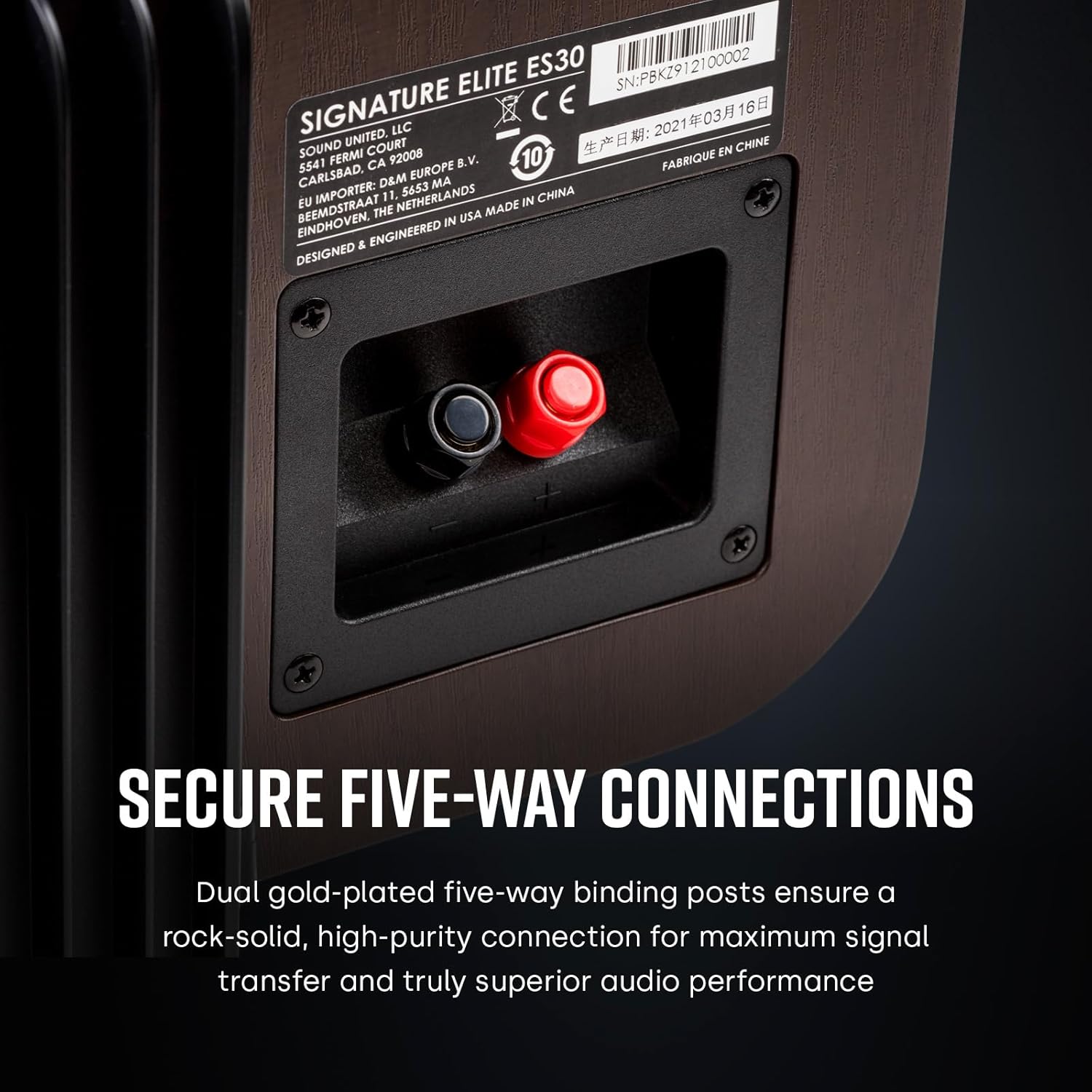
Image: A close-up of the rear of the ES30 speaker, highlighting the red and black binding posts for connecting speaker wire from an ampเครื่องขยายเสียงหรือตัวรับสัญญาณ
Initial Configuration (AV Receiver)
After connecting the speaker, power on your AV receiver and perform the following steps:
- Speaker Setup Menu: Access the speaker setup menu on your AV receiver.
- ขนาดลำโพง: Set the center channel speaker to "Small" if you are using a subwoofer, or "Large" if you are not using a subwoofer and want the ES30 to handle full-range audio. For optimal performance with a subwoofer, "Small" is generally recommended.
- ความถี่ครอสโอเวอร์: If set to "Small", configure the crossover frequency. A common starting point is 80 Hz, but you may adjust this based on your subwoofer and personal preference.
- การปรับเทียบระดับ: Use your receiver's auto-calibration feature (e.g., Audyssey, MCACC, YPAO) or manually adjust the channel levels to ensure the center speaker's volume matches other speakers in your system.
คำแนะนำการใช้งาน
The Polk Signature Elite ES30 is a passive speaker, meaning its operation is directly controlled by your connected AV receiver or amplifier. There are no direct controls on the speaker itself.
- เปิด/ปิดเครื่อง: The speaker will receive power and signal when your AV receiver/ampเครื่องขยายเสียงเปิดอยู่
- การควบคุมระดับเสียง: Adjust the overall system volume using your AV receiver's remote or controls.
- โหมดเสียง: Utilize your AV receiver's various sound modes (e.g., Dolby Digital, DTS, Stereo) to optimize the audio experience for different content. The ES30 is designed to reproduce dialogue and central sound effects with clarity.

ภาพ: ด้านหน้าโดยตรง view of the Polk ES30 speaker, showcasing its drivers and grille-less design.
การซ่อมบำรุง
- ทำความสะอาดตู้: Use a soft, dry, lint-free cloth to wipe the speaker cabinet. Avoid abrasive materials or chemical cleaners, as these can damage the finish.
- การทำความสะอาดกระจังหน้า: If your speaker has a removable grille, gently remove it and use a soft brush or vacuum cleaner with a brush attachment to remove dust.
- Dusting Drivers: Avoid touching the speaker drivers (tweeter and woofers) directly. If dust accumulates, use a soft brush or compressed air from a distance.
- การดูแลสิ่งแวดล้อม: Keep the speaker away from extreme temperatures, high humidity, and direct sunlight to prevent damage to the cabinet and internal components.
การแก้ไขปัญหา
If you experience issues with your Polk Signature Elite ES30 speaker, consult the following table for common problems and solutions.
| ปัญหา | สาเหตุที่เป็นไปได้ | สารละลาย |
|---|---|---|
| No sound from center speaker |
|
|
| Distorted or unclear dialogue |
|
|
| Dialogue sounds too quiet or too loud compared to other speakers |
|
|
If the problem persists after trying these solutions, please contact Polk Audio customer support or refer to your AV receiver's manual for further assistance.
ข้อมูลจำเพาะ
| คุณสมบัติ | รายละเอียด |
|---|---|
| ชื่อรุ่น | ES30 |
| ประเภทลำโพง | ช่องกลาง |
| ประเภทการติดตั้ง | ที่วางบนโต๊ะ |
| ส่วนประกอบที่รวมอยู่ | ลำโพง |
| วัสดุ | Mica Reinforced Polypropylene |
| ขนาดสินค้า (ลึก x กว้าง x สูง) | 27D x 50.8W x 19.1H เซนติเมตร |
| น้ำหนักสินค้า | 19 ปอนด์ (ประมาณ 8.6 กก.) |
| อิมพีแดนซ์ | 8 โอห์ม |
| เอาท์พุต วัดtagอี (Ampเครื่องฟอก) | 150 Watts (Recommended) |
| กำลังขับสูงสุดของลำโพง | 25 วัตต์ (RMS, โดยทั่วไป) |
| การตอบสนองความถี่ | 40 KHz (Upper limit, Hi-Res Audio Certified) |
| ทวีตเตอร์ | 1" Terylene High-Resolution |
| วูฟเฟอร์ | Two 5.25" Mica-Fortified Polypropylene |
| การกำหนดค่าช่องเสียงรอบทิศทาง | 5.1 (Compatible) |
| เทคโนโลยีการเชื่อมต่อ | Wired (Dolby Atmos compatible systems) |
| โหมดเอาต์พุตเสียง | Surround, 3D Spatial Audio (via compatible receiver) |
หมายเหตุ: ข้อมูลจำเพาะอาจเปลี่ยนแปลงได้โดยไม่ต้องแจ้งให้ทราบล่วงหน้า
การรับประกันและการสนับสนุน
Polk Audio products are designed for reliability and performance. This product typically comes with a manufacturer's warranty. For specific warranty terms and conditions, including duration and coverage, please refer to the warranty card included with your purchase or visit the official Polk Audio webเว็บไซต์.
For technical support, troubleshooting assistance beyond this manual, or service inquiries, please contact Polk Audio customer support through their official webเว็บไซต์หรือข้อมูลติดต่อที่ระบุไว้ในเอกสารผลิตภัณฑ์ของคุณ
แหล่งข้อมูลออนไลน์:
- Polk Audio อย่างเป็นทางการ Webเว็บไซต์: www.polkaudio.com
- Product Support Page: (Refer to the official website for the specific ES30 support page)


