1. บทนำและเรื่องอื่นๆview
The OMTech XF-180 Fume Extractor is an industrial-strength air purification system designed to effectively remove harmful fumes and particulates generated during various industrial processes such as laser cutting, engraving, soldering, CNC machining, and welding. Equipped with an 80W DC motor, it provides a powerful 106 CFM (Cubic Feet per Minute) airflow, ensuring a cleaner and safer working environment.
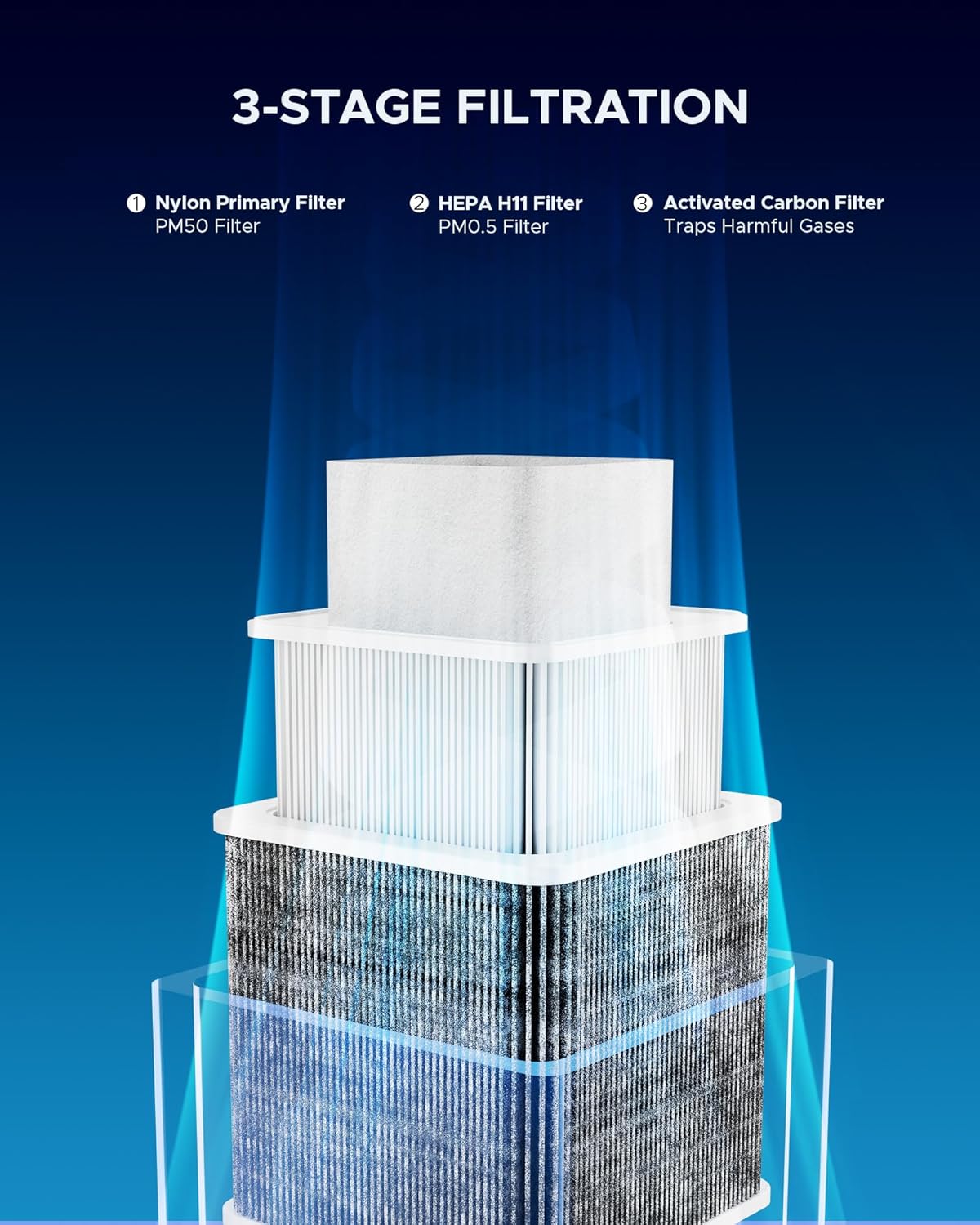
This unit features a highly efficient 3-stage filtration system that captures a wide range of airborne contaminants, from large dust particles to microscopic fumes and unpleasant odors. Its compact design, coupled with four quality caster wheels, allows for easy mobility and flexible placement within your workspace.

2. คำแนะนำด้านความปลอดภัย
Please read and understand all safety warnings and instructions before operating the OMTech XF-180 Fume Extractor. Failure to follow these instructions may result in electric shock, fire, or serious injury.
- ความปลอดภัยทางไฟฟ้า: Ensure the unit is connected to a grounded power outlet with the correct voltage. Do not operate with a damaged power cord or plug.
- การระบายอากาศ : While the fume extractor significantly reduces airborne contaminants, ensure adequate general ventilation in the workspace.
- การบำรุงรักษาตัวกรอง: Always turn off and unplug the unit before performing any maintenance, especially filter replacement. Wear appropriate personal protective equipment (PPE) such as gloves and a mask when handling used filters.
- วัสดุไวไฟ: Do not use the fume extractor near highly flammable liquids, gases, or explosive dust.
- วัตถุประสงค์การใช้: Use the unit only for its intended purpose of fume and particulate extraction. Do not block the intake or exhaust vents.
- เด็กและสัตว์เลี้ยง: ให้เด็กและสัตว์เลี้ยงอยู่ห่างจากอุปกรณ์ผ่าตัด
3. ส่วนประกอบผลิตภัณฑ์
The OMTech XF-180 Fume Extractor comes with the following main components:
- Main Fume Extractor Unit with Caster Wheels
- Flexible Extraction Tube (Gooseneck Arm)
- Extraction Hood/Nozzle
- 2.6" to 4" Adapter
- 3-สtage Filter Set:
- Nylon Primary Filter (PM50 Filter)
- HEPA H11 Filter (PM0.5 Filter)
- ตัวกรองคาร์บอนกัมมันต์
- สายไฟ
4. คำแนะนำในการตั้งค่า
Follow these steps to set up your OMTech XF-180 Fume Extractor:
- การแกะกล่อง: นำส่วนประกอบทั้งหมดออกจากบรรจุภัณฑ์อย่างระมัดระวัง ตรวจสอบความเสียหายระหว่างการขนส่ง
- การติดตั้งตัวกรอง: 3-stage filters are typically pre-installed. If not, open the top cover by unlatching the side clips. Insert the filters in the correct order: Nylon Primary Filter at the top, followed by the HEPA H11 Filter, and finally the Activated Carbon Filter at the bottom. Ensure they are seated properly. Close and latch the cover securely.
- Attach Exhaust Port: Remove the four screws from the top exhaust port. Place the exhaust port adapter over the opening and secure it with the screws.
- Connect Flexible Tube: Attach one end of the flexible extraction tube to the exhaust port adapter on the fume extractor. Secure it with the provided clamp, tightening with a screwdriver.
- Connect to Machine: Attach the other end of the flexible tube to your laser engraver, cutter, or other machine's exhaust port. Use the 2.6" to 4" adapter if necessary for compatibility. Secure this connection with another clamp.
- การวางตำแหน่ง: Utilize the caster wheels to easily move the fume extractor to your desired location. Lock the wheels in place once positioned.
- การเชื่อมต่อไฟฟ้า: Plug the power cable into the unit's power input, then plug the other end into a grounded electrical outlet.
วิดีโอสาธิตการติดตั้ง
This video demonstrates the assembly and connection process for the OMTech XF-180 Fume Extractor, including filter installation and connecting to a laser machine.

5. คู่มือการใช้งาน
The OMTech XF-180 Fume Extractor is designed for intuitive operation.
- เปิด/ปิดเครื่อง: Press the power button on the front panel to turn the unit on or off. The indicator light will illuminate when the unit is active.
- ปรับการไหลของอากาศ: The unit features three adjustable airflow modes. Press the power button repeatedly to cycle through the modes:
- อ่อนโยน: Indicated by a green light. Suitable for light fume generation.
- ปานกลาง: Indicated by a blue light. For average fume levels.
- แข็งแกร่ง: Indicated by a red light. For heavy fume generation or when maximum extraction is required.
- Positioning the Extraction Arm: Adjust the flexible gooseneck arm and hood to optimally capture fumes at their source. Ensure the hood is positioned as close as possible to the work area without obstructing your work.


6. การบำรุงรักษา
Regular maintenance ensures the optimal performance and longevity of your fume extractor.
การเปลี่ยนตัวกรอง
The OMTech XF-180 uses a 3-stage filtration system, and each filter has a recommended replacement cycle:
- Nylon Primary Filter (PM50 Filter): Recommended replacement every 7-30 days, depending on usage and material.
- HEPA H11 Filter (PM0.5 Filter): Recommended replacement every 3-6 months.
- ตัวกรองถ่านกัมมันต์: Recommended replacement every 6-12 months.
To Replace Filters:
- Turn off the fume extractor and unplug it from the power source.
- Unlatch the side clips and carefully open the top cover of the unit.
- Remove the old filters, starting from the top (Nylon, then HEPA, then Activated Carbon). Dispose of used filters according to local regulations, as they may contain hazardous materials.
- Insert new filters in the correct order: Activated Carbon Filter at the bottom, followed by the HEPA H11 Filter, and finally the Nylon Primary Filter at the top. Ensure they fit snugly.
- Close the top cover and secure the side latches.
- Plug the unit back in and test its operation.
การทำความสะอาดทั่วไป
เช็ดทำความสะอาดภายนอกตัวเครื่องเป็นระยะด้วยผ้านุ่มๆamp cloth. Do not use abrasive cleaners or solvents. Ensure the intake and exhaust vents are free from obstructions.
7 การแก้ไขปัญหา
If you encounter issues with your OMTech XF-180 Fume Extractor, refer to the following common troubleshooting steps:
- หน่วยไม่เปิดเครื่อง:
- Check if the power cable is securely plugged into both the unit and the electrical outlet.
- ตรวจสอบว่าปลั๊กไฟใช้งานได้หรือไม่ โดยลองเสียบกับอุปกรณ์อื่นดู
- โปรดตรวจสอบให้แน่ใจว่าได้กดปุ่มเปิด/ปิดเครื่องแล้ว
- Low Airflow/Poor Fume Extraction:
- Check if the filters are clogged. Replace them if necessary, especially the primary filter.
- Ensure the flexible extraction tube is not kinked or obstructed.
- Verify that the extraction arm and hood are positioned correctly and close to the fume source.
- Confirm the unit is set to an appropriate speed level (Moderate or Strong for higher fume generation).
- เสียงรบกวนที่ผิดปกติระหว่างการทำงาน:
- Check for any loose components or foreign objects inside the unit or the flexible tube.
- ตรวจสอบให้แน่ใจว่าวางเครื่องไว้บนพื้นผิวที่ได้ระดับและมั่นคง
- หากเสียงรบกวนยังคงดังต่อเนื่องและดังมากเกินไป โปรดติดต่อฝ่ายบริการลูกค้า
For issues not covered here, please contact OMTech customer service for assistance.
8. ข้อมูลจำเพาะ
| คุณสมบัติ | ข้อมูลจำเพาะ |
|---|---|
| แบบอย่าง | เอ็กซ์เอฟ-180 |
| ชั้นกรอง | 3 (Nylon, HEPA H11, Activated Carbon) |
| การใช้พลังงาน | 80วัตต์ |
| การไหลของอากาศสูงสุด | 106 CFM (180 ลบ.ม./ชม.) |
| แม็กซ์ ระดับเสียง | 55 เดซิเบล |
| ขนาด (กว้าง x ยาว x สูง) | 11 x 11 x 17 นิ้ว (28 x 28 x 43 ซม.) |
| น้ำหนักสินค้า | 19.8 ปอนด์ (9 กก.) |

9. การรับประกันและการสนับสนุน
OMTech stands behind the quality of the XF-180 Fume Extractor with a strong warranty. For specific warranty terms and conditions, please refer to the warranty card included with your product or visit the official OMTech webเว็บไซต์.
Our dedicated customer service team is available 24/7 to assist you with any questions, concerns, or technical support needs. We are committed to ensuring your satisfaction and providing prompt assistance for years to come.
หากต้องการความช่วยเหลือเพิ่มเติม โปรดไปที่ OMTech Store.


