การแนะนำ
The Pruveeo D90 is an advanced 3-channel dash camera system engineered to provide comprehensive video surveillance for your vehicle. It is equipped with three 1080P cameras, capturing simultaneous footage from the front, interior, and side perspectives. This design ensures a wide 170-degree viewing angle for each camera, enhancing situational awareness and evidence collection. The D90 incorporates features such as superior night vision for clear recordings in low-light conditions, 24/7 parking monitoring for continuous protection, automatic loop recording to manage storage efficiently, and an emergency accident lock function that secures critical footage เมื่อตรวจจับแรงกระแทกได้
This manual serves as a comprehensive guide to help you set up, operate, and maintain your Pruveeo D90 dash cam, ensuring optimal performance and longevity.
คุณสมบัติหลัก

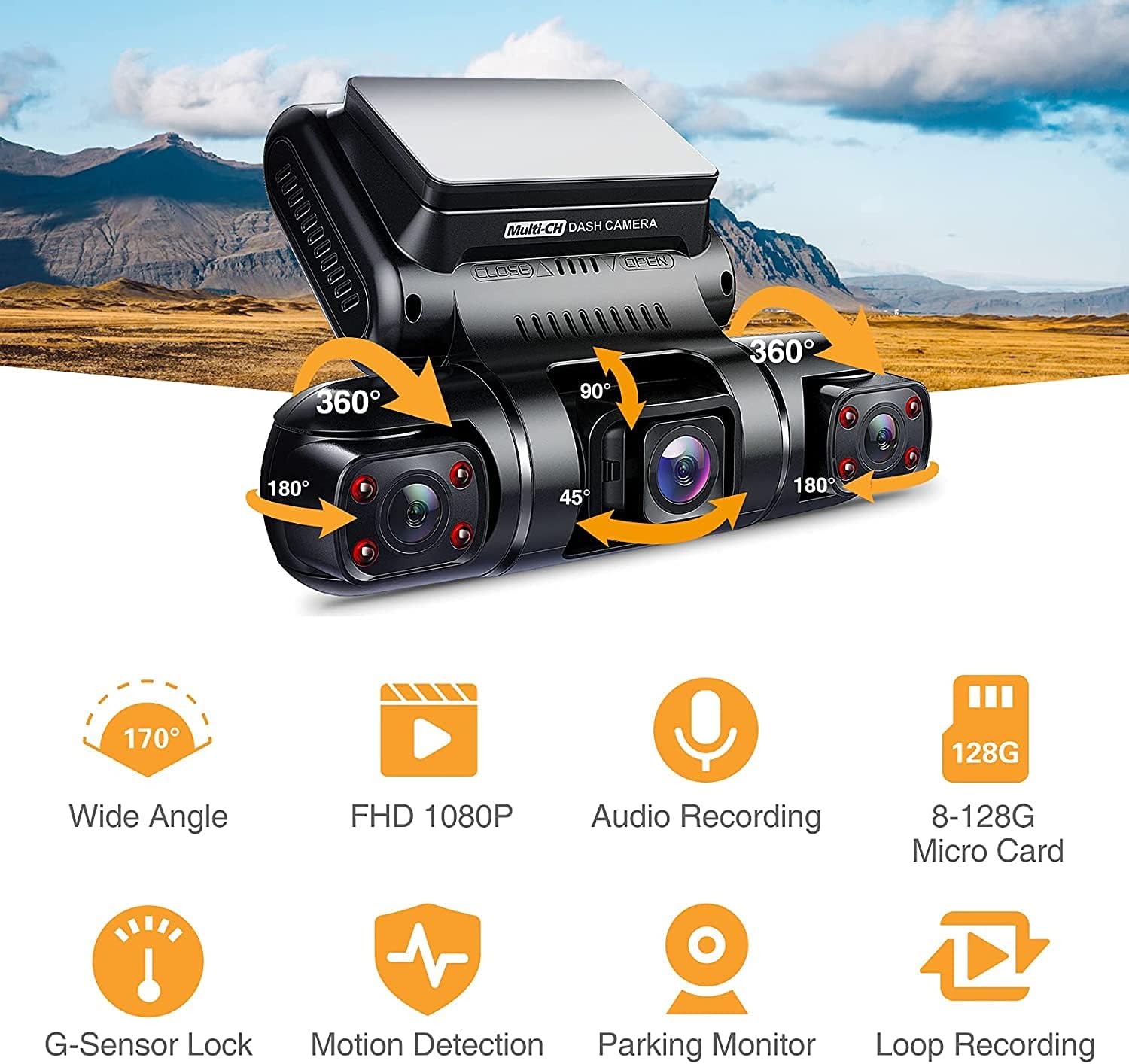
ผลิตภัณฑ์โดยรวม View: The Pruveeo D90 dash cam features a central display unit with two adjustable side cameras, allowing for flexible recording angles. The main unit includes control buttons for easy navigation.

Triple Channel Recording: The dash cam records simultaneously from three perspectives: front, interior, and side (left/right), each in 1080P resolution with a 170° wide angle, providing comprehensive coverage.
- Triple 1080P Recording: Captures video at 1920x1080P resolution from three independent channels (front, interior, and side).
- 170° Super Wide Angle Lens: Each camera provides a broad field of view, minimizing blind spots and capturing more of the surrounding environment.
- Adjustable Interior Cameras: The two cabin cameras can rotate back and forth, and left and right, allowing users to customize recording angles for specific needs, such as monitoring the left and right sides of the car or the interior.
- การมองเห็นตอนกลางคืนที่เหนือกว่า: Equipped with 4 infrared lights and an F1.8 aperture on the cabin cameras, along with a highly sensitive night vision image sensor, ensuring clear video capture even in dark conditions.
- ระบบตรวจสอบที่จอดรถตลอด 24 ชั่วโมง: Provides continuous surveillance of your vehicle when parked, automatically detecting and recording moving objects or impacts.
- การบันทึกแบบวนซ้ำ: ระบบจะเขียนทับไฟล์ foo ที่ปลดล็อกเก่าที่สุดโดยอัตโนมัติtage when the memory card reaches its maximum capacity, ensuring continuous recording without manual intervention. Supports 1, 2, or 3-minute loop recording segments.
- ระบบล็อคอุบัติเหตุฉุกเฉิน (G-Sensor): A built-in G-sensor detects sudden collisions and automatically locks the current recording, preventing it from being overwritten.
- Wide Memory Card Support: Compatible with Class 10 or higher micro-SD cards up to 128GB.
- ซุปเปอร์คาปาซิเตอร์: Utilizes a supercapacitor for power, offering enhanced durability and reliability in extreme temperatures compared to traditional lithium-ion batteries.

Flexible Recording Angles: The D90's design allows for multiple recording configurations, enabling users to capture various perspectives inside and around the vehicle for comprehensive evidence.

ฟีเจอร์โอเวอร์view: Visual representation of the dash cam's core functionalities including wide-angle recording, Full HD 1080P resolution, audio recording, extensive micro SD card support, G-sensor lock, motion detection, parking monitor, and loop recording.
Super Night Vision & 24 Hours Parking Monitor: The dash cam provides clear images even in low light. When parked, it detects moving objects and automatically begins recording, ensuring continuous protection.

Loop Recording Functionality: When the micro SD card's storage is full, the oldest non-protected files are automatically overwritten, allowing for continuous recording without interruption.
มีอะไรอยู่ในกล่อง
เมื่อเปิดบรรจุภัณฑ์ โปรดตรวจสอบว่ารวมส่วนประกอบทั้งหมดดังต่อไปนี้:
- Pruveeo D90 3-Channel Dash Cam Unit
- การ์ดหน่วยความจำ
- แท่นดูด
- คู่มือการใช้งาน (เอกสารนี้)
- Car Charger (typically included for power)
- USB Cable (for data transfer/power)
Note: Specific accessories may vary slightly. Please refer to the product packaging for the most accurate list.
คู่มือการติดตั้ง
1. เตรียมการ์ดหน่วยความจำ
- Insert a Class 10 or higher micro SD card (up to 128GB) into the dash cam's memory card slot. Ensure the card is inserted correctly until it clicks into place.
- It is highly recommended to format the memory card within the dash cam's settings before first use and periodically thereafter (e.g., once a month) to ensure optimal performance and prevent data corruption.
2. ติดตั้งกล้องติดรถยนต์
- ทำความสะอาดบริเวณที่เลือกบนกระจกหน้ารถให้สะอาดหมดจด ตรวจสอบให้แน่ใจว่าปราศจากฝุ่นและคราบไขมัน
- ติดฐานยึดแบบดูดเข้ากับตัวกล้องติดรถยนต์
- Press the suction cup firmly against the cleaned windshield surface and engage the locking mechanism to secure it. Position the dash cam so that the front camera has a clear view of the road ahead, and the interior/side cameras can capture their intended areas.
- Adjust the angle of the dash cam and individual cameras as needed to achieve the desired recording coverage.
3. การเชื่อมต่อไฟฟ้า
- Connect the provided car charger to the dash cam's power input port.
- เสียบปลายอีกด้านหนึ่งของเครื่องชาร์จในรถยนต์เข้ากับเต้ารับไฟ 12V ของรถของคุณ (ช่องจุดบุหรี่)
- Route the power cable neatly along the windshield and dashboard edges to avoid obstructing your view หรือขัดขวางการขับขี่
คำแนะนำการใช้งาน
เปิด/ปิดเครื่อง
- ระบบเปิด-ปิดอัตโนมัติ: The dash cam will automatically power on and begin recording when your vehicle's ignition is turned on (and the 12V outlet receives power). It will power off automatically shortly after the ignition is turned off.
- กำลังแบบแมนนวล: To manually power on or off, press and hold the Power button located on the dash cam unit.
โหมดการบันทึก
- การบันทึกแบบวนซ้ำ: Once powered on, the dash cam will automatically start loop recording. Video files are saved in segments (e.g., 1, 2, or 3 minutes). When the memory card is full, the oldest unlocked fileจะถูกเขียนทับ
- การบันทึกเหตุการณ์ฉุกเฉิน (G-Sensor): In the event of a sudden impact or collision, the built-in G-sensor will automatically trigger emergency recording. These files are locked and protected from being overwritten by loop recording. You can also manually trigger emergency recording by pressing the designated button (refer to your device's button layout).
- การตรวจสอบที่จอดรถ: When the vehicle is parked and the dash cam is connected to a continuous power source (e.g., hardwire kit, not included), the parking monitor function will activate. It uses motion detection or G-sensor triggers to record events while the vehicle is stationary.
การเล่นและ File การจัดการ
- ถึง view recorded videos on the dash cam's screen, enter playback mode via the menu. Navigate through files using the directional buttons and select a video to play.
- การถ่ายโอน files to a computer, remove the micro SD card and insert it into a card reader connected to your computer, or connect the dash cam directly to your computer via USB (if supported for data transfer).
การปรับแต่งการตั้งค่า
Access the menu settings to customize various parameters:
- ความละเอียดวิดีโอ: Adjust the recording resolution for each channel.
- ระยะเวลาการบันทึกแบบวนซ้ำ: Set the length of video segments (1/2/3 minutes).
- ความไวของ G-Sensor: Adjust the sensitivity of the G-sensor to prevent accidental emergency recordings or ensure proper detection.
- การตรวจสอบที่จอดรถ: Enable/disable and configure parking monitor settings.
- วันที่/เวลา สamp: Ensure the correct date and time are set for accurate record-keeping.
- การบันทึกเสียง: เปิดหรือปิดการบันทึกเสียง
- ภาษา: เลือกภาษาที่คุณต้องการใช้สำหรับเมนู
การซ่อมบำรุง
- การฟอร์แมตการ์ดหน่วยความจำ: Regularly format your micro SD card (e.g., once a month) using the dash cam's format function. This helps maintain card health and prevents data corruption. Back up any important fileก่อนทำการฟอร์แมต
- การทำความสะอาด: Use a soft, dry cloth to clean the dash cam's lenses and screen. Avoid using abrasive cleaners or solvents that could damage the device.
- อัพเดตเฟิร์มแวร์: Periodically check the Pruveeo official webตรวจสอบเว็บไซต์เพื่อดูการอัปเดตเฟิร์มแวร์ที่มีให้ใช้งาน การอัปเดตเฟิร์มแวร์อาจช่วยปรับปรุงประสิทธิภาพ เพิ่มคุณสมบัติใหม่ หรือแก้ไขข้อบกพร่อง โปรดปฏิบัติตามคำแนะนำที่ให้มาพร้อมกับการอัปเดตเฟิร์มแวร์อย่างระมัดระวัง
- การพิจารณาอุณหภูมิ: Avoid exposing the dash cam to extreme temperatures for prolonged periods. While the supercapacitor offers better heat resistance, prolonged exposure to direct sunlight in a hot car can still affect its lifespan.
การแก้ไขปัญหา
| ปัญหา | วิธีแก้ปัญหาที่เป็นไปได้ |
|---|---|
| กล้องติดรถยนต์ไม่สามารถเปิดได้ |
|
| Dash cam turns off unexpectedly. |
|
| Video recording stops or freezes. |
|
| คุณภาพวิดีโอไม่ดีหรือภาพเบลอ |
|
| เซ็นเซอร์ G ไวเกินไป/ไวไม่พอ |
|
ข้อมูลจำเพาะ
| คุณสมบัติ | รายละเอียด |
|---|---|
| ขนาดสินค้า | 2 x 3 x 5 นิ้ว |
| น้ำหนักสินค้า | 1.28 ปอนด์ |
| ชื่อรุ่น | D90 |
| หมายเลขรุ่นสินค้า | 1080P Front +1080P Inside +1080P Inside |
| ความละเอียดในการจับภาพวิดีโอ | 1080p (for each channel) |
| คุณสมบัติพิเศษ | Night Vision, G-Sensor, Parking Monitor, Loop Recording |
| เทคโนโลยีการเชื่อมต่อ | ยูเอสบี |
| ประเภทการติดตั้ง | แท่นดูด |
| สี | สีดำ |
| แหล่งพลังงาน | supercapacitor |
| รองรับการ์ด SD สูงสุด | 256GB (Class 10 or higher) |
การรับประกันและการสนับสนุน
Pruveeo products are designed and manufactured to the highest quality standards. For specific warranty information regarding your D90 dash cam, please refer to the warranty card included in your product packaging or visit the official Pruveeo webไซต์ โดยทั่วไปการรับประกันจะครอบคลุมข้อบกพร่องในการผลิตเป็นระยะเวลาหนึ่งนับจากวันที่ซื้อ
For technical support, troubleshooting assistance beyond this manual, or warranty claims, please contact Pruveeo customer service through the contact information provided on their official website or the product packaging. When contacting support, please have your product model (D90) and purchase details readily available.


