1. บทนำ
ขอบคุณสำหรับการซื้อasing the Kimwood Bluetooth Headset. This manual provides detailed instructions on how to set up, operate, and maintain your headset. Please read this manual carefully before use to ensure optimal performance and longevity of your device.

Figure 1.1: Kimwood Bluetooth Headset with its charging case.
2. ข้อมูลด้านความปลอดภัย
- ห้ามให้ชุดหูฟังสัมผัสกับอุณหภูมิที่สูงหรือความชื้นสูง หรือสัมผัสกับสารกัดกร่อน
- หลีกเลี่ยงการทำหูฟังตกหรือได้รับแรงกระแทกรุนแรง
- ห้ามถอดประกอบหรือดัดแปลงชุดหูฟัง การกระทำดังกล่าวจะทำให้การรับประกันเป็นโมฆะและอาจทำให้เกิดความเสียหายได้
- เก็บหูฟังให้ห่างจากเด็กและสัตว์เลี้ยง
- ใช้เฉพาะสายชาร์จที่ให้มาและอะแดปเตอร์ไฟที่เข้ากันได้เท่านั้น
3. เนื้อหาบรรจุภัณฑ์
กรุณาตรวจสอบแพ็คเกจสำหรับรายการต่อไปนี้:
- Kimwood Bluetooth Headset
- เคสชาร์จไฟ
- สายชาร์จแบบ USB Type-C
- คู่มือการใช้งาน

รูปที่ 3.1: รายการที่รวมอยู่ในแพ็คเกจ
4. สินค้าหมดview
Familiarize yourself with the components of your Kimwood Bluetooth Headset:
| เลขที่ | ส่วนประกอบ | การทำงาน |
|---|---|---|
| 1 | ปุ่มเปิด/ปิด/มัลติฟังก์ชั่น | Power On/Off, Play/Pause, Answer/End Call, Voice Assistant |
| 2 | เพิ่มเสียง/เพลงถัดไป | Increase volume, skip to next track (long press) |
| 3 | ลดเสียง/เพลงก่อนหน้า | Decrease volume, go to previous track (long press) |
| 4 | ไมโครโฟน | Picks up your voice for calls |
| 5 | พอร์ตชาร์จ (Type-C) | Connects to charging cable |
| 6 | ไฟ LED แสดงสถานะ | Shows power, pairing, and charging status |
5. การตั้งค่า
5.1 การชาร์จหูฟังและเคส
Before first use, fully charge the headset and its charging case.
- Connect the USB Type-C cable to the charging port on the case.
- เชื่อมต่อปลายอีกด้านของสายเคเบิลเข้ากับแหล่งจ่ายไฟ USB (เช่น คอมพิวเตอร์ อะแดปเตอร์ติดผนัง)
- จอแสดงผลดิจิทัลบนเคสชาร์จจะแสดงเปอร์เซ็นต์แบตเตอรี่tage. When fully charged, it will display "100".
- Place the headset into the charging case. The headset will automatically begin charging.
The charging case has a 500mAh battery, and the earphone has a 100mAh battery. A full charge takes approximately 1.5 hours.

Figure 5.1: Charging the headset and case.
5.2 การจับคู่กับอุปกรณ์บลูทูธ
The headset supports Bluetooth 5.1 for stable and automatic connections.
- Take the headset out of the charging case. It will automatically power on and enter pairing mode (LED indicator will flash blue).
- บนอุปกรณ์ของคุณ (สมาร์ทโฟน แท็บเล็ต คอมพิวเตอร์) เปิดใช้งานบลูทูธ
- ค้นหา available Bluetooth devices and select "VYK-B26" from the list.
- Once connected, the LED indicator on the headset will stop flashing and remain solid blue. A voice prompt will confirm the connection.
After the initial pairing, the headset will automatically connect to the last paired device when taken out of the case.

Figure 5.2: Automatic pairing process.
5.3 การสวมชุดหูฟัง
The ear-hook design allows for comfortable wear on either the left or right ear. The microphone and ear hook can be rotated to fit your preference.
- Adjust the ear hook to fit securely around your ear.
- Rotate the microphone arm up to 180 degrees and the ear hook up to 360 degrees to find the optimal position for comfort and clear voice pickup.

Figure 5.3: Adjusting the headset for left or right ear use.
6. คู่มือการใช้งาน
6.1 เปิด/ปิดเครื่อง
- เปิดเครื่อง: Take the headset out of the charging case, or long-press the Multi-function Button for 3 seconds.
- หมดแรง: Place the headset back into the charging case, or long-press the Multi-function Button for 5 seconds.
6.2 ฟังก์ชั่นการโทร
- รับ/วางสาย: กดปุ่มมัลติฟังก์ชั่นสั้นๆ
- ปฏิเสธสาย: Long press the Multi-function Button for 2 seconds.
- ปิดเสียง/เปิดเสียงไมโครโฟน: During a call, long press the Volume Up or Volume Down button for approximately 3 seconds.

Figure 6.1: Mute function and unidirectional microphone for clear calls.
6.3 การเล่นเพลง
- เล่น/หยุดชั่วคราว: กดปุ่มมัลติฟังก์ชั่นสั้นๆ
- เพลงถัดไป: กดปุ่มเพิ่มระดับเสียงสั้นๆ
- แทร็กก่อนหน้า: กดปุ่มลดระดับเสียงสั้นๆ
6.4 การควบคุมระดับเสียง
- เพิ่มปริมาณ: กดปุ่มเพิ่มระดับเสียงสั้นๆ
- ลดระดับเสียง: กดปุ่มลดระดับเสียงสั้นๆ
6.5 ผู้ช่วยเสียง
Activate your device's voice assistant (Siri, Google Assistant, etc.) directly from the headset.
- เปิดใช้งาน Voice Assistant: While the headset is connected and in standby mode, long press the Multi-function Button for 2 seconds.
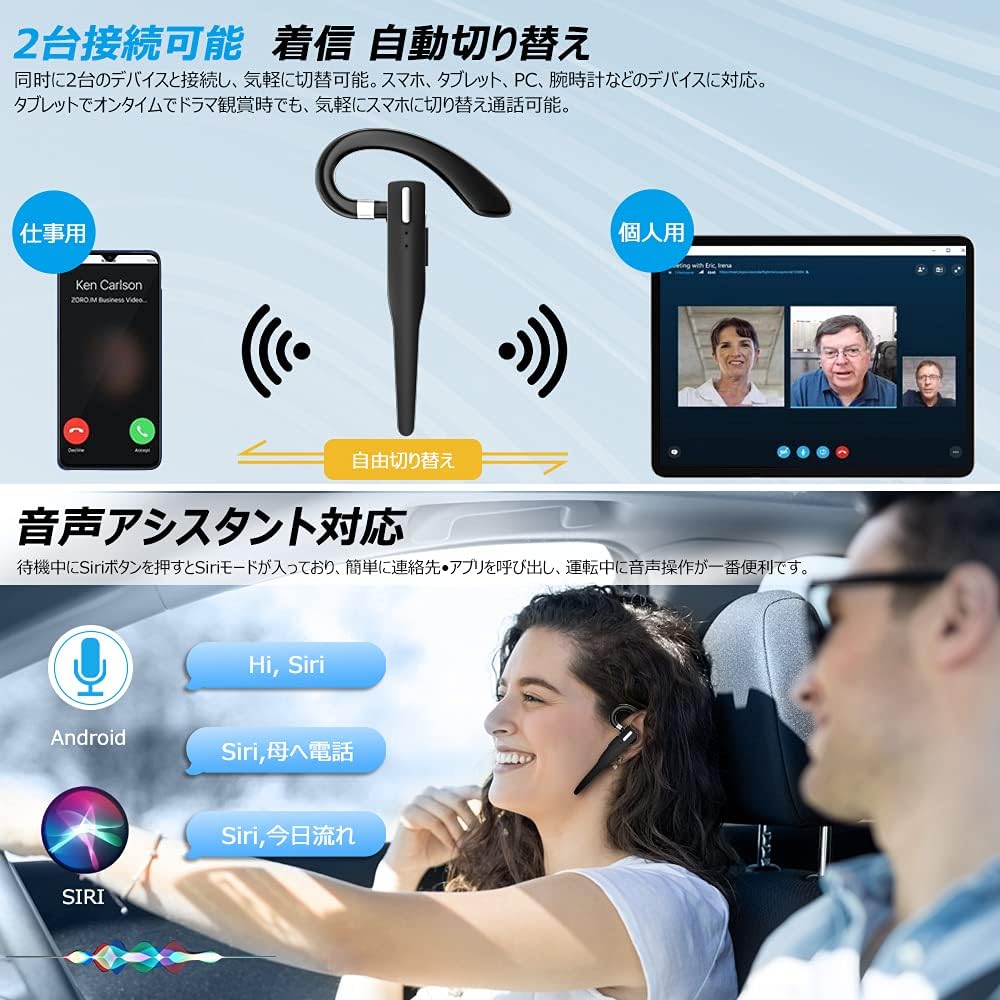
Figure 6.2: Multi-device connectivity and voice assistant features.
6.6 การเชื่อมต่ออุปกรณ์หลายเครื่อง
ชุดหูฟังนี้สามารถเชื่อมต่อกับอุปกรณ์บลูทูธได้พร้อมกันสองเครื่อง ทำให้สามารถสลับใช้งานระหว่างอุปกรณ์ได้อย่างราบรื่น
- Pair the headset with the first device as described in Section 5.2.
- Turn off Bluetooth on the first device. The headset will re-enter pairing mode.
- จับคู่ชุดหูฟังกับอุปกรณ์ที่สอง
- Turn on Bluetooth on the first device. The headset should now be connected to both devices.
- The headset will automatically switch audio output to the device that is actively playing media or receiving a call.
7. การบำรุงรักษา
7.1 การทำความสะอาด
- Wipe the headset and charging case with a soft, dry, lint-free cloth.
- ห้ามใช้สารเคมีรุนแรง น้ำยาทำความสะอาด หรือสารซักฟอกชนิดเข้มข้น
7.2 พื้นที่จัดเก็บ
- เมื่อไม่ใช้งาน ควรเก็บหูฟังไว้ในกล่องชาร์จเพื่อป้องกันฝุ่นและความเสียหาย
- เก็บอุปกรณ์ไว้ในที่แห้งและเย็น หลีกเลี่ยงแสงแดดโดยตรงและอุณหภูมิที่สูงหรือต่ำเกินไป

Figure 7.1: The compact charging case provides convenient storage.
8 การแก้ไขปัญหา
หากคุณพบปัญหาเกี่ยวกับชุดหูฟัง โปรดดูปัญหาทั่วไปและวิธีแก้ไขต่อไปนี้:
| ปัญหา | สาเหตุที่เป็นไปได้ | สารละลาย |
|---|---|---|
| หูฟังไม่สามารถเปิดเครื่องได้ | แบตเตอรี่อ่อน | Charge the headset and charging case. |
| ไม่สามารถจับคู่กับอุปกรณ์ได้ | บลูทูธปิดอยู่บนอุปกรณ์; ชุดหูฟังไม่ได้อยู่ในโหมดจับคู่; อยู่ห่างจากอุปกรณ์มากเกินไป | Ensure Bluetooth is on; take headset out of case to enter pairing mode; keep within 10 meters. |
| ไม่มีเสียงหรือเสียงเบา | Volume too low; headset not connected; sound output set to another device. | Increase volume on headset and device; re-pair headset; check device's audio output settings. |
| ไมโครโฟนไม่ทำงาน | Microphone muted; incorrect audio input settings on device. | Unmute microphone (long press Volume Up/Down); check device's audio input settings. |
| Connection unstable or drops. | สัญญาณรบกวน; อยู่ห่างจากอุปกรณ์มากเกินไป; แบตเตอรี่เหลือน้อย | Move closer to device; avoid strong electromagnetic interference; charge headset. |
9. ข้อมูลจำเพาะ
| คุณสมบัติ | รายละเอียด |
|---|---|
| แบบอย่าง | VYK-B26 |
| เวอร์ชันบลูทูธ | 5.1 |
| ระบบตัดเสียงรบกวน | CVC8.0 |
| ความจุแบตเตอรี่ชุดหูฟัง | 100mAh |
| ความจุแบตเตอรี่ของเคสชาร์จ | 500mAh |
| เวลาสนทนา | นานถึง 12 ชั่วโมง |
| เวลาเล่นเพลง | นานถึง 12 ชั่วโมง |
| ระยะเวลาการใช้งานทั้งหมด (รวมเคส) | นานถึง 72 ชั่วโมง |
| เวลาสแตนด์บาย | นานถึง 400 ชั่วโมง |
| เวลาในการชาร์จ | ประมาณ 1.5 ชั่วโมง |
| พอร์ตชาร์จ | ยูเอสบี ไทป์ ซี |
| ระดับการกันน้ำ | IPX7 (กันเหงื่อ) |
| ความเข้ากันได้ | iOS, Android, Windows (Bluetooth-enabled devices) |

Figure 9.1: Advanced Bluetooth 5.1 and CVC8.0 Noise Cancelling features.
10. การรับประกันและการสนับสนุน
Kimwood products are designed for reliability and performance. For warranty information and technical support, please refer to the contact details provided on the product packaging or visit the official Kimwood webไซต์ โปรดเก็บหลักฐานการซื้อไว้เพื่อใช้ในการเรียกร้องการรับประกัน


