การแนะนำ
Thank you for choosing the SONICAKE Rude Mouse Distortion Pedal. This manual provides essential information for the proper setup, operation, and maintenance of your new guitar effects pedal. Please read this manual thoroughly to ensure optimal performance and longevity of your device.
สินค้าเกินview
The SONICAKE Rude Mouse is a compact, all-analog distortion pedal designed to deliver a wide range of classic and modern distortion tones. It features two distinct modes, "Classic" and "Hot," offering versatility from creamy overdrive to aggressive fuzz. Its true bypass design ensures your guitar's signal remains uncolored when the effect is disengaged.
- วงจรอนาล็อก 100%: Provides authentic and rich distortion, overdrive, and fuzz tones.
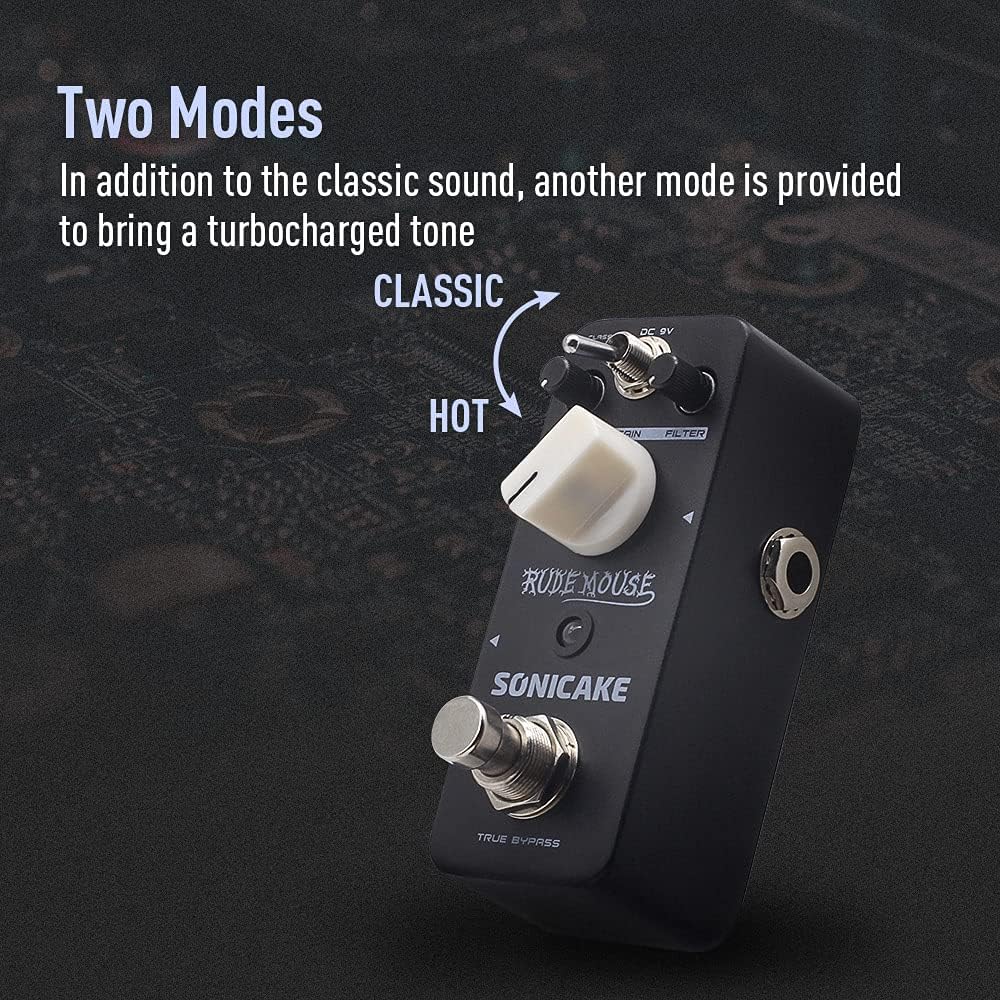
- สองโหมด: Switch between "Classic" for vintage distortion and "Hot" for a more aggressive, turbo-charged sound.
- การควบคุมตัวกรอง: Offers a broad tonal range, from dark to bright, allowing precise sound sculpting.
- บายพาสทรู: Maintains the integrity of your guitar's signal when the pedal is off.
- โครงสร้างทนทาน: Housed in a robust zinc-alloy die-cast casing for reliability.
- ขนาดกระทัดรัด: Designed for portability and efficient pedalboard space utilization.


การควบคุมและฟังก์ชั่น
Familiarize yourself with the controls of the Rude Mouse pedal:

- อินพุต DC 9V: Connect a standard 9V DC power adapter (center negative) here. The pedal requires a stable power supply for operation.
- ปุ่มปรับระดับ: Controls the overall output volume of the effect. Adjust to balance the effect volume with your clean signal.
- กำไรลูกบิด: Adjusts the amount of distortion. Turning clockwise increases the intensity of the distortion.
- FILTER Knob: Shapes the tone of the distorted sound. This control allows you to dial in a wide range of frequencies, from dark and bass-heavy to bright and cutting.
- MODE Switch (Classic/Hot): Toggles between two distinct distortion voicings.
- คลาสสิก: ระบุหมายเลข VINtage, smooth distortion tone.
- ร้อน: Delivers a more aggressive, higher-gain distortion with increased saturation.
- แจ็คเอาท์พุท: เชื่อมต่อสิ่งนี้เข้ากับของคุณ ampแอมป์หรือเอฟเฟ็กต์ตัวถัดไปในลำดับสัญญาณของคุณ
- แจ็คอินพุต: Connect your guitar or the preceding pedal in your signal chain here.
- ทรูบายพาสฟุตสวิตช์: Engages or disengages the effect. When engaged, the LED indicator will illuminate. When disengaged, the pedal is bypassed, and your signal passes through unaffected.
การตั้งค่า
Follow these steps to set up your SONICAKE Rude Mouse pedal:
- การเชื่อมต่อไฟฟ้า: Connect a standard 9V DC power adapter (center negative) to the DC 9V input jack (1). Ensure the power supply meets the specified voltagข้อกำหนดด้าน e และขั้วไฟฟ้า (Note: Power adapter is not included.)
- การเชื่อมต่ออินพุต: Connect your guitar to the Input Jack (7) using a standard 1/4-inch instrument cable.
- การเชื่อมต่อเอาท์พุต: Connect the Output Jack (6) to your amplifier's input or to the input of the next pedal in your effects chain using a standard 1/4-inch instrument cable.
- การตั้งค่าเริ่มต้น: Before powering on, set the LEVEL knob to a low position, and the GAIN and FILTER knobs to their middle positions (12 o'clock).
- เปิดเครื่อง: เมื่อเชื่อมต่อทุกอย่างเรียบร้อยแล้ว ให้เปิดเครื่องของคุณ ampแอมป์ แล้วก็แป้นเหยียบ


คำแนะนำการใช้งาน
To achieve various distortion sounds:
- Engage the Effect: Press the TRUE BYPASS Footswitch (8) to activate the distortion effect. The red LED indicator will light up.
- Adjust Level: Use the LEVEL knob (2) to set the desired output volume. Start low and increase gradually to avoid sudden loud sounds.
- ตั้งค่าเกน: Rotate the GAIN knob (3) to control the amount of distortion. Lower settings provide a mild crunch, while higher settings deliver heavy, saturated distortion.
- Shape Tone with Filter: Adjust the FILTER knob (4) to fine-tune the tonal characteristics. Turning it clockwise generally brightens the sound, while counter-clockwise makes it darker. Experiment to find the sweet spot for your guitar and ampชีวิต.
- เลือกโหมด: Use the MODE Switch (5) to toggle between "Classic" and "Hot" voicings.
- For a more traditional, smooth distortion, select คลาสสิค.
- For a more aggressive, modern, and higher-gain sound, select ร้อน.
- Disengage Effect: Press the TRUE BYPASS Footswitch (8) again to bypass the effect. The LED indicator will turn off, and your signal will pass through the pedal without modification.
การซ่อมบำรุง
- การทำความสะอาด: ใช้ผ้าแห้งเนื้อนุ่มเช็ดทำความสะอาดภายนอกของแป้นเหยียบ หลีกเลี่ยงการใช้สารทำความสะอาดที่มีฤทธิ์กัดกร่อนหรือตัวทำละลาย เพราะอาจทำให้พื้นผิวเสียหายได้
- พื้นที่จัดเก็บ: เก็บแป้นเหยียบไว้ในที่แห้ง หลีกเลี่ยงอุณหภูมิที่สูงและแสงแดดโดยตรง
- แหล่งจ่ายไฟ: Always use a regulated 9V DC power supply with a center-negative plug. Incorrect power supplies can damage the unit and void the warranty.
- การเชื่อมต่อ: Ensure all cables are securely connected but do not overtighten. Periodically check cables for wear and tear.
การแก้ไขปัญหา
| ปัญหา | สาเหตุที่เป็นไปได้ | สารละลาย |
|---|---|---|
| ไม่มีเสียงเมื่อเหยียบแป้นเหยียบ | Incorrect power supply, faulty cables, incorrect connections, LEVEL knob set too low. | Verify 9V DC center-negative power supply. Check all instrument cables. Ensure guitar is connected to INPUT and amplifier to OUTPUT. Increase LEVEL knob. |
| เสียงเบาหรือผิดเพี้ยน (โดยไม่ตั้งใจ) | Low battery (if applicable, though this pedal is not battery-powered), incorrect impedance, faulty cables. | Ensure proper power supply. Check cable integrity. Ensure correct input/output impedance matching with other gear. |
| เสียงรบกวนหรือเสียงหึ่งที่ไม่พึงประสงค์ | วงจรลูปกราวด์, แหล่งจ่ายไฟขัดข้อง, สัญญาณรบกวนจากอุปกรณ์อิเล็กทรอนิกส์อื่นๆ | Use a high-quality, isolated power supply. Try a different power outlet. Move pedal away from other electronic devices. Check for faulty cables. |
| ไฟ LED ไม่ติด | No power, pedal not engaged. | Ensure power supply is connected and functional. Press the footswitch to engage the effect. |
ข้อมูลจำเพาะ
| คุณสมบัติ | รายละเอียด |
|---|---|
| หมายเลขรุ่น | คิวเอสเอส-18 |
| ยี่ห้อ | โซนิเคก |
| น้ำหนักสินค้า | 7.3 ออนซ์ (208 กรัม) |
| ขนาดสินค้า | ขนาด 2.05 นิ้ว (ยาว) x 1.65 นิ้ว (กว้าง) x 3.68 นิ้ว (สูง) (52 มม. ยาว x 42 มม. กว้าง x 93.5 มม. สูง) |
| วัสดุตัวเครื่อง | Zinc-alloy die-cast casing |
| แหล่งพลังงาน | Corded Electric (9V DC, center negative) |
| เล่มที่tage | 9 โวลต์ |
| รูปแบบสัญญาณ | อนาล็อก |
| ประเภทขั้วต่อ | แจ็คเสียงขนาด 1/4 นิ้ว (6.35 มม.) |


การรับประกันและการสนับสนุน
For warranty information, please refer to the documentation included with your purchase or visit the official SONICAKE website. If you encounter any issues or require technical assistance, please contact SONICAKE customer support through their official channels.
คุณสามารถหาข้อมูลเพิ่มเติมและรายละเอียดการติดต่อได้ที่ SONICAKE Amazon Store.
ข้อมูลที่สำคัญ
- หมายเลขซีเรียล : For product identification and warranty purposes, please note your pedal's serial number: 60190008971.
- ยูพีซี: 0843037101667
- อีเอเอ็น: 6971002021666
แหล่งข้อมูลวิดีโอ
While this manual provides comprehensive instructions, visual demonstrations can be helpful. Please note that specific product videos were not available in the provided data for embedding. For official product videos and demonstrations, please visit the SONICAKE official webเว็บไซต์หรือช่อง YouTube อย่างเป็นทางการของพวกเขา


