1. สินค้าหมดview
The HTC HS01 Wireless Neckband Earphones are designed for comfort and performance, featuring Bluetooth 5.0 connectivity, active noise cancellation (ANC), and IPX5 water resistance. This manual provides instructions for setting up, operating, and maintaining your earphones.

Figure 1: HTC HS01 Earphones in use, showcasinคุณสมบัติหลักของ g
2. การตั้งค่าและการใช้งานเบื้องต้น
2.1 การชาร์จหูฟัง
Before first use, fully charge your HTC HS01 earphones. A full charge takes approximately 1 hour and 50 minutes and provides up to 16 hours of battery life.
- Locate the USB-C charging port on the control module.
- Connect the provided USB-C cable to the charging port and plug the other end into a compatible USB power source.
- ไฟแสดงสถานะ LED จะแสดงสถานะการชาร์จและดับลงเมื่อชาร์จเต็มแล้ว
2.2 การจับคู่กับอุปกรณ์
The HTC HS01 earphones use Bluetooth 5.0 for stable and efficient connection.
- ตรวจสอบให้แน่ใจว่าหูฟังปิดอยู่
- กดปุ่มเปิด/ปิดค้างไว้จนกระทั่งไฟ LED แสดงสถานะกะพริบเป็นสีน้ำเงินและสีแดง แสดงถึงโหมดจับคู่
- บนอุปกรณ์ของคุณ (สมาร์ทโฟน แท็บเล็ต ฯลฯ) เปิดใช้งานบลูทูธและค้นหาอุปกรณ์ที่มีอยู่
- Select "HTC HS01" from the list of devices.
- เมื่อเชื่อมต่อแล้ว ไฟ LED จะกะพริบเป็นสีน้ำเงินช้าๆ

รูปที่ 2: เทคโนโลยีบลูทูธ 5.0 เพื่อการส่งสัญญาณที่เสถียร
2.3 Fitting the Earphones
For optimal sound quality and comfort, choose the correct earplug size. The earphones come with multiple earplug sizes (Small, Medium, Large).
- ค่อยๆใส่เอียร์บัดเข้าไปในหูของคุณ
- Adjust the neckband for a secure and comfortable fit around your neck.
- If the fit is loose or uncomfortable, try a different size of earplug.

Figure 3: Proper earphone fit and available ear tip sizes.
3. คู่มือการใช้งาน
3.1 ฟังก์ชั่นการควบคุม
โมดูลควบคุมบนสายคล้องคอช่วยให้คุณจัดการฟังก์ชันต่างๆ ได้:
- เปิด/ปิดเครื่อง: กดปุ่มเปิด/ปิดค้างไว้
- ปรับระดับเสียงขึ้น: กดปุ่ม '+'
- ลดเสียงลง: กดปุ่ม '-'
- เล่น/หยุดชั่วคราว: Press the Power button once during music playback.
- เพลงถัดไป: กดปุ่ม '+' ค้างไว้
- แทร็กก่อนหน้า: กดปุ่ม '-' ค้างไว้
- รับ/วางสาย: Press the Power button once during an incoming call or active call.
- ปฏิเสธสาย: Press and hold the Power button during an incoming call.
- Activate ANC (Active Noise Cancellation): Press the 'ANC' button.
รูปที่ 4: รายละเอียด view of the control buttons on the neckband.

Figure 5: Man-machine interaction with control buttons.
3.2 ระบบตัดเสียงรบกวนแบบแอคทีฟ (ANC)
The ANC feature reduces ambient noise, allowing for a more immersive audio experience. Press the 'ANC' button to toggle this feature on or off.

Figure 6: Visual representation of noise cancellation.
3.3 หูฟังแม่เหล็ก
The earbuds feature a magnetic design, allowing them to snap together when not in use. This helps prevent tangling and keeps the earphones secure around your neck.

Figure 7: Magnetic suction feature for convenient storage.
4. การบำรุงรักษาและการดูแล
4.1 ความทนทานต่อน้ำและเหงื่อ
The HTC HS01 earphones are IPX5 water resistant, meaning they can withstand splashes and sweat. They are suitable for sports and exercise. However, they are not designed for submersion in water.

Figure 8: IPX5 waterproof design for active use.

Figure 9: Earphones designed to be sweatproof.
4.2 การทำความสะอาด
To maintain the longevity and hygiene of your earphones:
- Wipe the earbuds and neckband with a soft, dry cloth after each use.
- หลีกเลี่ยงการใช้สารเคมีรุนแรงหรือวัสดุที่มีฤทธิ์กัดกร่อน
- Periodically remove earplugs and clean them with mild soap and water, ensuring they are completely dry before reattaching.
5 การแก้ไขปัญหา
| ปัญหา | สาเหตุที่เป็นไปได้ | สารละลาย |
|---|---|---|
| หูฟังไม่สามารถเปิดเครื่องได้ | แบตเตอรี่อ่อน | ชาร์จหูฟังให้เต็ม |
| ไม่สามารถจับคู่กับอุปกรณ์ได้ | หูฟังไม่ได้อยู่ในโหมดจับคู่; บลูทูธปิดอยู่บนอุปกรณ์; อุปกรณ์อยู่ไกลเกินไป | Ensure earphones are in pairing mode (flashing blue/red). Turn on Bluetooth on your device. Move device closer to earphones. |
| ไม่มีเสียงหรือเสียงเบา | ระดับเสียงเบาเกินไป; ไม่ได้เชื่อมต่อ; เอาต์พุตเสียงไม่ถูกต้อง | Increase volume on earphones and device. Re-pair earphones. Check device's audio output settings. |
| เสียงขาดๆ หายๆ เป็นช่วงๆ | สัญญาณรบกวน, อุปกรณ์อยู่ไกลเกินไป, แบตเตอรี่อ่อน | Move closer to the paired device. Avoid strong electromagnetic interference. Charge earphones. |
6. ข้อมูลจำเพาะ
- หมายเลขรุ่น: เอชทีซี HS01
- ยี่ห้อ: เอชทีซี
- เทคโนโลยีการสื่อสารไร้สาย: บลูทูธ 5.0
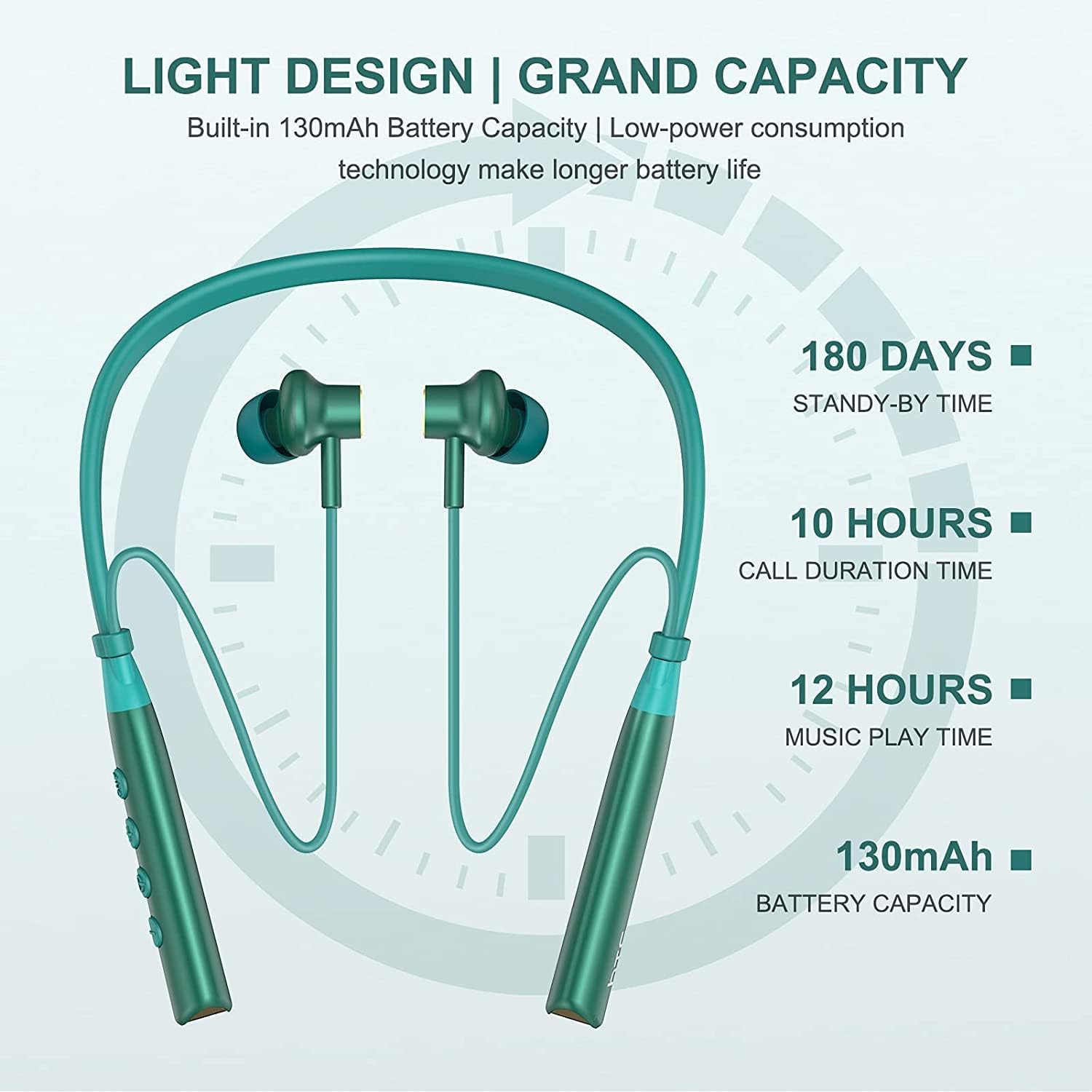
- ความจุแบตเตอรี่: 130mAh (from image)
- เวลาในการชาร์จ: Approx. 1 hour 50 minutes (from video)
- เวลาเล่นเพลง: Up to 12 hours (from image)
- Call Duration Time: Up to 10 hours (from image)
- เวลาสแตนด์บาย: Up to 180 days (from image)
- ระดับการต้านทานน้ำ: IPX5 (กันน้ำ)
- คุณสมบัติพิเศษ: Active Noise Cancellation (ANC), Microphone Included, Lightweight, Sweatproof
- วิธีการควบคุม: Press Control / Touch
- ฟอร์มแฟกเตอร์: In Ear (Neckband)
- วัสดุ: ยาง ซิลิโคน
- ขนาดสินค้า : 5.8 x 4.7 x 0.94 นิ้ว
- น้ำหนักสินค้า: 8 ออนซ์

Figure 10: Battery and usage duration details.
7. วิดีโอผลิตภัณฑ์อย่างเป็นทางการ
7.1 HTC Wireless Earphones Overview
วิดีโอนี้ให้ข้อมูลทั่วไปเกี่ยวกับview of the HTC Wireless Earphones, demonstrating their features and design.
7.2 HTC Neckband Bluetooth Headphone Features
This video highlights specific features of the HTC Neckband Bluetooth Headphone, including its ergonomic design and IPX5 water resistance.
8. การรับประกันและการสนับสนุน
For warranty information and customer support, please refer to the warranty card included in your product packaging or visit the official HTC webไซต์ เก็บหลักฐานการซื้อของคุณไว้เพื่อใช้ในกรณีเรียกร้องการรับประกัน


