การแนะนำ
The ikbc CD108 V2 is a full-size mechanical keyboard designed for both Windows and Mac users, featuring Cherry MX Red switches and durable Mistel PBT double-shot keycaps. This manual provides essential information for setting up, operating, maintaining, and troubleshooting your keyboard to ensure optimal performance and longevity.
เนื้อหาแพ็คเกจ

Image: Contents of the ikbc CD108 V2 keyboard package, including the keyboard, keycap puller, USB cable, and user manual.
โปรดตรวจสอบว่ารายการทั้งหมดที่ระบุไว้ด้านล่างมีอยู่ในแพ็คเกจของคุณหรือไม่:
- ikbc CD108 V2 Mechanical Keyboard
- ตัวดึงกุญแจ
- สาย USB
- คู่มือการใช้งาน
- Free Keyset of RGBY modifiers (12 pieces)
การตั้งค่า

ภาพ: จากบนลงล่าง view of the ikbc CD108 V2 keyboard, showcasing its full layout and retro color scheme.
- แกะคีย์บอร์ดออก: ถอดคีย์บอร์ดและอุปกรณ์เสริมทั้งหมดออกจากบรรจุภัณฑ์อย่างระมัดระวัง
- เชื่อมต่อกับคอมพิวเตอร์: Plug the USB cable from the keyboard into an available USB port on your computer (desktop or laptop). The keyboard is wired and does not require batteries.
- ปรับขาตั้งคีย์บอร์ด: The ikbc CD108 V2 features 3 levels of adjustable feet. Extend the feet at the rear of the keyboard to your preferred typing angle for ergonomic comfort.
- ขั้นตอนการติดตั้งไดรเวอร์ครั้งแรก: Your operating system (Windows or macOS) should automatically detect and install the necessary drivers. No additional software is typically required for basic functionality.
- Mac Compatibility Note: While fully compatible with Windows, the CD108 V2 is partially compatible with Mac. To optimize functionality on macOS, you may need to go to System Settings > Keyboard > Modifier Keys and switch the "Option" key to "Command" and vice-versa to match standard Mac keyboard layouts.
การใช้งานแป้นพิมพ์

ภาพ: มุมเอียง view of the ikbc CD108 V2 keyboard, highlighting its ergonomic design and keycap profile.
คุณสมบัติหลัก
- Cherry MX Red Switches: This keyboard is equipped with Cherry MX Red mechanical switches. These are linear switches, meaning they have a smooth, consistent keystroke without a tactile bump or audible click. They are favored for gaming due to their light actuation force and rapid response, allowing for quick, successive key presses.
- Mistel PBT Double-Shot Keycaps: The keycaps are made from durable PBT plastic using a double-shot molding process. This ensures that the legends will not fade over time and provides excellent touch, abrasion resistance, and oil resistance. The retro color scheme combines beige and dark grey-green tones.
- Full N-Key Rollover (NKRO) and Anti-Ghosting: The keyboard supports 100% anti-ghosting with full key rollover via USB, ensuring that every key press is registered accurately, even during rapid typing or complex gaming sequences.
- Lockable Win Key: A dedicated function allows you to disable the Windows key to prevent accidental presses during gaming sessions.
- คีย์มัลติมีเดีย: Convenient multimedia functions are integrated, including volume up, volume down, mute, and a dedicated calculator key. These are typically accessed via the Fn key combined with specific function keys.
- การจัดการสายเคเบิล: The keyboard features a 3-way direction management system for the USB cable, allowing you to route the cable neatly to the left, right, or center.
Using the RGBY Modifier Keyset
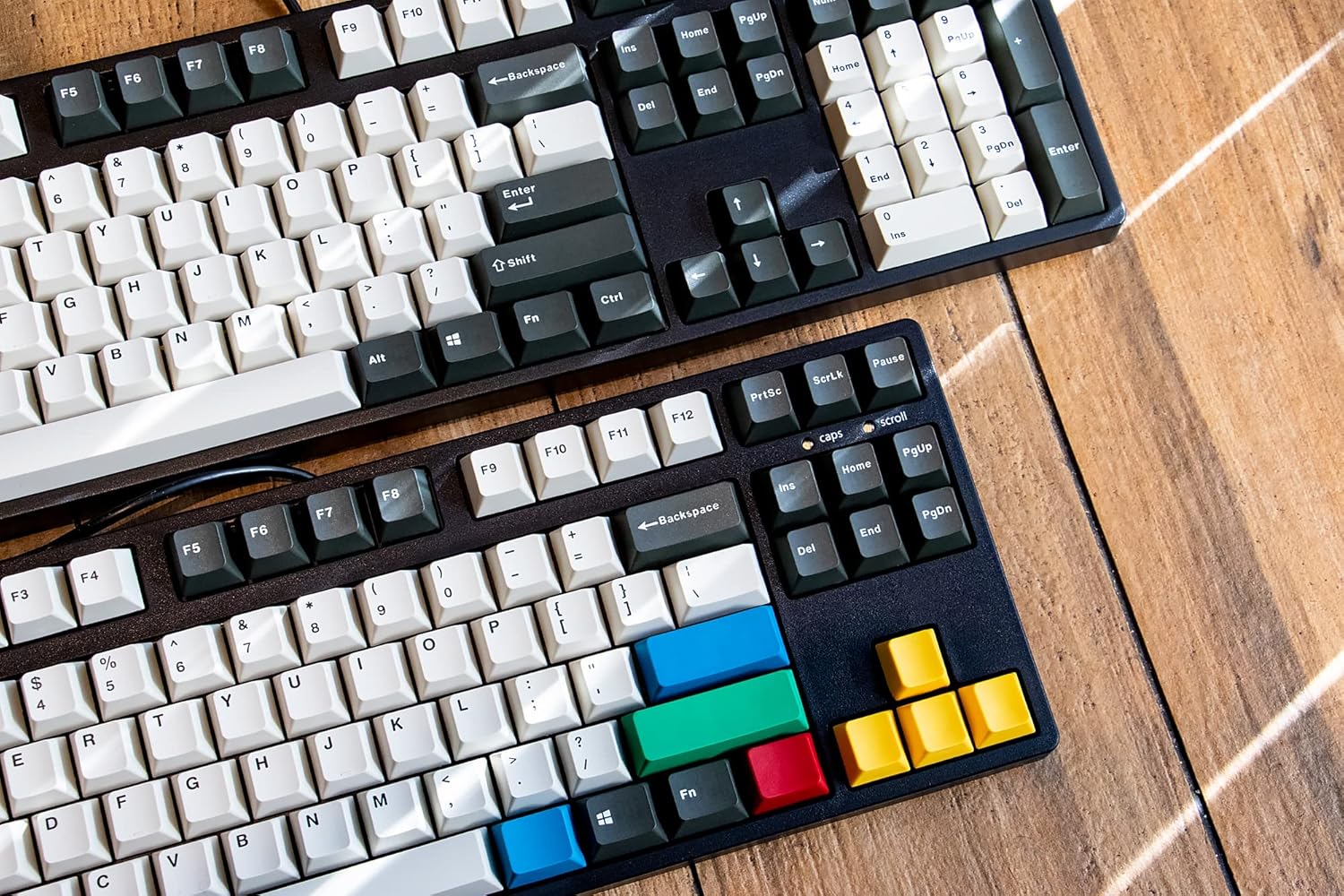
Image: Two ikbc keyboards, one showcasing the standard keycaps and the other with the included RGBY modifier keycaps installed.
Your keyboard comes with a free set of RGBY (Red, Green, Blue, Yellow) modifier keycaps. You can use the included keycap puller to replace certain keys (e.g., Esc, Enter, arrow keys, etc.) with these colorful alternatives to personalize your keyboard's appearance.
- Gently use the keycap puller to remove the desired keycap from the keyboard.
- Align the new RGBY keycap with the switch stem and press down firmly until it clicks into place.
การซ่อมบำรุง
Proper maintenance will extend the life and preserve the appearance of your ikbc CD108 V2 keyboard.
- การทำความสะอาดปกติ: Use a can of compressed air to blow out dust and debris from between the keycaps. For surface cleaning, wipe the keycaps and case with a soft, slightly damp ผ้า. หลีกเลี่ยงการใช้สารเคมีรุนแรงหรือวัสดุกัดกร่อน
- การทำความสะอาดคีย์แคป: For deeper cleaning of keycaps, you can remove them using the provided keycap puller and wash them gently with mild soap and water. Ensure they are completely dry before reattaching them to the keyboard.
- การดูแลสายเคเบิล: Avoid sharp bends or excessive pulling on the USB cable to prevent damage. Utilize the integrated cable management channels to keep the cable tidy and protected.
การแก้ไขปัญหา
This section addresses common issues you might encounter with your ikbc CD108 V2 keyboard.
- แป้นพิมพ์ไม่ตอบสนอง:
- ตรวจสอบให้แน่ใจว่าสาย USB เสียบเข้ากับคีย์บอร์ดและคอมพิวเตอร์อย่างแน่นหนา
- ลองเสียบคีย์บอร์ดเข้ากับพอร์ต USB อื่นบนคอมพิวเตอร์ของคุณ
- รีสตาร์ทเครื่องคอมพิวเตอร์ของคุณ
- คีย์เฉพาะไม่ทำงาน:
- The switches on this keyboard are soldered and not hot-swappable. If a specific key is not registering, ensure no debris is lodged under the keycap. Carefully remove the keycap with the puller and inspect the switch. If the issue persists, it may indicate a hardware fault.
- Spacebar or Other Large Keys Feel Stuck/Wobbly:
- This can sometimes be due to stabilizer issues. Ensure the keycap is properly seated on both the switch stem and the stabilizer stems.
- Minor variations in stabilizer performance can occur. If it significantly impacts usability, contact customer support.
- Metallic "Springy" Echo Sound:
- Some mechanical keyboards, especially those with linear switches, can exhibit a subtle metallic