ยินดีต้อนรับ
Thank you for choosing the HTC HS01 Bluetooth Headphones. This manual provides essential information for setting up, operating, maintaining, and troubleshooting your new headphones. Please read it carefully to ensure optimal performance and longevity of your device.
เนื้อหาแพ็คเกจ
ตรวจสอบว่ารายการทั้งหมดที่ระบุไว้ด้านล่างนี้รวมอยู่ในแพ็คเกจของคุณ:
- 1 x HTC HS01 Bluetooth Headphones
- สายชาร์จ USB 1 เส้น
- จุกหูฟังหลายขนาด (เล็ก, กลาง, ใหญ่)
- 1 x คู่มือผู้ใช้
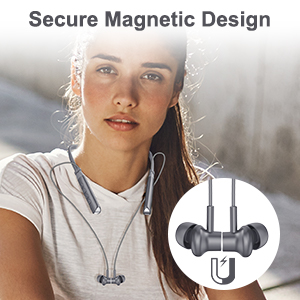
Image: The package contents, including the headphones, charging cable, various ear tips, and the user manual.
สินค้าเกินview
The HTC HS01 features a lightweight neckband design with in-ear earbuds, equipped with intuitive controls for easy operation.
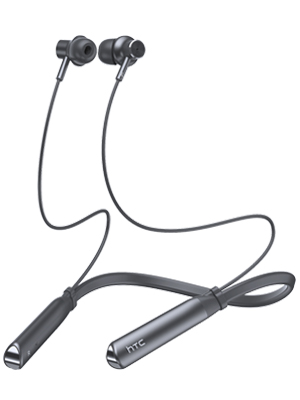
ภาพ: เต็ม view of the HTC HS01 Bluetooth Headphones, showcasing แถบคาดคอและหูฟัง
การควบคุม
The control panel is located on the neckband for easy access:
- ปุ่ม ANC: เปิดหรือปิดระบบตัดเสียงรบกวน
- ระดับเสียง + / แทร็กถัดไป: เพิ่มระดับเสียงหรือข้ามไปยังแทร็กถัดไป
- Power / Multi-function Button: Powers the device on/off, plays/pauses music, answers/ends calls.
- ระดับเสียง - / เพลงก่อนหน้า: ลดระดับเสียงหรือย้อนกลับไปเล่นแทร็กก่อนหน้า
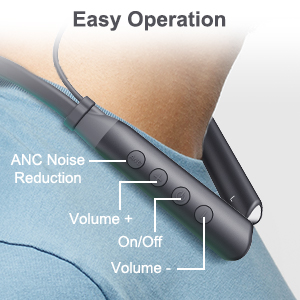
ภาพ: ภาพระยะใกล้ view of the control buttons on the HTC HS01 neckband, detailing their functions.
การตั้งค่า
1. การชาร์จหูฟัง
- เชื่อมต่อสายชาร์จ USB เข้ากับพอร์ตชาร์จบนหูฟัง
- เสียบปลายอีกด้านของสายเคเบิลเข้ากับแหล่งจ่ายไฟ USB (เช่น คอมพิวเตอร์ อะแดปเตอร์ติดผนัง)
- ไฟแสดงสถานะจะแสดงสถานะการชาร์จ โดยปกติการชาร์จเต็มจะใช้เวลาประมาณ 2 ชั่วโมง
A fully charged battery provides up to 12 hours of music playback, 10 hours of talk time, and 180 days of standby time.
2. การจับคู่กับอุปกรณ์บลูทูธ
- ตรวจสอบให้แน่ใจว่าหูฟังปิดอยู่
- Press and hold the Power/Multi-function button until the indicator light flashes red and blue, indicating pairing mode.
- บนอุปกรณ์ของคุณ (สมาร์ทโฟน แท็บเล็ต คอมพิวเตอร์) เปิดใช้งาน Bluetooth และค้นหาอุปกรณ์ที่มีอยู่
- เลือก "HTC HS01" จากรายการอุปกรณ์ที่พบ
- เมื่อเชื่อมต่อแล้ว ไฟแสดงสถานะจะเปลี่ยนเป็นสีน้ำเงินค้าง หรือกะพริบเป็นสีน้ำเงินช้าๆ
The headphones utilize Bluetooth 5.0 technology for stable and efficient wireless transmission.
คำแนะนำการใช้งาน
เปิด/ปิดเครื่อง
- การเปิดเครื่อง: กดปุ่มเปิด/ปิดเครื่องค้างไว้ 3 วินาที
- วิธีปิดเครื่อง: กดปุ่มเปิด/ปิดเครื่องค้างไว้ 5 วินาที
การเล่นเพลง
- เล่น/หยุดชั่วคราว: กดปุ่มเปิด/ปิด/ปุ่มมัลติฟังก์ชั่นหนึ่งครั้ง
- เพลงถัดไป: กดปุ่มปรับระดับเสียง + ค้างไว้
- แทร็กก่อนหน้า: กดปุ่มปรับระดับเสียง - ค้างไว้
- ปรับระดับเสียงขึ้น: กดปุ่มเพิ่มระดับเสียง (Volume +) สั้นๆ
- ลดเสียงลง: กดปุ่มลดเสียง (-) สั้นๆ

Image: A woman enjoying music with the HTC HS01 headphones, illustrating the 9D stereo sound experience.
การจัดการการโทร
- รับ/วางสาย: กดปุ่มเปิด/ปิด/ปุ่มมัลติฟังก์ชั่นหนึ่งครั้ง
- ปฏิเสธสาย: กดปุ่มเปิด/ปิดเครื่องค้างไว้ 2 วินาที
การตัดเสียงรบกวนแบบแอคทีฟ (ANC)
- Press the dedicated ANC button to activate or deactivate the noise cancellation feature.
The ANC+ENC technology uses both outward-facing and inward-facing microphones to detect and counteract environmental noise, providing a clearer audio experience.

Image: A man wearing the HTC HS01 headphones in an outdoor setting, highlighting the ANC feature.
การซ่อมบำรุง
การทำความสะอาด
Regularly clean your headphones to maintain optimal performance:
- Wipe the earbuds and neckband with a soft, dry cloth.
- ถอดปลายหูออกและทำความสะอาดด้วยสบู่ชนิดอ่อนและน้ำหากจำเป็น และตรวจสอบให้แน่ใจว่าแห้งสนิทก่อนจะใส่กลับเข้าไปอีกครั้ง
- ห้ามใช้น้ำยาทำความสะอาดที่มีฤทธิ์กัดกร่อนหรือตัวทำละลาย
พื้นที่จัดเก็บ
When not in use, store your headphones in a cool, dry place away from direct sunlight and extreme temperatures. The earbuds feature a secure magnetic design for tangle-free storage.
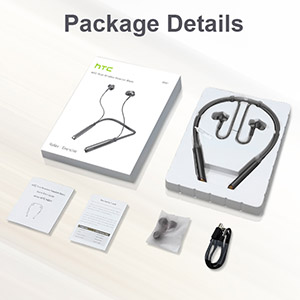
Image: A woman wearing the headphones, demonstrating the magnetic earbuds that secure them around the neck.
ความต้านทานต่อน้ำ (IPX5)
The HTC HS01 headphones are IPX5 water-resistant, meaning they can withstand light rain and sweat. They are suitable for sports and outdoor activities. However, they are not designed for submersion in water.

Image: A man exercising, highlighting the IPX5 waterproof design of the headphones, suitable for workouts.
การแก้ไขปัญหา
If you encounter any issues with your HTC HS01 headphones, refer to the following common problems and solutions:
- หูฟังจะไม่เปิด:
Ensure the battery is charged. Connect the headphones to a power source using the USB charging cable. - ไม่สามารถจับคู่กับอุปกรณ์ได้:
Make sure the headphones are in pairing mode (indicator light flashing red and blue). Ensure Bluetooth is enabled on your device and it is within range. Try restarting both the headphones and your device. - ไม่มีเสียงหรือระดับเสียงต่ำ:
ตรวจสอบระดับเสียงทั้งบนหูฟังและอุปกรณ์ที่เชื่อมต่อ ตรวจสอบให้แน่ใจว่าหูฟังจับคู่และเชื่อมต่ออย่างถูกต้อง ลองจับคู่หูฟังอีกครั้ง - คุณภาพเสียงไม่ดี:
Ensure the ear tips provide a secure and comfortable seal in your ear canal. Clean the earbuds to remove any debris that might be obstructing the sound. Move closer to your paired device to avoid interference. - Short Bluetooth range or frequent disconnections:
Bluetooth range can be affected by obstacles and interference. Try to keep your paired device closer to the headphones, ideally within 10 meters (33 feet) in an open environment.
ข้อมูลจำเพาะ
| หมายเลขรุ่น | HS01 |
| เทคโนโลยีการเชื่อมต่อ | บลูทูธ 5.0 |
| การควบคุมเสียงรบกวน | Active Noise Cancellation (ANC+ENC) |
| หน่วยลำโพง | 10มม. |
| ความจุของแบตเตอรี่ | 130 mAh ลิเธียมไอออน |
| เวลาเล่นเพลง | นานถึง 12 ชั่วโมง |
| เวลาสนทนา | นานถึง 10 ชั่วโมง |
| เวลาสแตนด์บาย | นานถึง 180 วัน |
| เวลาในการชาร์จ | ประมาณ 2 ชั่วโมง |
| ระดับการต้านทานน้ำ | IPX5 |
| น้ำหนักสินค้า | 35 กรัม (1.23 ออนซ์) |
| วัสดุ | พลาสติก |
| การวางตำแหน่งหู | ในหู |
| วิธีการควบคุม | สัมผัส, ปุ่ม |
การรับประกันและการสนับสนุน
HTC products are designed for reliability and performance. For warranty information or technical support, please refer to the warranty card included in your package or visit the official HTC support webไซต์ โปรดเก็บใบเสร็จรับเงินของคุณไว้เป็นหลักฐานการซื้อสำหรับการเรียกร้องการรับประกันใดๆ


