การแนะนำ
The XPLORA XMOVE is an advanced activity and fitness tracker designed to help you monitor your health and activity levels. It features a heart rate monitor, sleep tracking, various sports modes, and smart notifications, all integrated with the unique Goplay Platform to encourage an active lifestyle.
This manual provides essential information on setting up, operating, maintaining, and troubleshooting your XMOVE device.
สินค้าเกินview

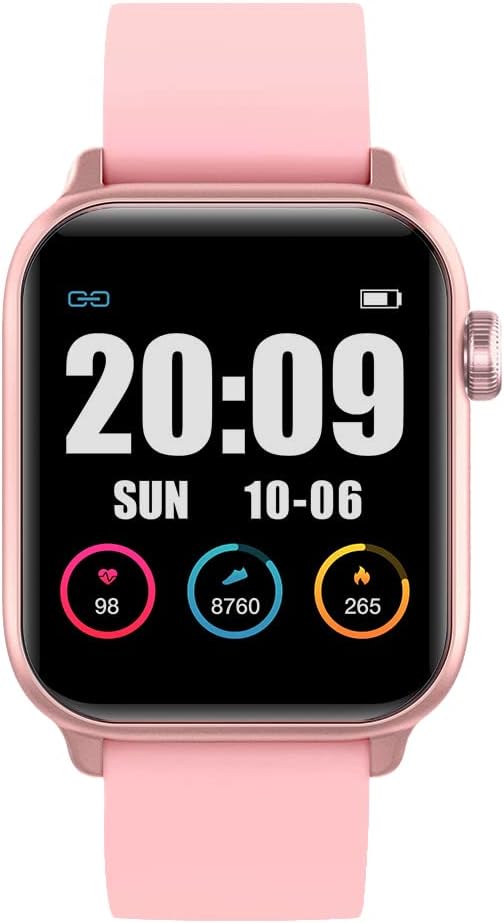
The XPLORA XMOVE Activity Tracker, shown from an angled front view, displaying the current time, weekly step count, and various daily metrics such as heart rate, calories burned, and total steps.

โปรข้างfile view of the XPLORA XMOVE Activity Tracker, illustrating its sleek and slim design, along with the single physical button located on the side of the device.
คุณสมบัติหลัก:
- เครื่องวัดอัตราการเต้นของหัวใจ: Real-time heart rate detection to help optimize exercise intensity.
- การติดตามการนอนหลับ: Measures duration and quality of sleep, viewable in the Xplora app.
- Sports Monitoring Modes: Dedicated modes for running, walking, cycling, and climbing.
- Movement Reminders: Built-in sensor prompts you to move after periods of inactivity.
- GOPLAY Platform: Earn Xplora coins for physical activity, balancing screen time with active play.
- การซิงค์การแจ้งเตือน: Displays call alerts, messages, and reminders from your connected smartphone via Bluetooth.
- อายุการใช้งานแบตเตอรี่ยาวนาน: Up to 3 days of working time and up to 8 days of standby time.
การตั้งค่า
1. การชาร์จอุปกรณ์
Before first use, fully charge your XPLORA XMOVE. Connect the included charging cable to the charging port on the back of the device and plug the USB end into a compatible power source (e.g., computer USB port or wall adapter). A full charge typically takes approximately 2 hours.
The XPLORA XMOVE display showing the time and a full battery indicator, typical when the device is fully charged or actively charging.
2. Installing the XPLORA App
The XPLORA XMOVE requires the XPLORA app for full functionality and data synchronization. The app is compatible with Android smartphones.
- ค้นหา "XPLORA" in your smartphone's app store (Google Play Store for Android).
- Download and install the official XPLORA app.
- ปฏิบัติตามคำแนะนำบนหน้าจอเพื่อสร้างบัญชีหรือเข้าสู่ระบบ
3. การจับคู่กับสมาร์ทโฟนของคุณ
Once the app is installed and you have an account, pair your XMOVE with your smartphone via Bluetooth:
- ตรวจสอบให้แน่ใจว่าได้เปิดใช้งาน Bluetooth บนสมาร์ทโฟนของคุณแล้ว
- Open the XPLORA app and navigate to the device pairing section.
- Turn on your XMOVE by pressing and holding the side button.
- The app will search for nearby XMOVE devices. Select your device from the list.
- Confirm the pairing request on both your smartphone and the XMOVE if prompted.
การดำเนินงาน
การนำทางหน้าจอ
The XMOVE features a 1.3-inch digital display. You can navigate through different screens and functions by swiping horizontally and vertically on the touchscreen, or by using the side button for specific actions like waking the screen or returning to the home screen.

The XPLORA XMOVE display showing current heart rate, daily steps, and calories burned, each represented with a circular progress indicator.
การตรวจสอบกิจกรรม
- ขั้นตอน: The pedometer automatically tracks your daily step count. View your progress on the device or in the app.
- อัตราการเต้นของหัวใจ: Access the heart rate monitor function on the device to take a real-time reading. For continuous monitoring, refer to app settings.
- นอน: Wear the XMOVE to bed for automatic sleep tracking. Data on sleep duration and quality will be available in the XPLORA app.
- โหมดกีฬา: Select a specific sports mode (e.g., running, cycling) before starting an activity to track relevant metrics like distance, duration, and calories more accurately.

Two users interacting with their XPLORA XMOVE trackers, demonstrating the ease of use and touch screen responsiveness during active wear.
ฟังก์ชั่นอัจฉริยะ
- การแจ้งเตือน: Once paired, the XMOVE can display incoming call alerts, messages, and reminders from your smartphone. Manage notification settings within the XPLORA app.
- Movement Reminders: The device will vibrate to remind you to move if it detects prolonged inactivity. This feature can be configured in the app.
- GOPLAY Platform: Synchronize your activity data with the XPLORA app to earn Xplora coins through the Goplay platform, which can be redeemed for various rewards.
การซ่อมบำรุง
ทำความสะอาดอุปกรณ์ของคุณ
การทำความสะอาดอย่างสม่ำเสมอจะช่วยรักษารูปลักษณ์และฟังก์ชันการทำงานของอุปกรณ์:
- เช็ดหน้าจอและสายคล้องด้วยผ้านุ่มๆampผ้าที่ไม่เป็นขุย
- ห้ามใช้น้ำยาทำความสะอาดที่มีฤทธิ์กัดกร่อน ตัวทำละลาย หรือสารเคมีรุนแรง
- ตรวจสอบให้แน่ใจว่าหน้าสัมผัสการชาร์จสะอาดและแห้งก่อนชาร์จ
ความต้านทานต่อน้ำ
The XPLORA XMOVE is IP68 waterproof, meaning it is resistant to dust and can withstand immersion in water up to 1.5 meters for up to 30 minutes. It is suitable for daily use, including hand washing and light rain. However, it is not recommended for swimming, showering with hot water, or diving, as steam and high-pressure water jets can compromise the seal.
การดูแลแบตเตอรี่
- Charge the device regularly, even if not in constant use, to prolong battery life.
- หลีกเลี่ยงอุณหภูมิที่สูงหรือต่ำเกินไป เพราะอาจทำให้ประสิทธิภาพของแบตเตอรี่ลดลง
- ใช้เฉพาะสายชาร์จที่ให้มาเท่านั้น
พื้นที่จัดเก็บ
When not in use for extended periods, store the XMOVE in a cool, dry place away from direct sunlight and extreme temperatures.
การแก้ไขปัญหา
ปัญหาทั่วไปและวิธีแก้ไข:
- อุปกรณ์ไม่เปิด: ตรวจสอบให้แน่ใจว่าอุปกรณ์ชาร์จเต็มแล้ว เสียบอุปกรณ์เข้ากับเครื่องชาร์จอย่างน้อย 30 นาที
- ไม่สามารถจับคู่กับสมาร์ทโฟนได้:
- Ensure Bluetooth is enabled on your phone and the XMOVE is discoverable.
- Restart both the XMOVE and your smartphone.
- Make sure the XMOVE app is updated to the latest version.
- If previously paired, try unpairing and re-pairing the device from your phone's Bluetooth settings.
- การอ่านค่าที่ไม่ถูกต้อง (จำนวนก้าว อัตราการเต้นของหัวใจ):
- Ensure the device is worn snugly on your wrist, about one finger's width above the wrist bone.
- Clean the sensor on the back of the device.
- สำหรับการวัดอัตราการเต้นของหัวใจ โปรดอยู่นิ่งๆ ขณะทำการวัด
- การแจ้งเตือนไม่ปรากฏ:
- Check notification settings in the XPLORA app and your phone's system settings to ensure permissions are granted.
- Ensure the device is connected via Bluetooth.
- อายุการใช้งานแบตเตอรี่สั้น:
- ลดความสว่างหน้าจอ
- Limit the number of apps sending notifications to the device.
- Ensure background app refresh is not excessively draining battery.
If you encounter persistent issues, refer to the XPLORA app's help section or contact customer support.
ข้อมูลจำเพาะ
| คุณสมบัติ | รายละเอียด |
|---|---|
| หมายเลขรุ่น | XMove Activity Band |
| ขนาดสินค้า | 13.34 x 0.79 x 4.22 ซม. |
| น้ำหนักสินค้า | 110 กรัม |
| ขนาดจอแสดงผล | 1.3 นิ้ว |
| ประเภทจอภาพ | ดิจิตอล |
| ประเภทแบตเตอรี่ | แบตเตอรี่ลิเธียมไอออน 1 ก้อน (รวมอยู่ด้วย) |
| เทคโนโลยีการเชื่อมต่อ | บลูทูธ |
| ความต้านทานต่อน้ำ | IP68 (Dust and water resistant up to 1.5m for 30 mins) |
| ระบบปฏิบัติการที่รองรับ | แอนดรอยด์ |
| คุณสมบัติพิเศษ | Sleep Monitor, Pedometer, Notifications, Heart Rate Monitor |
การรับประกันและการสนับสนุน
ข้อมูลการรับประกัน
The XPLORA XMOVE Activity and Fitness Tracker includes a 2-year warranty from the date of purchase, covering manufacturing defects. Please retain your proof of purchase for warranty claims.
การสนับสนุนลูกค้า
For technical assistance, warranty claims, or further inquiries, please contact XPLORA customer support:
- อีเมล: support@xplora.com
- ที่อยู่: Xplora Technologies AS - HQ Nedre Slottsgate 8 0157 Oslo, Norway
Please visit the official XPLORA webเว็บไซต์นี้มีข้อมูลการสนับสนุนและคำถามที่พบบ่อย (FAQ) ที่ทันสมัยที่สุด


