การแนะนำ
This manual provides essential information for the installation, operation, and maintenance of your Zalman GigaMax 700W 80 Plus Bronze ATX Power Supply. Please read this manual thoroughly before installation and keep it for future reference.
The Zalman GigaMax 700W power supply is designed for desktop PC systems, offering 700 Watts of stable power with 80 Plus Bronze efficiency. It features a 120mm silent fan for quiet operation and includes multiple protection circuits to safeguard your system components.
ข้อมูลด้านความปลอดภัย
- ความปลอดภัยทางไฟฟ้า: ควรตัดสายไฟออกจากเต้ารับที่ผนังทุกครั้งก่อนทำการติดตั้ง ถอด หรือทำความสะอาดอุปกรณ์จ่ายไฟ
- การต่อลงดิน: Ensure your system is properly grounded to prevent electrical hazards.
- การระบายอากาศ : Do not block the ventilation openings of the power supply. Ensure adequate airflow within your PC case.
- ความชื้น: ควรเก็บแหล่งจ่ายไฟให้ห่างจากน้ำ ความชื้น หรือของเหลวใดๆ
- การเปิดหน่วย: ห้ามเปิดแหล่งจ่ายไฟ casinก. ปริมาตรสูงtagมีชิ้นส่วนอิเล็กทรอนิกส์อยู่ภายใน และการเปิดเครื่องจะทำให้การรับประกันเป็นโมฆะ อีกทั้งยังมีความเสี่ยงต่อการถูกไฟฟ้าช็อต
- อุณหภูมิ: ควรใช้งานแหล่งจ่ายไฟภายในช่วงอุณหภูมิที่กำหนด หลีกเลี่ยงความร้อนหรือความเย็นจัด
เนื้อหาแพ็คเกจ
ตรวจสอบว่ามีรายการทั้งหมดอยู่ในแพ็คเกจ:
- Zalman GigaMax 700W Power Supply Unit
- สายไฟ AC
- สกรูยึด
- สายรัดเคเบิล
- คู่มือการใช้งาน (เอกสารนี้)

Image: Zalman GigaMax 700W Power Supply, user manual, cable ties, power cord, and screw set.
การติดตั้งและการตั้งค่า
โปรดทำตามขั้นตอนต่อไปนี้เพื่อติดตั้งแหล่งจ่ายไฟของคุณ:
- เตรียมระบบของคุณ: Turn off your computer and disconnect the AC power cord from the wall outlet. Open your computer case.
- ถอด PSU เก่าออก (ถ้ามี): ถอดสายเคเบิลทั้งหมดออกจากแหล่งจ่ายไฟเก่าของคุณและถอดออกจากเคส
- ติดตั้ง PSU ใหม่: Carefully place the Zalman GigaMax 700W power supply into the designated PSU bay in your computer case. Secure it with the provided mounting screws.
- Connect Mainboard Power: Connect the 20+4 pin mainboard power connector to your motherboard. Ensure it is firmly seated.
- เชื่อมต่อพลังงาน CPU: Connect the 4+4 pin CPU power connector to your motherboard's CPU power socket.
- Connect PCIe Power: For graphics cards requiring additional power, connect the 6+2 pin PCIe connectors. Use the appropriate number of connectors for your GPU.
- Connect SATA and Peripheral Power: Connect SATA power connectors to your storage drives (HDDs, SSDs) and optical drives. Use peripheral (Molex) connectors for other components as needed.
- การจัดการสายเคเบิล: Utilize the black sleeved cables and included cable ties to organize the cables within your case for improved airflow and aesthetics.
- ปิดฝาเคสและเสียบปลั๊กไฟ: ปิดเคสคอมพิวเตอร์ของคุณ เสียบสายไฟ AC เข้ากับแหล่งจ่ายไฟ แล้วจึงเสียบเข้ากับเต้ารับที่ผนัง
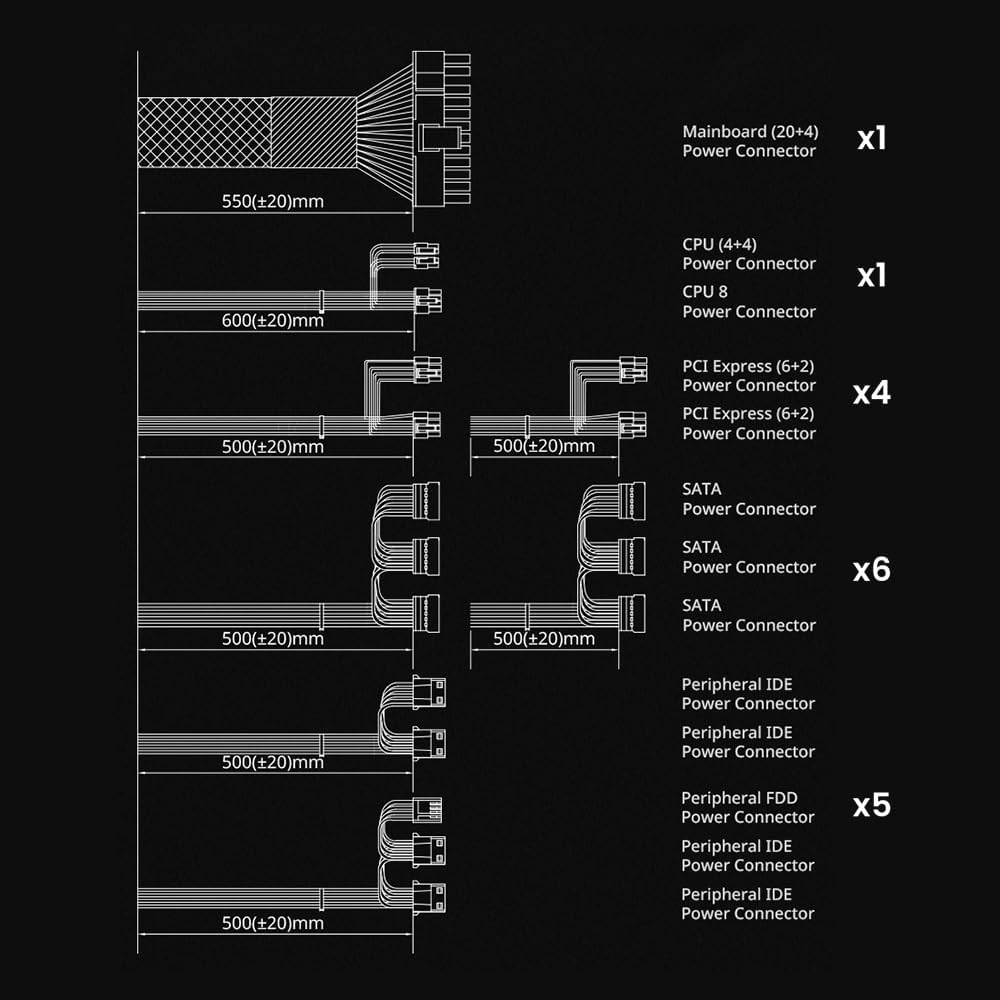
Image: Cable connection diagram showing lengths and types of connectors (Mainboard, CPU, PCI Express, SATA, Peripheral IDE).

Image: Detail of the black and flat sleeved cables for organized installation.
คำแนะนำการใช้งาน
After successful installation, you can power on your system. The Zalman GigaMax 700W power supply is designed for efficient and stable operation.
- เปิดเครื่อง: Flip the power switch on the back of the PSU to the 'I' (On) position. Then, press your computer's power button.
- ประสิทธิภาพ: The 80 Plus Bronze certification ensures up to 87% efficiency at 100% load (115-240VAC), minimizing wasted energy and heat generation.
- เอาต์พุตที่เสถียร: The Active PFC system provides a maximum power factor of 99%, contributing to consistent and stable energy delivery to your components.
- การทำงานที่เงียบ: The integrated 120mm silent fan with a sleeved bearing operates quietly, maintaining optimal cooling without excessive noise.
การซ่อมบำรุง
Proper maintenance helps ensure the longevity and performance of your power supply:
- การกำจัดฝุ่น: Periodically clean the exterior of the power supply and the fan grille to prevent dust buildup, which can impede airflow and cooling. Use compressed air for best results, ensuring the system is powered off and unplugged.
- สภาพแวดล้อม : Ensure the operating environment is clean, dry, and well-ventilated. Avoid placing the computer in areas with excessive dust, high humidity, or extreme temperatures.
- การตรวจสอบสายเคเบิล: Occasionally check all power connections to ensure they are secure and free from damage.
การแก้ไขปัญหา
หากคุณพบปัญหาเกี่ยวกับแหล่งจ่ายไฟ โปรดพิจารณาสิ่งต่อไปนี้:
- ไม่มีไฟฟ้า:
- ตรวจสอบว่าสายไฟ AC เชื่อมต่อกับแหล่งจ่ายไฟและเต้ารับที่ผนังอย่างแน่นหนาหรือไม่
- Ensure the power switch on the PSU is in the 'I' (On) position.
- Verify that the mainboard and CPU power connectors are correctly and firmly seated.
- ระบบไม่เสถียร/ปิดเครื่องเองโดยไม่ทราบสาเหตุ:
- This could indicate an overloaded power supply or a component issue. Ensure your system's power requirements do not exceed the PSU's 700W capacity.
- The power supply features multiple protection circuits (OCP, OVP, OPP, OTP, UVP, SCP) that may trigger a shutdown to protect components. If this occurs frequently, consult a professional.
- เสียงพัดลมดัง:
- While designed for quiet operation, excessive dust buildup can cause fan noise. Refer to the Maintenance section for cleaning instructions.

ภาพ: เหนือview of the power supply's protection features: Over-Current Protection (OCP), Over-Power Protection (OPP), Over-Voltage Protection (OVP), Under-Voltage Protection (UVP), Over-Temperature Protection (OTP), and Short-Circuit Protection (SCP).
ข้อมูลจำเพาะ
| หมายเลขรุ่น | ZM700-GVII-A |
| ยี่ห้อ | ซาลมาน |
| เอาท์พุต วัดtage | 700 วัตต์ |
| การรับรองประสิทธิภาพ | 80 พลัสบรอนซ์ |
| ฟอร์มแฟกเตอร์ | เอทีเอ็กซ์ |
| วิธีการทำความเย็น | พัดลม (ขนาด 120 มม. แบบเงียบ) |
| ขนาดสินค้า (กว้าง x ยาว x สูง) | 5.9 x 5.5 x 3.4 นิ้ว (150 x 140 x 86 มม.) |
| น้ำหนักสินค้า | 3.3 ปอนด์ |
| อุปกรณ์ที่รองรับ | Desktop, PC, Windows |
| ประเภทของขั้วต่อ | ATX, PCI Express, SATA, Peripheral IDE |
| คุณสมบัติการป้องกัน | OCP, OVP, OPP, OTP, UVP, SCP |
| การรับรอง | cTUVus, TUV, FCC, CB, CE certified, RoHS Compliant |

Image: Standard ATX size (140mm x 150mm x 86mm) for wide compatibility.
การรับประกันและการสนับสนุน
Your Zalman GigaMax 700W Power Supply is backed by a การรับประกันจากผู้ผลิต 5 ปีการรับประกันนี้ครอบคลุมถึงข้อบกพร่องในวัสดุและฝีมือการผลิตภายใต้การใช้งานปกติ
For warranty claims, technical support, or further inquiries, please contact Zalman customer service through their official website or the retailer where the product was purchased. Please have your product model number (ZM700-GVII-A) and proof of purchase ready when contacting support.

Image: Zalman 5 Year Warranty emblem.


