การแนะนำ
Welcome to your new Matrix Fitness TF30 Treadmill with XER Console. This manual provides essential information for the safe and effective operation, setup, maintenance, and troubleshooting of your treadmill. Designed for a comfortable and high-performance running experience, the TF30 combines robust construction with advanced technology to enhance your fitness journey.

Figure 1: Matrix Fitness TF30 Treadmill with XER Console, showcasing its sleek design and integrated console.
ข้อมูลด้านความปลอดภัย
Before operating the treadmill, please read and understand all safety instructions. Failure to do so may result in serious injury or equipment damage.
- หยุดฉุกเฉิน: Always attach the safety key clip to your clothing before starting a workout. In case of an emergency, pulling the safety key or pressing the emergency stop button will immediately halt the treadmill.
- เคลียร์สต๊อก : Ensure adequate clearance around the treadmill (at least 6 feet behind and 2 feet on each side) for safe operation and emergency dismount.
- รองเท้า: Always wear appropriate athletic footwear while using the treadmill.
- เด็กและสัตว์เลี้ยง: ให้เด็กและสัตว์เลี้ยงอยู่ห่างจากลู่วิ่งไฟฟ้าระหว่างการใช้งาน
- เงื่อนไขทางการแพทย์: Consult a physician before starting any new exercise program, especially if you have pre-existing medical conditions.
- พลัง: Connect the treadmill to a properly grounded outlet. Do not use extension cords.
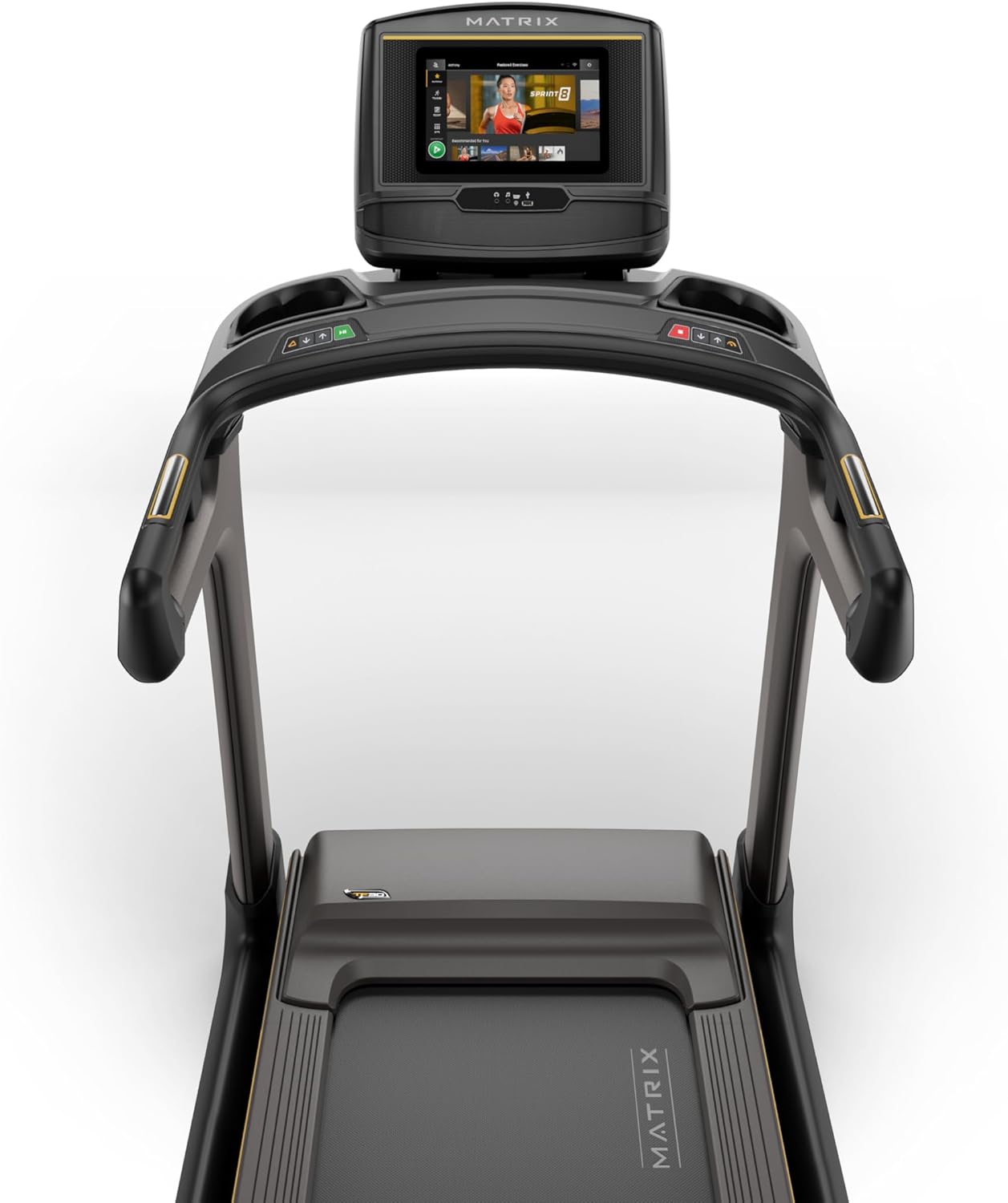
Figure 2: Close-up of the XER Console, highlighting the emergency stop button and safety key attachment point.
การตั้งค่า
The Matrix Fitness TF30 Treadmill requires some assembly. Please ensure all components listed below are present before beginning assembly.
ส่วนประกอบที่รวมอยู่:
- กรอบลู่วิ่ง
- เสากระโดง
- Mast Boots
- ฐานคอนโซล
- แฮนด์จับ
- Handlebar Sleeves
- ฝาครอบแฮนด์บาร์
- Frame Cover Sets
- ฝาหลัง
- สายไฟ
- กุญแจนิรภัย
- ชุดฮาร์ดแวร์
For detailed assembly instructions, please refer to the separate assembly guide provided with your product. Ensure the treadmill is placed on a flat, stable surface.
คำแนะนำการใช้งาน
Your TF30 Treadmill is equipped with advanced features for an optimal workout.
คุณสมบัติหลัก:
- พื้นผิวการวิ่ง: A spacious 20" x 55" running surface provides ample room for comfortable strides.
- Speed & Incline: Adjust speed from 0.5 to 12.5 mph and incline from 0% to 15% to customize your workout intensity.
- ระบบขับเคลื่อนจอห์นสัน: Experience quiet, durable, and responsive performance with the continuous-duty drive system.
- ระบบดาดฟ้าขั้นสุดยอด: Benefit from a heavy-duty frame, extra-thick deck, and industrial-grade cushioning for superior comfort and joint protection.
- การออกแบบประหยัดพื้นที่: The treadmill features a near 90-degree fold for convenient storage when not in use.

Figure 3: Diagram illustrating key features of the TF30 Treadmill, including its folding design, running surface, motor, incline, speed, and cushioning.

Figure 4: Demonstrating the space-saving folding capability of the TF30 Treadmill.
XER Console Operation:
The 10-inch touchscreen XER Console offers a rich interactive experience.
- แอพแบบบูรณาการ: Stream entertainment from popular apps like Netflix, YouTube, and Spotify directly on the console.
- โปรแกรมการออกกำลังกาย: Access 12 built-in programs, including Sprint 8, and integrate with iFIT and Virtual Active for diverse workout experiences and scenic routes.
- การเชื่อมต่อ: Connect via Bluetooth FTMS to third-party apps and use Bluetooth HR with the included strap for heart rate monitoring.
- การชาร์จแบบไร้สาย: Conveniently charge your compatible smartphone by placing it on the designated wireless charging pad on the console.
- ผู้ใช้มืออาชีพfiles: The console supports multiple user profiles, allowing personalized settings and tracking for each user.

Figure 5: The XER Console, highlighting its 10-inch touchscreen and integrated apps for entertainment and diverse workouts.

Figure 6: The XER Console's interface showing various entertainment applications available for use during workouts.

Figure 7: The XER Console displaying a virtual active scenic route, enhancing the immersive workout experience.
การซ่อมบำรุง
การบำรุงรักษาตามปกติจะช่วยให้ลู่วิ่งของคุณมีอายุการใช้งานยาวนานและมีประสิทธิภาพสูงสุด
- การทำความสะอาด: Wipe down the treadmill and console after each use with a damp ใช้ผ้าเช็ดทำความสะอาดเหงื่อและฝุ่นละออง หลีกเลี่ยงการใช้น้ำยาทำความสะอาดที่มีฤทธิ์กัดกร่อน
- การหล่อลื่นสายพาน: Periodically check and lubricate the running belt according to the instructions in your detailed product manual to ensure smooth operation and prevent wear.
- Belt Tension & Alignment: Inspect the running belt for proper tension and alignment. Adjust as needed to prevent slipping or rubbing.
- พื้นที่มอเตอร์: Keep the area around the motor clean and free of dust and debris to ensure proper ventilation.
การแก้ไขปัญหา
If you encounter issues with your treadmill, refer to the following common troubleshooting tips.
| ปัญหา | สาเหตุที่เป็นไปได้ | สารละลาย |
|---|---|---|
| ลู่วิ่งไม่สามารถเปิดเครื่องได้ | Power cord not connected, circuit breaker tripped, safety key not engaged. | Ensure power cord is securely plugged in. Check household circuit breaker. Ensure safety key is fully inserted. |
| สายพานวิ่งลื่นหรือติดขัด | Belt tension too loose, belt needs lubrication. | Adjust belt tension according to manual. Lubricate the running belt. |
| เสียงรบกวนที่ผิดปกติระหว่างการทำงาน | Loose components, motor issues, belt friction. | Inspect for loose bolts and tighten. Check belt lubrication. If noise persists, contact customer support. |
| Console display is blank or unresponsive. | ปัญหาพลังงาน, ซอฟต์แวร์ขัดข้อง | Ensure power is connected. Try restarting the treadmill by unplugging and re-plugging. |
For more complex issues, please refer to the comprehensive troubleshooting section in your full user manual or contact Matrix Fitness customer support.
ข้อมูลจำเพาะ
| ข้อมูลจำเพาะ | ค่า |
|---|---|
| ยี่ห้อ | เมทริกซ์ |
| ชื่อรุ่น | ลู่วิ่งไฟฟ้า Matrix Fitness TF30 |
| สไตล์ | TF30 Treadmill with XER Console |
| ขนาดสินค้า (กxยxส) | ลึก 77 นิ้ว x กว้าง 35 นิ้ว x สูง 62 นิ้ว |
| ขนาดเมื่อพับ | 42"x35"x71" |
| น้ำหนักสินค้า | 294 ปอนด์ |
| คำแนะนำน้ำหนักสูงสุด | 350 ปอนด์ |
| Running Surface (Deck Length x Deck Width) | 55 นิ้ว x 20 นิ้ว |
| ความเร็วสูงสุด | 12.5 ไมล์ต่อชั่วโมง |
| ความเร็วขั้นต่ำ | 0.5 ไมล์ต่อชั่วโมง |
| เปอร์เซ็นต์ความลาดเอียงสูงสุดtage | 15% |
| แรงม้าสูงสุด | 3.25 แรงม้า |
| ประเภทจอภาพ | LCD (10 Inches Screen Size) |
| จำนวนโปรแกรม | 12 |
| แหล่งพลังงาน | สายไฟ |
| จำเป็นต้องประกอบ | ใช่ |
| เมตริกที่วัด | ระยะทาง |

Figure 8: Dimensions of the Matrix Fitness TF30 Treadmill.
การรับประกันและการสนับสนุน
Your Matrix Fitness TF30 Treadmill is backed by a comprehensive manufacturer's warranty:
- กรอบ: รับประกันตลอดอายุการใช้งาน
- มอเตอร์และระบบกันกระแทก: รับประกันตลอดอายุการใช้งาน
- คอนโซล: 5 years parts / 1 year labor
- Frame (Parts/Labor): 5 years parts / 2 years labor
For customer support or warranty claims, please contact Matrix Fitness USA directly.


