1. บทนำ
Thank you for choosing the Cherub WST-680 Rechargeable Clip-on Guitar Tuner. This compact and versatile tuner is designed to provide accurate tuning for a variety of string instruments, including guitar, bass, and ukulele. Its rechargeable battery and clear LCD display make it an essential tool for musicians. Please read this manual carefully to ensure proper use and optimal performance of your new tuner.

รูปที่ 1 : ด้านหน้า view of the Cherub WST-680 Tuner, showing the display and clip mechanism.
2. คุณสมบัติหลัก
- โหมดการปรับแต่ง: Chromatic, Guitar, Bass, Ukulele.
- Intuitive Power Control: Simply flip the tuner up to power it on, and push it down to turn it off.
- แบตเตอรี่แบบชาร์จไฟได้: Equipped with a Li-ion battery, providing up to 10 hours of continuous use.
- ความแม่นยำสูง: Built-in high-sensitivity piezo sensors ensure ±1 cent accuracy.
- Large Colored LCD Display: Offers clear and easy-to-read tuning information.
3. เนื้อหาบรรจุภัณฑ์
The Cherub WST-680 package includes:
- 1 x Cherub WST-680 Clip-on Tuner
- สายชาร์จ 1 x USB-C
- 1 x คู่มือผู้ใช้ (เอกสารนี้)
4. การตั้งค่า
4.1 การติดตั้งจูนเนอร์
The WST-680 features a robust clip designed for secure attachment to your instrument's headstock. Open the clip by pressing the levers, then position it firmly on the headstock. Ensure the tuner is stable and the display is visible from your playing position.
4.2 การเปิด/ปิดเครื่อง
The tuner utilizes a convenient flip mechanism for power control:
- สู่พลัง ON, simply flip the display unit upwards.
- สู่พลัง ปิด, push the display unit downwards.
4.3 การปรับค่า Viewอิงแองเกิล
The tuner's display head can rotate 360 degrees and pivot forwards and backwards, allowing you to adjust the viewing angle for optimal visibility. Gently rotate or pivot the display to your preferred position.
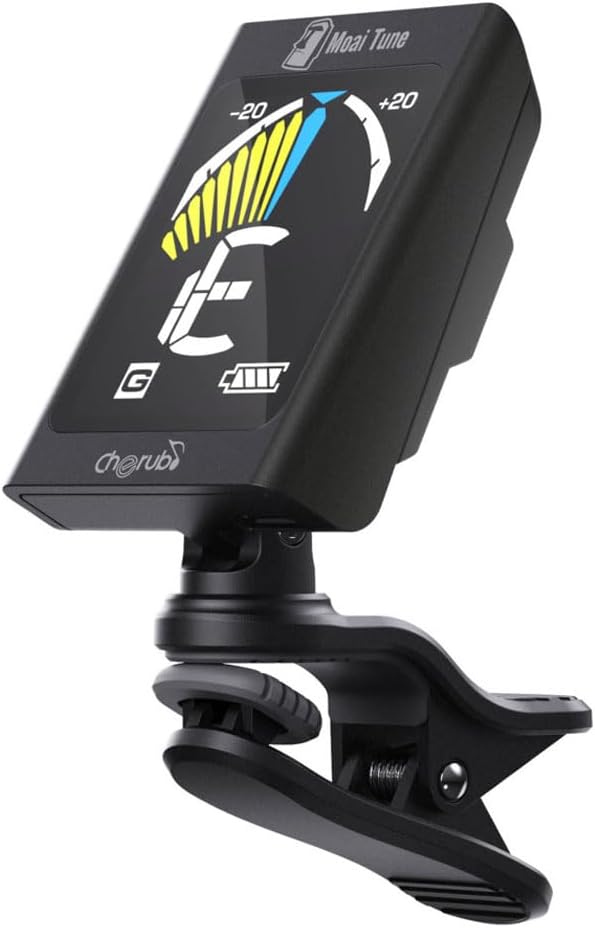
Figure 2: The tuner attached to a guitar headstock, demonstrating its compact size and adjustable angle.
5. การดำเนินการ
5.1 การเลือกโหมดการปรับแต่ง
After powering on the tuner, press the 'M' (Mode) button to cycle through the available tuning modes:
- ซี (โครมาติก): Tunes all notes.
- จี (กีตาร์): การตั้งสายกีตาร์แบบมาตรฐาน
- บี (เบส): การตั้งสายเบสแบบมาตรฐาน
- U (อูคูเลเล่): การตั้งสายอูคูเลเล่แบบมาตรฐาน
5.2 การปรับแต่งเครื่องดนตรีของคุณ
Once the desired mode is selected:
- Pluck a single string on your instrument.
- The tuner's display will show the detected note and a needle/bar indicator.
- Adjust the tuning peg of the string until the needle/bar is centered and the display turns green. If the needle is to the left (red), the note is flat; if it's to the right (yellow), the note is sharp.
- Repeat for all strings.

Figure 3: The tuner display indicating a note being tuned, with the needle centered for accurate pitch.
6. การชาร์จแบตเตอรี่
The Cherub WST-680 is equipped with a rechargeable Li-ion battery. To charge the tuner:
- หาพอร์ตชาร์จ USB-C ที่ด้านข้างของเครื่องรับสัญญาณวิทยุ
- Connect the provided USB-C cable to the tuner and the other end to a standard USB power source (e.g., computer, USB wall adapter).
- ไฟแสดงสถานะแบตเตอรี่บนจอแสดงผลจะแสดงสถานะการชาร์จ
- การชาร์จเต็มสามารถใช้งานประมาณ 10 ชั่วโมง

Figure 4: Close-up of the USB-C charging port on the tuner.
7. การบำรุงรักษา
To ensure the longevity and performance of your Cherub WST-680 Tuner:
- Clean the tuner with a soft, dry cloth. Avoid using abrasive cleaners or solvents.
- เก็บจูนเนอร์ไว้ในที่แห้งและเย็น หลีกเลี่ยงแสงแดดโดยตรงและอุณหภูมิที่สูงหรือต่ำเกินไป
- ควรหลีกเลี่ยงการทำเครื่องตั้งสายตก หรือการกระแทกอย่างแรง
8 การแก้ไขปัญหา
8.1 Tuner Not Powering On
- Ensure the tuner is flipped upwards to the ON position.
- Check the battery level. If low, charge the tuner using the provided USB-C cable.
8.2 Inaccurate Tuning
- ตรวจสอบให้แน่ใจว่าตัวตั้งสายติดกับหัวกีตาร์อย่างแน่นหนา
- Verify that the correct tuning mode (Chromatic, Guitar, Bass, Ukulele) is selected for your instrument.
- Tune in a quiet environment to minimize external vibrations.
8.3 Resetting the Tuner
If the tuner is unresponsive or behaving erratically, a reset may resolve the issue. Locate the small 'RESET' button on the back of the tuner (often a pinhole) and gently press it with a thin object like a paperclip.

Figure 5: Close-up of the back of the tuner, highlighting the 'RESET' button.
9. ข้อมูลจำเพาะ
| คุณสมบัติ | ข้อมูลจำเพาะ |
|---|---|
| หมายเลขรุ่น | WST-680 |
| โหมดปรับแต่ง | โครมาติก กีตาร์ เบส อูคูเลเล่ |
| ความแม่นยำ | ± 1 เซ็นต์ |
| ประเภทแบตเตอรี่ | ลิเธียมไอออนแบบชาร์จได้ |
| อายุการใช้งานแบตเตอรี่ | สูงสุด 10 ชั่วโมง (โดยประมาณ) |
| พอร์ตชาร์จ | ยูเอสบี-ซี |
| น้ำหนักสินค้า | 1.17 ออนซ์ |
| ขนาดสินค้า | 2.05 x 1.46 x 1.38 นิ้ว |
10. การรับประกันและการสนับสนุน
Cherub products are designed for reliability and performance. For warranty information, technical support, or any inquiries regarding your WST-680 tuner, please refer to the official Cherub webหรือติดต่อตัวแทนจำหน่ายในพื้นที่ของคุณ เก็บใบเสร็จรับเงินไว้เป็นหลักฐานการซื้อสำหรับการเรียกร้องการรับประกัน


