1.1. เนื้อหาบรรจุภัณฑ์
โปรดตรวจสอบว่าแพ็คเกจของคุณมีรายการต่อไปนี้:
- Beafon SL720 Mobile Phone
- แบตเตอรี่
- สายชาร์จ
- Charging Cradle (optional, may vary by region)
- คู่มือการใช้งาน
This manual provides detailed instructions for setting up, operating, maintaining, and troubleshooting your Beafon SL720 Silver Line mobile phone.
โปรดตรวจสอบว่าแพ็คเกจของคุณมีรายการต่อไปนี้:
Before first use, fully charge your Beafon SL720. Connect the charging cable to the phone or place the phone in the charging cradle. The battery indicator on the screen will show charging status.

Image: Beafon SL720 flip phone placed in its charging cradle, showing an incoming call with a photo contact on the external display.
The Beafon SL720 features a large XXL 2.8-inch color display and large, illuminated keys for easy navigation. Use the directional keys to move through menu options and the central OK ปุ่มเพื่อยืนยันการเลือก
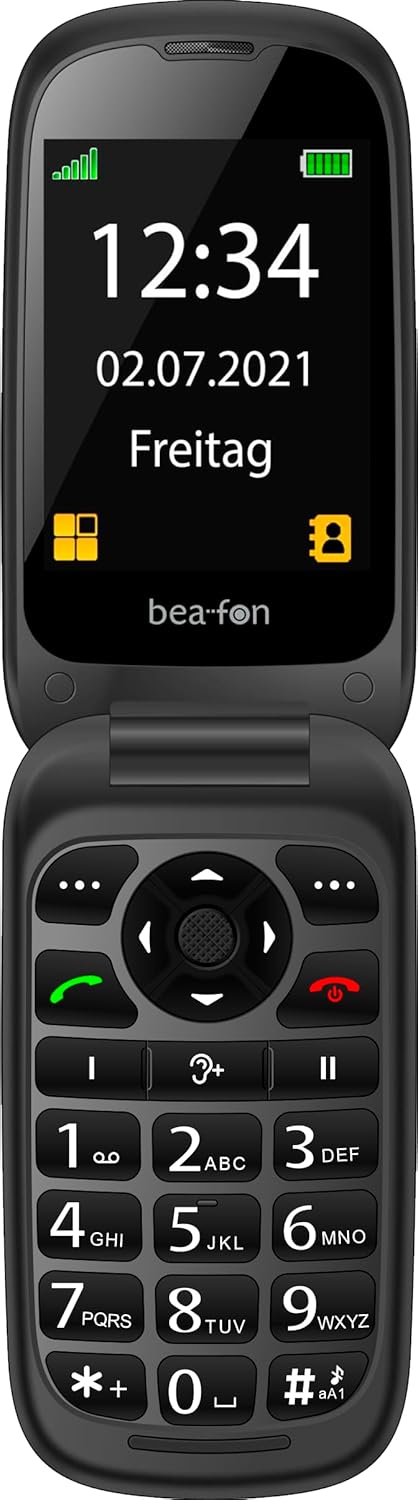
Image: The Beafon SL720 flip phone open, showing the main display with time and date.
You can store frequently used numbers in your phone's contact list. The Beafon SL720 supports photo contacts, allowing you to assign a picture to a contact for easier identification during incoming calls on both the internal and external screens.

Image: The Beafon SL720 flip phone displaying a photo contact on its main screen.

Image: The Beafon SL720 flip phone closed, showing an incoming call with a photo contact on the external 1.44-inch display.
The Beafon SL720 is equipped with a programmable SOS emergency call button located on the back of the device. In an emergency, pressing this button will initiate a call to pre-programmed emergency contacts or send an SOS message with location information (if GPS is active).
This phone offers enhanced accessibility features:

Image: Visual representation of key features including hearing aid compatibility, sound amplification, loud ringtone, SOS button, and display sizes.
Use a soft, dry cloth to clean the phone's exterior. Avoid using liquid cleaners or abrasive materials, as they may damage the device.
To prolong battery life, avoid exposing the phone to extreme temperatures. Do not leave the phone fully charged or fully discharged for extended periods.
When storing the phone for an extended period, ensure it is partially charged (around 50%) and kept in a cool, dry place.
| คุณสมบัติ | รายละเอียด |
|---|---|
| ยี่ห้อ | Beafon |
| ชื่อรุ่น | SL720 |
| สี | สีดำ |
| ประเภทสินค้า | โทรศัพท์ฝาพับ |
| ระบบปฏิบัติการ | Android (Simplified OS) |
| ขนาดหน้าจอหลัก | 2.8 นิ้ว (7.11 ซม.) |
| External Screen Size | 1.44 นิ้ว (4.49 ซม.) |
| เทคโนโลยีเซลลูล่าร์ | 2G |
| เทคโนโลยีการเชื่อมต่อ | จีพีเอส |
| คุณสมบัติพิเศษ | Hearing Aid Compatible (M4/T4), SOS Emergency Button, +25 dB Sound Amplification, 95 dB Ringtone |
| แบตเตอรี่ | ลิเธียมไอออน 1 ก้อน (รวมอยู่ด้วย) |

Image: Physical dimensions of the Beafon SL720 phone.
Your Beafon SL720 mobile phone comes with a standard manufacturer's warranty. Please refer to the warranty card included in your package or contact your retailer for specific details regarding warranty coverage and duration.
If you encounter any issues not covered in this manual or require further assistance, please contact your point of purchase or the official Beafon customer support. Contact details can usually be found on the manufacturer's webไซต์หรือในเอกสารผลิตภัณฑ์ของคุณ
 |
โทรศัพท์มือถือ Beafon SL495 Silver Line - ข้อมูลจำเพาะและคุณสมบัติ รายละเอียดมากกว่าview ของโทรศัพท์มือถือ Beafon SL495 Silver Line ซึ่งรวมถึงข้อมูลจำเพาะ ฟังก์ชัน คุณสมบัติด้านความปลอดภัย และสิ่งที่บรรจุอยู่ภายใน เอกสารนี้ให้ข้อมูลที่ครอบคลุมสำหรับผู้ใช้ที่สนใจ |
 |
beafon SL605 Feature Phone - Specifications and Features Detailed information about the beafon SL605 feature phone, including its specifications, functions, safety features, and package contents. Discover its large display, SOS button, and ease of use. |
 |
โทรศัพท์มือถือ Beafon SL860 Silver Line - คุณสมบัติและข้อมูลจำเพาะ ข้อมูลจำเพาะโดยละเอียดของโทรศัพท์มือถือ Beafon SL860 Silver Line ครอบคลุม 4G LTE, WhatsApp, ฟังก์ชัน SOS, รายละเอียดกล้อง และความสามารถด้านมัลติมีเดีย เรียนรู้เกี่ยวกับอินเทอร์เฟซผู้ใช้ การแสดงผล และตัวเลือกการเชื่อมต่อ |
 |
Bea-fon SL720 Guía del Usuario: ฟังก์ชั่นและการดำเนินการ คู่มือการใช้งานสำหรับโทรศัพท์เคลื่อนที่ Bea-fon SL720, การกำหนดค่าเริ่มต้น, ฟังก์ชันลามาดา, การแจ้งเตือน, รายชื่อติดต่อ, มัลติมีเดีย, การแก้ปัญหาและการแก้ปัญหา |
 |
Hama SL720 Slimline Keyboard - User Guide and Connection Instructions User guide for the Hama SL720 Slimline Keyboard, detailing USB connection, special key functions, and warranty disclaimer. Learn how to connect and use your keyboard. |
 |
เมทริกซ์ความเข้ากันได้ของ Parrot ของ ZENEC FC6000TS เอกสารนี้ให้รายละเอียดเกี่ยวกับความเข้ากันได้ของโทรศัพท์มือถือรุ่นต่างๆ กับอุปกรณ์ ZENEC ที่ใช้เทคโนโลยี Parrot Bluetooth โดยจะสรุปประสิทธิภาพของฟังก์ชันสำคัญๆ เช่น การจัดการสายโทรศัพท์ การเข้าถึงสมุดโทรศัพท์ และการสตรีมสื่อ (A2DP/AVRCP) สำหรับอุปกรณ์หลากหลายประเภท ช่วยให้ผู้ใช้มั่นใจได้ว่าสามารถผสานรวมอุปกรณ์ได้อย่างราบรื่น |