1. บทนำ
Thank you for choosing the MOOKA UHM-JS02 Cool Mist Humidifier. This 2-in-1 device functions as both a humidifier and an essential oil diffuser, designed to improve air quality and comfort in your home. It features a 4-liter capacity, top-fill design, adjustable mist output, quiet ultrasonic operation, automatic shut-off, and a night light function. Please read this manual thoroughly before use to ensure proper operation and maintenance.

Image 1.1: MOOKA UHM-JS02 Cool Mist Humidifier. This image displays the humidifier from a slight angle, showcasing its sleek white cylindrical design with a blue illuminated water level indicator and the control panel on top.
2. คำแนะนำด้านความปลอดภัย
- ควรวางเครื่องเพิ่มความชื้นบนพื้นผิวที่แข็ง เรียบ และกันน้ำได้ โดยให้ห่างจากผนังและเครื่องใช้ไฟฟ้าอย่างน้อย 6 นิ้ว (15 ซม.) เสมอ
- ห้ามวางเครื่องเพิ่มความชื้นลงบนพรมหรือเสื่อโดยตรง
- ห้ามจุ่มตัวเครื่องลงในน้ำหรือของเหลวอื่นๆ
- ใช้น้ำประปาที่สะอาดและเย็น หรือน้ำกลั่นเท่านั้น ห้ามใช้น้ำร้อน
- เก็บให้พ้นจากมือเด็กและสัตว์เลี้ยง
- ถอดปลั๊กเครื่องเพิ่มความชื้นก่อนเติมน้ำ ทำความสะอาด หรือเคลื่อนย้ายเครื่อง
- Do not add essential oils directly into the water tank; use the designated essential oil tray.
- หากเครื่องเพิ่มความชื้นชำรุด ห้ามใช้งาน โปรดติดต่อฝ่ายบริการลูกค้า
- ตรวจสอบให้แน่ใจว่าสายไฟไม่ได้รับความเสียหายหรือถูกหนีบ

Image 2.1: Important Safety Warning. This image shows two panels: one with a red 'X' over a humidifier part submerged in water, and another with a red 'X' over a hand holding the main unit upside down. This illustrates what not to do during cleaning or handling.
3. เนื้อหาบรรจุภัณฑ์
กรุณาตรวจสอบแพ็คเกจสำหรับรายการต่อไปนี้:
- MOOKA UHM-JS02 Humidifier Main Unit
- คู่มือการใช้งาน
4. ส่วนประกอบผลิตภัณฑ์
Familiarize yourself with the different parts of your humidifier:
- Mist Nozzle / Top Cover
- Control Panel (Power, Mist Level, Night Light)
- ถังน้ำ (ความจุ 4 ลิตร)
- ตัวบอกระดับน้ำ
- ถาดน้ำมันหอมระเหย
- Base Unit (contains ultrasonic transducer)
- พอร์ตสายไฟ
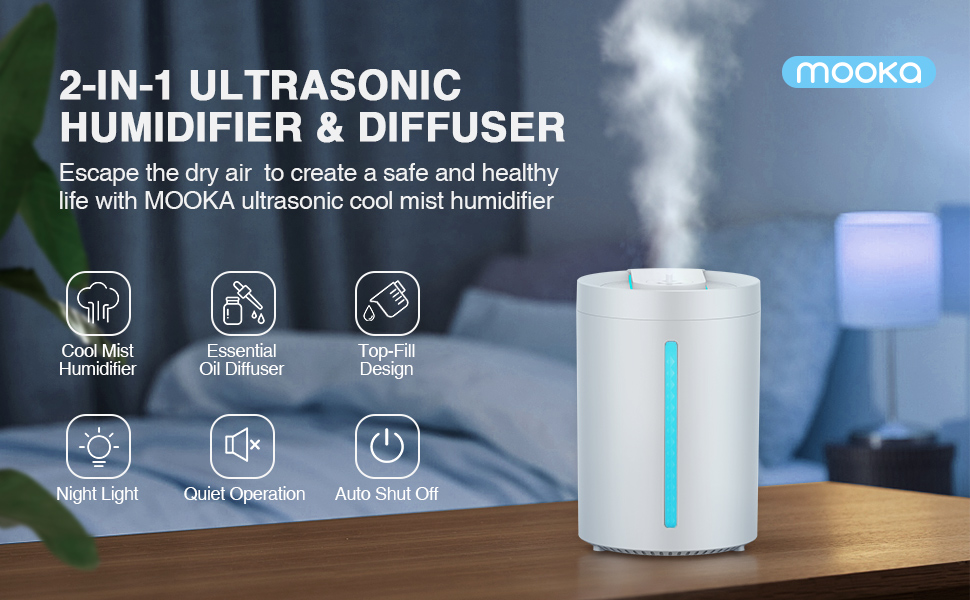
ภาพที่ 4.1: จบแล้วview of MOOKA Humidifier Features. This image highlights key features such as Cool Mist Humidifier, Essential Oil Diffuser, Top-Fill Design, Night Light, Quiet Operation, and Auto Shut Off, with an illustration of the humidifier in a bedroom setting.
5. การตั้งค่า
5.1 การจัดวาง
Place the humidifier on a flat, stable surface. Ensure it is not placed directly on the floor or near heat sources.
5.2 การเติมถังเก็บน้ำ
The MOOKA UHM-JS02 features a convenient top-fill design.
- ถอดฝาครอบด้านบนของเครื่องเพิ่มความชื้นออก
- Pour clean, cool tap water or distilled water directly into the water tank. Do not exceed the maximum fill line.
- เปลี่ยนฝาครอบด้านบนอย่างแน่นหนา

Image 5.1: Top-Fill Design. This image demonstrates the ease of filling the humidifier by pouring water directly into the open top of the unit. It also shows the internal structure and how to clean the tank.

Image 5.2: Incorrect Water Filling. This image shows a red 'no' symbol over the mist outlet, indicating that water should not be poured into this opening when refilling the tank.
5.3 Adding Essential Oils
To use the essential oil diffuser function:
- Locate the essential oil tray, usually a small compartment on the side or top of the unit.
- Add a few drops of your preferred essential oil onto the aroma pad in the tray.
- Close the essential oil tray securely.
บันทึก: Do not add essential oils directly into the water tank, as this can damage the unit and void the warranty.

Image 5.3: Essential Oil Diffuser Function. This image illustrates how to add essential oils to the dedicated tray, showing both the tray being pulled out and drops being added, as well as an alternative method of adding oil directly into the water tank (which is generally not recommended for this model, refer to specific instructions).

Image 5.4: Correct Essential Oil Application. This image specifically shows a hand adding drops of essential oil into the designated oil tray, which is the recommended method.
6. คู่มือการใช้งาน
6.1 เปิด/ปิดเครื่อง
Plug the power cord into a suitable electrical outlet. The humidifier will enter standby mode. Press the power button on the control panel to turn the unit on or off.
6.2 Adjusting Mist Output
The humidifier offers adjustable mist levels:
- Press the mist level button (often indicated by a mist icon or 'H/M/L') to cycle through Low, Medium, and High mist settings.
- An intermittent mist setting (e.g., 18-second evaporation) may also be available for maintaining humidity.

Image 6.1: Adjustable Mist Levels. This image displays three humidifiers, each demonstrating a different mist output level: Low (L), Medium (M), and High (H), with corresponding mist heights and evaporation rates.
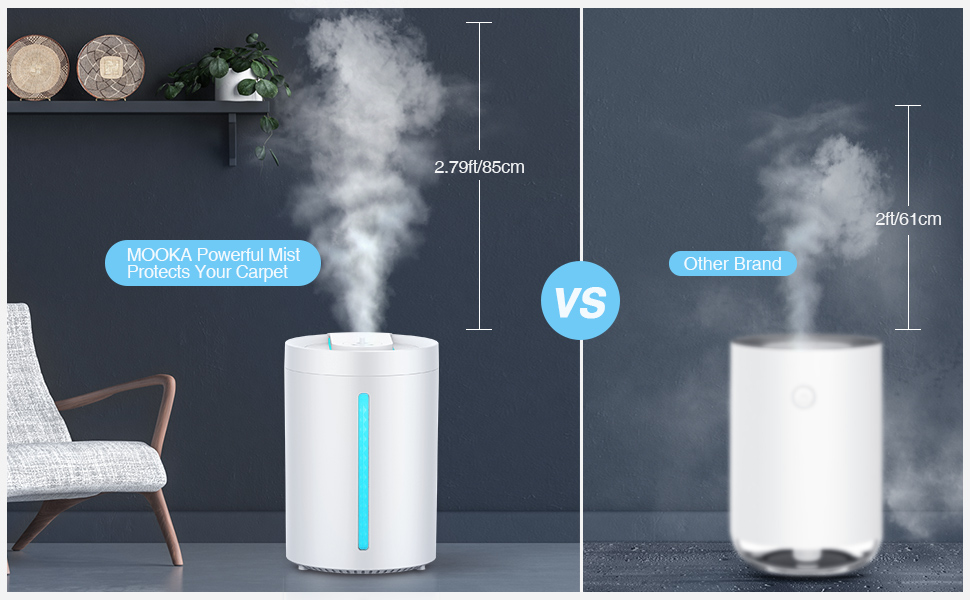
Image 6.2: Mist Height Comparison. This image compares the mist height of the MOOKA humidifier (2.79ft/85cm) against another brand, highlighting the MOOKA's powerful mist output.
6.3 ฟังก์ชันไฟกลางคืน
Press and hold the power button for approximately 3 seconds to turn the LED night light on or off. This feature provides a soft glow for nighttime use.
6.4 ระบบปิดเครื่องอัตโนมัติ
The humidifier is equipped with an automatic shut-off feature that activates when the water level is too low, ensuring safety and preventing damage to the unit.

Image 6.3: Ideal Humidifier for Your Family. This image showcases the humidifier's features: Auto Shut Off, Whisper Quiet operation, and the option to turn Lights Off, with a child sleeping peacefully in the background.

Image 6.4: Undisturbed Night with Restful Sleep. This image emphasizes the humidifier's quiet operation (less than 24dB), auto shut-off, and aromatherapy features, contributing to a peaceful sleep environment.
6.5 การสาธิตวิดีโอ
Video 6.5: MOOKA Cool Mist Humidifier Overview. This video provides a visual guide to the humidifier's features, assembly, water filling, essential oil addition, and operation, demonstrating its ease of use and quiet performance.
7. การบำรุงรักษา
การทำความสะอาดอย่างสม่ำเสมอเป็นสิ่งจำเป็นเพื่อประสิทธิภาพและสุขอนามัยที่ดีที่สุด
7.1 การบำรุงรักษารายวัน
- ถอดปลั๊กเครื่องเพิ่มความชื้น
- เทน้ำที่เหลืออยู่ออกจากถัง
- Wipe the water tank and base with a clean, dry cloth.
7.2 การทำความสะอาดรายสัปดาห์
- Unplug the humidifier and disassemble the top unit from the water tank.
- Clean the water tank with a soft brush and mild detergent. Rinse thoroughly.
- Gently wipe the ultrasonic transducer (located in the base) with a soft cloth. Do not scrub or use abrasive materials.
- Clean the essential oil tray with a damp ผ้า.
- ปล่อยให้ชิ้นส่วนทั้งหมดผึ่งลมให้แห้งสนิทก่อนประกอบกลับเข้าไปใหม่

Image 7.1: Cleaning the Water Tank. This image shows a hand wiping the inside of the humidifier's water tank with a cloth, demonstrating the ease of access for cleaning due to the top-fill design.

Image 7.2: Removing Top Unit. This image illustrates how to remove the top operational unit from the water tank by sliding it upwards, facilitating thorough cleaning.

Image 7.3: Releasing Clips. This image provides a closer view of the clips on the side of the top unit, showing how to press them to release the unit from the tank for cleaning.

Image 7.4: Reinserting Top Unit. This image shows the process of carefully lowering the top operational unit back into the water tank after cleaning, ensuring proper alignment.
8 การแก้ไขปัญหา
| ปัญหา | สาเหตุที่เป็นไปได้ | สารละลาย |
|---|---|---|
| ไม่มีหมอกหรือมีหมอกปริมาณน้อย | ระดับน้ำต่ำ Ultrasonic transducer dirty หัวฉีดหมอกอุดตัน | เติมถังน้ำ เครื่องแปลงสัญญาณที่สะอาด Check and clear mist nozzle |
| กลิ่นผิดปกติ | Stagน้ำแนนท์ ถังเก็บน้ำสกปรก | เทน้ำทิ้งแล้วเติมน้ำสะอาดใหม่ ทำความสะอาดถังน้ำให้สะอาดหมดจด |
| การรั่วซึมของน้ำ | Top cover not secured หน่วยวางบนพื้นผิวที่ไม่เรียบ | Ensure top cover is properly seated วางบนพื้นผิวเรียบและมั่นคง |
| เครื่องไม่เปิด | ไม่มีไฟฟ้า เปิดใช้งานปิดอัตโนมัติ | ตรวจสอบการเชื่อมต่อไฟฟ้า Refill water tank if empty |
9. ข้อมูลจำเพาะ
| คุณสมบัติ | รายละเอียด |
|---|---|
| แบบอย่าง | UHM-JS02 |
| ยี่ห้อ | มูก้า |
| ความจุ | 4 ลิตร (1.05 แกลลอน) |
| โหมดการทำงาน | อัลตราโซนิก Cool Mist |
| เอาต์พุตหมอกสูงสุด | 380 มล./ชม. |
| Continuous Use (Min Mist) | นานถึง 24 ชั่วโมง |
| พื้นที่ให้บริการ | พื้นที่สูงสุด 484 ตารางฟุต (40 ตารางเมตร) |
| ระดับเสียง | น้อยกว่า 24dB |
| คุณสมบัติพิเศษ | Auto Shut Off, Night Light, Essential Oil Diffuser, Top Fill Design |
| เล่มที่tage | 120 โวลต์ |
| น้ำหนักสินค้า | 2.94 ปอนด์ |
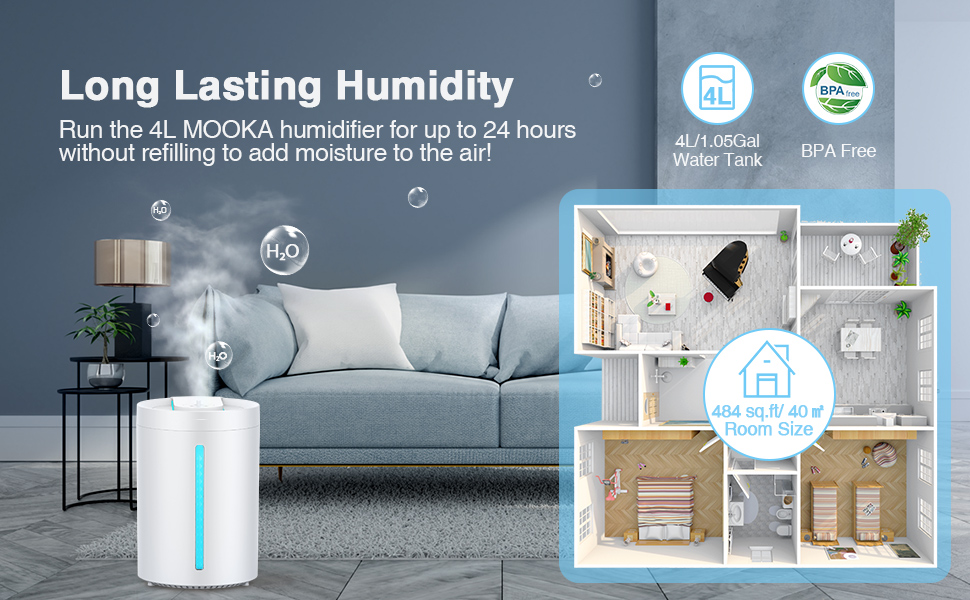
Image 9.1: Long Lasting Humidity. This image highlights the 4L/1.05Gal water tank capacity, providing up to 24 hours of continuous use, and indicates suitability for rooms up to 484 sq.ft / 40 m².
10. การรับประกันและการสนับสนุน
MOOKA products are designed for reliability and performance. For warranty information or technical support, please refer to the contact details provided on the product packaging or visit the official MOOKA website. Please have your model number (UHM-JS02) and purchase information ready when contacting support.


