การแนะนำ
This manual provides comprehensive instructions for the safe and efficient use of your Tronsmart Apollo Air TWS Bluetooth Earphones. Please read this manual thoroughly before using the product and retain it for future reference.
ข้อมูลด้านความปลอดภัย:
- Do not expose the earphones or charging case to extreme temperatures, humidity, or corrosive environments.
- หลีกเลี่ยงการทำตก กระแทก หรือถอดประกอบอุปกรณ์
- เก็บให้ห่างจากเด็กและสัตว์เลี้ยง
- ใช้เฉพาะสายชาร์จที่ให้มาหรือได้รับการรับรองเท่านั้น
- การสัมผัสกับเสียงดังเป็นเวลานานอาจทำให้เกิดความเสียหายต่อการได้ยิน
สินค้าเกินview
เนื้อหาแพ็คเกจ
- Tronsmart Apollo Air TWS Bluetooth Earphones (Left and Right)
- เคสชาร์จไฟ
- สายชาร์จ USB
- จุกหูฟัง (หลายขนาด)
- คู่มือการใช้งาน (เอกสารนี้)
การระบุส่วนประกอบ
Familiarize yourself with the main components of your Tronsmart Apollo Air earphones and charging case.
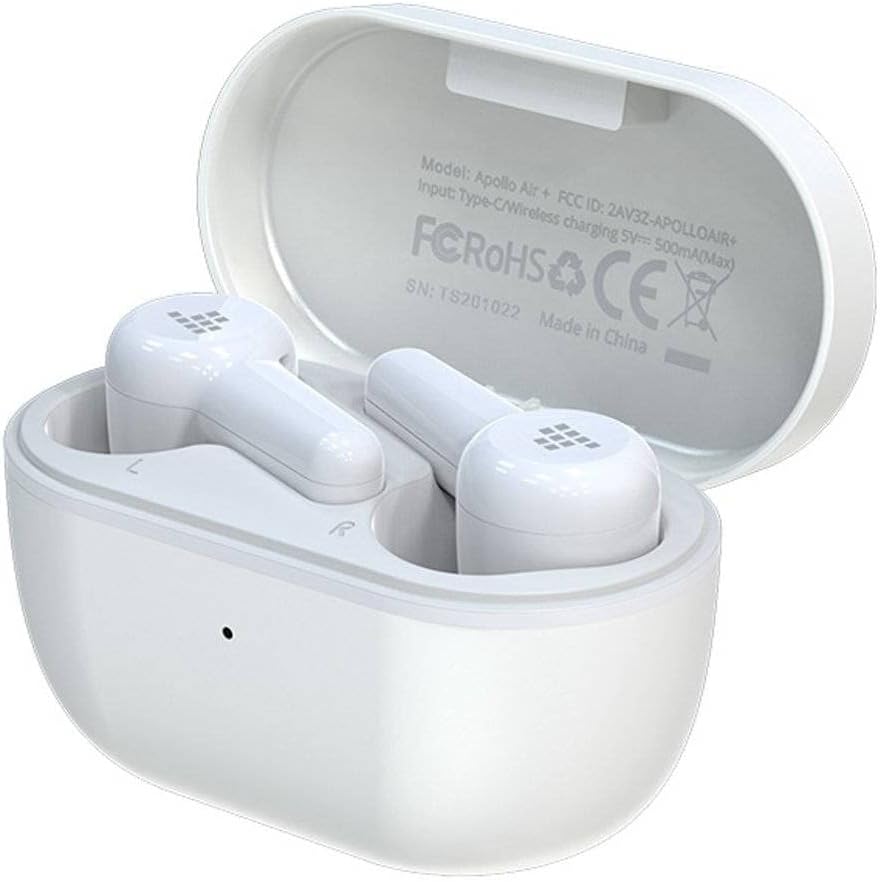
Image: Tronsmart Apollo Air TWS Earphones placed inside their open charging case. The case lid displays model information and certifications.

Image: Tronsmart Apollo Air TWS Earphones. One earbud is shown outside the charging case, highlighting its design and the charging contacts within the case.

ภาพ: ภาพระยะใกล้ view of the two Tronsmart Apollo Air TWS Earbuds, showcasing their ergonomic shape, ear tips, and touch control areas.
การตั้งค่า
การชาร์จหูฟังและเคส
- การชาร์จเคส: Connect the provided USB charging cable to the charging port on the case and to a USB power adapter (not included) or a computer's USB port. The indicator light on the case will show charging status.
- การชาร์จหูฟัง: Place the earphones into the charging case. Ensure they are correctly seated in their respective slots (L for left, R for right). The earphones will automatically begin charging. The indicator lights on the earphones will show charging status.
- Fully charge the earphones and case before first use.
จับคู่บลูทู ธ
- การจับคู่เริ่มต้น: Open the charging case. The earphones will automatically enter pairing mode, indicated by flashing lights (refer to product for specific light patterns).
- บนอุปกรณ์ของคุณ (สมาร์ทโฟน แท็บเล็ต ฯลฯ) เปิดใช้งานบลูทูธและค้นหาอุปกรณ์ที่มีอยู่
- Select "Tronsmart Apollo Air" from the list of found devices.
- เมื่อเชื่อมต่อสำเร็จแล้ว ระบบจะส่งเสียงแจ้งเตือนหรือแสดงไฟแสดงสถานะเพื่อยืนยันการจับคู่ที่สำเร็จ
- จับคู่ใหม่: If the earphones do not connect automatically, ensure Bluetooth is enabled on your device and the earphones are charged. You may need to manually select "Tronsmart Apollo Air" from your device's Bluetooth menu.
การใช้งานหูฟัง
เปิด/ปิดเครื่อง
- เปิดเครื่อง: เปิดเคสชาร์จหรือหยิบหูฟังออกจากเคส หูฟังจะเปิดโดยอัตโนมัติ
- หมดแรง: ใส่หูฟังกลับเข้าไปในกล่องชาร์จแล้วปิดฝา หูฟังจะปิดโดยอัตโนมัติ
- ปิดเครื่องด้วยตนเอง: (If supported) Long press the touch control area on both earbuds for approximately 5 seconds until the indicator light turns off.
การควบคุมด้วยระบบสัมผัส (ทั่วไป)
The Tronsmart Apollo Air earphones feature touch-sensitive controls. Specific functions may vary slightly, but common operations include:
- เล่น/หยุดชั่วคราว: แตะที่หูฟังข้างใดข้างหนึ่งเพียงครั้งเดียว
- เพลงถัดไป: แตะสองครั้งที่หูฟังด้านขวา
- แทร็กก่อนหน้า: แตะสองครั้งที่หูฟังด้านซ้าย
- รับ/วางสาย: แตะที่หูฟังข้างใดข้างหนึ่งเพียงครั้งเดียว
- ปฏิเสธสาย: กดที่หูฟังข้างใดข้างหนึ่งค้างไว้ 2 วินาที
- เปิดใช้งาน Voice Assistant: แตะสามครั้งที่หูฟังข้างใดข้างหนึ่ง
- การควบคุมระดับเสียง: (If supported) Long press on the right earbud to increase volume, long press on the left earbud to decrease volume.
Note: Refer to the quick start guide included in your package for precise touch control mappings if different from above.

Image: A smartphone screen showing an equalizer application with various sound presets (e.g., Default, Deep Bass, Hi-Fi, Rock, Vocal). The Tronsmart Apollo Air earphones and charging case are visible in the background, suggesting compatibility with audio customization apps.
การซ่อมบำรุง
การทำความสะอาด
- เช็ดหูฟังและกล่องชาร์จเบาๆ ด้วยผ้าแห้งนุ่มที่ไม่เป็นขุย
- ห้ามใช้สารทำความสะอาดที่มีฤทธิ์กัดกร่อน แอลกอฮอล์ หรือตัวทำละลายเคมี
- ถอดปลายหูออกและทำความสะอาดแยกต่างหากโดยใช้สบู่ชนิดอ่อนและน้ำหากจำเป็น และตรวจสอบให้แน่ใจว่าแห้งสนิทก่อนจะใส่กลับเข้าไป
- Ensure charging contacts on both the earphones and case are clean and free of debris.
พื้นที่จัดเก็บ
- เมื่อไม่ใช้งาน ควรเก็บหูฟังไว้ในกล่องชาร์จเสมอ เพื่อป้องกันความเสียหายและรักษาระดับประจุไฟ
- เก็บอุปกรณ์ไว้ในที่แห้งและเย็น หลีกเลี่ยงแสงแดดโดยตรงและอุณหภูมิที่สูงหรือต่ำเกินไป
การแก้ไขปัญหา
If you encounter issues with your Tronsmart Apollo Air earphones, please refer to the following common solutions:
หูฟังไม่จับคู่หรือเชื่อมต่อ
- Ensure both earphones are charged and taken out of the charging case.
- ปิดและเปิดบลูทูธบนอุปกรณ์ของคุณ
- Delete "Tronsmart Apollo Air" from your device's Bluetooth list and attempt to re-pair.
- Try resetting the earphones (refer to product-specific reset instructions if available, otherwise, place them back in the case, close, then reopen).
ไม่มีเสียงหรือเสียงเบา
- ตรวจสอบระดับเสียงบนอุปกรณ์ที่เชื่อมต่อและหูฟังของคุณ
- ตรวจสอบให้แน่ใจว่าหูฟังอยู่ในหูของคุณอย่างถูกต้อง
- Confirm the earphones are connected to the correct audio output on your device.
- Clean any debris from the earphone speaker grilles.
ปัญหาการชาร์จ
- ตรวจสอบให้แน่ใจว่าสายชาร์จเชื่อมต่อกับเคสและแหล่งจ่ายไฟอย่างแน่นหนา
- ตรวจสอบแหล่งพลังงานว่าใช้งานได้
- ทำความสะอาดหน้าสัมผัสการชาร์จบนหูฟังและภายในเคส
- ลองใช้สายชาร์จ USB หรืออะแดปเตอร์แปลงไฟอันอื่นดู
ข้อมูลจำเพาะ
| คุณสมบัติ | รายละเอียด |
|---|---|
| ยี่ห้อ | ทรอนสมาร์ท |
| ชื่อรุ่น | สายการบินอะพอลโลแอร์ |
| หมายเลขรุ่นสินค้า | 372452 |
| การเชื่อมต่อ | บลูทูธ, ไร้สาย |
| สี | สีขาว |
| ฟอร์มแฟกเตอร์ | In-Ear, Basic Case |
| วัสดุ | ยาง |
| น้ำหนักสินค้า | 100 กรัม |
| ขนาดสินค้า | 10 x 5 x 3 ซม. |
| ระดับความต้านทานต่อน้ำ | ไม่ทนน้ำ |
| รุ่นโทรศัพท์ที่รองรับ | Please check description (Generally compatible with most Bluetooth-enabled devices) |

Image: Technical diagram illustrating the precise dimensions of the Tronsmart Apollo Air charging case and individual earbuds in millimeters and inches.
การรับประกันและการสนับสนุน
Tronsmart products are designed and manufactured to the highest quality standards. For detailed warranty information, please refer to the warranty card included with your purchase or visit the official Tronsmart webเว็บไซต์.
For technical support, troubleshooting assistance, or to inquire about replacement parts, please contact Tronsmart customer service through their official channels. Contact information can typically be found on the product packaging or the official Tronsmart webเว็บไซต์.


