1. บทนำ
Thank you for choosing WENKEY True Wireless Earbuds. This manual provides essential information for setting up, operating, and maintaining your earbuds to ensure optimal performance and longevity. Please read this manual thoroughly before use.
มีอะไรอยู่ในกล่อง
- WENKEY True Wireless Earbuds (L/R)
- เคสชาร์จไฟ
- สายชาร์จ USB
- จุกหูฟังมีให้เลือกหลายขนาด (XS, S, M, L, XL)
- คู่มือการใช้งาน (เอกสารนี้)
- คู่มือเริ่มต้นอย่างรวดเร็ว
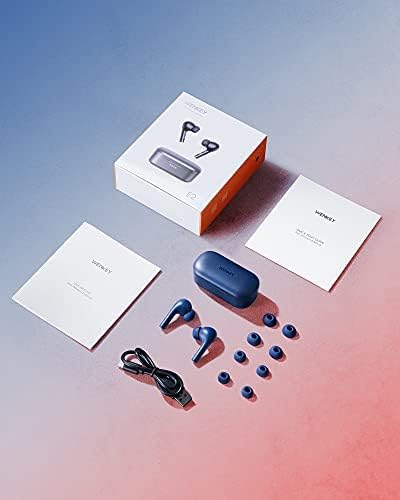
Image: The WENKEY E2 earbuds, charging case, USB cable, and multiple sizes of silicone ear tips, along with the user manual and quick start guide, as packaged in the product box.
2. การตั้งค่า
การชาร์จหูฟังเอียร์บัดและเคส
Before first use, fully charge both the earbuds and the charging case. Connect the provided USB cable to the charging port on the case and a power source. The LED indicators on the case will show the charging status.

Image: The WENKEY E2 earbuds resting in their open charging case, ready for charging or use. The case features LED indicators on the front.

ภาพ: รายละเอียด view of the charging case's LED indicators, illustrating how the number of lit LEDs corresponds to the remaining battery charge (e.g., one light for 0-25%, four lights for 76-100%).
จับคู่กับอุปกรณ์ของคุณ
- เปิดกล่องชาร์จ หูฟังจะเปิดอัตโนมัติและเข้าสู่โหมดจับคู่
- บนสมาร์ทโฟน แท็บเล็ต หรือแล็ปท็อปของคุณ เปิดใช้งาน Bluetooth
- ค้นหา "WENKEY E2" in the list of available Bluetooth devices.
- Select "WENKEY E2" to connect. Once connected, you will hear a confirmation tone.
Image: The WENKEY E2 charging case, open and ready for connection, positioned next to a smartphone screen that shows a successful Bluetooth pairing with the
เอกสารที่เกี่ยวข้อง - E2
 |
คู่มือเริ่มต้นใช้งานอย่างรวดเร็วสำหรับหูฟังไร้สาย WENKEY E2 True Wireless คู่มือย่อในการตั้งค่าและใช้งาน WENKEY E2 True Wireless Earbuds รวมถึงการจับคู่ การติดตั้ง และการควบคุม |
 |
คู่มือผู้ใช้ WENKEY E2 True Wireless Earbuds คู่มือผู้ใช้สำหรับ WENKEY E2 True Wireless Earbuds พร้อมรายละเอียดข้อมูลจำเพาะ การตั้งค่า การควบคุม การแก้ไขปัญหา และข้อมูลการรับประกัน |
 |
คู่มือผู้ใช้หูฟังไร้สาย WENKEY E2 คู่มือผู้ใช้สำหรับหูฟังไร้สาย WENKEY E2 ครอบคลุมการตั้งค่า การใช้งาน การแก้ไขปัญหา และคุณลักษณะต่างๆ |
 |
Baseus Bowie E2 True Wireless Headphones คู่มือผู้ใช้ คู่มือการใช้งานฉบับสมบูรณ์สำหรับหูฟังไร้สาย Baseus Bowie E2 True Wireless Earphones ครอบคลุมรายละเอียดเกี่ยวกับการตั้งค่า การใช้งาน คุณสมบัติของแอป การแก้ไขปัญหา ข้อมูลจำเพาะของผลิตภัณฑ์ และแนวทางด้านความปลอดภัย |