1. สินค้าหมดview
The Elitech ECB-5080S is an advanced electrical control box designed for precise temperature management in various applications. It integrates an MTC-6000N controller to manage cooling, defrosting, and fan operations. This unit is suitable for systems requiring 3-phase 380V power and up to 15Hp capacity, offering comprehensive protection features for reliable operation.

ภาพที่ 1: ด้านหน้า view of the Elitech ECB-5080S Electrical Control Box, showing the control panel with two digital displays, indicator lights for Power, Comp, Defr, Fan, and Fault, and an ON/OFF switch.
2. คุณสมบัติหลัก
- การตรวจสอบระยะไกล: Parameters can be viewed or set remotely via website and mobile application. Data and graph reports are available in real-time.
- จอแสดงผลคู่: Shows temperature on both integrated temperature controllers. Multiple indicator lights display the operational status of each connected device.
- Multi-Alarms: Provides alerts for temperature over-limit, over-range conditions, or sensor malfunctions.
- การป้องกันที่ครอบคลุม: Includes high-pressure, low-pressure, module, overload, phase sequence, phase loss, three-phase unbalance, and inverse time protection.
- ฟังก์ชันการทำงาน: Offers refrigeration, defrosting, and fan three-way output. Equipped with two storage temperature sensors and one defrosting temperature sensor.
3. การตั้งค่าและการติดตั้ง
Proper installation is crucial for the safe and efficient operation of the ECB-5080S control box. It is recommended that installation be performed by a qualified electrician.
- การติดตั้ง: Securely mount the control box in a suitable location, ensuring adequate ventilation and protection from environmental elements.
- การเชื่อมต่อไฟฟ้า: Connect the 3-phase 380V power supply to the designated terminals. Verify correct phase sequence and voltage.
- โหลดการเชื่อมต่อ: Connect the refrigeration unit, defrosting heaters, and fan motors to their respective output terminals as per the wiring diagram (refer to the detailed wiring diagram provided with the product packaging).
- การติดตั้งเซนเซอร์: Install the two storage temperature sensors and one defrosting temperature sensor in their appropriate locations within the controlled environment. Ensure sensors are correctly positioned for accurate readings.
- การต่อลงดิน: Ensure the control box is properly grounded to prevent electrical hazards.

ภาพที่ 2: มุม view of the Elitech ECB-5080S Electrical Control Box, highlighting the side ventilation and overall robust construction.
4. คู่มือการใช้งาน
The ECB-5080S utilizes an MTC-6000N controller for its primary functions. Familiarize yourself with the controller's interface for optimal use.
- เปิด/ปิดเครื่อง: Use the main ON/OFF switch on the front panel to power the unit.
- แสดงอุณหภูมิ: The dual digital displays show current temperatures. Refer to the MTC-6000N controller manual for specific display interpretations.
- การตั้งค่าพารามิเตอร์: Access the controller's menu to set desired temperature ranges, defrost cycles, fan operation modes, and alarm thresholds. Consult the MTC-6000N controller's dedicated manual for detailed parameter setting procedures.
- ไฟแสดงสถานะ:
- พลัง: ระบุว่าหน่วยกำลังรับพลังงาน
- คอมพ์: Indicates the compressor (cooling) is active.
- DEFR: Indicates the defrost cycle is active.
- แฟน: Indicates the fan is operating.
- ความผิดพลาด: Illuminates when an error or alarm condition is detected. Refer to troubleshooting for details.
- การเข้าถึงระยะไกล: Utilize the Elitech website or mobile application for remote monitoring and parameter adjustments. Ensure the unit is connected to a network as per its network configuration guide.
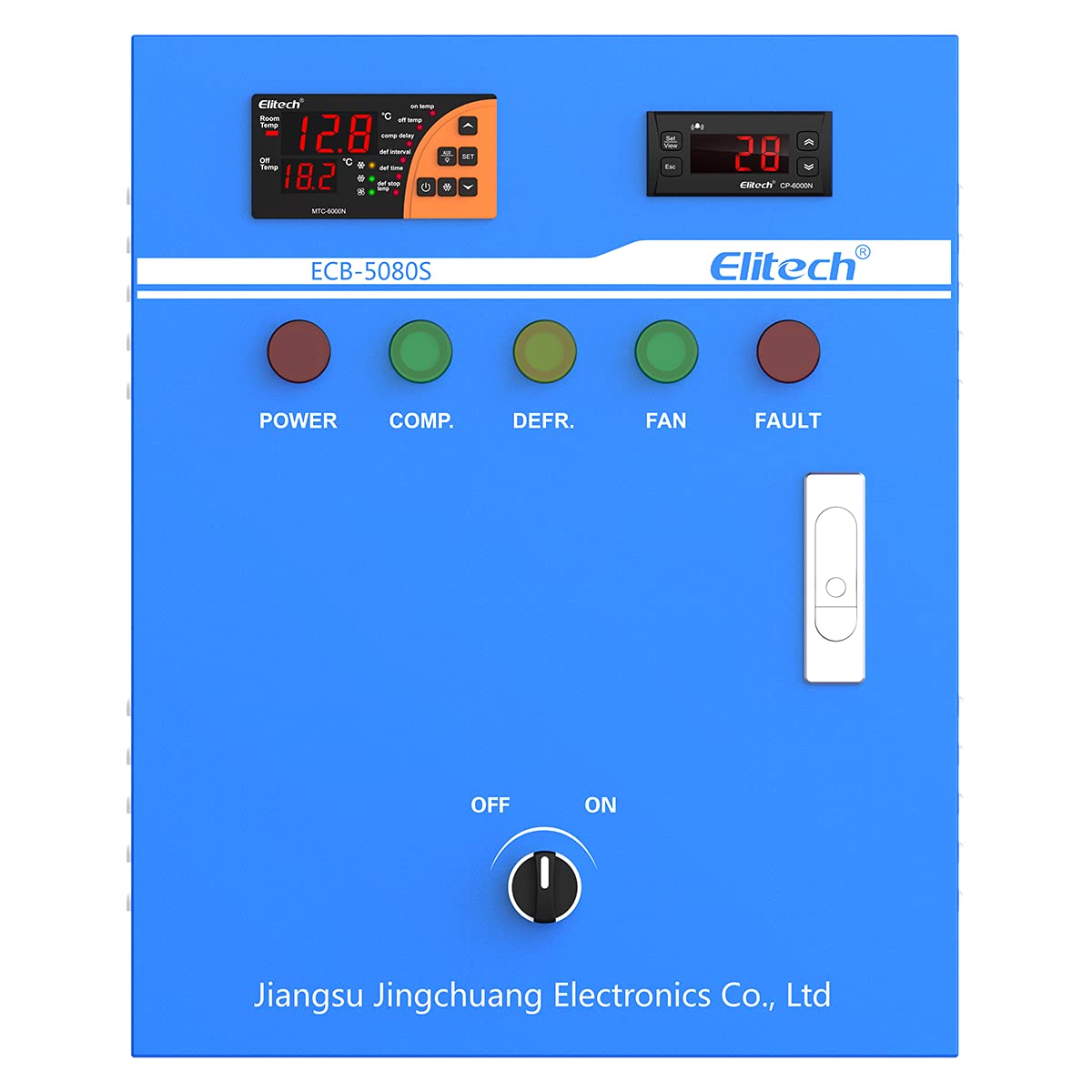
ภาพที่ 3: ภาพระยะใกล้ view of the Elitech ECB-5080S control panel, emphasizing the ON/OFF switch and the two integrated temperature controllers.
5. การบำรุงรักษา
Regular maintenance ensures the longevity and optimal performance of your ECB-5080S control box.
- การทำความสะอาด: Periodically clean the exterior of the control box with a soft, dry cloth. Do not use abrasive cleaners or solvents.
- การระบายอากาศ : Ensure that ventilation openings are clear of dust and obstructions to prevent overheating.
- การเชื่อมต่อ: ตรวจสอบความแน่นหนาและร่องรอยการกัดกร่อนของจุดเชื่อมต่อทางไฟฟ้าทั้งหมดเป็นประจำทุกปี และขันให้แน่นหากมีจุดใดหลวม
- การตรวจสอบเซ็นเซอร์: Verify that temperature sensors are clean and securely mounted. Check sensor cables for damage.
- การอัปเดตซอฟต์แวร์: Check the Elitech website or app for any available firmware updates for the MTC-6000N controller to ensure optimal functionality and security.
6 การแก้ไขปัญหา
This section provides solutions to common issues. For complex problems, contact Elitech technical support.
| ปัญหา | สาเหตุที่เป็นไปได้ | สารละลาย |
|---|---|---|
| เครื่องไม่เปิด | No power supply; main switch off; faulty wiring. | Check power source; ensure main switch is ON; inspect wiring connections. |
| การแสดงอุณหภูมิไม่แม่นยำ | Faulty sensor; sensor incorrectly placed; wiring issue. | Check sensor connections; verify sensor placement; replace faulty sensor if necessary. |
| FAULT indicator is lit. | Over-limit temperature; sensor error; protection activated (e.g., phase loss). | Check alarm messages on controller; inspect sensors; verify power supply and phase integrity. |
| Cooling/Defrost/Fan not operating. | Incorrect parameter settings; faulty output relay; motor/component failure. | Verify controller settings; check indicator lights; inspect connected components. |
7. ข้อมูลจำเพาะ
| ยี่ห้อ | อีลิเทค |
| หมายเลขรุ่น | อีซีบี-5080เอส |
| เล่มที่tage | 380 Volts (3 Phase) |
| แรงม้าสูงสุด | 15 แรงม้า |
| ประเภทตัวควบคุม | เอ็มทีซี-6000เอ็น |
| ฟังก์ชั่น | Refrigeration, Defrosting, Fan Control |
| คุณสมบัติการป้องกัน | High/Low Pressure, Module, Overload, Phase Sequence/Loss, Three-phase Unbalance, Inverse Time |
| ASIN | B097MXGKFP |
| ยูพีซี | 781454242337 |


