1. บทนำ
This manual provides detailed instructions for the installation, operation, and maintenance of your DALY Smart BMS (Battery Management System) for LiFePo4 24S 72V 200A battery packs. This BMS is designed to protect and manage your lithium battery system, ensuring its safety and optimal performance. It features a programmable Bluetooth module for monitoring and parameter adjustments via a mobile application.
2. ข้อมูลด้านความปลอดภัย
Always exercise caution when working with battery systems. Improper installation or handling can lead to serious injury or damage to equipment. Adhere to the following safety guidelines:
- ตรวจสอบให้แน่ใจว่าแหล่งจ่ายไฟทั้งหมดถูกตัดการเชื่อมต่อก่อนการติดตั้งหรือการบำรุงรักษา
- สวมใส่อุปกรณ์ป้องกันส่วนบุคคล (PPE) ที่เหมาะสม รวมถึงถุงมือกันความร้อนและแว่นตาป้องกันดวงตา
- Verify all wiring connections are correct and secure before applying power. Incorrect wiring can cause damage to the BMS and battery.
- หลีกเลี่ยงการลัดวงจรขั้วแบตเตอรี่หรือการเชื่อมต่อ BMS
- Do not attempt to disassemble or modify the BMS.
- Install the BMS in a well-ventilated area, away from flammable materials.
- Consult a qualified professional if you are unsure about any installation or operation steps.
3. สินค้าหมดview
The DALY Smart BMS is a sophisticated battery management system designed for LiFePo4 24S 72V 200A battery packs. It integrates essential protection features and smart monitoring capabilities.
คุณสมบัติหลัก:
- High Current Capability: Supports up to 200A continuous discharge and 100A charge current.
- Programmable Protections: Over-charge, over-discharge, over-current, and temperature protection.
- เล่มที่tage การปรับสมดุล: High detection precision for voltagอี สมดุล
- ระบบป้องกันการชาร์จที่อุณหภูมิต่ำ: Prevents charging below -1°C.
- การตรวจสอบอัจฉริยะ: Bluetooth module for real-time data monitoring and parameter settings via mobile app (iOS & Android).
- การออกแบบพอร์ตทั่วไป: Utilizes a single port for both charging and discharging.
- พัดลมระบายความร้อน: Integrated fan for thermal management during high current operations.
- SOC Calculation: Precise State of Charge (SOC) calculation with automatic learning function.
ส่วนประกอบ:
The package includes the DALY Smart BMS, balance wires, a Bluetooth module, a UART cable for PC connection, and an English version wiring manual.

รูปที่ 3.1: ด้านบน view of the DALY Smart BMS with integrated cooling fan.
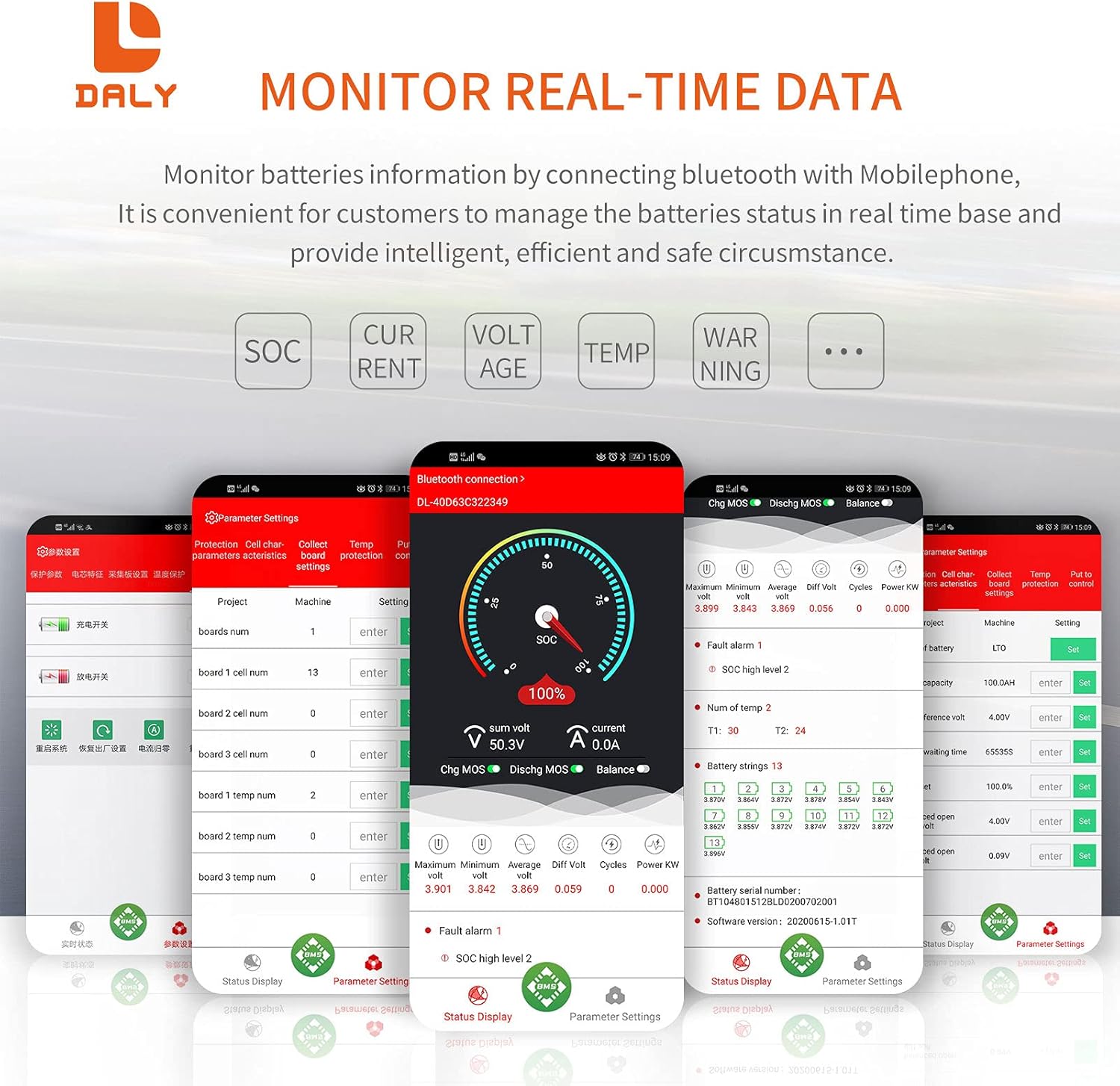
Figure 3.2: DALY Smart BMS showing the Bluetooth module connection and mobile app compatibility.

รูปที่ 3.3: เกินview of the 12 protection functions including over-charge, over-discharge, over-current, short-circuit, over-voltage, balance, NTC temperature, waterproof, moistureproof, fireproof, and dustproof features.

รูปที่ 3.4: ระเบิด view detailing internal components such as the insulated flame-retardant shell, smart fan, pure aluminum heat sink, high current copper plate, BMS board, thermal conductive compound, and insulation fixing plate.
4. การตั้งค่าและการติดตั้ง
Careful wiring is crucial for the correct operation and safety of the BMS. Follow these steps precisely:
- เตรียมชุดแบตเตอรี่: Ensure your LiFePo4 24S 72V battery pack is assembled and individual cell voltages are balanced as much as possible before connecting the BMS.
- เชื่อมต่อสายบาลานซ์:
- ขั้นแรกให้เชื่อมต่อ สายสีดำ of the balance harness to the total negative pole (B-) of your battery pack.
- Then, connect the remaining balance wires (red wires) sequentially from B1 to B24 to the positive terminals of each cell in your battery pack. Ensure the order is correct.
- สำคัญ: Do not connect the balance harness to the BMS connection port yet.
- เชื่อมต่อสายไฟหลัก:
- Connect the main negative wire from the battery pack's total negative terminal to the B- terminal on the BMS.
- Connect the main negative wire for discharge/charge (common port) from the P- terminal on the BMS to your load/charger negative terminal.
- The main positive wire from the battery pack's total positive terminal connects directly to your load/charger positive terminal, bypassing the BMS.
- Connect Balance Harness to BMS: After all main power wires and balance wires are securely connected to the battery, plug the balance harness into the designated port on the BMS.
- เปิดใช้งาน BMS: Press the activation button on the BMS board, or charge the battery system to activate the BMS for the first use.
- Bluetooth Module Connection: Insert the Bluetooth module into the UART port on the BMS.

Figure 4.1: Detailed wiring diagram for connecting the DALY Smart BMS to a 24S LiFePo4 battery pack, motor/load, and charger. Note the sequence of connections for safety.
บันทึก: It is recommended to use appropriate tools for wiring, such as soldering machine (if applicable), scissors, double-sided tape, tin wire, and a multimeter for verification.
5. คู่มือการใช้งาน
The DALY Smart BMS can be monitored and configured via a mobile application using its Bluetooth module or via a PC using the UART cable.
5.1 แอปมือถือ (บลูทูธ)
- ดาวน์โหลดแอพ: ค้นหา "DALY BMS" or "Smart BMS" in your mobile app store (iOS or Android) and install the application.
- เปิดใช้งานบลูทูธ: ตรวจสอบให้แน่ใจว่าได้เปิดใช้งาน Bluetooth บนอุปกรณ์มือถือของคุณ
- เชื่อมต่อกับระบบจัดการแบตเตอรี่ (BMS): Open the app. It should automatically detect nearby DALY BMS devices. Select your BMS from the list. The initial password to change parameters is 123456.
- ข้อมูลการตรวจสอบ: The app displays real-time data such as total voltage แต่ละเซลล์ฉบับtages, charge/discharge current, temperature, and State of Charge (SOC).
- ปรับพารามิเตอร์: Access the "Parameter Settings" section to customize protection thresholds (e.g., over-charge voltage, ปริมาตรการคายประจุเกินtage, over-current limits, temperature limits).

Figure 5.1: Screenshots of the DALY Smart BMS mobile application displaying real-time monitoring data and parameter adjustment options.
5.2 ซอฟต์แวร์พีซี (UART)
For advanced monitoring and configuration, connect the BMS to a PC using the provided UART cable. Download the corresponding PC software from the DALY website. The software offers similar functionalities to the mobile app but with a larger interface for detailed analysis.
The serial number of the BMS and the protection parameters (Li-ion, LiFePo4) have default values. The capacity AH of the battery pack needs to be set according to the actual capacity. If the capacity AH is not set correctly, the percentage of remaining power will be inaccurate. Other parameters can also be set to your needs.
6. การบำรุงรักษา
Proper maintenance ensures the longevity and reliability of your DALY Smart BMS and battery system:
- การติดตามอย่างสม่ำเสมอ: Periodically check the BMS data via the mobile app to ensure all parameters are within normal operating ranges.
- รักษาความสะอาด: Ensure the BMS and its connections are free from dust, dirt, and moisture.
- การระบายอากาศ : Ensure adequate airflow around the BMS, especially around the cooling fan, to prevent overheating.
- ความสมบูรณ์ของการเชื่อมต่อ: ตรวจสอบการเชื่อมต่อสายไฟทั้งหมดเป็นระยะๆ เพื่อดูว่ามีความแน่นหนาและมีสัญญาณของการกัดกร่อนหรือความเสียหายหรือไม่
- อัพเดตเฟิร์มแวร์: ตรวจสอบของผู้ผลิต website for any available firmware updates for the BMS to ensure optimal performance and access to new features.
7 การแก้ไขปัญหา
หากคุณพบปัญหาเกี่ยวกับระบบ DALY Smart BMS โปรดดูขั้นตอนการแก้ไขปัญหาทั่วไปต่อไปนี้:
- ระบบ BMS ไม่ทำงาน:
- Ensure all balance wires are correctly connected and the main power connections are secure.
- Press the activation button on the BMS board.
- Connect a charger to the battery pack; charging typically activates the BMS.
- ปัญหาการเชื่อมต่อบลูทูธ:
- Verify the Bluetooth module is correctly inserted into the UART port.
- Ensure Bluetooth is enabled on your mobile device and the app has necessary permissions.
- รีสตาร์ทแอปบนมือถือแล้วลองเชื่อมต่อใหม่อีกครั้ง
- ตรวจสอบให้แน่ใจว่าไม่มีอุปกรณ์อื่นใดเชื่อมต่อกับ BMS ผ่านบลูทูธอยู่
- Protection Triggered (e.g., Over-voltage, ต่ำกว่า voltage, Over-current):
- Check the mobile app for specific fault codes or warnings.
- Verify individual cell voltages are within safe operating limits.
- Reduce the load or charging current if an over-current protection is triggered.
- Inspect battery temperatures if temperature protection is active.
- Review and adjust programmable parameters in the app if they are set too restrictively for your application.
- Inaccurate SOC Reading:
- Ensure the battery pack's actual capacity (AH) is correctly set in the BMS parameters via the app.
- Allow the BMS to complete a few full charge/discharge cycles for its automatic learning function to calibrate the SOC more accurately.
If the issue persists after attempting these steps, contact DALY customer support for further assistance.
8. ข้อมูลจำเพาะ
| คุณสมบัติ | ข้อมูลจำเพาะ |
|---|---|
| รุ่นสินค้า | 24S 72V 200A LiFePo4 Smart BMS |
| ประเภทแบตเตอรี่ | LiFePo4 |
| การกำหนดค่าซีรีส์ | 24วินาที |
| เล่มที่กำหนดtage | 72โวลต์ |
| ปล่อยอย่างต่อเนื่องในปัจจุบัน | 200เอ |
| กระแสไฟชาร์จต่อเนื่อง | 100เอ |
| การป้องกันกระแสไฟเกิน | 300A ± 30A (ปรับแต่งได้) |
| การป้องกันกระแสไฟเกิน | 300A ± 30A (ปรับแต่งได้) |
| คิดราคาแพงเกินไปVoltagการป้องกันอี | 3.75V ± 0.05V per cell (Configurable) |
| ปล่อยเกินVoltagการป้องกันอี | 2.2V ± 0.1V per cell (Configurable) |
| ชาร์จ Voltage | 87.6 โวลต์ (ปรับแต่งได้) |
| อินเทอร์เฟซการสื่อสาร | UART (for Bluetooth module and PC connection) |
| ขนาด | 221 x 130 x 32 มม. (ประมาณ 9.21 x 4.72 x 2.09 นิ้ว) |
| น้ำหนักสินค้า | ~1884g (approx. 4.09 pounds) |
| เกจวัดสายไฟขาออก | 6AWG |
| Balance Wires Gauge/Length | 24AWG / 350 มม. |
| ยูพีซี | 766293717109 |

Figure 8.1: Fan specifications and physical dimensions of the DALY Smart BMS.
9. การรับประกันและการสนับสนุน
For warranty information, technical support, or any inquiries regarding your DALY Smart BMS, please contact the manufacturer directly or refer to their official webไซต์ โปรดเก็บใบเสร็จรับเงินไว้เป็นหลักฐานการซื้อ
You can visit the DALY Store on Amazon for more information: ร้านเดลี่

รูปที่ 9.1: อดีตamples of product certifications for DALY products, including Waterproof Patent, ISO, FCC, RoHS, PSE, and CE.


