การแนะนำ
This manual provides detailed instructions for the Google Pixel Buds A-Series wireless earbuds. These earbuds are designed to deliver high-quality audio and feature a comfortable, secure fit with multiple eartip sizes and a stabilizer arc. They are compatible with Android, iOS, and other Bluetooth 4.0+ devices.
มีอะไรอยู่ในกล่อง
- Google Pixel Buds A-Series Earbuds
- เคสชาร์จไฟ
- สายชาร์จ USB-C
- จุกหูฟัง (เล็ก กลาง ใหญ่)
- คู่มือเริ่มต้นอย่างรวดเร็ว (ไม่รวมอยู่ในคู่มือดิจิทัลฉบับนี้)

Image: Google Pixel Buds A-Series earbuds securely placed within their white charging case, which is open to reveal the earbuds.
การตั้งค่า
1. การจับคู่เบื้องต้น
For Android Devices (One-Tap Pairing):
- Ensure your Android device is unlocked and has Bluetooth enabled.
- Open the charging case of your Pixel Buds A-Series next to your Android device.
- A pairing notification will appear on your device's screen. Tap to connect.
- Follow any on-screen prompts to complete the setup, including installing the Pixel Buds app for additional features.
For iOS and Other Bluetooth 4.0+ Devices:
- เมื่อใส่หูฟังลงในกล่องชาร์จแล้ว ให้เปิดฝากล่อง
- Press and hold the pairing button on the back of the charging case until the status light begins to pulse white.
- On your device, navigate to Bluetooth settings and select "Pixel Buds A-Series" from the list of available devices.
- Confirm the pairing on your device.
2. การบรรลุความพอดีที่ปลอดภัย
The Pixel Buds A-Series come with three sizes of eartips (small, medium, large) and a flexible stabilizer arc to ensure a comfortable and secure fit.
- Experiment with different eartip sizes to find the best seal for your ears. A good seal is crucial for optimal sound quality and bass response.
- Gently insert each earbud into your ear, rotating slightly until the stabilizer arc tucks comfortably into your ear's concha.

ภาพ: ภาพระยะใกล้ view of a single Google Pixel Bud A-Series earbud, highlighting its ergonomic design, eartip, and stabilizer arc.
คำแนะนำการใช้งาน
1. การควบคุมแบบสัมผัส
The Pixel Buds A-Series feature touch controls on the outer surface of each earbud.
- แตะครั้งเดียว: เล่น/หยุดเสียง, รับสาย/วางสาย
- แตะสองครั้ง: Skip forward a track, Decline call.
- แตะสามครั้ง: Skip backward a track.
- กดค้างไว้: Activate Google Assistant (Android only), or hear notifications.
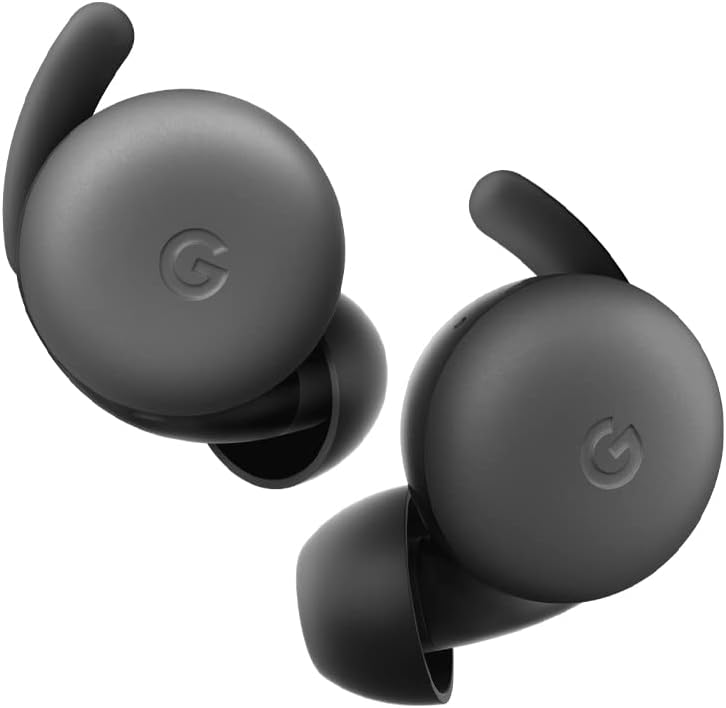
Image: A pair of Google Pixel Buds A-Series earbuds, showcasing their compact design and the 'G' logo on the touch-sensitive surface.
2. Google Assistant Integration
With a compatible Android device, you can access Google Assistant directly from your Pixel Buds A-Series.
- Say "Hey Google" or "Ok Google" to activate the Assistant hands-free.
- Alternatively, press and hold either earbud to speak to Google Assistant.
- You can ask for directions, check weather, control music, or have notifications read aloud.
3. การชาร์จไฟ
The Pixel Buds A-Series provide up to 5 hours of listening time or 2.5 hours of talk time on a single charge. The charging case extends this to up to 24 hours of total listening time.
- To charge the earbuds, place them inside the charging case. The indicator light on the case will show their charging status.
- To charge the case, connect it to a USB-C power source using the provided cable. The case's indicator light will show its charging status.
การซ่อมบำรุง
1. การทำความสะอาด
- ทำความสะอาดหูฟังและกล่องชาร์จของคุณเป็นประจำเพื่อรักษาประสิทธิภาพและสุขอนามัย
- Use a soft, dry, lint-free cloth to wipe the exterior of the earbuds and case.
- For eartips, gently remove them and clean with a mild soap solution and water, then rinse and dry thoroughly before reattaching.
- หลีกเลี่ยงการใช้วัสดุที่มีฤทธิ์กัดกร่อนหรือสารเคมีรุนแรง
2. การจัดเก็บ
- Always store the Pixel Buds A-Series in their charging case when not in use to protect them and keep them charged.
- เก็บไว้ในที่แห้งและเย็น ห่างจากอุณหภูมิที่สูงและแสงแดดโดยตรง
การแก้ไขปัญหา
If you encounter issues with your Pixel Buds A-Series, try the following steps:
- ไม่มีเสียงหรือการเชื่อมต่อไม่ต่อเนื่อง:
- ตรวจสอบให้แน่ใจว่าได้ชาร์จหูฟังเอียร์บัดทั้งสองข้างแล้ว
- ตรวจสอบว่าอุปกรณ์ของคุณได้เปิดใช้งานบลูทูธแล้วและเชื่อมต่อหูฟังแล้ว
- Try placing the earbuds back in the case, closing the lid for a few seconds, then reopening to reset the connection.
- ลืมอุปกรณ์ในการตั้งค่าบลูทูธของโทรศัพท์ของคุณและจับคู่ใหม่อีกครั้ง
- ตรวจสอบให้แน่ใจว่าอุปกรณ์ของคุณอยู่ในระยะการเชื่อมต่อบลูทูธ (สูงสุด 10 เมตร)
- หูฟังเอียร์บัดไม่ชาร์จ:
- ตรวจสอบให้แน่ใจว่าเคสชาร์จได้รับการชาร์จไฟเรียบร้อยแล้ว
- ตรวจสอบให้แน่ใจว่าหูฟังเสียบเข้ากับกล่องชาร์จอย่างถูกต้องแล้ว
- ทำความสะอาดหน้าสัมผัสการชาร์จบนหูฟังทั้งสองข้างและภายในเคสด้วยสำลีแห้ง
- ลองใช้สาย USB-C และอะแดปเตอร์ไฟอื่น
- คุณภาพเสียงไม่ดี:
- Ensure you have a secure fit with the correct eartip size.
- ทำความสะอาดตาข่ายและจุกหูฟัง
- ตรวจสอบการตั้งค่าเสียงและอีควอไลเซอร์ของอุปกรณ์ของคุณ
ข้อมูลจำเพาะ
| ชื่อรุ่น | Pixel Buds A-Series |
| เทคโนโลยีการเชื่อมต่อ | ไร้สาย (บลูทูธ 5.0) |
| อุปกรณ์ที่รองรับ | Android, iOS, and Bluetooth 4.0+ devices |
| อายุการใช้งานแบตเตอรี่ (หูฟัง) | ฟังได้นานสูงสุด 5 ชั่วโมง สนทนาได้นาน 2.5 ชั่วโมง |
| อายุการใช้งานแบตเตอรี่ (พร้อมเคสชาร์จ) | Up to 24 hours listening |
| ระดับความต้านทานต่อน้ำ | Water Resistant (IPx4 rating for earbuds) |
| ประเภทการควบคุม | Touch (Media Control, Google Assistant) |
| น้ำหนักสินค้า | 1.9 ออนซ์ (รวม) |
| ขนาด (หูฟัง) | 0.81 x 1.15 x 0.69 นิ้ว |
| ช่วงความถี่ | 20 เฮิรตซ์ - 20,000 เฮิรตซ์ |
| ช่วงบลูทูธ | 10 เมตร |
การรับประกันและการสนับสนุน
For detailed warranty information and customer support, please refer to the official Google Pixel Buds support webไซต์ โดยทั่วไปคุณจะพบแหล่งข้อมูลสนับสนุน คำถามที่พบบ่อย และตัวเลือกการติดต่อได้ที่ g.co/pixelbuds/help.
The Pixel Buds A-Series are designed to be repairable, but any repair, disassembly, or damage may affect the water resistance rating.


