สินค้าเกินview
The Poly Sync 60 USB/Bluetooth smart speakerphone is designed to provide clear audio for small to medium conference rooms. It features powerful twin speakers and a six-microphone array that focuses on voices while reducing background noise. This allows for natural conversations, even when multiple participants speak simultaneously. The device offers versatile connectivity options, including USB-A, USB-C, and Bluetooth, enabling connection to PCs, Macs, and smartphones. It is powered by an AC adapter, eliminating the need for battery charging during use. For larger spaces, two units can be wirelessly paired to expand voice pickup coverage.
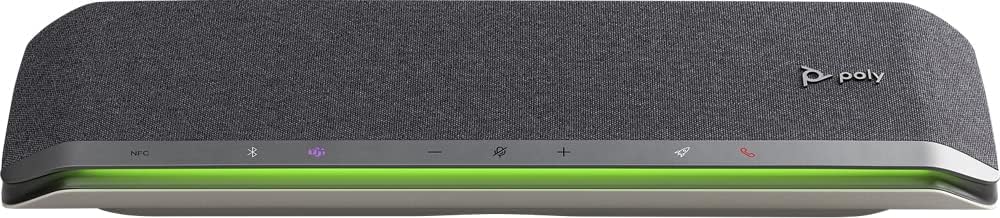
ภาพ: ด้านหน้า view of the Poly Sync 60 Smart Speakerphone, showing the speaker grille, control buttons, and an illuminated LED light bar.
เนื้อหาแพ็คเกจ
- Poly Sync 60 Speakerphone
- Main power supply with global pin adapters
- USB cable with USB-A and USB-C connectors
คุณสมบัติหลัก
- เสียงขั้นสูง: Six-microphone steerable array for echo and noise reduction, ensuring clear voice pickup.
- ลำโพงคู่: High-performance speakers deliver rich, clear audio for all participants.
- ขับเคลื่อนด้วยไฟฟ้ากระแสสลับ: Operates continuously via AC power, eliminating battery concerns.
- ความสามารถแบบเดซี่เชน: Wirelessly pair two units for extended coverage in larger meeting spaces.
- การเชื่อมต่อแบบยืดหยุ่น: Connects to computers via combined USB-A/USB-C cable and to smartphones via Bluetooth.
- USB Video Camera Support: Connect a USB video camera to the speakerphone for combined audio and video with a single cable to the computer.
- การชาร์จอุปกรณ์พกพา: Two USB ports allow charging of up to two mobile phones simultaneously.
- ได้รับการรับรอง Microsoft Teams: Includes a dedicated Teams button for instant access to the Teams application.
คู่มือการติดตั้ง
1. การเชื่อมต่อไฟฟ้า
Connect the provided main power supply to the Poly Sync 60 and plug it into a wall outlet. The device requires AC power for operation.
2. Connecting to a Computer (PC/Mac)
Use the integrated USB cable to connect the Poly Sync 60 to your computer. The cable supports both USB-A and USB-C ports. Once connected, the device should be recognized automatically by your operating system.
3. Connecting to a Smartphone (Bluetooth)
- กดปุ่มค้างไว้ ปุ่มบลูทูธ on the Poly Sync 60 until the LED indicator flashes blue.
- On your smartphone, navigate to the Bluetooth settings and select "Poly Sync 60" from the list of available devices.
- เมื่อจับคู่แล้ว ไฟ LED จะเปลี่ยนเป็นสีน้ำเงินค้าง
4. Daisy Chain Two Units (Optional)
For expanded audio coverage, two Poly Sync 60 units can be wirelessly paired. Refer to the official Poly support documentation for detailed instructions on how to enable this feature.
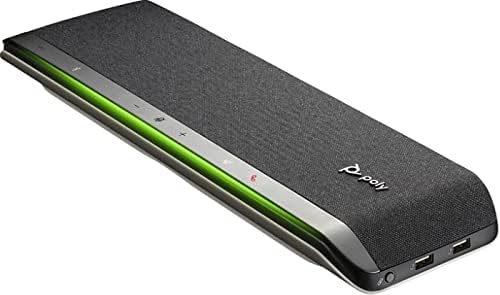
ภาพ: ด้านข้าง view of the Poly Sync 60 Smart Speakerphone, highlighting the USB ports for charging mobile devices and connecting a video camera.
คำแนะนำการใช้งาน
การควบคุมพื้นฐาน
- เพิ่ม/ลดระดับเสียง: ใช้ + และ - ปุ่มสำหรับปรับระดับเสียงลำโพง
- ปิดเสียง/เปิดเสียง: กดปุ่ม microphone icon button to mute or unmute the microphone. The LED indicator will change color to show mute status.
- รับสาย/วางสาย: กดปุ่ม phone icon button เพื่อรับสายหรือวางสาย
- ปุ่ม Microsoft Teams: กดปุ่ม Teams icon button to launch or interact with the Microsoft Teams application (if certified version).
กำลังชาร์จอุปกรณ์มือถือ
Connect your mobile phone or other USB-powered device to one of the two USB ports on the Poly Sync 60 to charge it during a meeting.
การบำรุงรักษาและการดูแล
- Clean the Poly Sync 60 with a soft, dry, lint-free cloth.
- Do not use abrasive cleaners, solvents, or strong chemicals, as these may damage the device.
- หลีกเลี่ยงการให้อุปกรณ์สัมผัสกับอุณหภูมิ ความชื้น หรือแสงแดดโดยตรง
- เก็บสปีกเกอร์โฟนไว้ในที่เย็นและแห้งเมื่อไม่ได้ใช้งาน
การแก้ไขปัญหา
- ไม่มีเสียง/ไมโครโฟนไม่ทำงาน:
- Ensure the device is powered on and the AC adapter is securely connected.
- Verify that the speakerphone is not muted (check the mute button LED).
- Check the volume levels on both the Poly Sync 60 and your connected computer/smartphone.
- Confirm that the Poly Sync 60 is selected as the audio input/output device in your computer's sound settings or conferencing application.
- Connection Issues (USB):
- ลองเชื่อมต่อสาย USB เข้ากับพอร์ตอื่นบนคอมพิวเตอร์ของคุณ
- รีสตาร์ทเครื่องคอมพิวเตอร์ของคุณ
- ปัญหาการเชื่อมต่อ (บลูทูธ):
- Ensure Bluetooth is enabled on your smartphone and the Poly Sync 60 is in pairing mode.
- Unpair and then re-pair the device from your smartphone's Bluetooth settings.
- ตรวจสอบให้แน่ใจว่าไม่มีอุปกรณ์ Bluetooth อื่นใดก่อให้เกิดสัญญาณรบกวน
- Echo or Background Noise:
- Place the speakerphone centrally in the room, away from walls or highly reflective surfaces.
- ตรวจสอบให้แน่ใจว่าห้องนั้นเงียบสงบและปราศจากเสียงรบกวนจากภายนอกมากเกินไป
ข้อมูลจำเพาะทางเทคนิค
| คุณสมบัติ | ข้อมูลจำเพาะ |
|---|---|
| ชื่อรุ่น | ซิงค์ 60 |
| หมายเลขรุ่นสินค้า | 216873-01 |
| ประเภทลำโพง | มัลติมีเดีย |
| เทคโนโลยีการเชื่อมต่อ | บลูทูธ, ยูเอสบี |
| เทคโนโลยีการสื่อสารไร้สาย | บลูทูธ |
| ช่วงบลูทูธ | 3 เมตร |
| แหล่งพลังงาน | สายไฟ |
| กำลังขับสูงสุดของลำโพง | 60 วัตต์ |
| โหมดเอาต์พุตเสียง | สเตอริโอ |
| การกำหนดค่าช่องเสียงรอบทิศทาง | 2.0 |
| วิธีการควบคุม | ปุ่มกด |
| ขนาดสินค้า | ลึก 1.5 นิ้ว x กว้าง 15.5 นิ้ว x สูง 4.8 นิ้ว |
| น้ำหนักสินค้า | 2.2 ปอนด์ (1000 กรัม) |
| การใช้ที่แนะนำ | Office work, remote work, conference calls, personal entertainment, charging mobile devices |
| ประเภทการติดตั้ง | ที่วางบนโต๊ะ |
| ผู้ผลิต | โพลี |
| ยูพีซี | 017229172517, 197029590572 |
ข้อมูลการรับประกัน
The Poly Sync 60 Smart Speakerphone comes with a full manufacturer's warranty. For detailed information regarding warranty terms, duration, and claim procedures, please refer to the official Poly webไซต์หรือเอกสารการรับประกันที่รวมอยู่ในการซื้อของคุณ
สนับสนุน
For further assistance, product updates, software downloads, or detailed guides, please visit the official Poly support website. You can also contact Poly customer service for technical support or service inquiries.
Official Poly Webเว็บไซต์: www.โพลี.คอม