1. สินค้าหมดview
The KOFIRE UG-05 is a versatile wireless gaming headset designed for an immersive audio experience across multiple platforms. It features 3D stereo surround sound, vibration feedback, and flexible connectivity options.

Figure 1: KOFIRE UG-05 Wireless Gaming Headset
คุณสมบัติหลัก:
- 3D Stereo & Vibrating Sound Quality: Dual 40mm dynamic EQ driver units provide immersive 3D stereo surround sound and strong bass with vibration feedback.
- 2.4GHz Ultra Low Latency: Delivers real-time transmission for lag-free gaming with up to 15M (50ft) connection range.
- ไมโครโฟนตัดเสียงรบกวนแบบถอดได้: Features a boom mic with a one-click mute button for clear voice pickup.
- เวลาเล่นนาน: Up to 30 hours of playtime on a single 1-2 hour charge, with a 3.5mm AUX cable for wired backup.
- ความเข้ากันได้กับหลายแพลตฟอร์ม: Supports PS5, PS4, PC, Laptop via 2.4GHz dongle; Android, iOS, WP Cellphones via Bluetooth 5.4; and Xbox, Xbox series via 3.5mm audio cable.
2. คู่มือการติดตั้ง
2.1 เนื้อหาบรรจุภัณฑ์
ก่อนการตั้งค่า ให้แน่ใจว่ามีส่วนประกอบทั้งหมดครบถ้วน:

Figure 2: Headset and Included Accessories
- KOFIRE UG-05 ชุดหูฟังเกมมิ่งไร้สาย
- ดองเกิล USB 2.4GHz
- ไมโครโฟนบูมแบบถอดออกได้
- สายสัญญาณเสียง AUX 3.5 มม.
- สายชาร์จ USB-C
- ฝาครอบโฟมไมโครโฟน
2.2 การเชื่อมต่อไมโครโฟน
The boom microphone is detachable for convenience. To attach:
- หาตำแหน่งพอร์ตไมโครโฟนที่ด้านซ้ายของหูฟัง
- Firmly insert the detachable boom microphone into the port until it clicks securely into place.
- Optionally, place the foam cover over the microphone head to reduce wind noise.
ในการถอด ให้ดึงไมโครโฟนออกจากพอร์ตอย่างเบามือ

รูปที่ 3: การติดตั้งไมโครโฟนแบบถอดได้
2.3 โหมดการเชื่อมต่อ
The headset offers three primary connection modes:
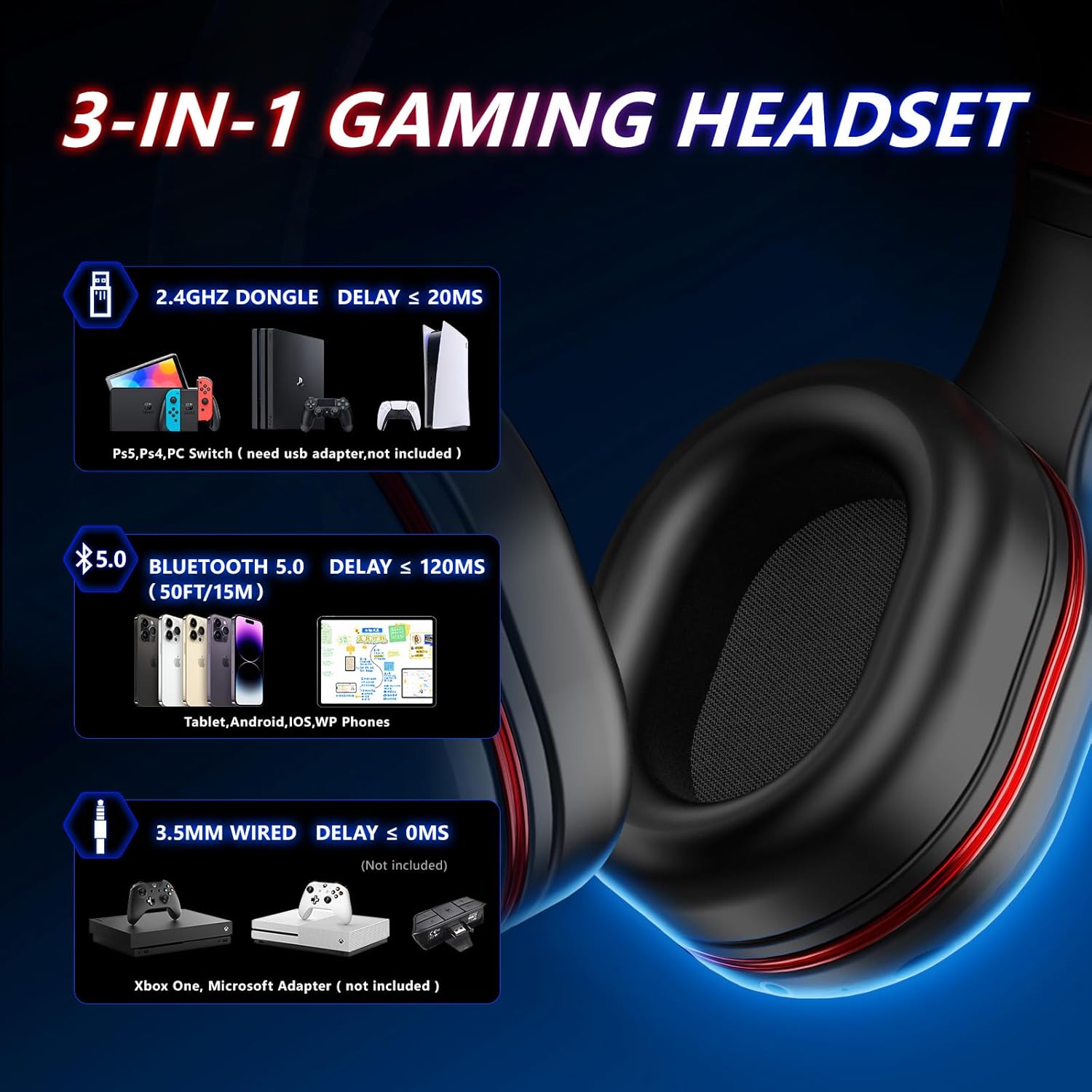
Figure 4: Multi-Platform Connectivity Options
- 2.4GHz Wireless (for PS5, PS4, PC, Laptop, Nintendo Switch):
- Plug the 2.4GHz USB dongle into an available USB port on your gaming device.
- Power on the headset. It should automatically pair with the dongle.
- For some games or systems, you may need to manually set the headset as the input and output audio device in your system settings.
- บันทึก: The microphone might be unavailable when connected to Nintendo Switch via Bluetooth. For microphone use on Switch, connect via the USB dongle.
- Bluetooth 5.4 (for Android, iOS, WP Cellphones):
- Ensure the headset is powered on and not connected via the 2.4GHz dongle.
- Activate Bluetooth on your mobile device and search for "UG-05" or "KOFIRE Headset".
- Select the headset to pair.
- 3.5mm AUX Wired (for Xbox, Xbox Series, PC, Laptop, Switch):
- Connect one end of the 3.5mm AUX audio cable to the headset's 3.5mm audio jack.
- Connect the other end to the 3.5mm audio port on your device (e.g., Xbox controller, PC).
- This mode is ideal when the headset battery is low or for devices without wireless support.
3. คู่มือการใช้งาน
3.1 การควบคุมมากกว่าview
ชุดหูฟังนี้มีปุ่มควบคุมที่ใช้งานง่ายอยู่บนตัวหูฟัง:

รูปที่ 5: การควบคุมชุดหูฟัง
- ON/OFF Key / Answer/Hang-up: Press and hold to power on/off. Short press to answer/end calls.
- ระดับเสียง + / แทร็กถัดไป: กดสั้นๆ เพื่อเพิ่มระดับเสียง กดยาวเพื่อเล่นเพลงถัดไป
- Volume - / Previous Track: กดสั้นเพื่อลดระดับเสียง กดยาวเพื่อเล่นเพลงก่อนหน้า
- Haptic Feedback Button: Activates/deactivates the vibration feedback feature.
- Mute Button (on mic): One-click to mute/unmute the microphone.
- พอร์ตชาร์จ USB-C: สำหรับการชาร์จชุดหูฟัง
- แจ็คเสียงขนาด 3.5 มม.: สำหรับการเชื่อมต่อแบบมีสาย
3.2 การตอบรับการสั่นสะเทือน
The headset includes extra bass units that produce strong bass and vibration feedback, enhancing immersion during gaming or music listening. You can feel the vibration during explosions, shooting, or racing scenes. Use the Haptic Feedback Button to toggle this feature.

Figure 6: Immersive Vibration Feedback
4. การบำรุงรักษา
4.1 การชาร์จชุดหูฟัง
The headset is equipped with a 1000 mA rechargeable battery.
- Connect the USB-C charging cable to the headset's USB-C port and the other end to a USB power source.
- การชาร์จเต็มจะใช้เวลาประมาณ 1-2 ชั่วโมง
- The headset provides up to 30 hours of playtime on a full charge.
4.2 การดูแลและการเก็บรักษา
- Clean the earcups and headband with a soft, dry cloth. Avoid abrasive cleaners.
- เก็บหูฟังไว้ในที่แห้งและเย็น หลีกเลี่ยงแสงแดดโดยตรงและอุณหภูมิที่สูงหรือต่ำเกินไป
- The headset features a foldable design for compact storage and portability.

Figure 7: Foldable Design for Easy Portability
5 การแก้ไขปัญหา
5.1 ปัญหาไมโครโฟน
If the microphone is not working:
- Ensure Microphone is Fully Inserted: Please plug the microphone a little harder and make sure it is fully inserted into the headset.
- ตรวจสอบปุ่มปิดเสียง: Try to press the mute button on the end of the microphone to unmute it.
- การตั้งค่าระบบ: Plug the dongle into your device and launch the game. Some games may require you to set the headset as your input and output device in their settings.
- โหมดการเชื่อมต่อ: The microphone might be unavailable when connected to Nintendo Switch via Bluetooth. For microphone use on Switch, connect via the 2.4GHz dongle.
5.2 ปัญหาการเชื่อมต่อ
- No Sound/Connection (2.4GHz): Ensure the USB dongle is securely plugged in and the headset is powered on and within the 15M range. Try re-pairing by powering off/on the headset.
- ความล้มเหลวในการจับคู่บลูทูธ: Ensure the headset is not connected via the dongle. Turn off and on Bluetooth on your device and the headset, then try pairing again.
- Wired Connection Issues: Ensure the 3.5mm AUX cable is fully inserted into both the headset and the device. Test with another audio source if possible.
6. ข้อมูลจำเพาะ
| คุณสมบัติ | รายละเอียด |
|---|---|
| ชื่อรุ่น | ยูจี-05 |
| เทคโนโลยีการเชื่อมต่อ | Bluetooth, Auxiliary Cable, 2.4GHz Wireless |
| เทคโนโลยีการสื่อสารไร้สาย | บลูทูธ 5.4 |
| ขนาดไดร์เวอร์เสียง | 40 มิลลิเมตร |
| อายุการใช้งานแบตเตอรี่ | 30 ชั่วโมง |
| เวลาในการชาร์จ | 1-2 ชั่วโมง |
| ช่วงบลูทูธ | 15 เมตร |
| อุปกรณ์ที่รองรับ | PS4, PS5, PC, Nintendo Switch, Android, iOS, WP Cellphones, Xbox, Xbox Series |
| การควบคุมเสียงรบกวน | การแยกเสียง |
| น้ำหนักสินค้า | 0.41 กิโลกรัม (14.4 ออนซ์) |
| วัสดุ | พลาสติก |
| สี | สีแดง |
7. วิดีโอผลิตภัณฑ์อย่างเป็นทางการ
Video 1: UG-05 Wireless Gaming Headset Overview by KOFIRE. This video provides a visual demonstration of the headset's features, including its ultra-low latency, 3D stereo sound, battery life, and multi-platform compatibility.
8. การรับประกันและการสนับสนุน
For detailed warranty information and further support, please refer to the official User Manual provided with your product or visit the KOFIRE official webเว็บไซต์.
สามารถดาวน์โหลดคู่มือผู้ใช้ฉบับดิจิทัลได้:


