1. บทนำ
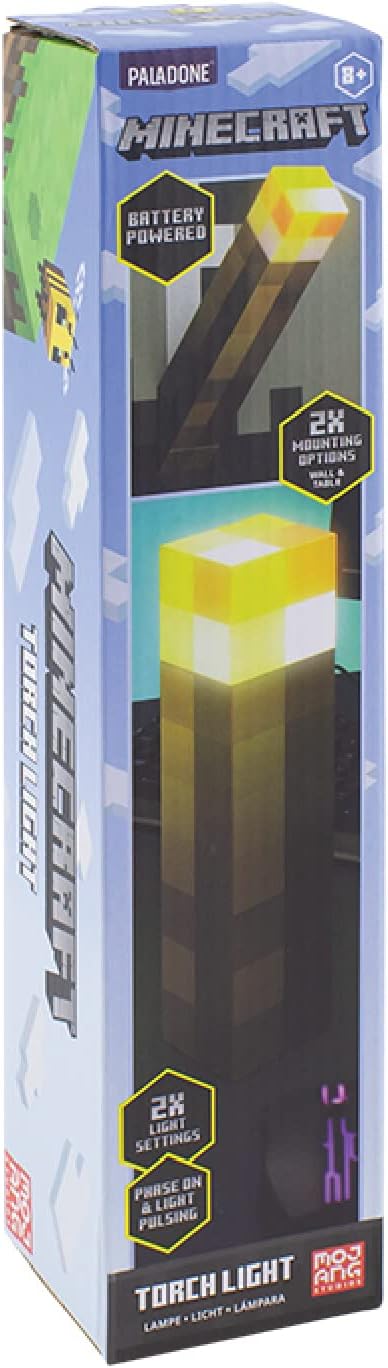
ขอบคุณสำหรับการซื้อasing the Paladone Minecraft Torch Light. This officially licensed product brings the iconic Minecraft torch to life, offering two distinct light modes and versatile placement options. This manual provides essential information for the safe and effective use of your new torch light.
2. คุณสมบัติ
- สองโหมดแสง: Choose between a steady light or a pulsating effect, mimicking a real torch.
- ตำแหน่งที่หลากหลาย: Designed for both tabletop display and wall mounting.
- ใช้พลังงานจากแบตเตอรี่: Operates on 3x AAA batteries (not included) for portability.
- ปิดอัตโนมัติ: Features a 20-minute auto shut-off function, ideal for use as a bedside light.
- ได้รับอนุญาตอย่างเป็นทางการ: Authentic Minecraft merchandise.
3. เนื้อหาบรรจุภัณฑ์
ตรวจสอบให้แน่ใจว่ามีรายการทั้งหมดอยู่ก่อนดำเนินการตั้งค่า:
- 1 x Paladone Minecraft Torch Light
- คู่มือการใช้งาน
4. การตั้งค่า
4.1. การติดตั้งแบตเตอรี่
- Locate the battery compartment cover on the bottom of the torch light.
- Using a small Phillips head screwdriver, unscrew the retaining screw on the battery compartment cover.
- ถอดฝาครอบออก
- Insert 3x AAA batteries (not included), ensuring correct polarity (+/-) as indicated inside the compartment.
- ใส่ฝาปิดช่องใส่แบตเตอรี่และขันให้แน่นด้วยสกรู

4.2. ตัวเลือกการติดตั้ง
The Minecraft Torch Light offers two ways to display it:
- การใช้โต๊ะ: Simply place the torch light on any flat, stable surface.
- การติดตั้งบนผนัง: The torch light features keyhole slots on its base for wall mounting. Flip the bottom section to reveal the wall mount option. Use appropriate screws (not included) for your wall type to securely hang the torch light.


5. การดำเนินการ
5.1. Turning On/Off and Changing Light Modes
The torch light has a button on its side to control power and light modes.
- เปิด: Press the button once. The light will illuminate in its steady mode.
- ในการเปลี่ยนโหมด: Press the button a second time to switch to the pulsating light mode.
- วิธีปิด: กดปุ่มครั้งที่สามเพื่อปิดไฟ

5.2. Auto Shut-Off Function
The torch light is equipped with a 20-minute auto shut-off feature. This conserves battery life and makes it suitable for use as a night light. After 20 minutes of continuous operation, the light will automatically turn off.
5.3. วิดีโอผลิตภัณฑ์
วิดีโอ 1: 360 องศา view of the Minecraft Torch Light, showcasing its design and appearance from all angles.
Video 2: Demonstrates the two light modes (steady and pulsating) and the wall mounting feature of the Minecraft Torch Light.
6. การบำรุงรักษา
- การทำความสะอาด: Wipe the torch light with a soft, dry cloth. Do not use abrasive cleaners or solvents.
- การเปลี่ยนแบตเตอรี่: Replace batteries when the light dims or stops functioning. Always replace all three batteries at the same time with new ones.
- พื้นที่จัดเก็บ: หากจัดเก็บเป็นเวลานาน ควรถอดแบตเตอรี่ออกเพื่อป้องกันการรั่วไหล
7 การแก้ไขปัญหา
| ปัญหา | สาเหตุที่เป็นไปได้ | สารละลาย |
|---|---|---|
| ไฟไม่เปิด | แบตเตอรี่หมดหรือติดตั้งไม่ถูกต้อง | ตรวจสอบขั้วแบตเตอรี่และเปลี่ยนแบตเตอรี่ AAA ใหม่ |
| แสงสลัวหรือกระพริบ | พลังงานแบตเตอรี่ต่ำ | Replace all three AAA batteries with new ones. |
| Auto shut-off activates too soon or not at all. | Internal sensor issue or defect. | Ensure the light is not obstructed. If the issue persists, contact customer support. |
8. ข้อมูลจำเพาะ
| คุณลักษณะ | รายละเอียด |
|---|---|
| ชื่อรุ่น | อาร์เอส561006 |
| หมายเลขชิ้นส่วน | PP9202MCF |
| ยี่ห้อ | ปาลาโดเน่ |
| ขนาดสินค้า | ลึก 1.01 นิ้ว x กว้าง 2.17 นิ้ว x สูง 11.02 นิ้ว (ลึก 2.57 ซม. x กว้าง 5.51 ซม. x สูง 28 ซม.) |
| น้ำหนักสินค้า | 9.5 ออนซ์ (270 กรัม) |
| แหล่งพลังงาน | Battery Powered (3x AAA batteries required, not included) |
| อายุการใช้งานแบตเตอรี่ | ประมาณ 8 ชั่วโมง |
| ประเภทแหล่งกำเนิดแสง | นำ |
| ความสว่าง | 125 ลูเมน |
| วิธีการควบคุม | แตะปุ่ม |
| วัสดุ | พลาสติก |
| การใช้งานภายใน/ภายนอกอาคาร | ในร่ม |
| ระดับความต้านทานต่อน้ำ | ไม่ทนน้ำ |
9. ข้อมูลด้านความปลอดภัย
- สินค้านี้ไม่ใช่ของเล่น ควรเก็บให้พ้นมือเด็กเล็ก
- อย่าใช้แบตเตอรี่เก่าและใหม่ผสมกัน หรือแบตเตอรี่ประเภทต่างๆ
- ทิ้งแบตเตอรี่ที่ใช้แล้วอย่างรับผิดชอบตามข้อบังคับท้องถิ่น
- ห้ามให้ผลิตภัณฑ์โดนน้ำหรือโดนอุณหภูมิที่สูงหรือต่ำเกินไป
- อย่าพยายามถอดประกอบหรือดัดแปลงผลิตภัณฑ์
10. การรับประกันและการสนับสนุน
สำหรับข้อมูลการรับประกันหรือการสนับสนุนทางเทคนิค โปรดดูรายละเอียดการติดต่อที่ระบุไว้บนบรรจุภัณฑ์ของผลิตภัณฑ์ หรือเยี่ยมชมเว็บไซต์อย่างเป็นทางการของ Paladone webไซต์ เก็บหลักฐานการซื้อของคุณไว้เพื่อใช้ในกรณีเรียกร้องการรับประกัน


