1. บทนำ
This manual provides detailed instructions for the safe and effective use of your KAIWEETS HT206B Clamp Meter and KAIWEETS KM100 Digital Multimeter. Please read this manual thoroughly before operation and retain it for future reference.
2. ข้อมูลด้านความปลอดภัย
WARNING: Always observe safety precautions when working with electrical circuits to prevent personal injury or damage to the meter.
- The HT206B meets safety standard IEC 61010-1, CAT III 600V. The KM100 has passed CE and RoHS certifications and is IEC rated CAT III 600V.
- Both devices feature anti-burn protection with double fuses and overload protection on all ranges (KM100).
- Ensure the rotary switch is set to the correct test range before making measurements.
- อย่าพยายามวัดปริมาตรtagกระแสไฟฟ้าหรือค่าอื่นๆ ที่เกินขีดจำกัดสูงสุดที่กำหนดไว้
- ตรวจสอบสายทดสอบว่ามีรอยชำรุดเสียหายหรือไม่ก่อนใช้งานทุกครั้ง ห้ามใช้งานหากฉนวนชำรุด
- เมื่อวัดกระแสด้วย clamp meter, only clamp the live wire, not the entire power cord.
3. สินค้าหมดview
3.1 KAIWEETS HT206B Clamp เมตร
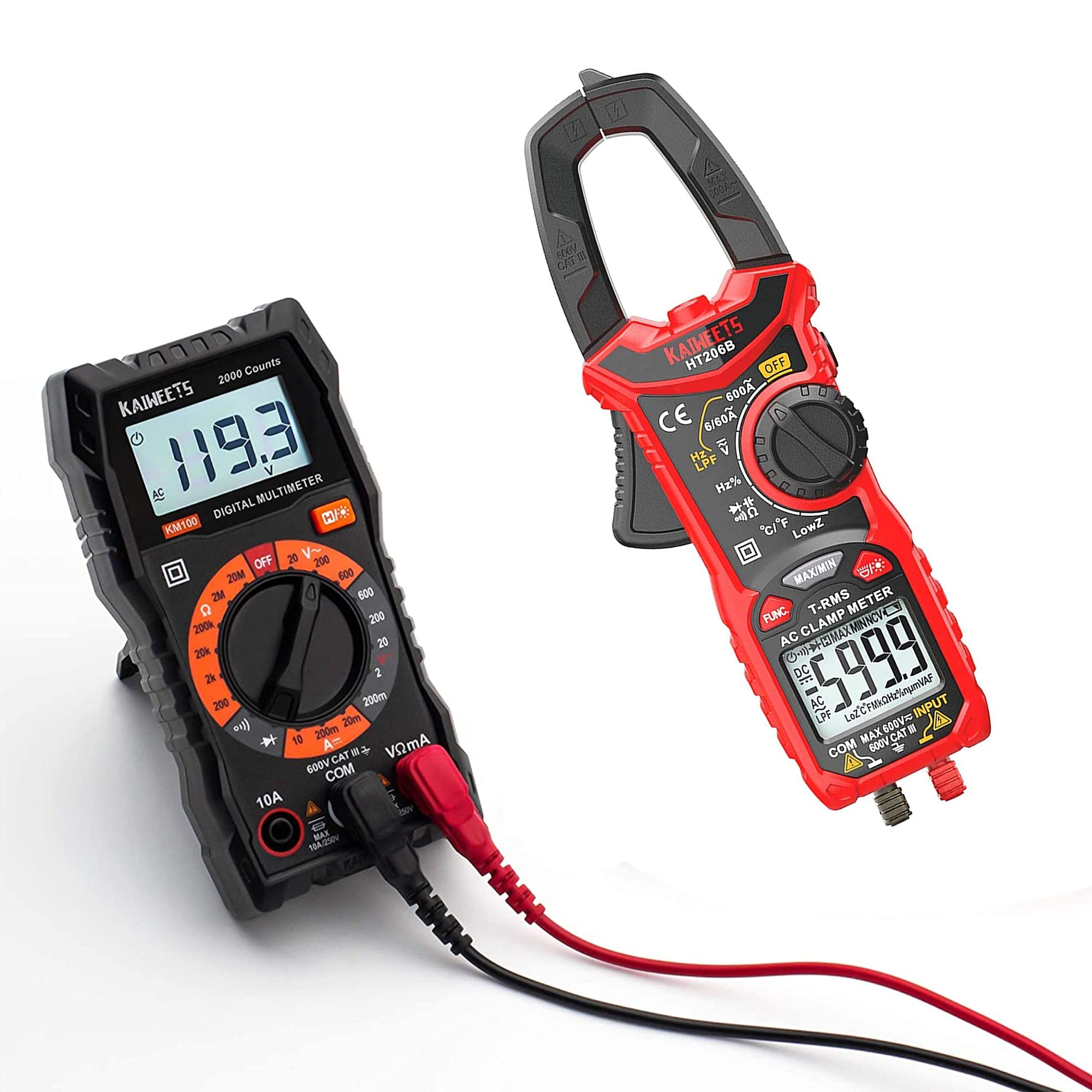
Figure 1: KAIWEETS HT206B Clamp มิเตอร์และอุปกรณ์เสริมที่ให้มาด้วย
The KAIWEETS HT206B is a True-RMS clamp meter designed for accurate measurements on non-linear loads. It is suitable for various applications in labs, factories, and households.
คุณสมบัติหลัก:
- ความสามารถในการวัด: กระแสไฟฟ้าสลับ, แรงดันไฟฟ้ากระแสสลับ/กระแสตรงtage, Frequency, Duty Cycle, Resistance, Capacitance, Diode, Continuity, and Temperature.
- Two-color Backlit LCD Display: The screen turns red to warn of high voltage (>80V) or high current (>3A).
- ไฟฉาย LED: สำหรับใช้ให้แสงสว่างในบริเวณที่มีแสงสลัว
- แบบไม่สัมผัส Voltagการตรวจจับ e (NCV): For detecting live wires without direct contact.
- ปิดเครื่องอัตโนมัติ: เครื่องจะปิดเองหลังจากไม่มีการใช้งาน 15 นาที เพื่อประหยัดพลังงานแบตเตอรี่
- สัญญาณเตือนแบตเตอรี่ต่ำ: แจ้งเตือนเมื่อแบตเตอรี่ถึงเวลาเปลี่ยน

Figure 2: HT206B Clamp Meter feature highlights.

Figure 3: NCV and Hold functions on the HT206B.
3.2 มัลติมิเตอร์ดิจิทัล KAIWEETS KM100

Figure 4: KAIWEETS KM100 Digital Multimeter and included accessories.
The KAIWEETS KM100 is a multi-function digital multimeter designed for safety and accuracy in various electrical tests, including household, automotive, and industrial applications.
คุณสมบัติหลัก:
- ความสามารถในการวัด: กระแสสลับ/กระแสตรง โวลtage, DC Current, Resistance, Continuity, and Diode Measurement. Note: This model cannot test AC current.
- ฟังก์ชั่นแบ็คไลท์: Improves visibility in dark conditions.
- ฟังก์ชั่นค้างไว้: Locks the displayed measurement value for easy recording.
- ขาตั้งรองรับ: Flexible and stable, adjustable up to 90°.
- ความปลอดภัย: CAT III 600V, CE and RoHS certified, with anti-burn double fuses and overload protection.
4. การตั้งค่า
4.1 การติดตั้งแบตเตอรี่
Both the HT206B and KM100 require AAA batteries for operation.
- ค้นหาฝาครอบช่องใส่แบตเตอรี่ที่ด้านหลังของอุปกรณ์
- ใช้ไขควง (ถ้าจำเป็น) เพื่อเปิดฝาครอบ
- Insert 2 AAA batteries, observing the correct polarity (+/-) as indicated inside the compartment. (For KM100, batteries are typically pre-installed).
- ปิดฝาช่องใส่แบตเตอรี่กลับเข้าที่และขันให้แน่น
4.2 Connecting Test Leads and Thermocouple
For most measurements, test leads are required. For temperature measurements with the HT206B, the K-Type thermocouple is used.
- Insert the red test lead into the "VΩmA" or "+" input jack.
- Insert the black test lead into the "COM" or "-" input jack.
- For HT206B temperature measurement, connect the K-Type thermocouple to the designated temperature input ports, observing polarity.
5. คู่มือการใช้งาน
5.1. การดำเนินการทั่วไป
- หมุนสวิตช์แบบหมุนไปยังฟังก์ชันการวัดที่ต้องการ
- เชื่อมต่อสายทดสอบหรือ clamp the conductor as appropriate for the measurement.
- อ่านค่าการวัดจากหน้าจอ LCD
- To turn off the device, rotate the switch to the "OFF" position. The HT206B also features automatic shutdown after 15 minutes of inactivity.
5.2 KAIWEETS HT206B Specific Operations
- การวัดกระแสไฟ AC: Rotate the switch to the AC Current range (e.g., 6/60A or 600A). Open the clamp jaw and enclose only the live wire of the circuit. Ensure the jaw is fully closed.
- ปุ่มฟังก์ชัน: Press the "FUNC." button to switch between secondary functions within a range, such as AC and DC voltage, or different frequency/duty cycle modes.
- NCV (Non-Contact Vol .)tage) การตรวจจับ: Rotate the switch to the NCV position. Bring the top of the clamp meter near the conductor. The meter will beep and the NCV indicator will light up if AC voltagอีถูกตรวจพบ
- ฟังก์ชั่น HOLD: Press the "MAX/MIN" button briefly to activate the data hold function, freezing the current reading on the display. Press again to release.
- การวัดอุณหภูมิ: Connect the K-Type thermocouple. Rotate the switch to the temperature function (°C/°F). Insert the thermocouple probe into the substance or area to be measured.

Figure 5: HT206B temperature measurement applications.
5.3 KAIWEETS KM100 Specific Operations
- เล่มที่tagการวัด (AC/DC): Rotate the switch to the desired AC V or DC V range. Connect test leads in parallel to the circuit.
- การวัดกระแส DC: Rotate the switch to the DC A range. Connect test leads in series with the circuit. Caution: Do not attempt to measure AC current with the KM100.
- การวัดความต้านทาน: Rotate the switch to the Ω range. Connect test leads across the component to be measured. Ensure the circuit is de-energized.
- การทดสอบความต่อเนื่อง: Rotate the switch to the continuity/diode position. Connect test leads across the circuit or component. A continuous beep indicates continuity.
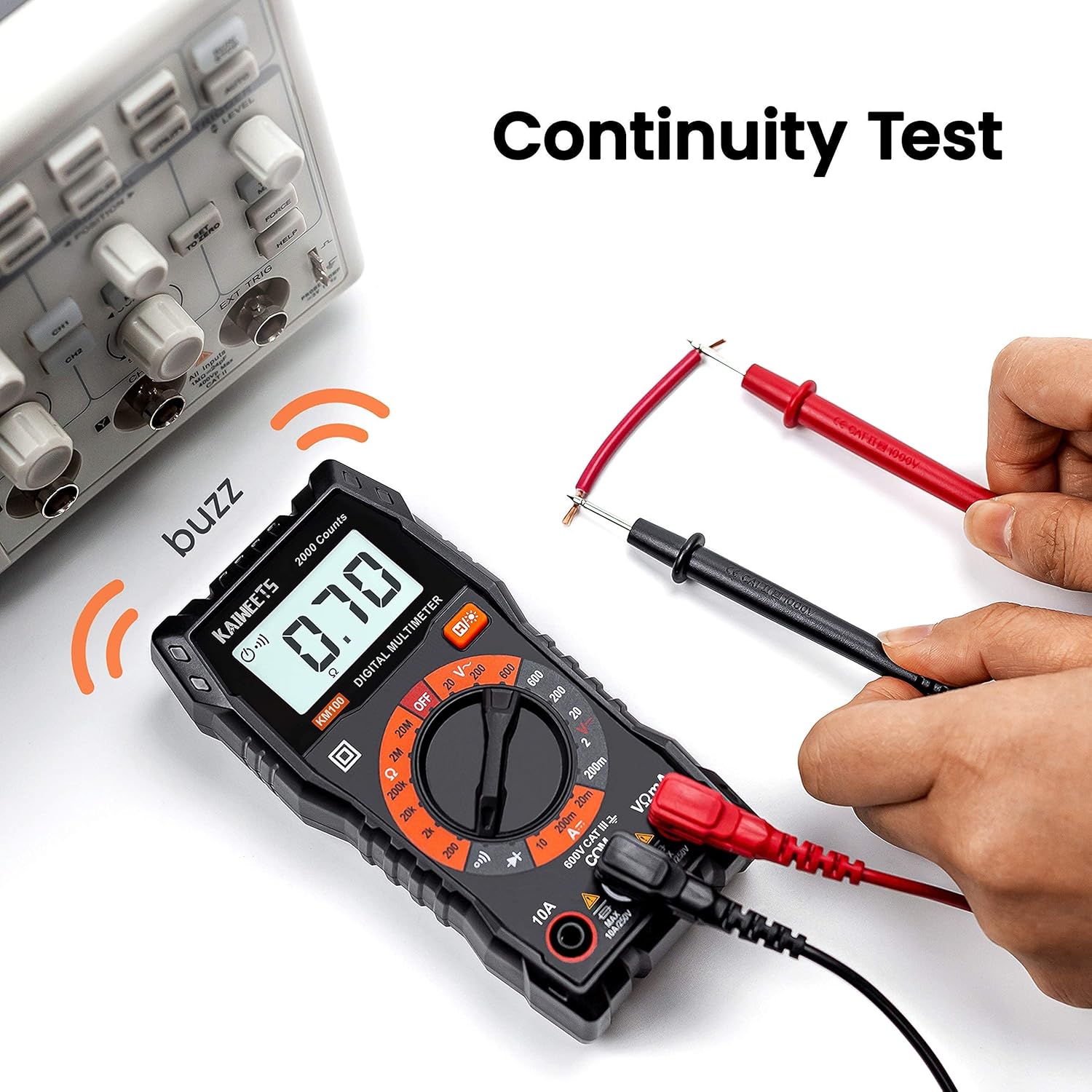
Figure 6: KM100 Continuity Test.

Figure 7: KM100 DC Voltagอี การวัด
6. การบำรุงรักษา
6.1 การทำความสะอาด
เช็ดมิเตอร์asinจีกับโฆษณาamp ใช้ผ้าและผงซักฟอกอ่อนๆ เช็ดทำความสะอาด ห้ามใช้สารขัดถูหรือตัวทำละลาย ตรวจสอบให้แน่ใจว่ามิเตอร์แห้งสนิทก่อนใช้งาน
6.2 การเปลี่ยนแบตเตอรี่
When the low battery indicator appears on the display, replace the batteries promptly to ensure accurate readings. Refer to Section 4.1 for battery installation instructions.
6.3 พื้นที่จัดเก็บ
When not in use for extended periods, remove the batteries to prevent leakage. Store the meters and accessories in their carrying cases in a cool, dry place, away from direct sunlight and extreme temperatures.

Figure 8: KM100 stored in its carrying case.
7 การแก้ไขปัญหา
- ไม่มีจอแสดงผล/จอแสดงผลจาง: ตรวจสอบระดับแบตเตอรี่และเปลี่ยนหากจำเป็น ตรวจสอบให้แน่ใจว่าใส่แบตเตอรี่โดยให้ขั้วถูกต้อง
- การอ่านไม่ถูกต้อง:
- Ensure the rotary switch is set to the correct measurement function and range.
- ตรวจสอบว่าสายทดสอบเชื่อมต่ออย่างถูกต้องและไม่มีความเสียหาย
- สำหรับ clamp meter, ensure the jaw is fully closed around a single conductor for current measurement.
- For resistance or continuity, ensure the circuit is de-energized.
- มิเตอร์ไม่ตอบสนอง: Turn the meter off and then on again. If the issue persists, replace batteries.
8. ข้อมูลจำเพาะ
8.1 KAIWEETS HT206B Clamp เมตร
| การวัด | พิสัย | ความแม่นยำ |
|---|---|---|
| กระแสไฟ AC | 6A/60A/600A | ±(2.5%+5) |
| ฉบับ ACtage | 6โวลต์/60โวลต์/600โวลต์ | ±(1.0%+5) |
| DC ฉบับที่tage | 600mV/6V/60V/600V | ±(0.5%+5) |
| ความต้านทาน | 600Ω/6kΩ/60kΩ/600kΩ/6MΩ/60MΩ | ±(1.0%+5) |
| ความจุ | 10nF/100nF/1μF/10μF/100μF/1mF/10mF/100mF | ±(4.0%+5) |
| ความถี่ / รอบการทำงาน | 10Hz ถึง 10MHz | ±(1.0%+3) |
| อุณหภูมิ | -4°F ถึง 1832°F (-20°C ถึง 1000°C) | ±(2.5%+5) |
| จำนวนการแสดงผล | 6000 นับ | |
| ระดับความปลอดภัย | CAT III 600V, CE, RoHS, IEC 61010-1 | |
| แหล่งพลังงาน | แบตเตอรี่ AAA 2 ก้อน | |
8.2 มัลติมิเตอร์ดิจิทัล KAIWEETS KM100
| การวัด | พิสัย | ความแม่นยำ |
|---|---|---|
| ฉบับ ACtage | 20โวลต์/200โวลต์/600โวลต์ | ±(1.0%+5) |
| DC ฉบับที่tage | 200mV/2V/20V/200V/600V | ±(1.0%+5) |
| กระแสไฟฟ้าตรง | 20mA / 200mA / 10A | ±(1.5%+5) |
| ความต้านทาน | 200Ω/2kΩ/20kΩ/200kΩ/2MΩ/20MΩ | ±(1.2%+5) |
| ระดับความปลอดภัย | CAT III 600V, CE, RoHS | |
| แหล่งพลังงาน | แบตเตอรี่ AAA จำนวน 2 ก้อน (ติดตั้งไว้ล่วงหน้า) | |
9. การรับประกันและการสนับสนุน
KAIWEETS products are designed and manufactured to high-quality standards. Both the HT206B and KM100 are CE and RoHS certified, indicating compliance with European safety, health, and environmental protection requirements.
For specific warranty information or technical support, please refer to the warranty card included with your product or contact KAIWEETS customer service directly through their official channels.


