1. บทนำ
This manual provides comprehensive instructions for the installation, programming, and operation of the Finder 12.A4.8.230.0010 NFC Weekly Time Clock. This electronic astronomical time switch features a weekly program, an analog output, and can be programmed via a joystick or an NFC-enabled smartphone using the Finder Toolbox app.
2. ข้อมูลด้านความปลอดภัย
Please read these safety instructions carefully before installation and operation. Failure to follow these instructions may result in electric shock, fire, or damage to the device.
- การติดตั้งจะต้องดำเนินการโดยช่างไฟฟ้าที่มีคุณสมบัติตามข้อบังคับเกี่ยวกับสายไฟในท้องถิ่น
- โปรดตรวจสอบให้แน่ใจว่าได้ตัดกระแสไฟแล้วก่อนทำการติดตั้งหรือบำรุงรักษาใดๆ
- ห้ามให้อุปกรณ์สัมผัสกับความชื้น อุณหภูมิที่สูงหรือสภาพแวดล้อมที่มีฤทธิ์กัดกร่อน
- อุปกรณ์ได้รับการออกแบบสำหรับใช้ภายในอาคารเท่านั้น
3. สินค้าหมดview
The Finder 12.A4.8.230.0010 is an electronic time switch designed for DIN rail mounting. It offers precise time control with a weekly program and astronomical function.

รูปที่ 1 : ด้านหน้า view of the Finder 12.A4.8.230.0010 Time Clock, showing the LCD display, joystick, and NFC symbol.
คุณสมบัติหลัก:
- Weekly program for flexible scheduling.
- 1 analog output: 0-10 V or PWM.
- 1 changeover contact for 16 A / 250 V AC (AC1).
- ปริมาณอุปทานtage: 110-230 V AC/DC.
- LCD display for clear information.
- Programming via joystick or NFC-enabled smartphone with Finder Toolbox app (Android and iOS).
- Astronomical time control: automatic switching at sunrise and sunset based on postcode or coordinates.
- Adjustable time offset for sunrise/sunset.
4. การตั้งค่าและการติดตั้ง
This device is designed for DIN rail mounting. Follow these steps for proper installation:
- การตัดการเชื่อมต่อไฟฟ้า: Ensure the main power supply to the installation area is completely disconnected before proceeding.
- การติดตั้ง: Mount the time switch securely onto a standard DIN rail.
- การเดินสายไฟ: Connect the power supply (110-230 V AC/DC) to terminals A1 and A2. Connect the load to the changeover contact terminals (NO, NC, COM) and the analog output (W, O, Y) as required. Refer to the wiring diagram below.
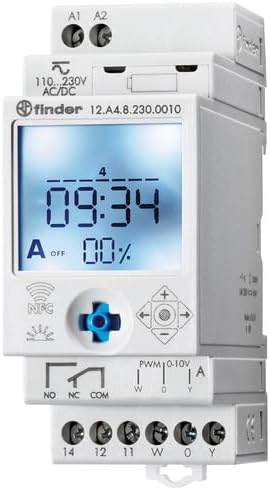
รูปที่ 2: รายละเอียด view of the wiring terminals for power input (A1, A2), relay output (NO, NC, COM), and analog output (W, O, Y).
บันทึก: The device features safe separation between the power supply and contacts.
5. คู่มือการใช้งาน
5.1 การเพิ่มพลังเริ่มต้น
Once wired, restore power. The LCD display will illuminate. You may need to set the current date and time if it's the first use or after a prolonged power outage.
5.2 Programming via Joystick
The integrated joystick allows for direct programming on the device:
- การนำทาง: Use the joystick to move through menu options (up, down, left, right).
- Selection/Confirmation: กดจอยสติ๊กเข้าด้านในเพื่อเลือกตัวเลือกหรือยืนยันการตั้งค่า
- Follow the on-screen prompts to set the current time, date, weekly program, and astronomical functions.
5.3 Programming via NFC (Finder Toolbox App)
For maximum flexibility, program the time switch using an NFC-enabled smartphone and the Finder Toolbox app:
- ดาวน์โหลดแอพ: Download the "Finder Toolbox" app from the Google Play Store (Android) or Apple App Store (iOS).
- Create/Load Program: Open the app and create a new program or load an existing one. The app allows for detailed configuration of weekly schedules, astronomical settings, and special functions.
- ถ่ายโอนข้อมูล: To transfer the program, hold your smartphone close to the NFC symbol on the time switch. The app will guide you through the data transfer process.
- Read Program: You can also read an existing program from the time switch to your smartphone for editing or backup.
5.4 Astronomical Time Control
The device can automatically switch based on sunrise and sunset times:
- การตั้งค่าตำแหน่ง: Set your location by entering a postcode or geographical coordinates in the programming menu (via joystick or app).
- ออฟเซ็ต: You can set a selectable time offset for both sunrise and sunset times to adjust switching points.
- Astro ON/OFF: Configure specific ON/OFF times during the astronomical ON period if needed.
6. การบำรุงรักษา
The Finder 12.A4.8.230.0010 is designed for maintenance-free operation. However, periodic checks are recommended:
- การทำความสะอาด: ทำความสะอาดอุปกรณ์ด้วยผ้าแห้งเนื้อนุ่ม ห้ามใช้สารทำความสะอาดที่มีฤทธิ์กัดกร่อนหรือตัวทำละลาย
- การเชื่อมต่อ: Periodically check terminal connections to ensure they are secure.
- อัพเดตเฟิร์มแวร์: Check the Finder website or app for any available firmware updates for improved functionality or bug fixes.
7 การแก้ไขปัญหา
| ปัญหา | สาเหตุที่เป็นไปได้ | สารละลาย |
|---|---|---|
| เครื่องเปิดไม่ติด | ไม่มีแหล่งจ่ายไฟหรือสายไฟไม่ถูกต้อง | Check power connections (A1, A2) and ensure power is supplied. Verify wiring against the diagram. |
| Program not executing. | Incorrect program settings or manual override active. | Review program settings via joystick or app. Check for any active manual override functions. Ensure current date/time is correct. |
| การถ่ายโอนข้อมูลผ่าน NFC ล้มเหลว | Smartphone not NFC-enabled, app not open, or poor contact. | Ensure your smartphone has NFC enabled. Open the Finder Toolbox app. Hold the phone directly over the NFC symbol on the device. |
| Astronomical function inaccurate. | Incorrect location (postcode/coordinates) or time zone setting. | Verify the entered postcode or coordinates. Check the time zone setting. |
If the problem persists, please contact Finder technical support.
8. ข้อมูลจำเพาะทางเทคนิค
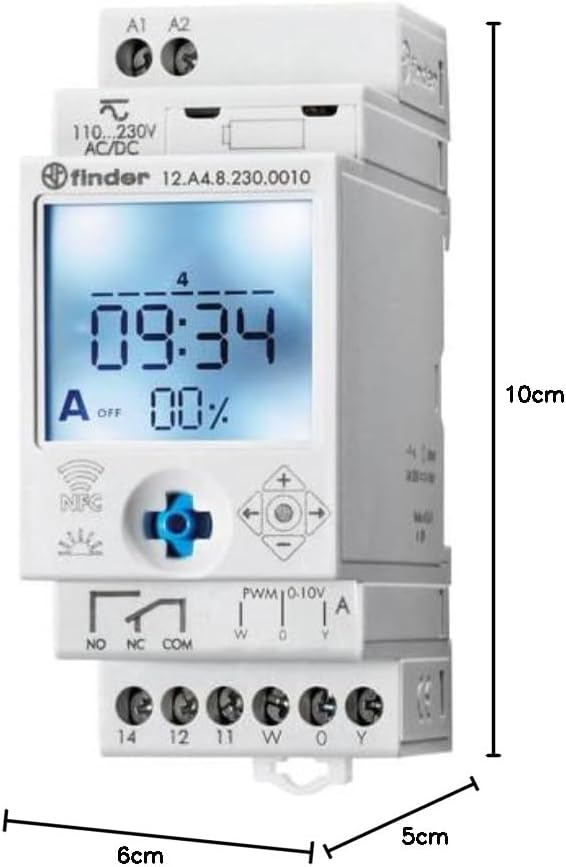
Figure 3: Dimensions of the Finder 12.A4.8.230.0010 Time Clock, showing approximate measurements of 10cm height, 6cm width, and 5cm depth.
| คุณสมบัติ | รายละเอียด |
|---|---|
| ยี่ห้อ | ตัวค้นหา |
| หมายเลขรุ่น | 12.A4.8.230.0010 |
| ขนาด (สูง x กว้าง x ลึก) | 10 x 6 x 5 ซม. |
| น้ำหนัก | 70 กรัม |
| ปริมาณอุปทานtage | กระแสสลับ/กระแสตรง 110-230 โวลต์ |
| ติดต่อเอาท์พุท | 1 changeover contact, 16 A / 250 V AC (AC1) |
| เอาท์พุตแบบอะนาล็อก | 0-10 V or PWM |
| วัสดุติดต่อ | เอจีเอสเอ็นโอ2 |
| แม็กซ์ กระแสน้ำไหลเข้า | 120 A เป็นเวลา 5 มิลลิวินาที |
| Min. Switching Time | 1 นาที |
| Max. Switching Power (230 V AC1) | 4000 วีเอ |
| อินพุตอินเทอร์เฟซมนุษย์ | Buttons (Joystick) |
| แบตเตอรี่ที่จำเป็น | เลขที่ |
| เข้ากันได้กับ | Power supplies/ballasts with 0-10 V or PWM inputs, or Slave dimmers Type 15.11 |
9. การรับประกันและการสนับสนุน
For warranty information and technical support, please refer to the official Finder webหรือติดต่อตัวแทนจำหน่ายในพื้นที่ของคุณ เก็บใบเสร็จรับเงินไว้เป็นหลักฐานการซื้อ
ผู้ผลิต: ตัวค้นหา
Product on Amazon.es since: 24 พฤษภาคม 2021


