1. บทนำ
This user manual provides comprehensive instructions for the setup, operation, and maintenance of your Sangoma P315 IP Phone. Please read this manual thoroughly to ensure proper use and to maximize the features of your device. For additional support, refer to the official Sangoma documentation and support resources.
2. สินค้าหมดview
The Sangoma P315 is a 2-line SIP IP Phone designed for clear communication with HD Voice quality. It features a 2.4-inch color display and supports Gigabit Ethernet connectivity. This phone is compatible with Sangoma's UC offerings, including Switchvox, PBXact, FreePBX, and Asterisk, offering seamless auto-provisioning.
2.1 คุณสมบัติหลัก
- 2-line appearance keys for managing multiple calls.
- 2.4-inch (320 x 240 pixel) backlit color LCD display for clear visibility.
- High-definition call quality for superior audio.
- Power over Ethernet (PoE) support with 2 switched 10/100/1000 Mbps Gigabit Ethernet ports.
- Built-in EHS support for Sangoma H10 and H20 wireless headsets.
- Secure deployments with SRTP/TLS and VLAN support.
- Compatibility with Switchvox 7.7, FreePBX v14, PBXact v14, Asterisk v16, Endpoint Manager v14/v15, DPMA 3.6.x.
2.2 ส่วนประกอบของโทรศัพท์
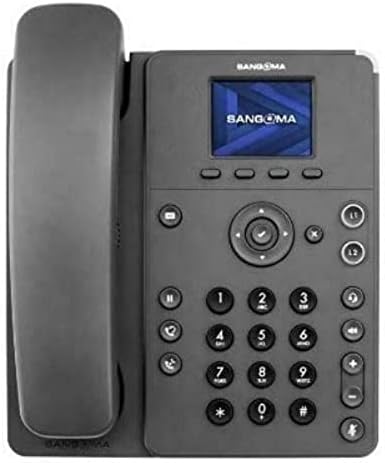
Figure 1: Sangoma P315 IP Phone Front View
The Sangoma P315 IP Phone features a standard telephone handset on the left, connected to the main unit. The main unit includes a 2.4-inch color display at the top, below which are four context-sensitive soft keys. A navigation cluster with a central 'OK' button is located below the soft keys. To the left of the navigation cluster are dedicated buttons for message, headset, and speakerphone. To the right are line keys (L1, L2) and call management buttons (hold, transfer, conference, mute, volume up/down). A standard numeric keypad (0-9, *, #) is positioned centrally on the lower part of the unit.
3. การตั้งค่า
3.1 เนื้อหาบรรจุภัณฑ์
ก่อนดำเนินการต่อ โปรดตรวจสอบให้แน่ใจว่ามีส่วนประกอบทั้งหมดครบถ้วน:
- Sangoma P315 IP Phone unit
- หูโทรศัพท์และสายโทรศัพท์
- สายอีเทอร์เน็ต
- ขาตั้งโทรศัพท์
- Note: A 12V Power Adapter (1TELP001LF) is not included and may be required if PoE is not available.
3.2 การเชื่อมต่อทางกายภาพ
- ติดตั้งขาตั้งโทรศัพท์: วางขาตั้งให้ตรงกับช่องด้านหลังของตัวเครื่องโทรศัพท์ แล้วกดให้เข้าที่
- เชื่อมต่อโทรศัพท์มือถือ: Plug one end of the coiled handset cord into the handset and the other end into the handset port on the phone unit (usually marked with a handset icon).
- เชื่อมต่อกับเครือข่าย:
- หากใช้ การจ่ายพลังงานผ่านอีเทอร์เน็ต (PoE): Connect one end of the Ethernet cable to the LAN port on the phone and the other end to a PoE-enabled network switch or router.
- หากใช้ an อะแดปเตอร์ AC (sold separately): Connect the AC adapter to the power port on the phone, then connect one end of the Ethernet cable to the LAN port on the phone and the other end to a standard network switch or router.
- เชื่อมต่อกับพีซี (ทางเลือก): If you wish to connect a computer through the phone, connect an Ethernet cable from your PC to the PC port on the phone.
3.3 Initial Boot-up and Provisioning
Once connected to the network and powered on, the phone will begin its boot-up sequence. The Sangoma P315 supports auto-provisioning with Sangoma's UC platforms. The phone will attempt to obtain network settings and configuration from your PBX system automatically. This process may take a few minutes. Once complete, the display will show your line status and be ready for use.
4. คู่มือการใช้งาน
4.1 ฟังก์ชันการโทรพื้นฐาน
- การโทร:
- Pick up the handset, press the speakerphone button, or press an available line key.
- กดหมายเลขที่ต้องการโดยใช้แป้นตัวเลข
- กดปุ่ม โทรออก กดปุ่มซอฟต์คีย์หรือรอให้ระบบเชื่อมต่อสายโดยอัตโนมัติ
- รับสาย: When the phone rings, pick up the handset, press the speakerphone button, or press the flashing line key.
- การวางสาย: Hang up the handset, press the speakerphone button again, or press the วางสาย ซอฟต์คีย์
4.2 คุณสมบัติการโทรขั้นสูง
- ถือ: ในระหว่างการสนทนา ให้กดปุ่ม ถือ ปุ่ม กดอีกครั้งเพื่อโทรกลับ
- โอน: ในระหว่างการสนทนา ให้กดปุ่ม โอนย้าย button. Dial the number to transfer to, then press the โอนย้าย soft key again (blind transfer) or wait for the party to answer and then press โอนย้าย (มีการรับส่งเข้าร่วม)
- การประชุม: ในระหว่างการสนทนา ให้กดปุ่ม การประชุม button. Dial the number of the third party, and once connected, press the การประชุม ปุ่มซอฟท์คีย์อีกครั้งเพื่อรวมทุกฝ่ายเข้าด้วยกัน
- ปิดเสียง: กดปุ่ม ปิดเสียง ปุ่มนี้ใช้สำหรับปิดเสียงไมโครโฟนระหว่างการโทร กดอีกครั้งเพื่อเปิดเสียง
- ข้อความเสียง: กดปุ่ม ข้อความ button to access your voicemail. Follow the voice prompts.
- การปรับระดับเสียง: ใช้ เพิ่ม/ลดระดับเสียง buttons to adjust the handset, headset, or speakerphone volume during a call, or the ringer volume when idle.
4.3 การนำทางบนหน้าจอแสดงผล
The 2.4-inch color display provides access to various phone features and settings. Use the navigation cluster (up, down, left, right arrows, and central OK button) to scroll through menus and select options. The soft keys below the display change their function based on the current screen or call status.
5. การบำรุงรักษา
5.1 การทำความสะอาดโทรศัพท์
เพื่อรักษารูปลักษณ์และการทำงานของโทรศัพท์ของคุณ:
- ใช้แปรงนุ่มๆ ปัดเบาๆamp, lint-free cloth to wipe the phone's surface.
- Avoid using harsh chemicals, abrasive cleaners, or aerosol sprays, as these can damage the phone's finish and internal components.
- ห้ามฉีดน้ำยาทำความสะอาดลงบนโทรศัพท์โดยตรง
5.2 การอัปเดตซอฟต์แวร์
Your Sangoma P315 IP Phone may receive software updates to improve performance, add features, or address security vulnerabilities. These updates are typically managed by your system administrator through the PBX. Do not attempt to manually update firmware unless instructed by your administrator or Sangoma support.
6 การแก้ไขปัญหา
หากคุณพบปัญหาเกี่ยวกับโทรศัพท์ IP Sangoma P315 โปรดดูปัญหาและวิธีแก้ไขทั่วไปต่อไปนี้:
| ปัญหา | สาเหตุที่เป็นไปได้ | สารละลาย |
|---|---|---|
| ไม่มีเสียงสัญญาณโทรศัพท์ / ไม่สามารถโทรออกหรือรับสายได้ | Network cable disconnected, no power, incorrect network configuration, PBX issue. |
|
| จอแสดงผลว่างเปล่าหรือค้าง | ปัญหาพลังงาน, ซอฟต์แวร์ขัดข้อง |
|
| คุณภาพเสียงไม่ดี (มีเสียงสะท้อน เสียงรบกวน) | Network congestion, faulty cable, environmental interference. |
|
For issues not covered here, please contact your IT department or Sangoma technical support.
7. ข้อมูลจำเพาะ
| คุณสมบัติ | รายละเอียด |
|---|---|
| แบบอย่าง | P315 |
| หมายเลขชิ้นส่วน | 1TELP315LF |
| แสดง | 2.4-inch (320 x 240 pixel) backlit color LCD |
| แป้นไลน์ | 2 |
| พอร์ตอีเทอร์เน็ต | 2 x 10/100/1000 Mbps Gigabit Ethernet (switched) |
| แหล่งพลังงาน | PoE (Power over Ethernet) and AC Adapter (12V, not included) |
| การรองรับชุดหูฟัง | EHS support for Sangoma H10 and H20 wireless headsets |
| ความปลอดภัย | SRTP/TLS, VLAN support |
| ขนาด (โดยประมาณ) | 27.9 x 21.3 x 8.9 ซม. (10.98 x 8.39 x 3.5 นิ้ว) |
| น้ำหนัก (โดยประมาณ) | 1.08 กก. (2.38 ปอนด์) |
| ยูพีซี | 797734603330 |
8. การรับประกันและการสนับสนุน
8.1 การรับประกันสินค้า
The Sangoma P315 IP Phone comes with a standard manufacturer's warranty. For detailed information regarding warranty terms, duration, and coverage, please refer to the warranty card included with your product or visit the official Sangoma webไซต์นี้ โปรดเก็บหลักฐานการซื้อไว้เพื่อใช้ยืนยันการรับประกัน
8.2 การสนับสนุนด้านเทคนิค
For technical assistance, troubleshooting beyond this manual, or advanced configuration, please contact your system administrator or Sangoma technical support. You can find contact information and additional resources on the official Sangoma support portal.
แหล่งข้อมูลออนไลน์: www.sangoma.com/support