1. บทนำ
Thank you for choosing the PROXTEND X502 Full HD Webcam. This manual provides detailed instructions to help you set up, operate, and maintain your webcam for optimal performance. The X502 is designed to deliver clear 1080p video at 30 frames per second, featuring an omni-directional microphone and automatic low light correction for various lighting conditions.
2. เนื้อหาบรรจุภัณฑ์
โปรดตรวจสอบว่าสินค้าทั้งหมดมีอยู่ในแพ็คเกจของคุณ:
- PROXTEND X502 ฟูล HD Webcam (PX-CAM007)
- Integrated Universal Mounting Clip
- คู่มือการใช้งาน (เอกสารนี้)
3. การตั้งค่า
Follow these steps to set up your PROXTEND X502 Webลูกเบี้ยว:
- การติดตั้ง Webลูกเบี้ยว:
การ webcam features an integrated universal mounting clip. You can place the webวางกล้องไว้บนจอคอมพิวเตอร์ จอแล็ปท็อป หรือพื้นผิวเรียบ ปรับคลิปให้ยึดกล้องได้อย่างแน่นหนา webcam in position. The webcam also supports mini tripod mounting (tripod not included).
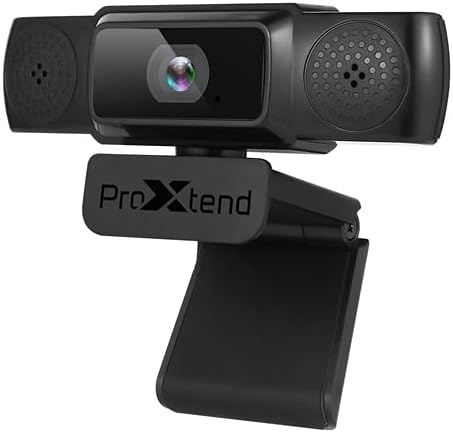
Image: The PROXTEND X502 Full HD Webcam shown with its universal mounting clip, suitable for monitors or flat surfaces.
- การเชื่อมต่อกับคอมพิวเตอร์ของคุณ:
เสียบสาย USB จาก webเข้าพอร์ต USB ที่มีอยู่บนคอมพิวเตอร์ของคุณ webcam is plug-and-play, meaning your operating system should automatically detect and install the necessary drivers. No additional software installation is typically required.
- Driver Installation Verification:
After connecting, allow a few moments for your computer to recognize the device. You can verify successful installation in your operating system's Device Manager (Windows) or System Information (macOS) under 'Cameras' or 'Imaging Devices'.
4. คู่มือการใช้งาน
เมื่อครั้งหนึ่ง webcam is set up, you can begin using it with various applications:
- การเลือก Webลูกเบี้ยว:
Open your preferred video conferencing, streaming, or recording application (e.g., Zoom, Microsoft Teams, Skype, OBS Studio). Navigate to the application's video and audio settings. Select "PROXTEND X502" as your camera and microphone input device.

ภาพ: ด้านหน้า view of the PROXTEND X502 Full HD Webcam, highlighting the lens and integrated microphones.
- คุณภาพวิดีโอ:
การ webcam automatically adjusts for optimal image quality, including auto-focus and auto low light correction. Ensure adequate lighting for the best video performance. The 1920x1080p resolution at 30fps provides clear and smooth video.
- คุณภาพเสียง:
The integrated omni-directional microphone captures sound from all directions. Position yourself appropriately to ensure your voice is clearly picked up. Most applications allow you to adjust microphone input levels in their audio settings.
5. คุณสมบัติ
Key features of the PROXTEND X502 Full HD Webcam include:
- เซ็นเซอร์ภาพ CMOS ขนาด 1/2.7”
- 2 ล้านพิกเซล
- Resolution: 1920x1080 at 30 frames per second
- ไมโครโฟนรอบทิศทาง
- คลิปยึดสากล
- Mini Tripod Support
- การแก้ไขแสงน้อยอัตโนมัติ
6. ข้อมูลจำเพาะ
Detailed technical specifications for the PROXTEND X502 Full HD Webลูกเบี้ยว:

Image: A visual representation of the PROXTEND X502 Full HD Webcam's key features and technical specifications.
| คุณสมบัติ | ข้อมูลจำเพาะ |
|---|---|
| เซ็นเซอร์รับภาพ | 1/2.7" CMOS Image Sensor |
| เมกะพิกเซล | 2 MP |
| ความละเอียดสูงสุด | ขนาด 1920x1080 |
| ความละเอียดวิดีโอ | ขนาด 1920x1080 |
| FPS สูงสุด | 30 เฟรมต่อวินาที |
| รูปแบบการถอดรหัสวิดีโอ | H.264/MJPG |
| โหมดการรับแสง | ออโต้ |
| สมดุลแสงขาว | ออโต้ |
| ได้รับ | ออโต้ |
| การชดเชยแสงน้อย | ออโต้ |
| Viewอิงแองเกิล | 77° |
| ระยะโฟกัส | 10 ซม. ถึงอินฟินิตี้ |
| ประเภทโฟกัส | ออโต้ |
| ไมโครโฟน | รอบทิศทาง |
| เสียง Sampลิงอัตรา | 1 ช่อง 16 บิต 16K 32K 44.1K 48K |
| รูปแบบเสียง | PCM เข้ากันได้กับ UAC 1.0 |
| อินเทอร์เฟซ | ยูเอสบี 2.0 |
| ความยาวสายเคเบิล | 1.5 เมตร |
| ระบบปฏิบัติการที่รองรับ | Windows XP, Windows 7 (32bit/64bit), Windows 8, Windows 10, Android V5.0 or higher OS, MAC OS 10.6 or higher |
| ขนาดสินค้า | 12.7 x 7.62 x 5.08 ซม. |
| น้ำหนักผลิตภัณฑ์ | 453.59 กรัม |
7 การแก้ไขปัญหา
If you encounter issues with your PROXTEND X502 Webแคม ลองทำตามวิธีแก้ปัญหาต่อไปนี้ดู:
- ไม่มีรูปภาพ/วิดีโอ:
- ตรวจสอบให้แน่ใจว่าสาย USB เชื่อมต่ออย่างแน่นหนากับทั้งสอง webแคมและคอมพิวเตอร์ของคุณ
- ลองใช้พอร์ต USB อื่นบนคอมพิวเตอร์ของคุณ
- รีสตาร์ทเครื่องคอมพิวเตอร์ของคุณ
- Check your application's settings to ensure the PROXTEND X502 is selected as the video input.
- Verify that no other application is currently using the webลูกเบี้ยว.
- ไม่มีเสียง/ไมโครโฟนไม่ทำงาน:
- Ensure the PROXTEND X502 is selected as the microphone input in your application's audio settings.
- ตรวจสอบการตั้งค่าเสียงของคอมพิวเตอร์เพื่อให้แน่ใจว่าไมโครโฟนเปิดใช้งานอยู่และไม่ได้ปิดเสียงไว้
- Adjust the microphone input level in your system or application settings.
- คุณภาพวิดีโอไม่ดี:
- Ensure sufficient lighting in your environment.
- ทำความสะอาด webเช็ดเลนส์กล้องเบาๆ ด้วยผ้านุ่มที่ไม่เป็นขุย
- Check your internet connection speed if streaming, as bandwidth can affect video quality.
8. การบำรุงรักษา
เพื่อให้มั่นใจถึงอายุการใช้งานที่ยาวนานและประสิทธิภาพการทำงานที่เหมาะสมที่สุดของคุณ webลูกเบี้ยว:
- การทำความสะอาด: เช็ดเบาๆ webcam lens with a soft, dry, lint-free cloth. Avoid using harsh chemicals or abrasive materials.
- พื้นที่จัดเก็บ: เมื่อไม่ใช้งาน ให้เก็บ webเก็บกล้องไว้ในที่สะอาดและแห้ง หลีกเลี่ยงอุณหภูมิที่สูงหรือต่ำเกินไป และแสงแดดโดยตรง
- การจัดการ: หลีกเลี่ยงการวาง webกล้องหรือการทำให้เกิดแรงกระแทกอย่างรุนแรง
9. การรับประกันและการสนับสนุน
The PROXTEND X502 Full HD Webกล้องมาพร้อมกับ รับประกัน 7 ปี, ensuring peace of mind regarding your purchase. For warranty claims, technical support, or any inquiries not covered in this manual, please refer to the contact information provided with your product packaging or visit the official PROXTEND webเว็บไซต์.
10. ข้อมูลการปฏิบัติตาม
This device complies with relevant regulatory standards for electronic equipment. For detailed compliance information, please refer to the product packaging or the official PROXTEND webเว็บไซต์.


