1. สินค้าหมดview
The Poly Savi 8210 is a Bluetooth Wireless DECT Single-Ear UC Headset designed for seamless connectivity across desk phones, PCs/Macs via USB-A, and mobile devices. This headset is Teams Certified and compatible with various communication platforms such as Zoom, RingCentral, 8x8, and Vonage. It features a noise-canceling microphone with Poly Acoustic Fence technology for clear conversations and enhanced DECT security (Step C) with 256-bit AES encryption.
คุณสมบัติที่สำคัญ ได้แก่:
- การเชื่อมต่อ: Desk phone, PC, and Bluetooth.
- เวลาสนทนา: สูงสุด 13 ชั่วโมงต่อการชาร์จหนึ่งครั้ง
- ระยะสัญญาณไร้สาย: Up to 590 ft (180 m) line-of-sight; up to 180 ft (55 m) in typical office environments.
- คุณภาพเสียง: Noise-canceling microphone with Acoustic Fence Technology for superior audio clarity.
- ความปลอดภัย: DECT security Step C with military-grade 256-bit AES encryption.

Image 1.1: The Poly Savi 8210 monaural headset, designed for single-ear use.
2. อะไรอยู่ในกล่อง
The Poly Savi 8210 package includes the following components:
- Poly Savi 8210 Bluetooth Wireless DECT Headset
- ฐานหูฟัง
- ผ้าไมโครไฟเบอร์ Global Teck

Image 2.1: The box contents, including the Poly Savi 8210 headset, base, and a Global Teck microfiber cloth.
3. คำแนะนำในการตั้งค่า
Follow these steps to set up your Poly Savi 8210 headset system.
3.1 การเชื่อมต่อฐาน
The headset base connects to your desk phone, PC, and can pair with mobile devices.
- เชื่อมต่อกับพลังงาน: Plug the power adapter into the base and then into a wall outlet.
- เชื่อมต่อกับโทรศัพท์ตั้งโต๊ะ: Use the provided telephone interface cable to connect the base to your desk phone. Refer to your desk phone's manual for specific port locations (usually the headset port).
- เชื่อมต่อกับพีซี/Mac: Connect the USB-A cable from the base to an available USB-A port on your computer.
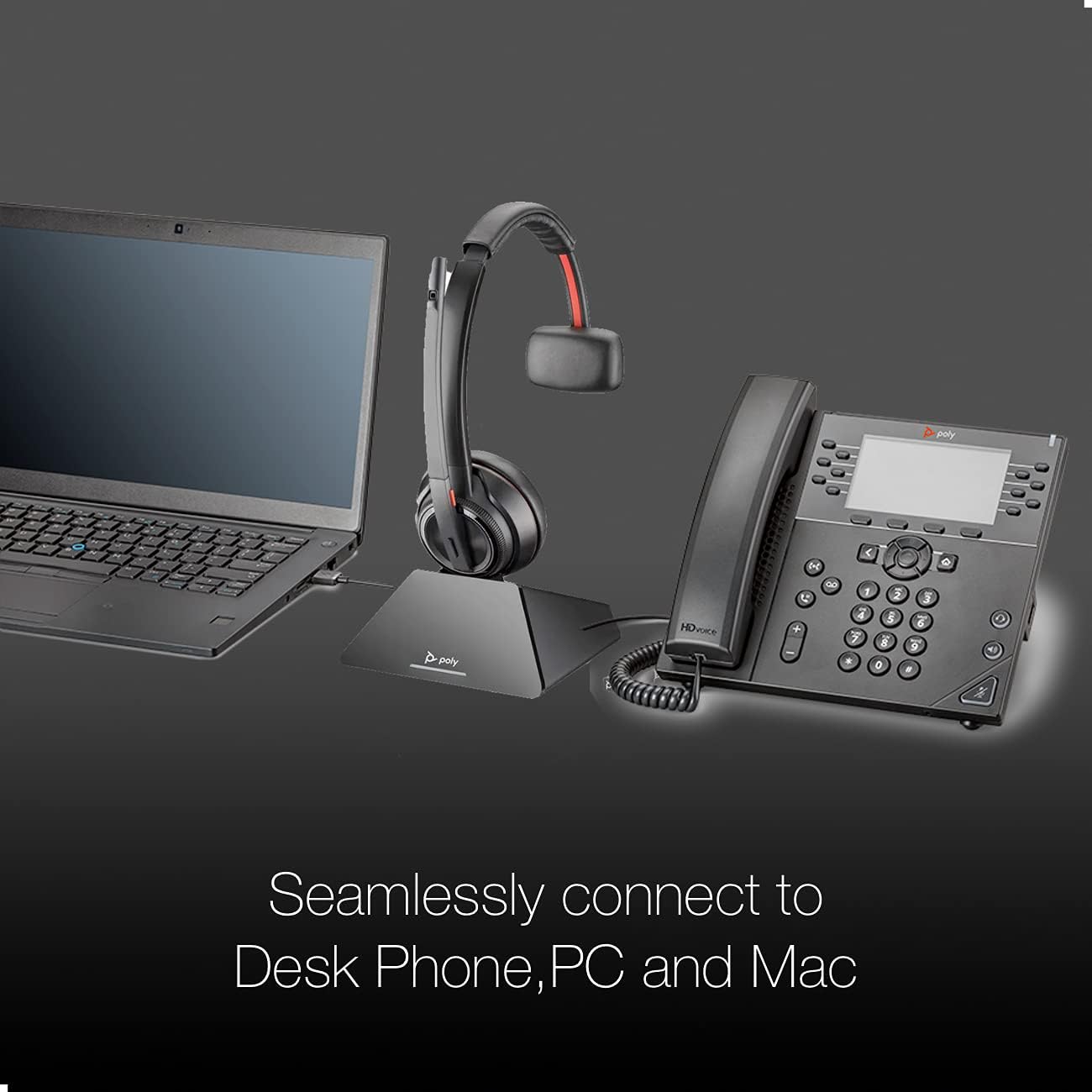
Image 3.1: The Poly Savi 8210 base seamlessly connected to both a laptop and a desk phone, illustrating its multi-device capability.
3.2 Pairing the Headset with the Base
The headset is typically pre-paired with the base. If re-pairing is needed:
- Place the headset in the charging cradle of the base.
- Press and hold the Subscription button on the base until the Subscription LED flashes.
- The headset and base will automatically pair. The Subscription LED will turn solid green when pairing is successful.
3.3 การเชื่อมต่อกับอุปกรณ์เคลื่อนที่ (บลูทูธ)
To use the headset with a mobile phone:
- With the headset on, press and hold the Bluetooth pairing button on the base until the Bluetooth LED flashes blue and red.
- On your mobile device, go to Bluetooth settings and select "Poly Savi 8210" from the list of available devices.
- The Bluetooth LED on the base will turn solid blue when connected.
4. คู่มือการใช้งาน
Understand the controls and functions of your Savi 8210 headset and base.
4.1 Base Controls

ภาพที่ 4.1: รายละเอียด view of the Poly Savi 8210 base, highlighting the Computer, Mobile Phone, Desk Phone, Bluetooth Pairing, Subscription buttons, Incoming Call Ringer, and Charging LED.
- Computer Button: Activates/deactivates the computer audio channel.
- Mobile Phone Button: Activates/deactivates the mobile phone audio channel.
- Desk Phone Button: Activates/deactivates the desk phone audio channel.
- Bluetooth Pairing Button/LED: Initiates Bluetooth pairing mode. LED indicates Bluetooth status.
- Subscription Button/LED: Initiates headset-to-base pairing. LED indicates subscription status.
- Incoming Call Ringer: Alerts for incoming calls.
- ไฟ LED สำหรับชาร์จไฟ: Indicates headset charging status.
4.2 การควบคุมชุดหูฟัง
- ปุ่มควบคุมการโทร: กดเพื่อรับสายหรือวางสาย
- เพิ่ม/ลดระดับเสียง: Adjusts listening volume.
- ปุ่มปิดเสียง: ปิดเสียงหรือเปิดเสียงไมโครโฟน
- สวิตช์ตัดเสียงรบกวนแบบแอคทีฟ (ANC): Activates or deactivates ANC for improved listening experience in noisy environments.

Image 4.2: The Poly Savi 8210 headset, featuring Hi-Fi Stereo Sound and Active Noise Cancellation for enhanced audio quality.
4.3 การจัดการการโทร
- การรับ / วางสาย: Press the Call Control button on the headset or the active audio channel button on the base.
- การสลับเสียง: During a call, press a different audio channel button on the base (e.g., from desk phone to mobile) to switch the call to that device.
- การประชุมทางโทรศัพท์: The Savi 8210 supports conferencing with up to three additional Savi headsets. Refer to the full user guide for detailed instructions.
4.4 แพลตฟอร์มที่รองรับ
The Poly Savi 8210 is designed to work with a wide range of communication platforms:

Image 4.3: Logos of various compatible platforms including Skype, Lync, Mitel, RingCentral, Avaya, GoToMeeting, Google Meet, Amazon Chime, Unify, Cisco, Zoom, Vonage, Microsoft Teams, Fuze, 8x8, and BlueJeans.
5. การบำรุงรักษา
5.1 การชาร์จชุดหูฟัง
Place the headset in the charging cradle on the base. The Charging LED on the base will indicate charging status. A full charge takes approximately 3 hours and provides up to 13 hours of talk time.
5.2 การทำความสะอาด
Use a soft, dry cloth to clean the headset and base. For the ear cushions, a slightly damp สามารถใช้ผ้าได้ หลีกเลี่ยงการใช้สารเคมีรุนแรงหรือวัสดุที่มีฤทธิ์กัดกร่อน
6 การแก้ไขปัญหา
If you encounter issues with your Poly Savi 8210 headset, refer to the following common solutions:
| ปัญหา | สาเหตุที่เป็นไปได้ | สารละลาย |
|---|---|---|
| ไม่มีเสียงในหูฟัง | Headset not powered on or not paired; incorrect audio source selected. | Ensure headset is charged and powered on. Verify headset is paired to the base. Select the correct audio channel button on the base (desk phone, PC, or mobile). |
| ไม่ได้ยินเสียงผู้โทร / ผู้โทรไม่ได้ยินฉัน | Microphone muted; volume too low; incorrect audio settings on PC/desk phone. | Check headset mute button. Adjust headset volume. Verify audio output/input settings on your computer or desk phone. |
| Headset not connecting to PC/Mac | USB cable loose; PC audio driver issue. | Ensure USB cable is securely connected. Try a different USB port. Restart your computer. Check for updated audio drivers. |
| คุณภาพเสียงไม่ดี / สัญญาณรบกวน | อยู่นอกระยะ, สัญญาณรบกวน, แบตเตอรี่อ่อน | Move closer to the base. Ensure no large metal objects are between headset and base. Charge the headset. |
6.1 การรีเซ็ตระบบ
If issues persist, a system reset may resolve them. Consult the full Poly Savi 8200 Series user guide for detailed reset procedures.
7. ข้อมูลจำเพาะ
| คุณสมบัติ | รายละเอียด |
|---|---|
| ชื่อรุ่น | ซาวี 8210 |
| เทคโนโลยีการเชื่อมต่อ | ไร้สาย (DECT, บลูทูธ) |
| เทคโนโลยีการสื่อสารไร้สาย | บลูทูธ 5.0 |
| Range (Line of Sight) | สูงถึง 590 ฟุต (180 ม.) |
| Range (Typical Office) | สูงถึง 180 ฟุต (55 ม.) |
| เวลาสนทนา | นานถึง 13 ชั่วโมง |
| เวลาในการชาร์จ | 3 ชั่วโมง (ชาร์จเต็ม) |
| ไมโครโฟน | Noise-canceling with Acoustic Fence Technology |
| คุณสมบัติการควบคุมเสียงรบกวน | Active Noise Cancellation (ANC), Passive Noise Cancellation |
| อุปกรณ์ที่รองรับ | Desktops, Laptops, Tablets, Telephones, Cellphones |
| น้ำหนักสินค้า | 0.018 ounces (headset) |
| ผู้ผลิต | โพลี |
| ยูพีซี | 812289034849 |
8. การรับประกันและการสนับสนุน
8.1 ข้อมูลการรับประกัน
The Poly Savi 8210 headset is covered by a manufacturer's warranty. Please refer to the warranty card included with your product or visit the official Poly webเว็บไซต์สำหรับข้อกำหนดและเงื่อนไขการรับประกันโดยละเอียด
8.2 การสนับสนุนด้านเทคนิค
For technical assistance, troubleshooting beyond this manual, or to access the full user guide, please visit the official Poly support website. For inquiries related to the product bundle, you may also contact Global Teck Worldwide support.
9. วิดีโอการสอน
9.1 Poly Savi 8200 Series Overview
วิดีโอ 9.1: จบแล้วview of the Poly Savi 8200 Series, demonstrating key features and benefits of the headset system. (Duration: 2:27)
9.2 Poly Savi 8200 Series Setup Guide
Video 9.2: A detailed guide on setting up the Poly Savi 8200 Series headset, including connections and initial pairing. (Duration: 3:36)