สินค้าเกินview
The YetiCool TX36 is a high-quality dual-zone portable compressor cooler designed for travelers and outdoor enthusiasts. It offers both refrigeration and freezing capabilities, with a wide temperature range from -20°C to +20°C. Equipped with a powerful compressor and the option for external battery connection, it can maintain temperatures for extended periods. The cooler features Bluetooth 5.0 connectivity for remote control via a mobile app (Android/iOS), an intuitive LCD control panel, and multiple power input options (12/24V DC and 100-240V AC). Its robust design includes a telescopic handle, durable wheels, and solid side handles for easy transport. Additional features like an internal light, integrated USB charging port, and a bottle opener enhance its utility for various applications, from camping and picnics to medical transport.

Image: The YetiCool TX36 portable compressor cooler, showcasing its grey and black design with wheels and handle.
คำแนะนำเพื่อความปลอดภัย
- อ่านคำแนะนำทั้งหมดอย่างละเอียดก่อนใช้งาน
- ตรวจสอบให้แน่ใจว่ามีการระบายอากาศที่เหมาะสมรอบๆ เครื่องทำความเย็นเพื่อป้องกันไม่ให้เครื่องร้อนเกินไป
- ห้ามปิดกั้นช่องระบายอากาศ
- Keep the cooler away from direct heat sources and moisture.
- โปรดใช้เฉพาะสายไฟและอะแดปเตอร์ที่ให้มาเท่านั้น
- Avoid placing liquids directly on the control panel.
- Do not immerse the cooler in water.
- Unplug the cooler before cleaning or maintenance.
- เก็บให้พ้นจากมือเด็ก
เนื้อหาแพ็คเกจ
เมื่อเปิดบรรจุภัณฑ์ โปรดตรวจสอบว่าส่วนประกอบทั้งหมดอยู่ครบและไม่ได้รับความเสียหาย:
- YetiCool TX36 Portable Compressor Cooler (Grey/Black)
- ใส่ตะกร้า
- 12/24V DC Connection Cable (3.5 meters long)
- AC/DC Adapter with 100-240V Connection Cable (EU/UK plug)
- คู่มือการใช้งาน

Image: The included 12/24V DC cable for car/truck use and the 100-240V AC adapter with various plug types for household use.
การตั้งค่า
1. การเชื่อมต่อไฟฟ้า
- กำลังไฟ DC (12V/24V): Connect the 12/24V DC cable to the cooler's DC input port and then to your vehicle's cigarette lighter socket or a compatible 12V/24V power source.
- กำลังไฟ AC (100-240V): Connect the AC/DC adapter to the cooler's AC input port. Then, plug the AC power cable into the adapter and a standard wall outlet (100-240V).
- ตรวจสอบให้แน่ใจว่าแหล่งจ่ายไฟตรงกับแรงดันไฟฟ้าของตัวระบายความร้อนtagข้อกำหนดอี
2. การจัดวางเริ่มต้น
Place the cooler on a flat, stable surface. Ensure there is adequate space around the ventilation grilles for proper airflow (at least 10 cm on all sides).
3. Dual Zone Configuration
The TX36 features two cooling chambers with independent temperature control. An adjustable divider separates these zones. If you wish to use the cooler as a single large zone, you can remove this divider to increase the overall useful capacity.
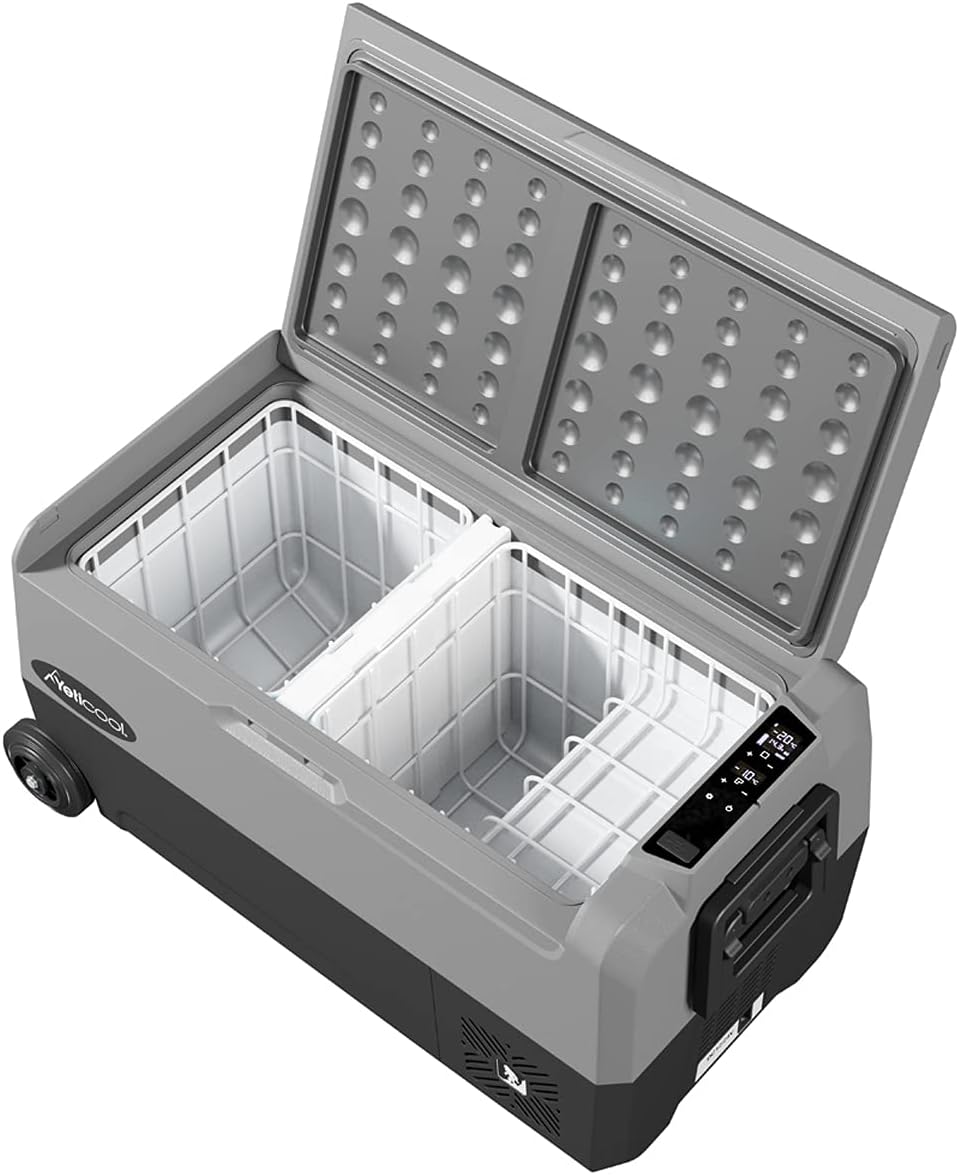
Image: The interior of the YetiCool TX36, showing the two separate cooling compartments and the removable divider.
4. การเชื่อมต่อแอปผ่านบลูทูธ
- Download the official YetiCool app from your mobile device's app store (available for Android and iOS).
- เปิดใช้งานบลูทูธบนอุปกรณ์เคลื่อนที่ของคุณ
- Open the YetiCool app and follow the on-screen instructions to pair with your TX36 cooler.
- Once paired, you can monitor and control the cooler's settings remotely.
คำแนะนำการใช้งาน
1. แผงควบคุมด้านบนview
The cooler features an intuitive LCD control panel for easy operation. The display shows the current temperature of each zone and operational status. Buttons allow for power on/off, temperature adjustment, and mode selection.
2. การเปิด/ปิดเครื่อง
กดปุ่มเปิด/ปิดบนแผงควบคุมค้างไว้เพื่อเปิดหรือปิดเครื่องทำความเย็น
3. การปรับอุณหภูมิ
- ใช้ปุ่ม '+' และ '-' บนแผงควบคุมเพื่อตั้งอุณหภูมิที่ต้องการสำหรับแต่ละโซน
- The temperature range is from -20°C to +20°C.
- For dual-zone models, ensure you select the correct zone before adjusting the temperature.
- Alternatively, use the YetiCool mobile app for precise temperature control.
4. การตั้งค่าการป้องกันแบตเตอรี่
The cooler is equipped with multi-stage battery discharge protection to prevent your vehicle's battery from draining. You can typically select between High, Medium, and Low protection levels via the control panel or app. Refer to the detailed in-app instructions for specific settings.
5. พอร์ตชาร์จ USB
An integrated USB socket is available on the cooler to charge external devices such as smartphones or tablets. Simply connect your device's USB cable to the port.
การซ่อมบำรุง
1. การทำความสะอาด
- ถอดปลั๊กเครื่องทำความเย็นทุกครั้งก่อนทำความสะอาด
- เช็ดพื้นผิวภายในและภายนอกด้วยโฆษณาamp ผ้าและผงซักฟอกอ่อนๆ
- ห้ามใช้น้ำยาทำความสะอาดที่มีฤทธิ์กัดกร่อนหรือตัวทำละลาย
- ตรวจสอบให้แน่ใจว่าตัวระบายความร้อนแห้งสนิทก่อนต่อสายไฟกลับเข้าไปใหม่
2. ละลายน้ำแข็ง
If ice builds up inside the freezer compartment, turn off the cooler and allow the ice to melt naturally. Wipe away excess water with a cloth. Do not use sharp objects to remove ice.
3. การจัดเก็บ
When storing the cooler for extended periods, ensure it is clean, dry, and unplugged. Store in a cool, dry place with the lid slightly ajar to prevent odors and mold growth.
การแก้ไขปัญหา
| ปัญหา | สาเหตุที่เป็นไปได้ | สารละลาย |
|---|---|---|
| คูลเลอร์เปิดไม่ติด | No power, loose connection, blown fuse, low battery voltage. | Check power cable connection. Ensure power source is active. Check vehicle's fuse. Adjust battery protection setting to 'Low' or charge vehicle battery. |
| อุณหภูมิไม่ถึงระดับที่ต้องการ | Poor ventilation, ambient temperature too high, lid not sealed properly, too much content. | Ensure adequate airflow around the cooler. Avoid direct sunlight. Check lid seal. Do not overfill. |
| Error code on LCD display | Internal fault, sensor error, voltagปัญหาอี | Note the error code and refer to the full user manual or contact customer support for specific error code meanings. Try restarting the unit. |
| ปัญหาการเชื่อมต่อบลูทูธ | ปิดบลูทูธ แอปไม่ได้อัปเดต มีสัญญาณรบกวน | Ensure Bluetooth is enabled on your device. Restart the app and cooler. Move closer to the cooler. |
ข้อมูลจำเพาะ
| คุณสมบัติ | รายละเอียด |
|---|---|
| แบบอย่าง | TX36 Grey |
| ยี่ห้อ | YetiCool |
| ความจุ | 36 ลิตร |
| ช่วงอุณหภูมิ | -20°C ถึง +20°C (-4°F ถึง +68°F) |
| กำลังไฟเข้า | ไฟฟ้ากระแสตรง 12V/24V, ไฟฟ้ากระแสสลับ 100-240V |
| ขนาด (กว้าง x ยาว x สูง) | 72.3 x 40.3 x 36.8 ซม. (28.4 x 15.8 x 14.4 นิ้ว) |
| น้ำหนัก | 18.31 กก. (40.37 ปอนด์) |
| วัสดุ | พลาสติก |
| การเชื่อมต่อ | Bluetooth 5.0 (App Control for Android/iOS) |
| คุณสมบัติพิเศษ | Dual Zone, LCD Display, USB Charging Port, Telescopic Handle, Durable Wheels, Internal Light, Bottle Opener, Multi-stage การป้องกันแบตเตอรี่ |

Image: Technical drawing illustrating the external dimensions of the YetiCool TX36 cooler.

Image: Diagram showing the internal dimensions and layout of the YetiCool TX36's dual compartments.
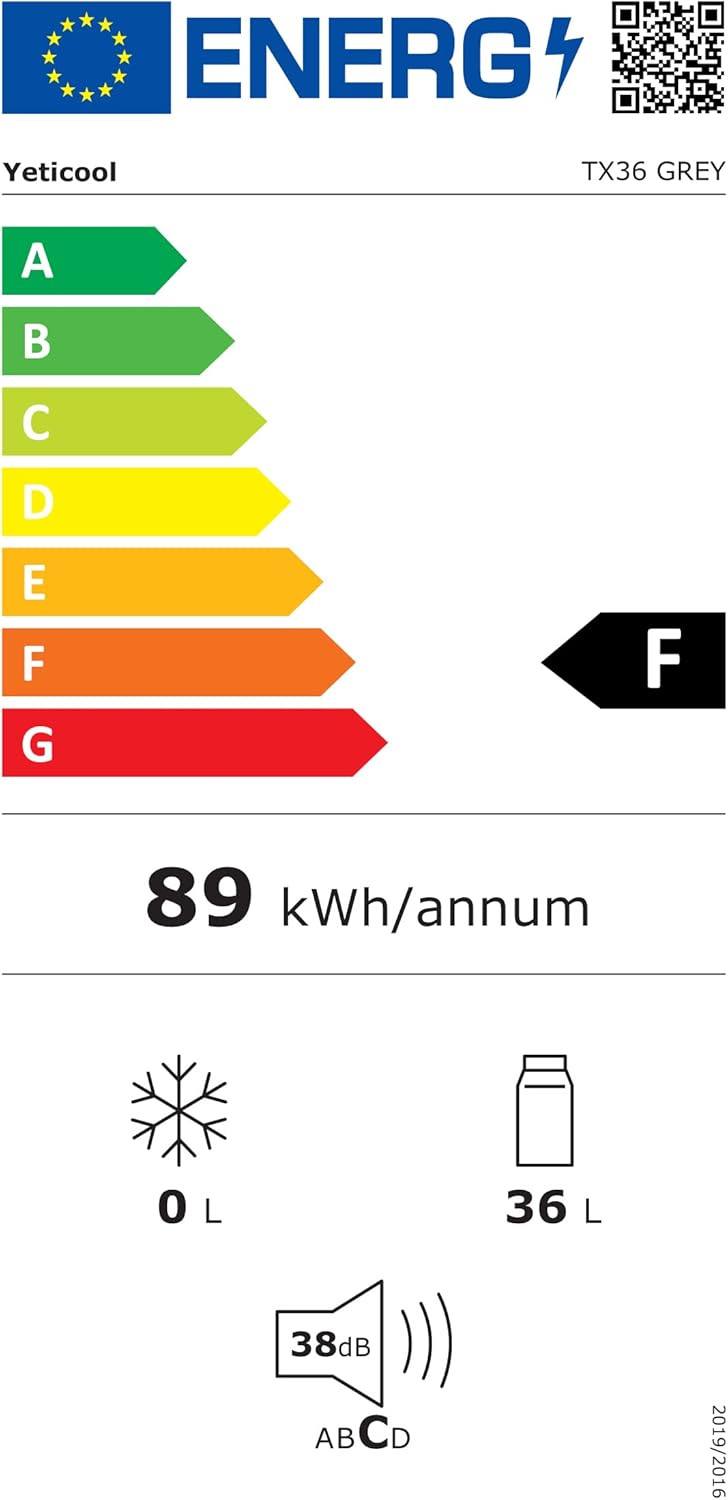
Image: The energy efficiency label for the YetiCool TX36, indicating its energy consumption and capacity. For more details, visit the official ฐานข้อมูล EPREL.
การรับประกันและการสนับสนุน
For warranty information, technical support, or service inquiries, please contact YetiCool customer service. Refer to the contact details provided in the full user manual included with your product or visit the official YetiCool webเว็บไซต์.
ผู้ผลิต: ARKAS SP. Z O.O.
