1. บทนำ
This manual provides detailed instructions for the setup, operation, and maintenance of your new Richmat Wireless Remote Control. This remote is designed to operate specific adjustable bed bases from Mlily, Bedtech, and Mattress Firm. Please read this manual thoroughly before use to ensure proper functionality.
หมายเหตุความเข้ากันได้ที่สำคัญ:
- This remote is compatible only with Mlily, Bedtech, or Mattress Firm 3000 Richmat bases that originally featured a remote identical to the ones pictured (white or black versions).
- Minor button label variations may exist (e.g., M3 button as a flat button, flat button as under bed light, anti-snore as TV lounge on certain Classic Brands remotes). These are functional equivalents.
- This remote will NOT work if your original remote had a Bluetooth logo in the bottom right corner.
- This remote will NOT work if your original remote had a flashlight button on the top row or other button icons/words not listed here.
2. ข้อมูลด้านความปลอดภัย
- เก็บรีโมทคอนโทรลให้ห่างจากน้ำและความชื้นที่มากเกินไป
- อย่าให้รีโมทโดนแสงแดดโดยตรงหรืออยู่ในอุณหภูมิที่สูงหรือต่ำเกินไป
- Do not attempt to disassemble or repair the remote control yourself. Contact qualified service personnel.
- เก็บแบตเตอรี่ให้พ้นมือเด็ก หากกลืนกิน ให้ไปพบแพทย์ทันที
- ทิ้งแบตเตอรี่ที่ใช้แล้วตามระเบียบข้อบังคับของท้องถิ่น
3. เนื้อหาบรรจุภัณฑ์
Upon opening your package, please verify that you have received the following item:
- Richmat Wireless Remote Control (White or Black version)
4. สินค้าหมดview และการควบคุม
The Richmat Wireless Remote Control provides a clear layout for operating your adjustable bed base. You may receive either a white or black version of the remote, both offering identical functionality.

Figure 1: White and Black Remote Control Versions. You will receive one of these two versions based on current inventory. Both versions function identically.
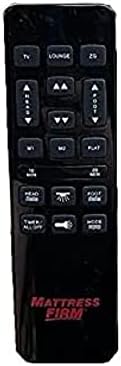
Figure 2: White Remote Control (Example with Mlily branding). This image displays the button layout and functions.

Figure 3: Black Remote Control (Example with Mattress Firm branding). This image displays the button layout and functions.
ปุ่มฟังก์ชั่น:
- TV / LOUNGE / ZG (Zero Gravity): Preset positions for watching TV, lounging, or achieving a zero-gravity posture.
- ลูกศรชี้ขึ้น/ลง: ปรับส่วนหัวของเตียงขึ้นหรือลงได้
- ลูกศรยก/วางเท้า: ปรับส่วนปลายเท้าของเตียงขึ้นหรือลง
- M1 / M2: Memory preset buttons to save and recall your favorite bed positions.
- แบน: คืนเตียงกลับสู่ตำแหน่งเรียบสนิท
- 10 MIN / 20 MIN: Timer buttons for massage functions (if applicable to your base).
- HEAD / FOOT Massage: Activates or adjusts massage intensity for the head or foot sections.
- TIMER / ALL OFF: Turns off all active functions, including massage and under-bed lighting.
- LIGHT (Under Bed Light): Toggles the under-bed lighting on or off.
- เส้นทาง: Cycles through different massage modes (if applicable).
Note: Button labels and specific functions may vary slightly depending on the adjustable base model. Refer to your adjustable base's manual for full details on its features.
5. คำแนะนำในการตั้งค่าและการจับคู่
To use your new Richmat Wireless Remote Control, it must first be paired with your adjustable bed base. The pairing process is typically straightforward.
5.1. การติดตั้งแบตเตอรี่
- ค้นหาช่องใส่แบตเตอรี่ที่ด้านหลังของรีโมทคอนโทรล
- เลื่อนเปิดฝาครอบแบตเตอรี่
- Insert the required batteries (typically AAA, check markings inside the compartment) according to the polarity indicators (+ and -).
- ปิดฝาครอบแบตเตอรี่ให้แน่น
5.2. การจับคู่รีโมทคอนโทรล
The exact pairing procedure may vary slightly depending on your adjustable bed base model. Generally, the steps involve:
- รับประกันการจ่ายไฟ: Make sure your adjustable bed base is plugged into a working power outlet.
- Locate Pairing Button: Find the pairing button on the control box of your adjustable bed base. This box is usually located under the bed frame, near the head or foot end. It may be labeled "PAIR," "SYNC," or have a small button.
- Activate Pairing Mode on Base: Press and hold the pairing button on the control box for approximately 3-5 seconds until you hear a beep or see an indicator light flash. This indicates the base is in pairing mode.
- Activate Pairing Mode on Remote: While the base is in pairing mode (within 10-20 seconds), press and hold the "FLAT" button on your new remote control. Some remotes may require pressing and holding the "HEAD UP" and "FOOT DOWN" buttons simultaneously, or a dedicated "PAIR" button if present.
- ยืนยันการจับคู่: Release the button(s) on the remote when the indicator light on the control box stops flashing or you hear another beep, signifying successful pairing.
- ทดสอบฟังก์ชันการทำงาน: Test all remote functions (head/foot adjustment, flat, presets) to ensure proper operation.
If you encounter difficulties, refer to the original instruction manual for your specific adjustable bed base model for precise pairing instructions.
6. คู่มือการใช้งาน
Once paired, your Richmat Wireless Remote Control allows you to easily adjust your bed to your desired comfort position.
- Adjusting Head/Foot: กดปุ่มค้างไว้ หัวขึ้น/ลง or FOOT UP/DOWN arrows to move the respective sections. Release the button when the desired position is reached.
- ตำแหน่งแบน: กดปุ่ม แบน button to return the bed to a completely flat position.
- ตำแหน่งที่กำหนดไว้ล่วงหน้า: กด TV, เลานจ์, หรือ ZG (Zero Gravity) to move the bed to these pre-programmed comfort positions.
- Saving Memory Presets (M1/M2):
- Adjust the bed to your desired position.
- กดปุ่มค้างไว้ M1 or M2 button for approximately 3 seconds until the bed slightly moves or the remote indicates the position is saved.
- To recall a saved position, simply press the M1 or M2 ปุ่ม.
- Massage Functions (if applicable):
- กด HEAD Massage or FOOT Massage to activate the massage for the respective section. Press again to cycle through intensity levels or modes.
- ใช้ 10 นาที or 20 นาที buttons to set a timer for the massage function.
- กด โหมด to change massage patterns.
- Under Bed Light: กดปุ่ม แสงสว่าง button to turn the under-bed light on or off.
- ปิดทั้งหมด: กด TIMER / ALL OFF to stop all active functions.
7. การบำรุงรักษา
7.1. การเปลี่ยนแบตเตอรี่
When the remote control's range decreases or buttons become unresponsive, it's time to replace the batteries.
- เลื่อนเปิดฝาช่องใส่แบตเตอรี่ที่ด้านหลังของรีโมท
- ถอดแบตเตอรี่เก่าออก
- Insert new batteries (e.g., AAA) ensuring correct polarity (+ and -).
- ปิดฝาครอบแบตเตอรี่ให้แน่น
- ทิ้งแบตเตอรี่เก่าด้วยความรับผิดชอบตามข้อบังคับท้องถิ่น
7.2. การทำความสะอาด
To clean the remote control, use a soft, dry cloth. Do not use liquid cleaners, aerosols, or abrasive materials, as these can damage the remote's surface or internal components.
8 การแก้ไขปัญหา
| ปัญหา | สาเหตุที่เป็นไปได้ | สารละลาย |
|---|---|---|
| รีโมตไม่ตอบสนอง |
|
|
| Bed base only moves in one direction or partially. |
|
|
| ระยะห่างไกลไม่ดี |
|
|
If troubleshooting steps do not resolve the issue, please refer to the support section for further assistance.
9. ข้อมูลจำเพาะ
- หมายเลขรุ่น: 685650227221
- ผู้ผลิต: ริชแมท
- อุปกรณ์ที่รองรับ: Mlily, Bed Tech, or Mattress Firm 3000 Richmat adjustable bases (specific models HJH55, Classic Brands Innova NU203CB, and others featuring identical remote as pictured).
- จำนวนสูงสุดของอุปกรณ์ที่รองรับ: 1 (one remote per base)
- ตัวเลือกสี: White, Silver (Black)
- คุณสมบัติพิเศษ: การออกแบบตามหลักสรีรศาสตร์
10. ข้อมูลการรับประกัน
Specific warranty details for this Richmat Wireless Remote Control are not provided in the product information. Please refer to the documentation that came with your adjustable bed base or contact the original seller/manufacturer of the remote for warranty terms and conditions.
11. การสนับสนุนลูกค้า
If you require further assistance, have questions, or need to report an issue that cannot be resolved using the troubleshooting guide, please contact the seller or manufacturer of your adjustable bed base or the remote control.
For purchases made through Amazon, you may contact the seller, UTAH RUSTIC FURNITURE, via your Amazon order history for support.


