การแนะนำ
This manual provides detailed instructions for the Pyle PKBRD8100 Portable Foldable 88-Key Digital Piano Keyboard. Please read this manual thoroughly before using the product to ensure proper operation and to maximize your musical experience. Keep this manual for future reference.
มีอะไรอยู่ในกล่อง
เมื่อแกะกล่องแล้ว โปรดตรวจสอบให้แน่ใจว่าสินค้าทั้งหมดที่ระบุไว้ด้านล่างนี้มีอยู่และอยู่ในสภาพดี:
- คีย์บอร์ดเปียโนแบบพกพาและพับได้
- สายชาร์จ USB
- อะแดปเตอร์ USB
- คู่มือการใช้งาน (เอกสารนี้)
- Piano Bag for Easy Storage & Travel
- ซัสเทนเพดัล

Image: All components included in the Pyle PKBRD8100 package, neatly arranged. This includes the foldable keyboard, a sustain pedal, a USB charger, a USB cable, and a black carrying bag.
คุณสมบัติผลิตภัณฑ์
The Pyle PKBRD8100 Digital Piano Keyboard offers a range of features designed for versatility and ease of use:
- 88 ปุ่มขนาดเต็ม: Provides a comprehensive range for musical expression.
- การออกแบบพับได้: ช่วยให้จัดเก็บได้อย่างกะทัดรัดและพกพาได้สะดวก
- การเชื่อมต่อบลูทูธ: Enables connection to smart devices for MIDI and audio streaming.
- 129 Selectable Tones: A wide variety of instrument sounds.
- 128 Rhythm Styles: Accompaniment options for practice and performance.
- Built-in Full Range Stereo Speakers: เพื่อให้ได้เสียงที่คมชัด
- Record & Playback Mode: จับและบันทึกview your performances.
- อินพุตเหยียบอย่างยั่งยืน: For expressive playing.
- Aux (3.5mm) Input Jack / Mic Input: For connecting external audio sources or a microphone.
- แจ็คหูฟัง (3.5 มม.): สำหรับคลินิกส่วนตัว
- Digital LCD Display & LED Indicators: For easy navigation and status updates.
- แบตเตอรี่แบบชาร์จไฟได้ในตัว: สำหรับใช้พกพา
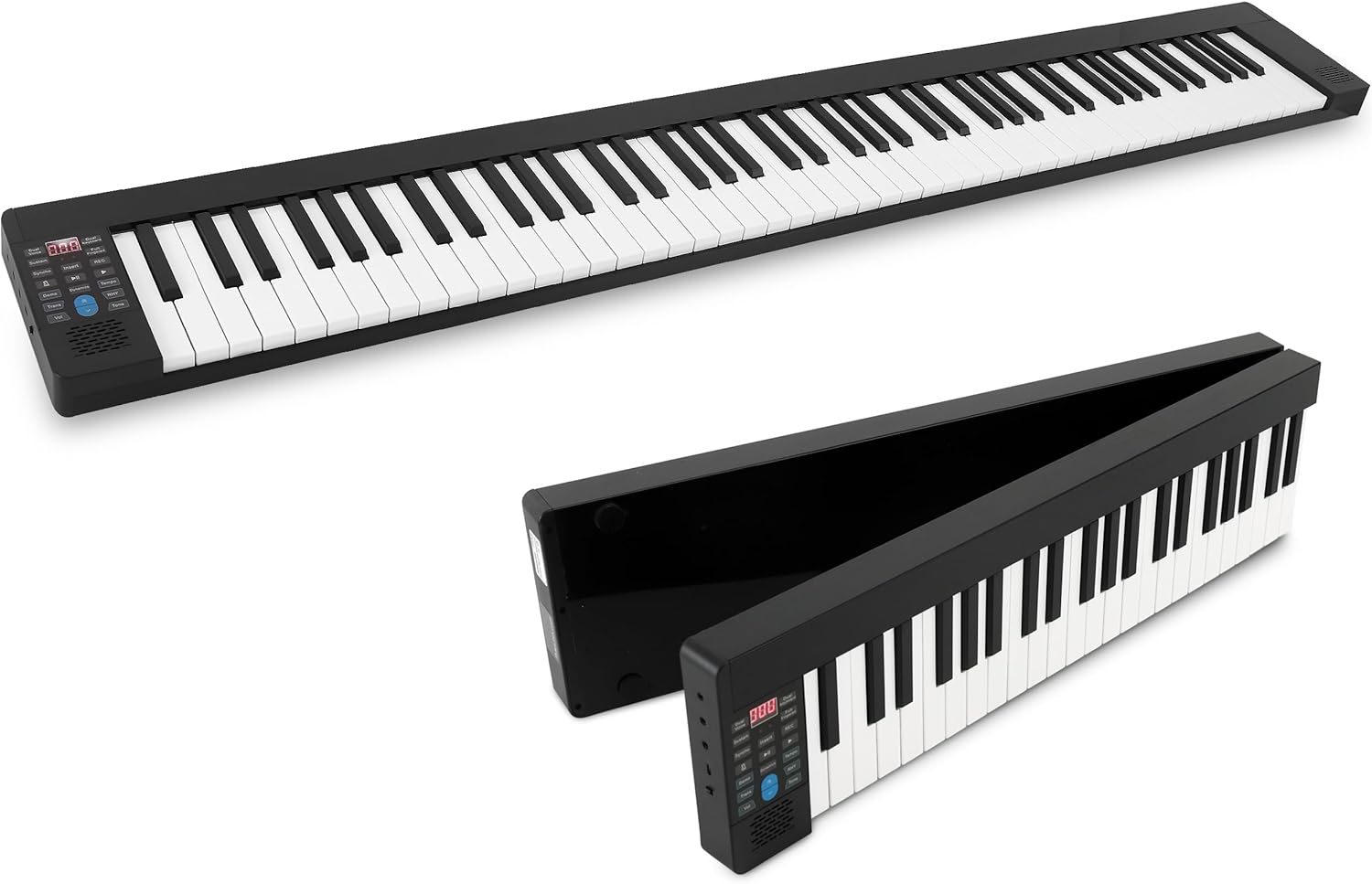
Image: The Pyle PKBRD8100 digital piano keyboard fully extended, showcasing its 88 keys and compact design.

Image: The Pyle PKBRD8100 keyboard in the process of folding, highlighting its 180-degree foldable design and a user carrying it in the included travel bag.
การตั้งค่า
- แกะคีย์บอร์ดออก: นำส่วนประกอบทั้งหมดออกจากบรรจุภัณฑ์อย่างระมัดระวัง
- กางแป้นพิมพ์ออก: Gently unfold the keyboard until it lies flat and locks into position. Ensure it is placed on a stable, flat surface.
- การเชื่อมต่อไฟฟ้า:
- การชาร์จ: Connect the USB charger cable to the keyboard's USB port and the USB adapter to a power outlet. The built-in battery will begin charging.
- Direct Power: The keyboard can also be operated directly from the power adapter while charging.
- Sustain Pedal Connection: Insert the sustain pedal cable into the designated sustain pedal interface on the keyboard.
- Headphones/External Speakers (Optional): For private practice, connect headphones to the 3.5mm headphone jack. To connect to external speakers, use the Aux (3.5mm) Input Jack.
- การจับคู่บลูทูธ (อุปกรณ์เสริม): To connect via Bluetooth, ensure Bluetooth is enabled on your smart device. The keyboard will appear as an available device for pairing.

ภาพ: รายละเอียด view of the input/output ports on the Pyle PKBRD8100, including the headphone jack, USB port for power/data, and the sustain pedal connection point.
คำแนะนำการใช้งาน
แผงควบคุมโอเวอร์view

Image: A detailed diagram illustrating the various buttons and their functions on the Pyle PKBRD8100 control panel, including LED display, volume, tone, rhythm, and function buttons.
- เปิด/ปิดเครื่อง: Locate the power button on the side or control panel to turn the keyboard on or off.
- การควบคุมระดับเสียง: Use the 'Vol' buttons (Decrease/Increase) to adjust the master volume.
- การเลือกโทนเสียง: Press the 'Tone' button, then use the arrow buttons to cycle through the 129 available tones. The selected tone number will appear on the LED display.
- การเลือกจังหวะ: Press the 'RHY' (Rhythm) button, then use the arrow buttons to select from the 128 rhythm styles. Press the 'START/STOP' button to begin or end the rhythm.
- เพลงเดโม่: Press the 'Demo' button to play a demonstration song. Press it again to stop.
- บันทึกและเล่น:
- Press 'REC' to start recording your performance.
- Press 'PLAY' to listen to your recorded performance.
- รักษาการทำงาน: Press the 'Sustain' button to activate or deactivate the sustain effect. The connected sustain pedal will also control this function.
- เสียงคู่: Press the 'Dual Voice' button to layer two different instrument sounds simultaneously.
- เครื่องเมตรอนอม: Press the 'Metronome' button to activate the metronome function for timing practice.
- Bluetooth MIDI/Audio:
- บลูทูธ MIDI: Connect to music apps on your smart device for learning or composition.
- บลูทู ธ เสียง: Stream audio from your device through the keyboard's speakers.

ภาพ: โอเวอร์view of the Bluetooth and MIDI capabilities, demonstrating how the keyboard connects to computers and mobile devices for editing, creating music, and using learning applications.
การซ่อมบำรุง
- การทำความสะอาด: Use a soft, dry cloth to wipe the surface of the keyboard. Do not use liquid cleaners, waxes, or solvents, as they may damage the finish.
- พื้นที่จัดเก็บ: When not in use, fold the keyboard and store it in the provided piano bag to protect it from dust and damage. Store in a cool, dry place away from direct sunlight and extreme temperatures.
- การดูแลแบตเตอรี่ เพื่อยืดอายุการใช้งานแบตเตอรี่ ควรหลีกเลี่ยงการปล่อยให้แบตเตอรี่หมดจนเกลี้ยงบ่อยๆ ชาร์จคีย์บอร์ดเป็นประจำ แม้ว่าจะไม่ได้ใช้งานตลอดเวลาก็ตาม
- การจัดการ: ควรหลีกเลี่ยงการทำแป้นพิมพ์ตกหรือการกระแทกอย่างแรง และอย่าวางสิ่งของหนักทับแป้นพิมพ์
การแก้ไขปัญหา
| ปัญหา | สาเหตุที่เป็นไปได้ | สารละลาย |
|---|---|---|
| แป้นพิมพ์ไม่เปิดใช้งาน | แบตเตอรี่หมดหรืออะแดปเตอร์ไฟไม่ได้เชื่อมต่ออย่างถูกต้อง | Connect the USB charger cable and adapter to a power outlet. Ensure the power button is pressed. |
| ไม่มีเสียงออกจากลำโพง | Volume is too low, headphones are connected, or external speakers are not properly connected. | Increase the volume. Disconnect headphones if not needed. Check connections to external speakers. |
| การเชื่อมต่อบลูทูธล้มเหลว | Bluetooth is not enabled on the device, keyboard is not in pairing mode, or interference. | Ensure Bluetooth is active on your device. Restart both the keyboard and your device. Move closer to the keyboard. |
| แป้นเหยียบ Sustain ไม่ทำงาน | Pedal not fully inserted or sustain function is off. | Ensure the sustain pedal cable is securely connected. Press the 'Sustain' button on the control panel to activate the function. |
ข้อมูลจำเพาะ
- ปุ่มคีย์บอร์ด: 88 คีย์ขนาดเต็ม
- Preset Selectable Tones: 129 โทนเสียง
- Preset Selectable Rhythms: 128 จังหวะ
- อินเทอร์เฟซเสียง: แจ็คอินพุต Aux (3.5 มม.) / อินพุตไมโครโฟน
- ระดับเสียงสูงสุด: สูงถึง 110 เดซิเบล
- USB/สายไฟความยาว: 3.9 ฟุต (1.2 เมตร)
- วัสดุก่อสร้าง: Engineered ABS, PC, PVC
- แบตเตอรี่แบบชาร์จไฟได้ในตัว: ลิเธียมไอออน 3.7V, 1100mAh
- แหล่งจ่ายไฟ: 120/240V, USB 5V/1A
- Piano Dimensions (Unfolded): 28.7'' x 9.0'' x 2.6'' inches (72.9 cm x 22.9 cm x 6.6 cm)
- น้ำหนักสินค้า: ประมาณ 12.27 ปอนด์ (5.57 กก.)
- เทคโนโลยีการเชื่อมต่อ: บลูทูธ
- ซอฟต์แวร์ที่รองรับ: Pop piano, GarageBand, Perfect Piano (via Bluetooth MIDI)
- ความเข้ากันได้ของระบบปฏิบัติการ: iOS, Android, Windows, macOS (via Bluetooth MIDI)
การรับประกันและการสนับสนุน
สำหรับข้อมูลการรับประกันและการสนับสนุนทางเทคนิค โปรดดูที่ Pyle อย่างเป็นทางการ webตรวจสอบรายละเอียดเพิ่มเติมได้ที่เว็บไซต์หรือติดต่อฝ่ายบริการลูกค้าโดยตรง โดยปกติรายละเอียดจะระบุไว้ในเอกสารการซื้อหรือในเว็บไซต์ของผู้ผลิต webเว็บไซต์.
ไพล์ ออฟฟิเชียล Webเว็บไซต์: www.pyleusa.com


