LONPOO Portable Boombox Instruction Manual
รุ่น: LP-D03
การแนะนำ
ขอบคุณสำหรับการซื้อasing the LONPOO Portable Boombox. This device offers versatile audio playback options including CD, Bluetooth, USB, AUX, and FM radio, all in a compact and portable design. Please read this manual carefully before using the product to ensure proper operation and to maximize your listening experience.
มีอะไรอยู่ในกล่อง
- LONPOO Portable CD Boombox (Model: LP-D03)
- 2-Prong US AC Power Cord (110V-240V)
- สายเสริม
- คู่มือการใช้งาน
คุณสมบัติผลิตภัณฑ์
- โหมดการเล่นหลายโหมด: Supports CD, CD-R, CD-RW, MP3 CD, Bluetooth, USB, AUX-in, and FM Radio.
- ลำโพงสเตอริโอในตัว: Equipped with 2x2W stereo speakers for clear audio.
- การออกแบบพกพา: Compact and lightweight with a convenient carrying handle.
- ตัวเลือกพลังงาน: Operates via AC power or 4 x C-size batteries (not included) for portable use.
- จอแสดงผล LCD: Blue backlit LCD for easy viewing of mode and track information.
- แจ็คหูฟัง: 3.5mm headphone output for private listening.
สินค้าเกินview
Familiarize yourself with the various parts and controls of your LONPOO Portable Boombox.
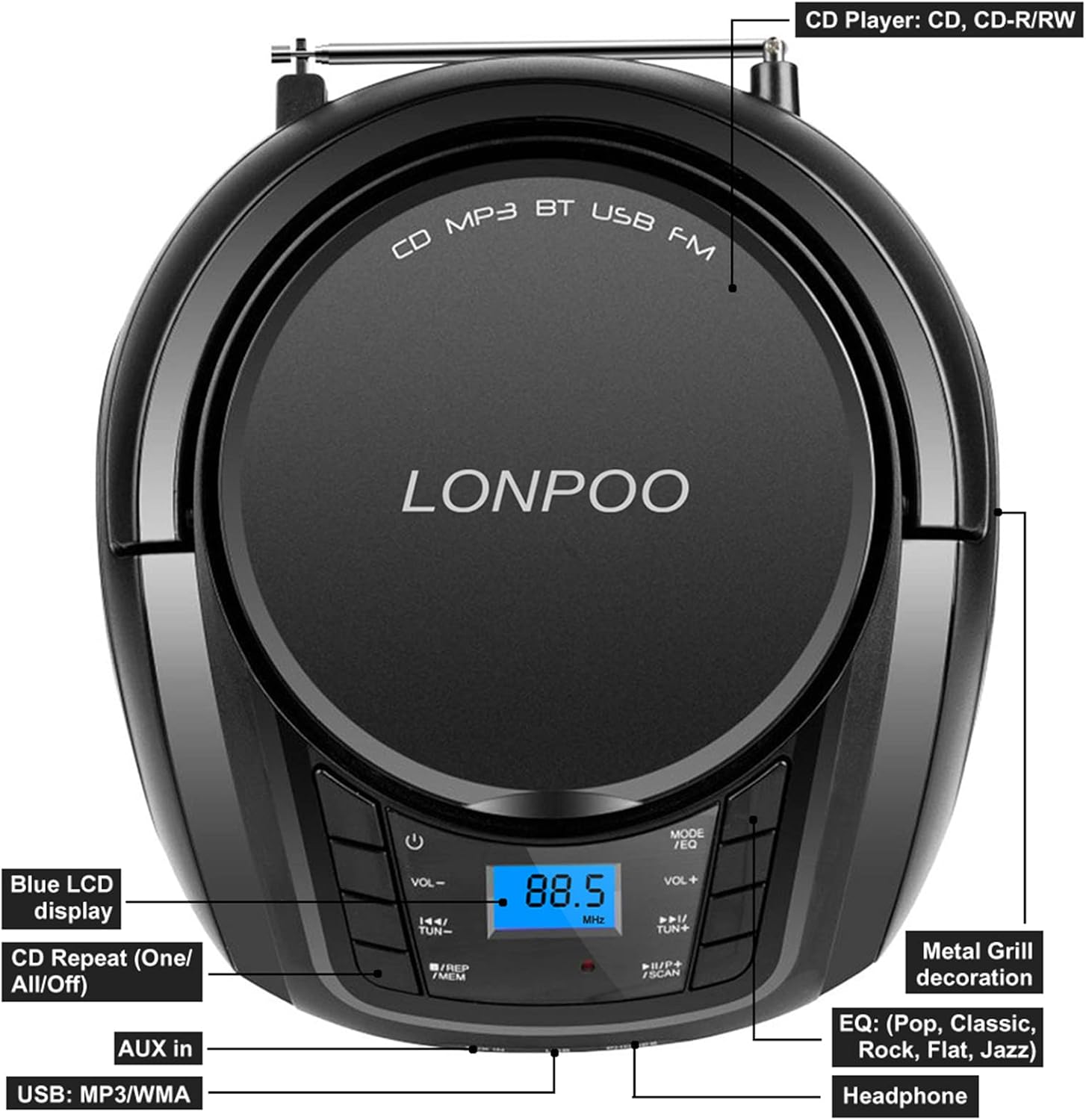
Figure 1: Top Panel Controls and Features
ภาพนี้แสดงด้านบน view of the boombox, highlighting the Blue LCD display, CD Repeat (One/All/Off) function, AUX in port, USB port, Headphone jack, Metal Grill decoration, and EQ (Pop, Classic, Rock, Flat, Jazz) settings.

Figure 2: Side and Rear Components
This image illustrates the Hang Handle, FM Antenna, and AC Port on the boombox. It also indicates support for MP3 CD/CD-R/CD-RW playback and the presence of 2x stereo speakers.
การตั้งค่า
การจ่ายไฟให้กับบูมบ็อกซ์
The LONPOO Portable Boombox can be powered by either AC electricity or batteries.
- ไฟฟ้ากระแสสลับ: Insert the supplied 2-prong AC power cord into the AC port on the back of the boombox and plug the other end into a standard 110V-240V wall outlet.
- พลังงานแบตเตอรี่: For portable use, open the battery compartment on the bottom of the unit and insert 4 x C-size (UM2) 1.5V batteries (not included), ensuring correct polarity.

Figure 3: Power Supply Options
This diagram illustrates both the battery compartment for 4 C batteries (not included) and the AC power connection (110V-240V 50/60Hz) for the boombox.
FM Antenna Setup
For optimal FM radio reception, extend the telescopic FM antenna located on the back of the unit. Adjust its position for the best signal clarity.

Figure 4: FM Antenna Extended
This image shows the boombox with its telescopic FM antenna fully extended for improved radio signal reception.
คำแนะนำการใช้งาน
การควบคุมทั่วไป
- ปุ่มเพาเวอร์ (⏻): กดเพื่อเปิดหรือปิดเครื่อง
- ปุ่มควบคุมระดับเสียง (VOL- / VOL+): ปรับระดับเสียงหลัก
- Mode Button (MODE/EQ): Press repeatedly to cycle through different playback modes: CD, Bluetooth (BT), USB, AUX, FM Radio. Long press to cycle through EQ presets (Pop, Classic, Rock, Flat, Jazz).
- Tune/Skip Buttons (◀◀ / ▶▶):
- In CD/USB mode: Press to skip to the previous/next track.
- In FM mode: Press to manually tune the frequency.
- ปุ่มเล่น/หยุดชั่วคราว (▶▶/SCAN):
- In CD/USB/Bluetooth mode: Press to play or pause playback.
- In FM mode: Long press to auto-scan and save available radio stations.
- Repeat Button (REP/MEM):
- In CD/USB mode: Press repeatedly to select repeat one track, repeat all tracks, or turn repeat off.
- In FM mode: Press to recall saved stations.

รูปที่ 5: รายละเอียดแผงควบคุม
ภาพนี้แสดงให้เห็นภาพระยะใกล้ view of the main control buttons, including power, volume, mode, track skip/tune, play/pause/scan, and repeat/memory functions.
การเล่นซีดี
- กดปุ่ม เปิด/ปิด ปุ่มสำหรับเปิดฝาช่องใส่ซีดี
- วางแผ่นซีดี (ซีดี, ซีดี-R, ซีดี-RW หรือซีดี MP3) อย่างระมัดระวังบนแกนหมุนโดยให้ด้านที่มีฉลากหงายขึ้น
- ปิดฝาช่องใส่ซีดีให้สนิท
- กดปุ่ม โหมด button until "CD" appears on the LCD display.
- แผ่นซีดีจะเริ่มเล่นโดยอัตโนมัติ หากไม่เล่น ให้กดปุ่ม ▶▶ ปุ่ม.
- ใช้ ◀◀ / ▶▶ ปุ่มสำหรับข้ามเพลง
- กดปุ่ม ผู้แทน button to set repeat mode (single track, all tracks).
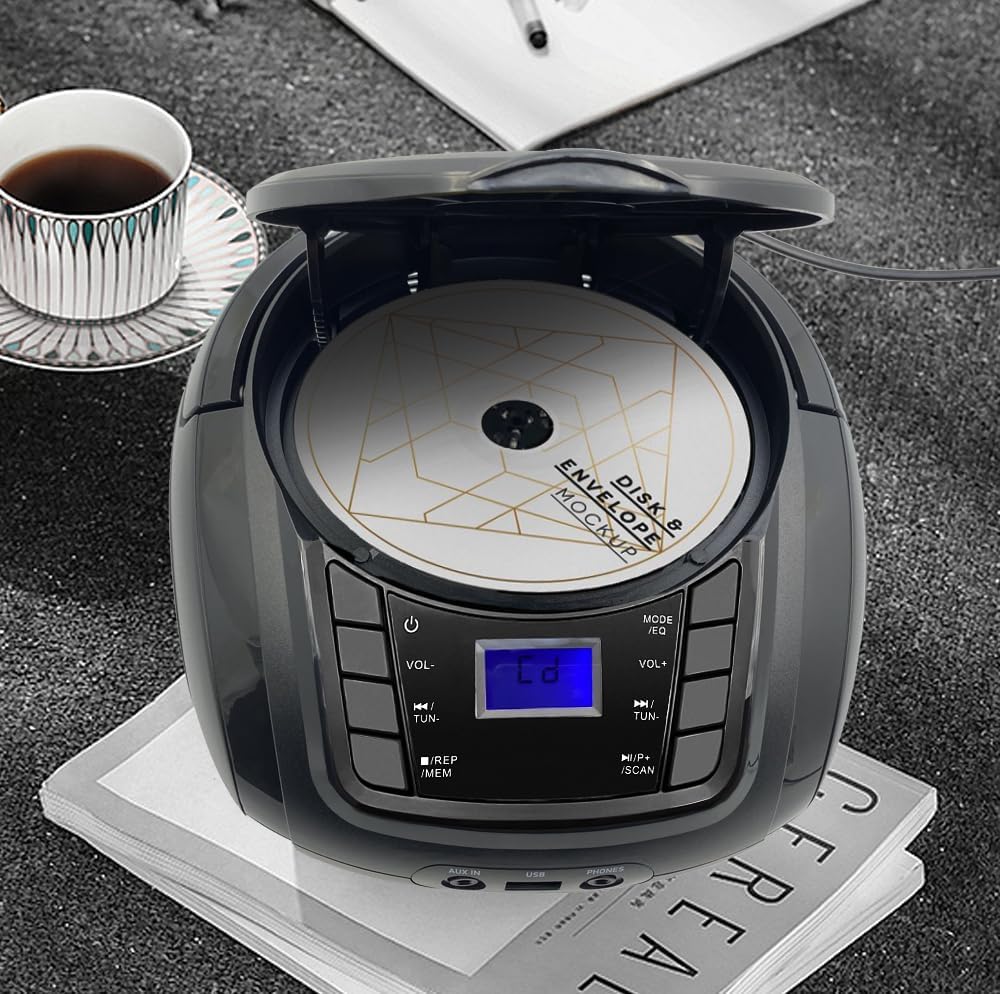
Figure 6: CD Compartment Open
This image shows the boombox with its CD compartment open, ready for disc insertion or removal.
การใช้งานบลูทูธ
- กดปุ่ม โหมด button until "BT" (Bluetooth) appears on the LCD display. The unit will enter pairing mode, indicated by a flashing "BT" icon.
- เปิดใช้งานบลูทูธบนอุปกรณ์พกพาของคุณ (สมาร์ทโฟน แท็บเล็ต ฯลฯ) แล้วค้นหาอุปกรณ์ที่ใช้งานได้
- Select "LONPOO LP-D03" from the list of devices.
- Once paired, the "BT" icon will stop flashing and remain solid. You can now play audio from your device through the boombox.
- ใช้บูมบ็อกซ์ ◀◀ / ▶▶ buttons to control track skipping, or control directly from your paired device.

รูปที่ 7: การเชื่อมต่อบลูทูธ
This image depicts the boombox wirelessly connected to a smartphone via Bluetooth, ready for audio streaming.
การเล่นผ่าน USB
- ใส่แฟลชไดรฟ์ USB ที่มีเสียง MP3 หรือ WMA files into the USB port on the front of the boombox.
- กดปุ่ม โหมด button until "USB" appears on the LCD display.
- The unit will automatically detect and begin playing the audio fileจากไดรฟ์ USB
- ใช้ ◀◀ / ▶▶ ปุ่มสำหรับข้ามเพลง
- กดปุ่ม ผู้แทน button to set repeat mode (single track, all tracks).

Figure 8: USB Playback Setup
This image shows the boombox positioned next to a USB flash drive, indicating its capability for USB audio playback.
อินพุต AUX
- Connect one end of the supplied auxiliary cable to the AUX-in port on the front of the boombox.
- Connect the other end of the auxiliary cable to the headphone jack or audio output of your external audio device (e.g., MP3 player, smartphone).
- กดปุ่ม โหมด button until "AUX" appears on the LCD display.
- Play audio from your external device. The sound will be routed through the boombox's speakers.
- Volume control is managed by the boombox's volume buttons and your external device's volume.
วิทยุเอฟเอ็ม
- Extend the FM telescopic antenna for best reception.
- กดปุ่ม โหมด button until "FM" appears on the LCD display.
- สแกนอัตโนมัติ: กดค้างไว้ ▶▶/SCAN button to automatically scan and save available FM radio stations. The unit will store stations in memory.
- ปรับด้วยตนเอง: กดปุ่ม ◀◀ / ▶▶ buttons briefly to manually tune to a specific frequency.
- เรียกคืนการตั้งค่าล่วงหน้า: กดปุ่ม REP/MEM button to cycle through saved radio stations.
การใช้หูฟัง
To listen privately, plug any standard 3.5mm stereo headphones (not included) into the "PHONES" jack on the front of the boombox. The internal speakers will automatically mute when headphones are connected.
การซ่อมบำรุง
- การทำความสะอาด: ใช้ผ้านุ่มและแห้งเช็ดทำความสะอาดภายนอกตัวเครื่อง ห้ามใช้น้ำยาทำความสะอาดที่มีฤทธิ์กัดกร่อนหรือตัวทำละลาย
- การดูแลเลนส์ซีดี: หากเกิดปัญหาในการเล่นซีดี ให้ใช้แผ่นทำความสะอาดเลนส์ซีดีที่มีจำหน่ายทั่วไป
- พื้นที่จัดเก็บ: When not in use for extended periods, remove batteries and store the unit in a cool, dry place away from direct sunlight and extreme temperatures.
- การระบายอากาศ : Ensure proper ventilation around the unit during operation to prevent overheating. Do not block ventilation openings.
การแก้ไขปัญหา
| ปัญหา | สาเหตุที่เป็นไปได้ | สารละลาย |
|---|---|---|
| ไม่มีไฟฟ้า | ไม่ได้เสียบสายไฟ; แบตเตอรี่หมดหรือใส่ไม่ถูกต้อง | ตรวจสอบการเชื่อมต่อสายไฟ AC เปลี่ยนแบตเตอรี่หรือตรวจสอบให้แน่ใจว่าขั้วถูกต้อง |
| ไม่มีเสียง | ระดับเสียงเบาเกินไป; เชื่อมต่อหูฟังแล้ว; เลือกโหมดไม่ถูกต้อง | Increase volume; Disconnect headphones; Press MODE button to select correct source. |
| แผ่นซีดีสะดุดหรือเล่นไม่ได้ | CD dirty or scratched; CD inserted incorrectly; CD format not supported. | Clean CD with a soft cloth; Reinsert CD correctly; Ensure it's an audio CD or compatible MP3 CD. |
| การรับสัญญาณ FM ไม่ดี | Antenna not extended or positioned correctly; Weak signal area. | ยืดและปรับเสาอากาศแบบยืดหดได้จนสุด ลองย้ายเครื่องไปยังตำแหน่งอื่นดู |
| บลูทูธไม่จับคู่ | เครื่องเล่นเพลงไม่อยู่ในโหมดบลูทูธ; อุปกรณ์อยู่ไกลเกินไป; บลูทูธไม่ได้เปิดใช้งานบนอุปกรณ์ภายนอก | Ensure boombox is in BT mode; Move device closer; Enable Bluetooth on your device and rescan. |
ข้อมูลจำเพาะ
| คุณสมบัติ | รายละเอียด |
|---|---|
| หมายเลขรุ่น | แผ่นเสียง -D03 |
| ขนาดสินค้า (กว้าง x ยาว x สูง) | 9.3 x 8.3 x 4.5 นิ้ว (23.6 x 21.1 x 11.4 ซม.) |
| น้ำหนักสินค้า | 2.65 ปอนด์ (1.2 กก.) |
| เทคโนโลยีการเชื่อมต่อ | อุปกรณ์เสริม, บลูทูธ, USB |
| ประเภทลำโพง | Built-In Stereo Speakers (2x2W) |
| รูปแบบดิสก์ที่รองรับ | ซีดี, ซีดี-อาร์, ซีดี-อาร์ดับเบิลยู, ซีดี MP3 |
| รูปแบบ USB ที่รองรับ | MP3, WMA |
การรับประกันและการสนับสนุน
LONPOO provides a รับประกันคืนเงินภายใน 30 วันโดยไม่มีเงื่อนไข และก รับประกันเปลี่ยนฟรี 1 ปี for this product. For any questions, technical support, or warranty claims, please contact LONPOO customer service through the retailer where you purchased the product or visit the official LONPOO webเว็บไซต์สำหรับข้อมูลการติดต่อ
โปรดเก็บใบเสร็จรับเงินไว้เป็นหลักฐานการซื้อเพื่อวัตถุประสงค์การรับประกัน


