1. คำแนะนำด้านความปลอดภัย
Please read all instructions carefully before operating the dehumidifier and retain this manual for future reference. Failure to follow these instructions may result in electric shock, fire, or personal injury.
- ตรวจสอบให้แน่ใจว่าแหล่งจ่ายไฟตรงกับปริมาตรtage ระบุไว้บนฉลากการจัดอันดับ
- ห้ามใช้งานเครื่องหากสายไฟหรือปลั๊กชำรุด หากสายไฟชำรุด จะต้องเปลี่ยนโดยผู้ผลิต ตัวแทนบริการ หรือบุคลากรที่มีคุณสมบัติเหมาะสม เพื่อหลีกเลี่ยงอันตราย
- อย่าปิดกั้นช่องอากาศเข้าหรือออก เว้นระยะห่างรอบตัวเครื่องอย่างน้อย 20 เซนติเมตร
- ห้ามสอดนิ้วหรือวัตถุแปลกปลอมเข้าไปในช่องอากาศเข้า/ออก
- Always place the unit on a level, stable surface to prevent water spillage.
- ถอดปลั๊กเครื่องก่อนทำความสะอาด เคลื่อนย้าย หรือบำรุงรักษาใดๆ
- ห้ามใช้เครื่องในบริเวณที่มีการจัดเก็บก๊าซหรือของเหลวไวไฟ
- เครื่องใช้ไฟฟ้าตัวนี้ไม่ได้มีวัตถุประสงค์เพื่อให้บุคคล (รวมทั้งเด็ก) ที่มีความบกพร่องทางร่างกาย ทางประสาทสัมผัส หรือทางจิตใจ หรือขาดประสบการณ์และความรู้ ใช้งาน เว้นแต่จะมีการดูแลหรือคำแนะนำเกี่ยวกับการใช้เครื่องใช้ไฟฟ้าโดยบุคคลที่รับผิดชอบด้านความปลอดภัยของบุคคลดังกล่าว
- ควรมีผู้ดูแลเด็กเพื่อให้แน่ใจว่าไม่ได้เล่นกับเครื่องใช้ไฟฟ้าดังกล่าว
- The refrigerant R290 is used in this dehumidifier. Handle with care and ensure proper ventilation.
2. สินค้าหมดview
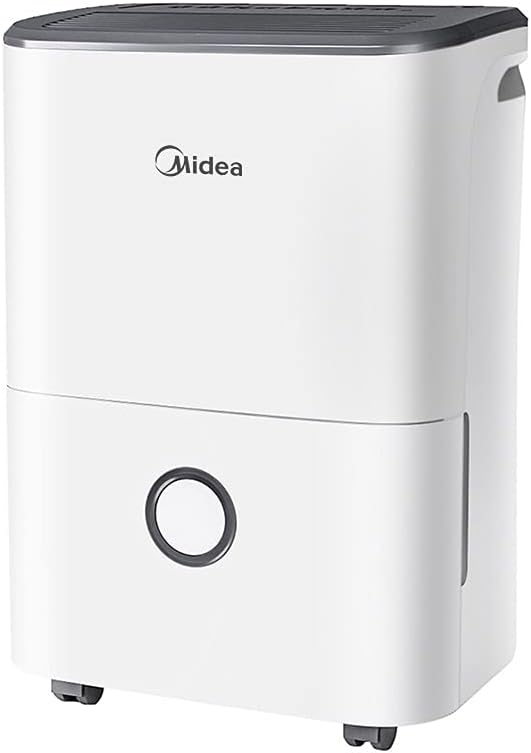
The Carrier Midea DF-20DEN7-WF is an efficient dehumidifier designed to reduce excess moisture in indoor environments, preventing issues such as condensation, mold growth, and musty odors. It is suitable for various rooms including bathrooms, cellars, laundry rooms, kitchens, and poorly ventilated areas.
คุณสมบัติหลัก:
- ประสิทธิภาพการลดความชื้นสูง: Up to 20 liters per 24 hours.
- App Capable: Remote monitoring and control via a smartphone application.
- Intelligent Dehumidifier Mode: Automatic humidity control between 45% and 55%.
- การออกแบบพกพา: Equipped with flexible wheels for easy movement.
- สารทำความเย็นที่เป็นมิตรต่อสิ่งแวดล้อม: ใช้สารทำความเย็น R290 ซึ่งเป็นสารทำความเย็นจากธรรมชาติ ปราศจากฟรีออน และปล่อยคาร์บอนต่ำ
- ตัวจับเวลา 24 ชั่วโมง: ช่วยให้สามารถกำหนดเวลาการทำงานได้
- ถังเก็บน้ำแบบถอดได้: 3-liter capacity with anti-spill features.
ส่วนประกอบของผลิตภัณฑ์:


3. การตั้งค่า
3.1 การแกะกล่อง
- นำเครื่องลดความชื้นออกจากบรรจุภัณฑ์อย่างระมัดระวัง
- นำวัสดุบรรจุภัณฑ์ เทปกาว และฟิล์มป้องกันออกทั้งหมด
- ตรวจสอบความเสียหายระหว่างการขนส่ง หากเกิดความเสียหาย ห้ามใช้งานและติดต่อฝ่ายสนับสนุนลูกค้า
3.2 การจัดวาง
- วางเครื่องลดความชื้นบนพื้นผิวที่มั่นคงและเรียบเสมอกัน ซึ่งสามารถรองรับน้ำหนักของเครื่องได้เมื่อถังเก็บน้ำเต็ม
- Ensure there is at least 20 cm (8 inches) of space around the unit for proper airflow. Do not place it against a wall or furniture that could obstruct the air inlets or outlets.
- เพื่อให้ได้ประสิทธิภาพสูงสุด โปรดปิดประตูและหน้าต่างทุกบานในห้องที่กำลังใช้งานเครื่องลดความชื้น
- หลีกเลี่ยงการวางเครื่องไว้ใกล้แหล่งความร้อนหรือโดนแสงแดดโดยตรง
3.3 Wheel Installation (Optional)
The dehumidifier comes with flexible wheels for easy mobility. These can be attached or removed as desired.
- Carefully tilt the unit to access the bottom.
- Insert the wheels into the designated slots on the base of the unit until they click into place.
- Ensure all four wheels are securely attached before returning the unit to an upright position.
3.4 การเชื่อมต่อสายไฟ
- เสียบสายไฟเข้ากับเต้ารับไฟฟ้าที่มีสายดิน
- Do not use extension cords or multi-plugs, as this may pose a fire hazard.
3.5 App Setup (Optional)
The dehumidifier is app-capable, allowing for remote monitoring and control.
- Download the Midea app from your smartphone's app store (iOS or Android).
- Follow the in-app instructions to create an account and connect your dehumidifier to your home Wi-Fi network.
- Once connected, you can control the unit, set schedules, and monitor humidity levels from your smartphone.
4. คู่มือการใช้งาน
4.1 การเปิด/ปิดเครื่อง
- To turn the unit on, press the Power button on the control panel. The unit will start operating in its default mode.
- To turn the unit off, press the Power button again.
4.2 การตั้งค่าระดับความชื้นที่ต้องการ
The dehumidifier features an intelligent dehumidifier mode that automatically controls room humidity within a comfortable range.
- Press the 'Mode' or 'Humidity' button (refer to control panel icons) to cycle through available humidity settings or modes.
- The intelligent mode aims to maintain humidity between 45% and 55% depending on the room temperature.
- You may also be able to manually set a target humidity percentage using the '+' and '-' buttons.
4.3 ฟังก์ชั่นจับเวลา
The 24-hour timer allows you to schedule when the unit turns on or off.
- To set Auto-On Timer: With the unit off, press the 'Timer' button. Use '+' and '-' to set the desired delay (in hours) before the unit turns on.
- To set Auto-Off Timer: With the unit on, press the 'Timer' button. Use '+' and '-' to set the desired delay (in hours) before the unit turns off.
- The timer indicator light will illuminate when the timer is active.
4.4 การจัดการถังเก็บน้ำ
The dehumidifier will automatically stop operating when the 3-liter water tank is full. The 'Tank Full' indicator light will illuminate.
- ดึงถังน้ำออกจากด้านหน้าเครื่องอย่างระมัดระวัง
- เทน้ำที่เก็บรวมไว้ในอ่างล้างจานหรือท่อระบายน้ำ
- Slide the empty water tank back into the unit until it is securely in place. The unit will resume operation automatically.
4.5 การระบายน้ำอย่างต่อเนื่อง (ทางเลือก)
For continuous operation without needing to empty the water tank, you can connect a drain hose (not included) to the continuous drainage port on the back of the unit. Ensure the hose is sloped downwards to allow gravity drainage.
5. การบำรุงรักษา
การบำรุงรักษาตามปกติจะช่วยให้เครื่องลดความชื้นทำงานได้อย่างเหมาะสมที่สุดและยืดอายุการใช้งานของเครื่องลดความชื้นของคุณ
5.1 การทำความสะอาดแผ่นกรองอากาศ
ควรทำความสะอาดตัวกรองอากาศทุกสองสัปดาห์หรือบ่อยกว่านั้น ขึ้นอยู่กับการใช้งานและคุณภาพอากาศ
- ปิดเครื่องลดความชื้นและถอดปลั๊กออกจากเต้าเสียบไฟฟ้า
- Locate the air filter (usually at the back or side of the unit). Remove it carefully.
- Clean the filter with a vacuum cleaner to remove dust and debris. For heavy dirt, wash it gently with warm, soapy water.
- Rinse the filter thoroughly and allow it to air dry completely before reinstalling. Do not expose to direct sunlight or high heat.
- ใส่แผ่นกรองแห้งกลับเข้าไปในตัวเครื่องอีกครั้ง
5.2 การทำความสะอาดภายนอก
- เช็ดด้านนอกของตัวเครื่องด้วยผ้านุ่มdamp ผ้า.
- ห้ามใช้สารเคมีรุนแรง น้ำยาทำความสะอาดที่มีฤทธิ์กัดกร่อน หรือตัวทำละลาย เนื่องจากอาจทำให้พื้นผิวเสียหายได้
5.3 การทำความสะอาดถังเก็บน้ำ
ทำความสะอาดถังเก็บน้ำเป็นระยะเพื่อป้องกันการเจริญเติบโตของเชื้อราและตะไคร่น้ำ
- นำถังน้ำออกและเทน้ำที่เหลืออยู่ออก
- ล้างถังด้วยผงซักฟอกอ่อนๆ และน้ำอุ่น
- ล้างให้สะอาดและปล่อยให้แห้งเองตามธรรมชาติก่อนนำกลับไปใส่ในเครื่อง
5.4 พื้นที่จัดเก็บ
หากจะไม่ใช้เครื่องเป็นระยะเวลานาน:
- ล้างถังน้ำและทำความสะอาด
- ทำความสะอาดตัวกรองอากาศ
- ถอดปลั๊กเครื่องและม้วนสายไฟให้เรียบร้อย
- ควรวางเครื่องลดความชื้นในแนวตั้งในที่แห้งและเย็น หลีกเลี่ยงแสงแดดโดยตรงและอุณหภูมิที่สูงหรือต่ำเกินไป
6 การแก้ไขปัญหา
ก่อนติดต่อฝ่ายบริการลูกค้า โปรดดูคำแนะนำในการแก้ไขปัญหาต่อไปนี้สำหรับปัญหาทั่วไป
| ปัญหา | สาเหตุที่เป็นไปได้ | สารละลาย |
|---|---|---|
| เครื่องไม่เปิด | ไม่มีแหล่งจ่ายไฟ สายไฟไม่ได้เสียบเข้าที่อย่างแน่นหนา Water tank full or not properly installed. | ตรวจสอบเต้ารับไฟฟ้า Ensure power cord is firmly plugged in. Empty water tank and ensure it is correctly seated. |
| เครื่องลดความชื้นไม่สามารถเก็บน้ำได้ | อุณหภูมิห้องต่ำเกินไป กรองอากาศอุดตัน ตั้งค่าความชื้นสูงเกินไป ประตู/หน้าต่างเปิดอยู่ | เครื่องลดความชื้นทำงานได้ดีที่สุดที่อุณหภูมิสูงกว่า 5 องศาเซลเซียส (41 องศาฟาเรนไฮต์) ทำความสะอาดตัวกรองอากาศ ลดระดับความชื้นที่ต้องการลง ปิดประตูและหน้าต่างทั้งหมด |
| หน่วยมีเสียงดัง | เครื่องไม่ได้วางอยู่บนพื้นผิวที่เรียบ กรองอากาศอุดตัน พัดลมอุดตัน | วางเครื่องไว้บนพื้นผิวที่เรียบและมั่นคง ทำความสะอาดตัวกรองอากาศ Check for any obstructions in the fan area. |
| น้ำรั่วออกจากตัวเครื่อง | Water tank not properly installed. Unit is tilted. ท่อระบายน้ำต่อเนื่องอุดตันหรือต่อไม่ถูกต้อง | Reinstall water tank correctly. Ensure unit is on a level surface. Check and clear the drainage hose, ensure proper slope. |
7. ข้อมูลจำเพาะทางเทคนิค
| คุณสมบัติ | ข้อมูลจำเพาะ |
|---|---|
| หมายเลขรุ่น | DF-20DEN7-WF |
| ยี่ห้อ | ผู้ให้บริการ |
| ลดความชื้นความจุ | 20 Liters/24 hours |
| ความจุถังน้ำ | 3 ลิตร |
| พื้นที่แนะนำ | มากถึง 40 ตารางเมตร |
| เพาเวอร์/วัตต์tage | 440 วัตต์ |
| เล่มที่tage | 230โวลต์ |
| ระดับเสียง | 46 เดซิเบล |
| สารทำความเย็น | R290 |
| ขนาดสินค้า (ลึก x กว้าง x สูง) | 26D x 35W x 51H cm |
| น้ำหนักสินค้า | 15.1 กิโลกรัม |
| จำนวนความเร็ว | 2 |
| คุณสมบัติพิเศษ | Anti-Spill, Removable Tank, App Capable, Auto Shutoff |
| วัสดุ | โลหะ, พลาสติก |
8. การรับประกันและการสนับสนุน
This Carrier Midea dehumidifier is covered by a manufacturer's warranty. Please refer to the warranty card included with your purchase for specific terms, conditions, and duration of coverage.
การสนับสนุนลูกค้า:
For technical assistance, warranty claims, or service inquiries, please contact your local Carrier or Midea authorized service center. Ensure you have your model number (DF-20DEN7-WF) and proof of purchase available when contacting support.
You can also visit the official Carrier or Midea website for additional support resources and contact information.


