1. บทนำ
This manual provides detailed instructions for the installation, operation, and maintenance of your PGST PG107 4G Alarm System. This advanced security system is designed to provide comprehensive protection for your home or property, featuring 4G connectivity, a touch screen interface, and compatibility with various wireless sensors.

Figure 1.1: PGST PG107 4G Alarm System Control Panel
The system includes a main control panel, various wireless sensors (such as door/window contacts and PIR motion detectors), remote controls, and an SOS button. It supports two-way voice intercom, voice control integration with smart assistants, and mobile app control for convenient management.
2. ข้อมูลด้านความปลอดภัย
- Ensure the system is installed in a dry, stable environment, away from direct sunlight, extreme temperatures, and high humidity.
- อย่าพยายามถอดประกอบหรือซ่อมแซมอุปกรณ์ด้วยตนเอง แนะนำให้ส่งช่างผู้ชำนาญการไปรับบริการทั้งหมด
- Use only the specified power adapter and batteries. Incorrect power sources can damage the device and void the warranty.
- เก็บอุปกรณ์และชิ้นส่วนต่างๆ ให้พ้นมือเด็ก
- Regularly test the system and its sensors to ensure proper functionality.
3. เนื้อหาบรรจุภัณฑ์
Please check the package contents upon receipt to ensure all items are present and undamaged. Typical components include:
- PGST PG107 4G Alarm Control Panel (Main Unit)
- เซ็นเซอร์ประตู/หน้าต่างไร้สาย
- เครื่องตรวจจับความเคลื่อนไหว PIR
- รีโมทคอนโทรล
- ปุ่ม SOS
- อะแดปเตอร์แปลงไฟ
- คู่มือการใช้งาน
Figure 3.1: Typical PGST Alarm System Components
4. สินค้าหมดview
4.1 Main Panel Features
- อินเทอร์เฟซหน้าจอสัมผัส: Intuitive display for easy navigation and control.
- การเชื่อมต่อ 4G: Ensures reliable communication for alerts and remote control.
- ระบบอินเตอร์คอมเสียงสองทาง: Communicate directly through the panel.
- ปุ่ม SOS: ปุ่มฉุกเฉินเฉพาะสำหรับขอความช่วยเหลือทันที
- ความเข้ากันได้ของผู้ช่วยเสียง: Works with Amazon Alexa and Google Assistant for convenient voice control.
- แบตเตอรี่สำรอง: ให้พลังงานระหว่างการใช้งานtages (approx. 8.5 hours).

Figure 4.1: Backup Battery Feature
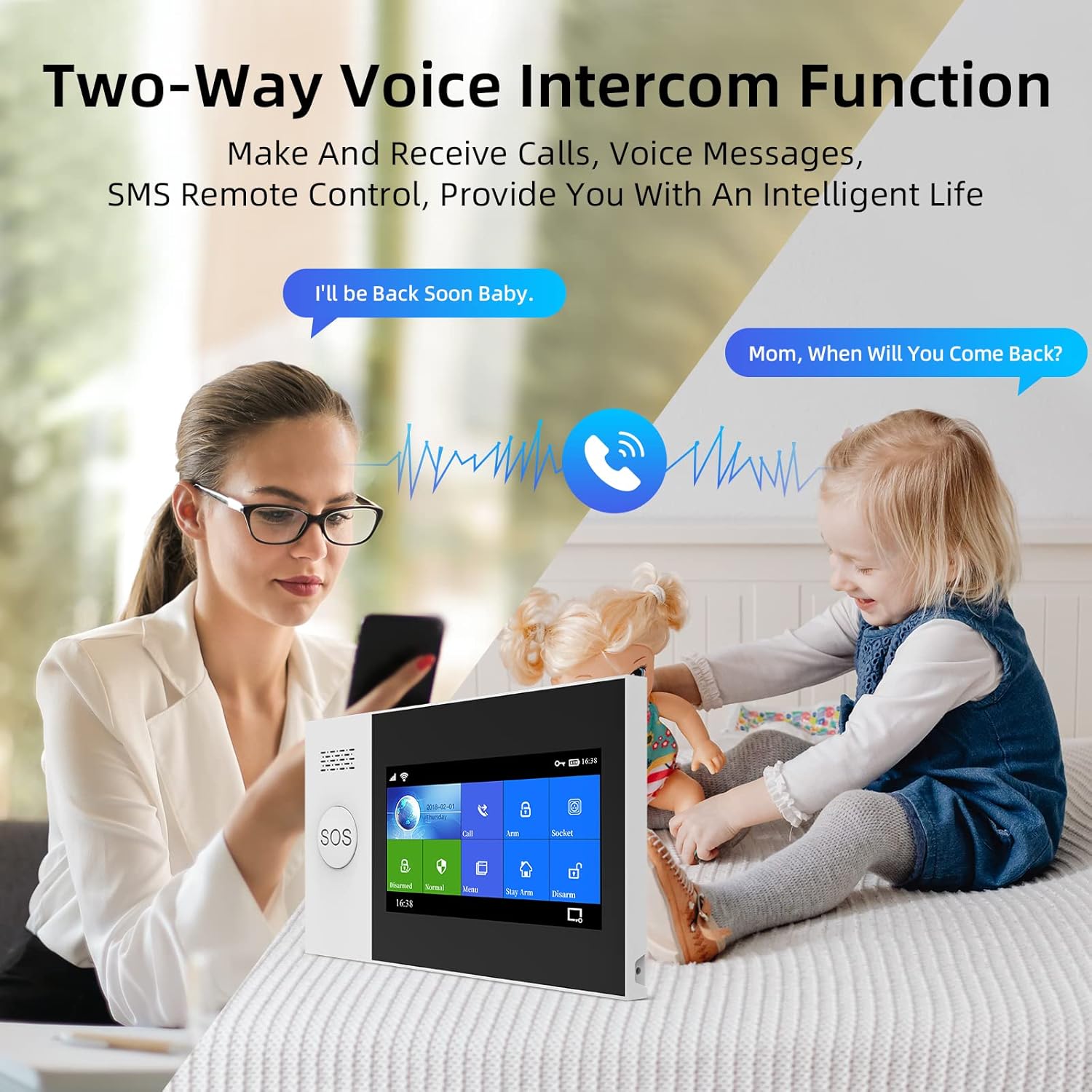
Figure 4.2: Two-Way Voice Intercom Function
4.2 ประเภทเซนเซอร์
- เซ็นเซอร์ประตู/หน้าต่าง: Detect opening and closing of entry points.
- เซ็นเซอร์ตรวจจับความเคลื่อนไหว PIR: Sense movement within a designated area.
- ปุ่ม SOS: For immediate emergency alerts.

Figure 4.3: Main Unit Dimensions and Parts
5. การตั้งค่า
5.1 การตั้งค่าเริ่มต้น
- การเชื่อมต่อไฟฟ้า: Connect the main control panel to a power outlet using the provided adapter.
- การติดตั้งแบตเตอรี่: Ensure the internal lithium polymer battery is properly connected.
- SIM Card (for 4G models): Insert a valid 4G SIM card into the designated slot on the main panel if you intend to use cellular communication features.
5.2 การเชื่อมต่อเซ็นเซอร์
The PGST system uses wireless sensors for easy installation. Follow these general steps to pair new sensors:
- Access the 'Add Device' or 'Sensor Pairing' menu on the main control panel's touch screen.
- Activate the sensor (e.g., open a door for a door sensor, or trigger a motion detector). The panel will detect the sensor.
- Confirm the pairing on the panel and assign a zone or name to the sensor for easy identification.

Figure 5.1: Wireless Sensor Pairing and Low Battery Indication
5.3 การติดตั้งและกำหนดค่าแอป
Download the official PGST alarm system mobile application from your smartphone's app store. Follow the in-app instructions to register an account and connect your alarm system. This app allows for remote arming/disarming, status checks, and receiving alerts.

รูปที่ 5.2: อดีตample of Sensor Placement in a Home
6. การใช้งานระบบ
6.1 อาวุธและปลดอาวุธ
- แขนออกไป: เปิดใช้งานเซ็นเซอร์ทั้งหมด ใช้เมื่อออกจากที่พัก
- อาร์ม โฮม: Activates perimeter sensors (e.g., door/window contacts) while allowing free movement inside.
- ปลดอาวุธ: ปิดใช้งานเซ็นเซอร์ทั้งหมด
You can arm or disarm the system using the control panel's touch screen, the remote control, or the mobile application.

Figure 6.1: Voice Prompts for System States
6.2 Two-Way Intercom Function
The main panel supports two-way voice communication. You can make and receive calls directly through the system, allowing for communication with family members or visitors.
6.3 การบูรณาการการควบคุมด้วยเสียง
Integrate your PGST alarm system with Amazon Alexa or Google Assistant for hands-free control. Follow the instructions in your smart assistant's app to link the PGST system. Common commands include "Alexa, arm my home" or "Hey Google, disarm the alarm."

Figure 6.2: Alexa Voice Control Integration
6.4 ฟังก์ชัน SOS
In case of an emergency, press the SOS button on the main panel or the dedicated SOS remote. This will immediately trigger an alarm and send alerts to pre-programmed emergency contacts.

Figure 6.3: SOS Button for Emergency Situations

Figure 6.4: SOS Function for Elderly Assistance
6.5 ฟังก์ชันกริ่งประตู
The main unit can also function as a doorbell. When a compatible doorbell button is pressed, the main unit will emit a chime.

Figure 6.5: Doorbell Functionality
7. การบำรุงรักษา
7.1 การเปลี่ยนแบตเตอรี่
Sensors and the main unit's backup battery will indicate low power. Replace batteries promptly to ensure continuous protection. Refer to individual sensor manuals for specific battery types and replacement procedures. The main unit uses a Lithium Polymer battery.
7.2 การทำความสะอาด
Wipe the main panel and sensors with a soft, dry cloth. Do not use abrasive cleaners or solvents, as these can damage the surfaces.
8 การแก้ไขปัญหา
If you encounter issues with your PGST PG107 4G Alarm System, refer to the table below for common problems and their solutions.
| ปัญหา | สาเหตุที่เป็นไปได้ | สารละลาย |
|---|---|---|
| ระบบไม่ตอบสนอง | No power, low battery, or system crash. | Check power connection. Recharge or replace backup battery. Restart the system. |
| เซ็นเซอร์ไม่ส่งสัญญาณเตือน | Sensor battery low, sensor out of range, or not properly paired. | Replace sensor battery. Relocate sensor closer to main unit. Re-pair the sensor. |
| ไม่มีการแจ้งเตือนทางมือถือ | No 4G signal, incorrect app settings, or SIM card issue. | Check 4G signal strength. Verify app notification settings. Ensure SIM card is active and has credit. |
| สัญญาณเตือนที่ผิดพลาด | การติดตั้งเซ็นเซอร์ไม่ถูกต้อง ปัจจัยด้านสิ่งแวดล้อม หรือเซ็นเซอร์ชำรุด | Adjust sensor sensitivity or placement. Ensure PIR sensors are not facing heat sources or direct sunlight. Test or replace faulty sensor. |

Figure 8.1: LED Indicator States
9. ข้อมูลจำเพาะ
| คุณสมบัติ | รายละเอียด |
|---|---|
| หมายเลขรุ่น | PG107-4G-0 |
| ยี่ห้อ | ป.ป.ช |
| ผู้ผลิต | ป.ป.ช |
| ขนาด (ยูนิตหลัก) | 10 x 3 x 3 ซม. |
| น้ำหนัก (ยูนิตหลัก) | 370 กรัม |
| วัสดุ | เอบีเอส |
| แหล่งพลังงาน | ใช้พลังงานจากแบตเตอรี่ |
| ประเภทแบตเตอรี่ | ลิเธียมโพลิเมอร์ (1 ชิ้น) |
| Average Battery Life (Main Unit) | 10 ชั่วโมง (สำรอง) |
| อุปกรณ์ที่รองรับ | Home Security System components |
| การเชื่อมต่อ | 4G, ไวไฟ |
10. การรับประกันและการสนับสนุน
10.1 ข้อมูลการรับประกัน
PGST products typically come with a limited manufacturer's warranty. Please refer to the warranty card included with your product or visit the official PGST webเพื่อดูข้อกำหนดและเงื่อนไขการรับประกันเฉพาะ โปรดเก็บหลักฐานการซื้อไว้เพื่อใช้ในการเรียกร้องการรับประกัน
10.2 การสนับสนุนลูกค้า
For technical assistance, troubleshooting, or any questions regarding your PGST PG107 4G Alarm System, please contact PGST customer support. Contact details can usually be found on the product packaging, the official PGST webไซต์หรือผ่านผู้ค้าปลีกของคุณ


