1. บทนำ
ขอบคุณสำหรับการซื้อasing the REMAX RP-W16 Wireless Fast Charger. This device is designed to provide convenient and efficient wireless charging for compatible mobile phones. Please read this manual carefully before use to ensure proper operation and to maximize the lifespan of your product.
2. ข้อมูลด้านความปลอดภัยที่สำคัญ
- อย่าให้เครื่องชาร์จโดนน้ำ ความชื้น หรืออุณหภูมิที่สูงหรือต่ำเกินไป
- หลีกเลี่ยงการทำที่ชาร์จตกหรือได้รับแรงกระแทกรุนแรง
- ห้ามถอดประกอบ ดัดแปลง หรือพยายามซ่อมแซมอุปกรณ์ด้วยตนเอง การกระทำดังกล่าวจะทำให้การรับประกันเป็นโมฆะ และอาจก่อให้เกิดความเสียหายหรืออันตรายได้
- Keep the charger away from medical implants (e.g., pacemakers) to prevent potential interference.
- Use only certified power adapters (not included) that meet the input voltage requirements (e.g., 9V) to ensure safe and efficient charging.
- Do not place metal objects, credit cards, or other foreign materials between the charging pad and your device, as this may interfere with charging or cause overheating.
- Ensure the charging pad is placed on a stable, flat surface.
3. เนื้อหาบรรจุภัณฑ์
กรุณาตรวจสอบแพ็คเกจสำหรับรายการต่อไปนี้:
- REMAX RP-W16 Wireless Fast Charger
- USB Charging Cable (Type-C or Micro-USB, depending on model variant)
- คู่มือการใช้งาน (เอกสารนี้)
Note: A power adapter is not included and must be purchased separately. For fast charging, a Quick Charge (QC) 2.0/3.0 or Power Delivery (PD) compatible adapter is recommended.
4. สินค้าหมดview
The REMAX RP-W16 is a compact and stylish wireless charging pad designed for convenience and fast charging. Its features include:
- กำลังขับสูง 10W: Provides efficient and fast wireless charging.
- Upgraded Pure Copper Coil: Enhances charging speed by up to 50% for quicker power delivery.
- Optimal Charging Distance: Supports wireless charging through cases with a sensing distance of 3-8mm.
- การออกแบบที่ทนทานและมีสไตล์: Features an aluminum base with a fabric surface, offering a simple yet elegant aesthetic.
- ขนาดกะทัดรัดและพกพาสะดวก: Palm-sized design makes it easy to carry.
- Anti-Skid Foot Pads: Four non-slip pads on the base prevent the charger from sliding, even during phone vibrations.
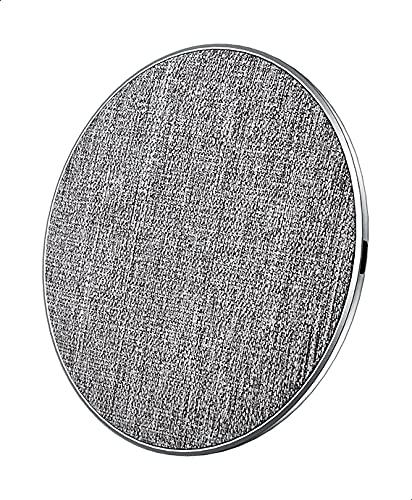
รูปที่ 1: REMAX RP-W16 Wireless Fast Charger in use. The image displays the circular charging pad with a fabric top, an aluminum base, and a smartphone placed on it, indicating active charging. The charger's compact size and anti-skid pads are visible.
5. คำแนะนำในการตั้งค่า
- เชื่อมต่อสายไฟ: Insert one end of the provided USB charging cable into the charging port on the REMAX RP-W16 wireless charger.
- เชื่อมต่อกับอะแดปเตอร์ไฟ: Insert the other end of the USB cable into a compatible USB power adapter (e.g., a Quick Charge 2.0/3.0 or Power Delivery adapter for fast charging).
- เสียบเข้ากับเต้ารับไฟฟ้า: Plug the power adapter into a wall outlet. The charger's indicator light (if present) may illuminate briefly to confirm it is powered on.
- การจัดวาง: Place the wireless charger on a flat, stable surface, ensuring there are no metal objects or foreign materials nearby.
6. คู่มือการใช้งาน
- ตรวจสอบความเข้ากันได้: Ensure your mobile phone supports Qi wireless charging.
- วางอุปกรณ์ลงบนแท่นชาร์จ: Carefully place your Qi-compatible mobile phone directly onto the center of the REMAX RP-W16 wireless charging pad.
- ยืนยันการเรียกเก็บเงิน: Your phone should display a charging indicator (e.g., a battery icon with a lightning bolt or a charging animation). The charger's indicator light (if present) may also change color or blink to indicate active charging.
- ตำแหน่งที่เหมาะสมที่สุด: If charging does not begin immediately, slightly adjust the position of your phone on the pad until the charging indicator appears.
- Charging with Case: The charger supports charging through most non-metallic phone cases up to 8mm thick. Remove cases containing metal or magnetic attachments, as these can interfere with wireless charging.
- การชาร์จเสร็จสมบูรณ์: Once your device is fully charged, it will stop drawing power from the wireless charger. You can remove your phone at any time.
7. การบำรุงรักษาและการดูแล
- การทำความสะอาด: Disconnect the charger from the power source before cleaning. Use a soft, dry cloth to wipe the surface. Do not use harsh chemicals, cleaning solvents, or strong detergents.
- พื้นที่จัดเก็บ: เมื่อไม่ใช้งาน ให้เก็บที่ชาร์จไว้ในที่เย็นและแห้ง ห่างจากแสงแดดโดยตรงและอุณหภูมิที่สูงเกินไป
- การจัดการ: Handle the charger with care. Avoid dropping it or placing heavy objects on it.
8 การแก้ไขปัญหา
| ปัญหา | สาเหตุที่เป็นไปได้ | สารละลาย |
|---|---|---|
| อุปกรณ์ไม่ชาร์จแบบไร้สาย |
|
|
| ชาร์จช้า |
|
|
| Charger indicator light blinking or off. |
|
|
9. ข้อมูลจำเพาะ
| แบบอย่าง | RP-W16 |
| ยี่ห้อ | REMAX |
| อินพุต Voltage | 9V (Requires compatible power adapter) |
| กำลังขับ | 10วัตต์ |
| พอร์ตชาร์จ | 1 (ไร้สาย) |
| ระยะการส่งข้อมูล | 3-8 มม. |
| อุปกรณ์ที่รองรับ | โทรศัพท์มือถือ (รองรับ Qi) |
| คุณสมบัติพิเศษ | ชาร์จเร็ว |
| มาตรฐานที่สอดคล้อง | CE |
| ประเภทการติดตั้ง | Desktop / Surface Placement |
| วัสดุ | Aluminum base, Fabric surface |
| ต้นทาง | ผลิตในประเทศจีน |
10. การรับประกันและการสนับสนุนลูกค้า
REMAX products are designed and manufactured to the highest quality standards. For information regarding warranty coverage, please refer to the warranty card included with your purchase or visit the official REMAX webเว็บไซต์.
If you encounter any issues or have questions about your REMAX RP-W16 Wireless Fast Charger, please contact REMAX customer support through their official channels. Please have your product model number (RP-W16) and proof of purchase ready when contacting support.