การแนะนำ
The FLEXISPOT Pro 3 Stages Dual Motor Electric Standing Desk is designed to enhance your workspace by allowing seamless transitions between sitting and standing positions. This desk promotes better blood circulation, alleviates back and leg pain, and helps maintain proper muscle alignment, contributing to a healthier and more productive work style.
Key features include a seamless whole-piece desktop, a robust 3-stage lift system, quiet dual motors, and an intuitive one-touch LED control panel for personalized height adjustments.

Figure 1: The FLEXISPOT Pro 3 Stages Dual Motor Electric Standing Desk, showcasing its spacious whole-piece desktop and sturdy white frame.
ข้อมูลด้านความปลอดภัย
โปรดอ่านคำแนะนำด้านความปลอดภัยทั้งหมดอย่างละเอียดก่อนประกอบและใช้งาน เพื่อป้องกันการบาดเจ็บหรือความเสียหายต่อผลิตภัณฑ์
- ความจุน้ำหนัก: Ensure the desk is not overloaded. The maximum weight capacity for this desk is 287 ปอนด์. Exceeding this limit can cause damage to the desk and potential injury.
- การประกอบ: When assembling the desk, handle heavy parts with care. It is highly recommended to have the assistance of another person for safe assembly.
- ความปลอดภัยทางไฟฟ้า: Ensure the power cord is properly connected and not pinched or damaged. Do not operate the desk with a damaged cord or plug. Keep liquids away from electrical components.
- จุดบีบคั้น: Keep hands and other objects clear of the moving parts of the desk frame during height adjustments to avoid pinching or crushing.
- เด็กและสัตว์เลี้ยง: Keep children and pets away from the desk during operation. Do not allow them to play on or under the desk.
- การจัดวาง: Place the desk on a level surface. Ensure there is sufficient clearance around the desk for safe movement and adjustment.
เนื้อหาแพ็คเกจ
ก่อนเริ่มประกอบ โปรดตรวจสอบให้แน่ใจว่าชิ้นส่วนทั้งหมดครบถ้วนและไม่เสียหาย หากมีชิ้นส่วนใดขาดหายหรือเสียหาย โปรดติดต่อฝ่ายบริการลูกค้า
- Whole-Piece Desktop (Natural Desktop)
- Electric Desk Frame (White) with Dual Motors
- One-Touch LED Control Panel
- อะแดปเตอร์และสายไฟ
- อุปกรณ์ประกอบ (สกรู, โบลต์, ฯลฯ)
- คู่มือการใช้งาน (เอกสารนี้)
การติดตั้งและการประกอบ
Assembly of the FLEXISPOT standing desk is designed to be straightforward, though it is recommended for two people. The desktop comes with pre-marked holes for easy alignment of the frame.
- แกะส่วนประกอบ: นำชิ้นส่วนทั้งหมดออกจากบรรจุภัณฑ์อย่างระมัดระวัง และวางเรียงบนพื้นผิวที่สะอาดและนุ่ม เพื่อป้องกันรอยขีดข่วน
- Attach Legs to Desktop: Align the desk frame with the pre-drilled holes on the underside of the desktop. Secure the frame to the desktop using the provided screws. A drill may be helpful for this step.
- ติดตั้งแผงควบคุม: Mount the one-touch LED control panel to the designated area on the underside of the desktop, typically on the front edge.
- Connect Motors and Control Panel: Connect the motor cables to the control box, and then connect the control panel cable to the control box. Ensure all connections are secure.
- เชื่อมต่อพลังงาน: Plug the power adapter into the control box, and then plug the power cord into a wall outlet.
- การจัดการสายเคเบิล: Use the included cable ties or management clips to neatly organize and secure all cables to prevent tangling or damage during desk movement.

Figure 2: The seamless whole-piece desktop provides a superior and more durable surface compared to multi-piece alternatives.
คำแนะนำการใช้งาน
The FLEXISPOT standing desk features an intuitive control panel for easy height adjustment and memory functions.
แผงควบคุมโอเวอร์view
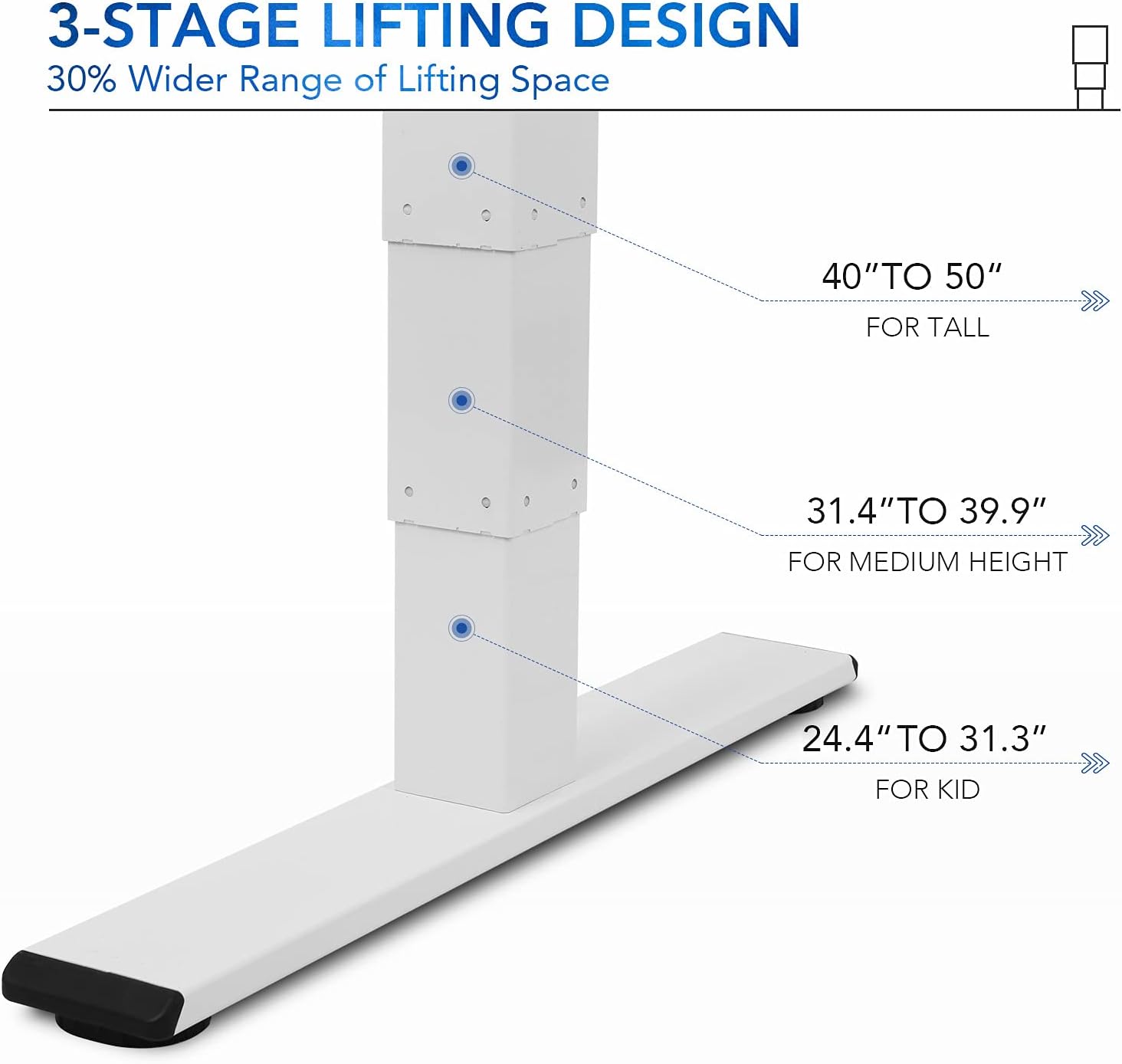
Figure 3: The one-touch LED control panel allows for precise height adjustments and memory programming.
- ลูกศรขึ้น/ลง: กดค้างไว้เพื่อปรับความสูงของโต๊ะด้วยตนเอง ปล่อยเพื่อหยุด
- ปุ่มหน่วยความจำ (1, 2, 3): Program and recall your preferred sitting and standing heights.
- ปุ่ม "M" : ใช้สำหรับบันทึกความสูงลงในค่าที่ตั้งไว้ล่วงหน้าในหน่วยความจำ
- "A" Button: (If applicable) May be used for advanced settings or a sit/stand reminder.
การปรับความสูง
3-stage lift system provides a wide height range from 24.4 inches (for children) to 50 inches (for tall adults), accommodating various user heights comfortably.

รูปที่ 4: 3-stage lifting design offers a 30% wider range of height adjustment compared to 2-stagระบบอี
- การปรับด้วยตนเอง: Use the up and down arrows to find your desired height.
- Saving Memory Presets:
- ปรับโต๊ะให้อยู่ในระดับความสูงที่คุณต้องการ
- Press the "M" button. The display will flash.
- Press one of the numbered memory buttons (1, 2, or 3) before the display stops flashing. The height is now saved.
- การเรียกคืนค่าที่ตั้งไว้ล่วงหน้า: Simply press the corresponding numbered memory button (1, 2, or 3) to automatically move the desk to the saved height.
Quiet Dual Motors and Stability
The desk is equipped with whisper-quiet dual motors that generate less than 45 dB of sound during operation. These motors provide enhanced stability and can handle up to 287 lbs, ensuring smooth and reliable height adjustments even with heavy setups.
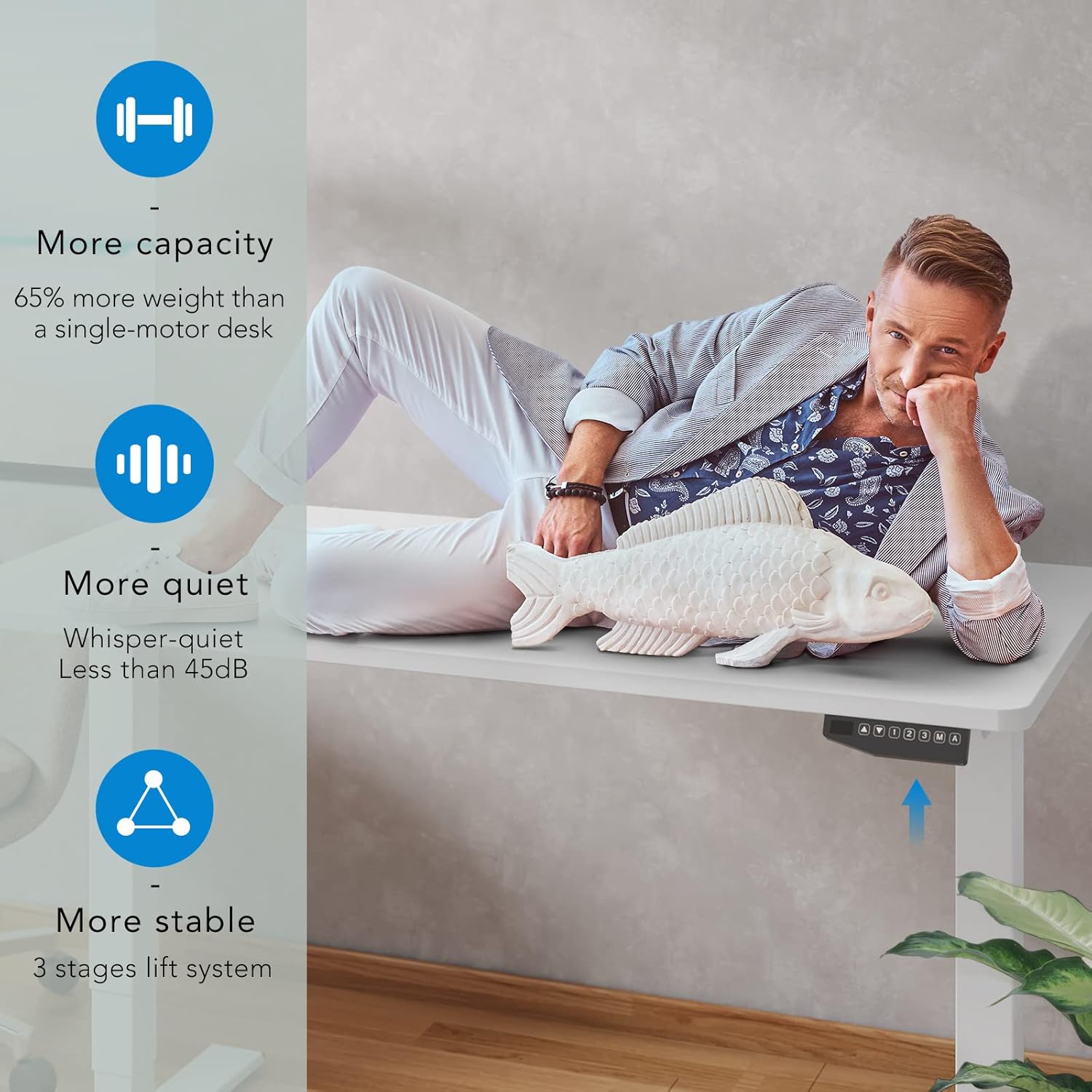
Figure 5: The dual motor system provides increased capacity, quiet operation, and superior stability.
Video 1: Demonstration of the FLEXISPOT Dual Motor Bamboo Standing Desk, highlighting its stability, quiet operation, and suitability for gaming setups. This video also shows the desk's ability to hold significant weight without instability.
Video 2: A home use version demonstration of the FLEXISPOT Dual Motor Bamboo Standing Desk, emphasizing its durability, ease of use with memory presets, and quiet operation for a productive home office environment.
การซ่อมบำรุง
Regular maintenance ensures the longevity and optimal performance of your FLEXISPOT standing desk.
- การทำความสะอาด: Wipe the desktop and frame with a dry, soft cloth. For stubborn marks, a slightly damp สามารถใช้ผ้าเช็ดทำความสะอาดได้ โดยตามด้วยผ้าแห้งทันที หลีกเลี่ยงสารเคมีรุนแรงหรือน้ำยาทำความสะอาดที่มีฤทธิ์กัดกร่อน
- ตรวจสอบสายเคเบิล: Periodically inspect all cables for any signs of wear, fraying, or damage. Ensure they are securely fastened and not interfering with the desk's movement.
- ความแน่นของสกรู: Over time, screws may loosen. Periodically check and tighten all assembly screws to maintain desk stability.
- การกระจายโหลด: Distribute weight evenly across the desktop to prevent undue stress on any single point or motor.
Video 3: A durability test video for the desktop, demonstrating its resistance to scratches, weight, and ease of cleaning. This highlights the robust nature of the bamboo desktop material.
การแก้ไขปัญหา
If you encounter any issues with your FLEXISPOT standing desk, refer to the following common solutions:
| ปัญหา | สาเหตุที่เป็นไปได้ | สารละลาย |
|---|---|---|
| โต๊ะไม่ขยับหรือไม่ตอบสนองต่อปุ่มควบคุม | Power disconnected, loose cables, motor overload. | Check power cord connection to outlet and control box. Ensure all motor cables are securely plugged in. Reduce weight on the desk if overloaded. |
| โต๊ะเคลื่อนไหวไม่สม่ำเสมอหรือมีเสียงผิดปกติ | Uneven load, loose assembly, obstruction. | Ensure weight is evenly distributed. Check and tighten all assembly screws. Inspect for any obstructions under or around the desk. |
| การตั้งค่าหน่วยความจำล่วงหน้าใช้งานไม่ได้ | การเขียนโปรแกรมไม่ถูกต้อง | Re-program the memory presets following the "Saving Memory Presets" instructions in the Operating section. |
| โต๊ะหยุดทำงานกลางคัน | Overheat protection, obstruction. | Allow the desk to cool down for 20 minutes if used continuously for an extended period. Check for obstructions. |
หากปัญหายังคงอยู่หลังจากลองวิธีแก้ปัญหาเหล่านี้แล้ว โปรดติดต่อฝ่ายบริการลูกค้าของ FLEXISPOT เพื่อขอความช่วยเหลือเพิ่มเติม
ข้อมูลจำเพาะ
| คุณสมบัติ | รายละเอียด |
|---|---|
| ยี่ห้อ | เฟล็กซิสพอท |
| หมายเลขรุ่น | อีซี5 |
| ขนาดสินค้า (ลึก x กว้าง x สูง) | 55.1"D x 27.5"W x 23.6"H (Minimum height) |
| ช่วงความสูง | 24.4" ถึง 50" |
| วัสดุเดสก์ท็อป | Whole-Piece Wood (Natural Desktop) |
| วัสดุฐาน | Metal (White Frame) |
| ประเภทมอเตอร์ | มอเตอร์คู่ |
| ระดับเสียง | น้อยกว่า 45 เดซิเบล |
| ความจุน้ำหนัก | 287 ปอนด์ |
| แผงควบคุม | One-Touch LED with 3 Memory Presets |
| จำเป็นต้องประกอบ | ใช่ (แนะนำ 2 คน) |
| ยูพีซี | 810072796073 |
การรับประกันและการสนับสนุน
FLEXISPOT stands behind the quality of its products. Your FLEXISPOT Pro 3 Stages Dual Motor Electric Standing Desk comes with the following warranty coverage:
- ความคุ้มครอง 5 ปี: Applies to the desk frame and motors.
- การรับประกัน 2 ปี: ใช้ได้กับแผงควบคุมและอุปกรณ์อิเล็กทรอนิกส์
For any assistance, warranty claims, or technical support, please contact FLEXISPOT customer service. Please have your model number (EC5) and proof of purchase ready when contacting support.
You can visit the official FLEXISPOT webเข้าชมเว็บไซต์เพื่อดูข้อมูลเพิ่มเติมและรายละเอียดการติดต่อ: www.flexispot.com


