1. บทนำ
This manual provides essential information for the setup, operation, maintenance, and troubleshooting of your GIGABYTE G5 KC-5US1130SH gaming laptop. This high-performance laptop is designed for an immersive gaming experience and demanding tasks, featuring advanced hardware components.
คุณสมบัติหลัก:
- โปรเซสเซอร์: 10th Gen Intel Core i5-10500H H-Series
- กราฟิก: NVIDIA GeForce RTX 3060 Laptop GPU with 8 GB GDDR6 (Boost Clock 1425 MHz, Max Graphics Power 105 W)
- แสดง: 15.6" Thin Bezel FHD IPS-Level 144Hz Anti-Glare display
- หน่วยความจำ: แรม DDR6 ขนาด 16 GB (3200 MHz)
- พื้นที่จัดเก็บ: 512 GB PCIe SSD with support for 3 storage slots
- ระบบปฏิบัติการ: วินโดวส์ 10 โฮม
- การเชื่อมต่อ: Intel Wi-Fi 6 AX200, RTL8411B REALTEK (1G) Ethernet
- เสียง: NAHIMIC 3D Audio for Gamers
- แป้นพิมพ์: 15 Full Area Colored RGB Backlit Keyboard
2. การตั้งค่าเริ่มต้น
2.1 Unboxing and First Power-On
Carefully remove your GIGABYTE G5 KC-5US1130SH laptop and its accessories from the packaging. Ensure all components, including the laptop, battery, and charger, are present.
Before initial use, connect the AC adapter to the laptop's DC power input port and then to a power outlet. The laptop may require charging before its first power-on. Press the power button to start the system.
2.2 การกำหนดค่าระบบปฏิบัติการ
Upon first boot, the Windows 10 Home operating system will guide you through the initial setup process. Follow the on-screen instructions to configure language, region, network settings, and user accounts.
3. คุณสมบัติและส่วนประกอบ
3.1 Laptop Overview

รูปที่ 1 : ด้านหน้า view of the GIGABYTE G5 KC-5US1130SH Gaming Laptop, showcasinก. จอภาพและแป้นพิมพ์

รูปที่ 2: จากบนลงล่าง view of the GIGABYTE G5 KC-5US1130SH keyboard and touchpad.
3.2 พอร์ตและตัวเชื่อมต่อ

Figure 3: Left side of the laptop, showing the Kensington Lock, USB 2.0 (Type-A), USB 3.2 Gen1 (Type-A), Microphone Jack, and Headphone Jack.
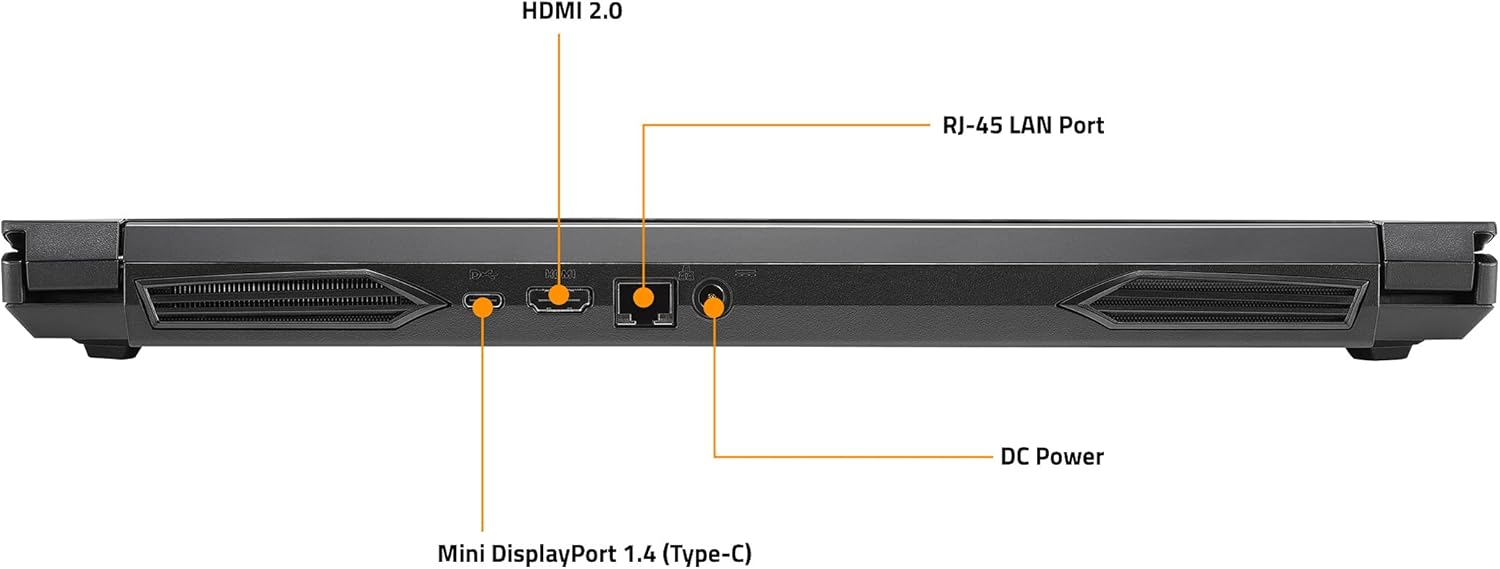
Figure 4: Rear side of the laptop, showing the HDMI 2.0 port, RJ-45 LAN Port, Mini DisplayPort 1.4 (Type-C), and DC Power input.
The right side of the laptop includes an SD/MMC Card Reader, Mini DisplayPort 1.4, and USB 3.2 Gen2 (Type-A) port.
3.3 RGB Backlit Keyboard
The laptop features a 15 full area colored RGB backlit keyboard. Lighting effects and colors can be customized through the pre-installed GAMING CENTER Software.
4. คู่มือการใช้งาน
4.1 เปิด/ปิดเครื่อง
- เปิดเครื่อง: กดปุ่มเปิด/ปิดที่อยู่เหนือแป้นพิมพ์
- หมดแรง: คลิกปุ่มเริ่มใน Windows จากนั้นเลือกเปิด/ปิดเครื่อง > ปิดเครื่อง
- โหมดสลีป: คลิกปุ่มเริ่มใน Windows จากนั้นเลือกเปิด/ปิดเครื่อง > โหมดสลีป
4.2 การกำหนดค่าการแสดงผล
The laptop supports 1+3 Multi Display for multi-tasking. You can connect up to three external monitors using the HDMI 2.0, mini DP 1.4, and DisplayPort 1.4 (Type-C) ports. Access display settings in Windows to configure extended or duplicated displays.
4.3 GAMING CENTER Software
Utilize the All-New GAMING CENTER Software to optimize your laptop's performance. This software allows you to manage fan speeds, power modes, keyboard RGB lighting, and other system settings for an enhanced gaming experience.
5. การบำรุงรักษา
5.1 การทำความสะอาดและการดูแล
- ควรทำความสะอาดหน้าจอเป็นประจำด้วยผ้าเนื้อนุ่มที่ไม่เป็นขุยและน้ำยาทำความสะอาดหน้าจอที่ปลอดภัย
- Use compressed air to clear dust from keyboard keys and ventilation grilles to prevent overheating.
- Avoid exposing the laptop to extreme temperatures, direct sunlight, or moisture.
5.2 การจัดการแบตเตอรี่
To prolong battery life, avoid constantly keeping the laptop plugged in at 100% charge. Periodically discharge the battery to around 20% and then fully recharge it. For optimal performance during gaming, it is recommended to keep the laptop connected to the power adapter.
5.3 Storage Upgrades
The laptop supports 3 slots of storage system, allowing for future upgrades of SSDs or HDDs. Consult a qualified technician for storage upgrades to ensure proper installation and avoid voiding your warranty.
6 การแก้ไขปัญหา
6.1 ปัญหาพลังงาน
- โน๊ตบุ๊คไม่เปิด: Ensure the AC adapter is securely connected to both the laptop and a working power outlet. Check if the power outlet is functional.
- ไม่ชาร์จแบตเตอรี่: Verify the charger is correctly connected. If the issue persists, try a different power outlet or contact support.
6.2 ปัญหาการแสดงผล
- ไม่มีการแสดงผลบนจอภาพภายนอก: Check the cable connections (HDMI, DisplayPort, Mini DisplayPort). Ensure the correct input source is selected on the external monitor. Press Windows key + P to cycle through display modes.
6.3 Performance and Overheating
- System slowing down: Close unnecessary background applications. Ensure drivers are up to date. Check for malware.
- Laptop overheating: Ensure ventilation grilles are clear of obstructions. Consider using a laptop cooling pad during intensive tasks or gaming sessions. Adjust fan settings via the GAMING CENTER Software.
6.4 'No Boot Device Detected' Error
This error indicates the system cannot find a drive to boot from. This could be due to a loose connection, a corrupted operating system, or a failed storage drive. Try restarting the laptop. If the issue persists, check BIOS settings to ensure the boot drive is recognized. If the problem continues, professional service may be required.
7. ข้อมูลจำเพาะทางเทคนิค
| คุณสมบัติ | ข้อมูลจำเพาะ |
|---|---|
| ขนาดหน้าจอยืน | 15.6 นิ้ว |
| ความละเอียดหน้าจอ | 1920 x 1080 พิกเซล |
| ความละเอียดหน้าจอสูงสุด | ขนาด 1920x1080 |
| โปรเซสเซอร์ | 4.5 GHz Intel_Mobile_CPU (Intel Core i5-10500H) |
| แรม | แรม 16GB DDR6 |
| ความเร็วหน่วยความจำ | 3200 เมกะเฮิรตซ์ |
| ฮาร์ดไดรฟ์ | SSD ความจุ 512GB |
| โคโปรเซสเซอร์กราฟิก | การ์ดจอ NVIDIA GeForce RTX 3060 |
| ยี่ห้อชิปเซ็ต | NVIDIA |
| คำอธิบายการ์ด | อุทิศ |
| ขนาดแรมการ์ดจอ | 8GB |
| ประเภทไร้สาย | 802.11ax (ไวไฟ 6) |
| จำนวนพอร์ต USB 2.0 | 1 |
| จำนวนพอร์ต USB 3.0 | 2 (USB 3.2 Gen1 Type-A, USB 3.2 Gen2 Type-A) |
| ระบบปฏิบัติการ | วินโดวส์ 10 โฮม |
| น้ำหนักสินค้า | 4.85 ปอนด์ |
| ขนาดสินค้า | 10.15 x 14.21 x 1.09 นิ้ว |
| สี | สีดำ |
| แบตเตอรี่ | ต้องใช้แบตเตอรี่ลิเธียมโพลิเมอร์ 1 ก้อน (รวมอยู่ด้วย) |
8. การรับประกันและการสนับสนุน
8.1 การรับประกันสินค้า
Your GIGABYTE G5 KC-5US1130SH laptop may be eligible for extended protection plans. Please refer to your purchase documentation for details on available 2-Year, 4-Year, or Complete Protect plans.
8.2 การสนับสนุนลูกค้า
For technical assistance, warranty claims, or further inquiries, please visit the official GIGABYTE support website or contact their customer service department. Keep your product model number (G5 KC-5US1130SH) and serial number readily available when seeking support.


