การแนะนำ
The Libratone Zipp Mini is a versatile and portable smart speaker designed to deliver immersive 360° sound. Featuring both Wi-Fi and Bluetooth connectivity, it supports Airplay2 and Spotify Connect, and is compatible with Alexa for voice control. Its compact design and 12-hour playtime make it ideal for use throughout your home or on the go. The speaker also allows for multi-room pairing, enabling up to 6 speakers to create a seamless audio experience.
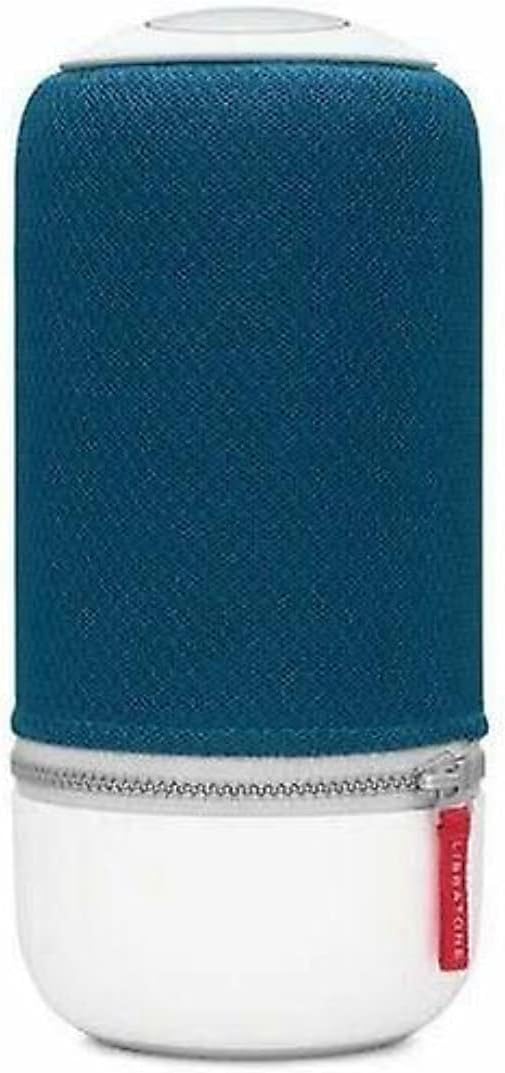
Image: The Libratone Zipp Mini Smart Speaker, showcasing its cylindrical design with a blue fabric cover and white base.
เนื้อหาแพ็คเกจ
โปรดตรวจสอบว่าสินค้าทั้งหมดมีอยู่ในแพ็คเกจ:
- Libratone Zipp Mini Smart Speaker
- รีโมทคอนโทรล
- อะแดปเตอร์ไฟฟ้า (แบบมีสาย)
- คู่มือเริ่มต้นใช้งานฉบับย่อ (ไม่รวมอยู่ในคู่มือนี้)
- ข้อมูลด้านความปลอดภัยและการรับประกัน (ไม่รวมอยู่ในคู่มือนี้)
ข้อมูลด้านความปลอดภัย
To ensure safe operation and prolong the life of your Libratone Zipp Mini speaker, please observe the following safety guidelines:
- ไม่กันน้ำ: ลำโพงตัวนี้คือ ไม่ waterproof. Avoid exposure to water, rain, or moisture.
- อุณหภูมิ: อย่าวางลำโพงไว้ในที่ที่มีอุณหภูมิสูงหรือต่ำเกินไป หรือโดนแสงแดดโดยตรงเป็นเวลานาน
- การระบายอากาศ : ตรวจสอบให้แน่ใจว่ามีการระบายอากาศที่เหมาะสมรอบๆ ลำโพง อย่าปิดกั้นช่องระบายอากาศใดๆ
- การทำความสะอาด: ใช้ผ้านุ่มและแห้งทำความสะอาด ห้ามใช้น้ำยาทำความสะอาดชนิดน้ำหรือสเปรย์
- ถอดชิ้นส่วน: Do not attempt to disassemble, repair, or modify the speaker yourself. Refer all servicing to qualified service personnel.
- แหล่งพลังงาน: ใช้เฉพาะอะแดปเตอร์ที่ให้มาเท่านั้น
การตั้งค่า
1. ชาร์จลำโพง
Before first use, fully charge your Libratone Zipp Mini speaker. Connect the provided power adapter to the speaker's charging port and plug it into a wall outlet. The indicator light will show charging status and turn off when fully charged.
2. เปิดเครื่องครั้งแรก
Press and hold the power button located on the top of the speaker until you hear an audible cue or see the indicator lights illuminate.
3. Connecting via Wi-Fi (for Smart Features)
For full smart speaker functionality, including Airplay2, Spotify Connect, and Alexa compatibility, connect your Zipp Mini to your home Wi-Fi network. Download the official Libratone app on your smartphone (compatible with iOS and Android). Follow the in-app instructions to connect your speaker to Wi-Fi and configure smart features.
4. การเชื่อมต่อผ่าน Bluetooth
วิธีเชื่อมต่ออุปกรณ์ผ่านบลูทูธ:
- ตรวจสอบให้แน่ใจว่าลำโพงเปิดอยู่
- Press the Bluetooth button on the speaker (refer to the speaker's top panel for button layout). The indicator light will flash, indicating pairing mode.
- On your smartphone or Bluetooth-enabled device, go to Bluetooth settings and select "Libratone Zipp Mini" from the list of available devices.
- เมื่อเชื่อมต่อเสร็จแล้ว ไฟแสดงสถานะจะติดสว่างค้าง

Image: The Libratone Zipp Mini Smart Speaker shown with its integrated carrying strap, highlighting its portability.
คำแนะนำการใช้งาน
การควบคุมพื้นฐาน
The Libratone Zipp Mini features intuitive touch controls on its top panel for music playback, volume adjustment, and other functions. Specific controls include:
- เล่น/หยุดชั่วคราว: Tap the center of the touch interface.
- ปริมาณ: Swipe clockwise or counter-clockwise around the edge of the touch interface.
- ข้ามแทร็ก: ปัดไปทางซ้ายหรือขวา
- Hush Gesture: Place your hand over the top of the speaker to temporarily mute the audio.
- การควบคุมด้วยเสียง: Activate your voice assistant (e.g., Alexa) by voice command or a dedicated button if available.
- ค่าที่ตั้งล่วงหน้า: Configure up to 5 presets for playlists or radio stations via the Libratone app for quick access.
Multi-Room Pairing (SoundSpace Link)
The Zipp Mini supports Libratone's SoundSpace Link technology, allowing you to connect up to 6 speakers for a synchronized audio experience across multiple rooms. Use the Libratone app to group speakers and manage your multi-room setup.
FullRoom Technology
The speaker utilizes FullRoom technology to project rich, 360° sound in all directions, ensuring consistent audio quality regardless of the speaker's placement or your listening position.

ภาพ: อีกภาพหนึ่ง view of the Libratone Zipp Mini Smart Speaker, emphasizing its sleek design and portability.
การซ่อมบำรุง
Proper maintenance ensures the longevity and optimal performance of your Libratone Zipp Mini speaker.
การทำความสะอาด
Gently wipe the speaker's surface with a soft, dry, lint-free cloth. Do not use abrasive cleaners, solvents, or chemical sprays, as these can damage the speaker's finish or internal components.
การดูแลแบตเตอรี่
The Zipp Mini features a built-in rechargeable battery. To maximize battery life:
- หลีกเลี่ยงการปล่อยแบตเตอรี่จนหมดบ่อยครั้ง
- เก็บลำโพงไว้ในที่แห้งและเย็นเมื่อไม่ได้ใช้งานเป็นเวลานาน
- หากจะจัดเก็บเป็นเวลานาน ควรชาร์จแบตเตอรี่ให้เหลือประมาณ 50% ก่อนจัดเก็บ
การแก้ไขปัญหา
If you encounter issues with your Libratone Zipp Mini, refer to the following common problems and solutions:
| ปัญหา | สาเหตุที่เป็นไปได้ | สารละลาย |
|---|---|---|
| ลำโพงไม่เปิดเครื่อง | แบตเตอรี่หมด | Connect the speaker to the power adapter and allow it to charge for at least 30 minutes before attempting to power on. |
| ไม่มีเสียงจากลำโพง | Volume is too low or muted; incorrect input source; device not connected. | Increase volume on both the speaker and the connected device. Ensure the correct input (Bluetooth/Wi-Fi) is selected. Re-establish Bluetooth or Wi-Fi connection. |
| การเชื่อมต่อบลูทูธไม่เสถียรหรือหลุดบ่อย | อุปกรณ์อยู่นอกระยะ; มีสัญญาณรบกวน; ปัญหาการจับคู่ | Move the connected device closer to the speaker. Avoid obstacles. Disconnect and re-pair the Bluetooth device. Turn off other Bluetooth devices nearby. |
| ปัญหาการเชื่อมต่อ Wi-Fi | Incorrect Wi-Fi password; router issues; speaker too far from router. | Verify Wi-Fi password. Restart your Wi-Fi router. Move the speaker closer to the router. Reconfigure Wi-Fi settings via the Libratone app. |
| Alexa compatibility not working. | Speaker not properly linked to Alexa account; outdated firmware. | Ensure your Libratone account is correctly linked to your Amazon Alexa account through the Libratone app. Check for and install any available firmware updates for the speaker. Note that some older Zipp Mini models may not support Alexa. |
| ลำโพงไม่ตอบสนอง | ซอฟต์แวร์มีปัญหาชั่วคราว | Perform a soft reset by holding the power button until the speaker turns off, then power it back on. If issues persist, a factory reset may be necessary (refer to Libratone support for specific instructions). |
ข้อมูลจำเพาะ
| คุณสมบัติ | รายละเอียด |
|---|---|
| ชื่อรุ่น | ซิป มินิ |
| หมายเลขรุ่นสินค้า | 5710957012449 |
| ประเภทลำโพง | Multi Room, Subwoofer |
| คุณสมบัติพิเศษ | พกพาได้ |
| เทคโนโลยีการเชื่อมต่อ | บลูทู ธ Wi-Fi |
| เทคโนโลยีการสื่อสารไร้สาย | บลูทู ธ Wi-Fi |
| โหมดเอาต์พุตเสียง | สเตอริโอ |
| การกำหนดค่าช่องเสียงรอบทิศทาง | 2.0 |
| กำลังขับสูงสุดของลำโพง | 75 วัตต์ |
| การตอบสนองความถี่ | 60 เฮิรตซ์ |
| วิธีการควบคุม | เสียง |
| แหล่งพลังงาน | สายไฟ |
| วัสดุ | พลาสติก |
| สี | แอตแลนติกบลู |
| น้ำหนักสินค้า | 3.82 ปอนด์ |
| ขนาดแพ็คเกจ | 11.15 x 6.86 x 6.38 นิ้ว |
| ระดับความต้านทานต่อน้ำ | ไม่ทนน้ำ |
| ส่วนประกอบที่รวมอยู่ | ระยะไกล |
ข้อมูลการรับประกัน
The Libratone Zipp Mini Smart Speaker comes with a การรับประกันแบบจำกัด. Specific terms and conditions of the warranty, including coverage period and claim procedures, are typically provided with the product packaging or available on the official Libratone webไซต์ โปรดเก็บหลักฐานการซื้อไว้เพื่อใช้ในการเรียกร้องการรับประกัน
การสนับสนุนลูกค้า
For further assistance, technical support, or to inquire about service, please visit the official Libratone website or contact their customer support channels. Up-to-date contact information and FAQs can typically be found on their support pages.
You can visit the Libratone Store on Amazon for more information: Libratone Store


