1. บทนำ
This manual provides essential information for the setup, operation, and maintenance of your LOUTOC Universal Replacement Remote Control. This remote is designed to provide a seamless replacement experience for compatible Roku streaming devices.
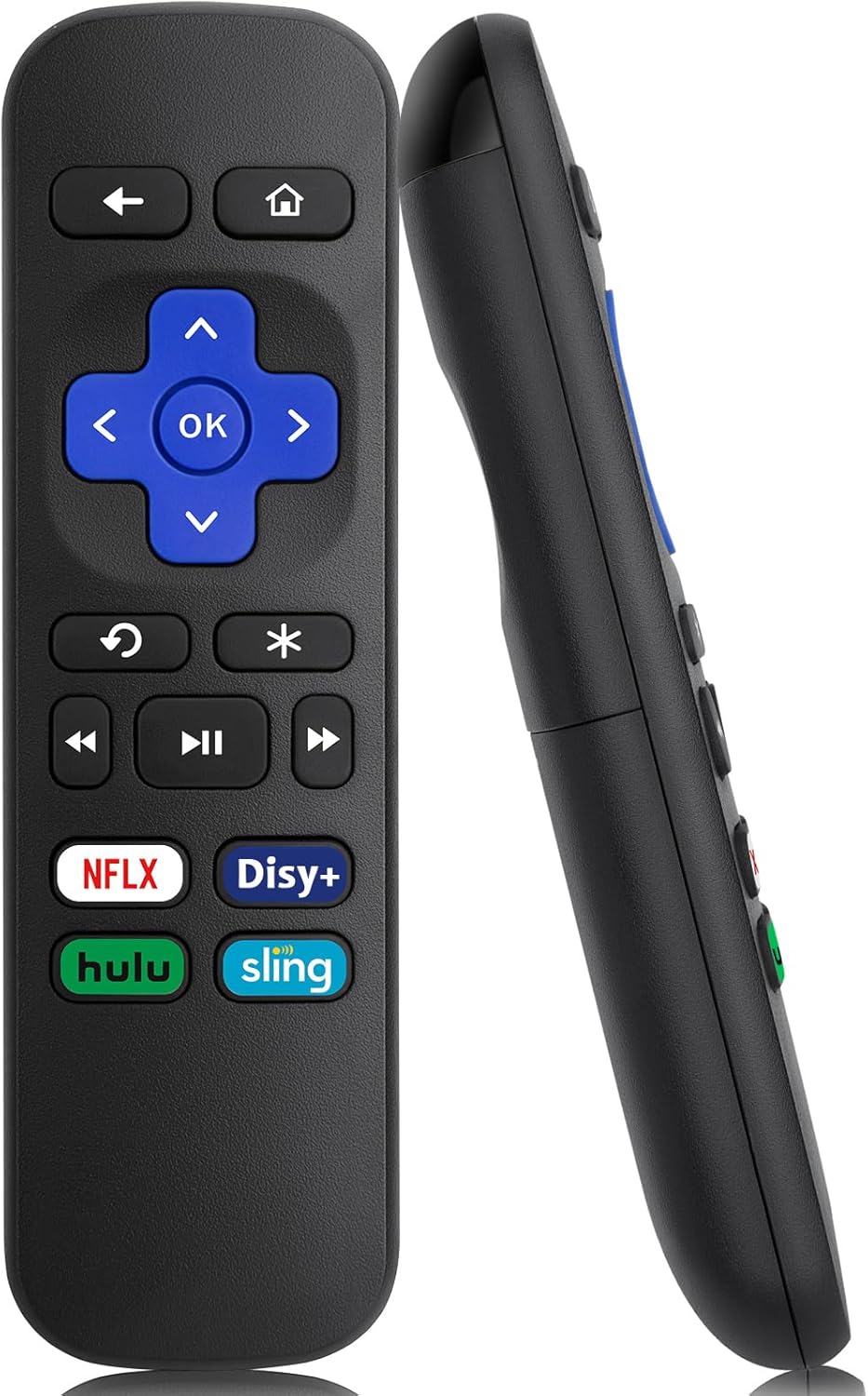
ภาพที่ 1: ด้านหน้าและด้านข้าง view of the LOUTOC Universal Replacement Remote Control.
2. ความเข้ากันได้
The LOUTOC Universal Replacement Remote Control is compatible with a range of Roku streaming players and boxes. Please verify your Roku model against the list below to ensure compatibility.
2.1 Compatible Roku Models:
- Roku 1 SE (Model 2710)
- Roku 2 HD (Model 3000), Roku 2 XD (Model 3050), Roku 2 XS (Model 3100), Roku 2 (Models 2720, 4210)
- Roku 3 (Models 4200, 4230)
- Roku 4 (Model 4400)
- Roku HD (Models 2500, 2000, N1100), Roku LT (Models 2450, 2400), Roku XD (Model 2050), Roku XDS (Model 2100)
- Roku Express (Models 3700, 3900, 3930R)
- Roku Express+ (Models 3710, 3910, 3931W)
- Roku Premiere (Models 4620, 3920R)
- Roku Premiere+ (Models 4630, 3921RW)
2.2 Incompatible Devices:
รีโมทคอนโทรลนี้คือ ไม่ compatible with the following devices:
- Any Roku Streaming Stick model
- Any Roku TV model (e.g., TCL Roku TV, Hisense Roku TV)
- โรคุ อุลตร้า
- Roku devices requiring an RF (Radio Frequency) remote
- Roku Gaming devices
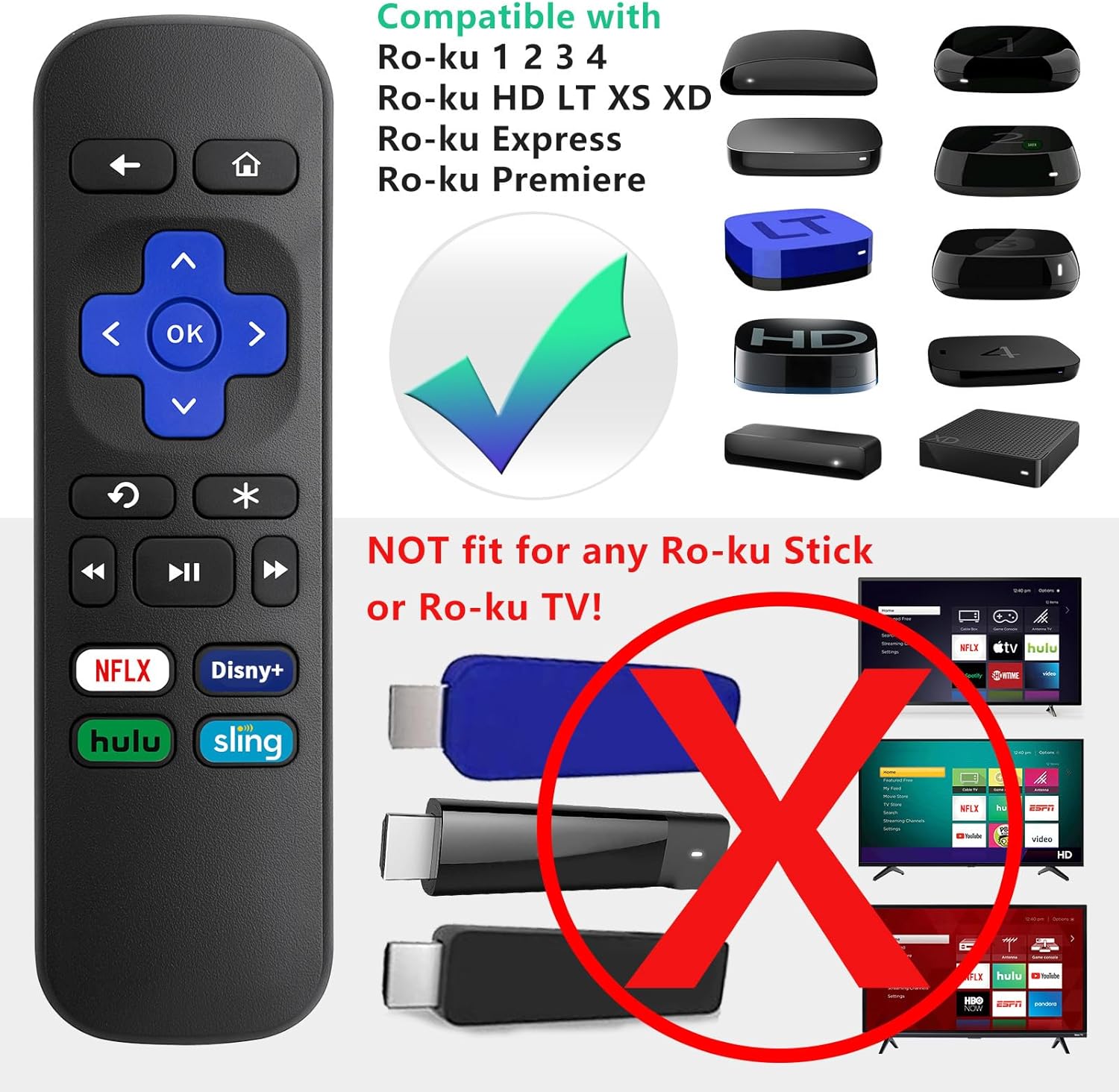
Image 2: Visual guide to compatible Roku players and incompatible Roku Sticks/TVs.

Image 3: Comprehensive compatibility chart for Roku devices.
3. Features and Limitations
3.1 คุณสมบัติที่สำคัญ:
- เทคโนโลยีอินฟราเรด (IR): Operates using infrared signals, requiring a direct line of sight to your Roku device.
- No Setup Required: Functions immediately upon battery insertion with compatible Roku devices. No programming or pairing is needed.
- ปุ่มลัดเฉพาะ: Includes four direct access buttons for popular streaming services: Netflix, Disney+, Hulu, and Sling.
- โครงสร้างทนทาน: ผลิตจากวัสดุ ABS เพื่อความทนทาน

Image 4: Remote in use, emphasizing ease of use and IR technology.
3.2 Important Limitations:
Please note that this remote control does ไม่ include the following functionalities:
- ไม่มีช่องเสียบหูฟัง
- No Pairing Button
- ไม่มีการควบคุมระดับเสียง
- ไม่มีการค้นหาด้วยเสียง
- No Power Button
- Not an RF (Radio Frequency) Model

Image 5: Visual representation of features not included (volume, pairing, headphone jack).

Image 6: Visual representation of features not included (power, voice search, RF model).
4. การตั้งค่า
4.1 การติดตั้งแบตเตอรี่:
- ค้นหาช่องใส่แบตเตอรี่ที่ด้านหลังของรีโมทคอนโทรล
- เลื่อนฝาครอบแบตเตอรี่ลงเพื่อเปิด
- Insert two (2) AAA batteries, ensuring correct polarity (+ and -) as indicated inside the compartment. Batteries are not included.
- ปิดฝาครอบแบตเตอรี่โดยเลื่อนขึ้นจนกระทั่งได้ยินเสียงคลิกเข้าที่

Image 7: Battery compartment for AAA batteries.
4.2 การใช้งานครั้งแรก:
Once batteries are installed, the remote is ready for immediate use with your compatible Roku device. No additional programming or pairing steps are required.
5. คู่มือการใช้งาน
Point the remote control directly at your Roku streaming device. Ensure there are no obstructions between the remote and the Roku player for optimal performance.
5.1 ฟังก์ชันปุ่ม:
| ปุ่ม | การทำงาน |
|---|---|
| บ้าน | กลับไปยังหน้าจอหลักของ Roku |
| กลับ | กลับไปยังหน้าจอหรือเมนูที่แล้ว |
| แผงทิศทาง (ขึ้น, ลง, ซ้าย, ขวา) | นำทางผ่านเมนูและเนื้อหาต่างๆ |
| OK | เลือกรายการหรือยืนยันการกระทำ |
| รีเพลย์ทันที | Replays the last few seconds of video. |
| Options (*) | Accesses additional options or settings within an app. |
| ย้อนกลับ | Rewinds video playback. |
| เล่น/หยุดชั่วคราว | เล่นหรือหยุดวิดีโอชั่วคราว |
| ส่งต่ออย่างรวดเร็ว | Fast forwards video playback. |
| เน็ตฟลิกซ์ | เข้าถึงแอปพลิเคชั่น Netflix ได้โดยตรง |
| ดิสนีย์+ | Direct access to the Disney+ application. |
| ฮูลู | Direct access to the Hulu application. |
| สลิง | Direct access to the Sling application. |

Image 8: Remote control highlighting the dedicated streaming service buttons.
6 การแก้ไขปัญหา
6.1 Remote Not Responding:
- ตรวจสอบแบตเตอรี่: Ensure the batteries are inserted correctly with the proper polarity. Replace old or depleted batteries with fresh AAA batteries.
- แนวสายตา: Confirm that there is a clear, unobstructed path between the remote control and the infrared receiver on your Roku device.
- ความเข้ากันได้: Double-check that your Roku model is listed as compatible in Section 2.1. This remote will not work with Roku Sticks or Roku TVs.
- การรบกวน: ตรวจสอบให้แน่ใจว่าไม่มีแหล่งกำเนิดแสงที่แรง (เช่น แสงแดดโดยตรงหรือไฟฟลูออเรสเซนต์ที่สว่าง) ที่จะรบกวนสัญญาณ IR
7. ข้อมูลจำเพาะ
| ข้อมูลจำเพาะ | รายละเอียด |
|---|---|
| ขนาดสินค้า | 5.5 x 1.65 x 0.79 นิ้ว (13.97 x 4.19 x 2.01 ซม.) |
| น้ำหนักสินค้า | 1.76 ออนซ์ (50 กรัม) |
| แหล่งพลังงาน | 2 x แบตเตอรี่ AAA (ไม่รวม) |
| เทคโนโลยีการเชื่อมต่อ | อินฟาเรด (IR) |
| วัสดุ | เอบีเอส |

Image 9: Remote control dimensions.
8. การรับประกันและการสนับสนุน
LOUTOC offers a การเปลี่ยนทดแทนภายใน 60 วัน policy for this product. If you experience any issues within 60 days of purchase, please contact your retailer for a replacement.

Image 10: 60-Day Replacement icon.
For further assistance or inquiries, please refer to the contact information provided by your point of purchase or visit the official LOUTOC brand store.


