1. บทนำและเรื่องอื่นๆview
This manual provides detailed instructions for the installation, operation, and maintenance of your Sharp QW-MA814-SS Dishwasher. Please read this manual thoroughly before using your appliance to ensure safe and efficient operation. This dishwasher features 14 place settings and 8 wash programs, including an Auto wash function, designed for optimal cleaning performance.
- ความจุ: 14 การตั้งค่าสถานที่
- โปรแกรม: 8 (including Auto wash)
- คุณสมบัติพิเศษ: Child Lock, LED light inside, Delay Start (1-24 Hours), Anti-Bacterial Filter, Alternative Wash, Three Layer Cutlery Drawer
- ประสิทธิภาพการใช้พลังงาน: เอ++
- ปริมาณการใช้น้ำ: 11 ลิตร/รอบ
2. ข้อมูลด้านความปลอดภัย
ปฏิบัติตามข้อควรระวังด้านความปลอดภัยขั้นพื้นฐานเสมอเมื่อใช้เครื่องใช้ไฟฟ้า เพื่อลดความเสี่ยงจากไฟไหม้ ไฟฟ้าช็อต หรือการบาดเจ็บ เก็บคู่มือนี้ไว้เพื่อใช้อ้างอิงในอนาคต
- ตรวจสอบให้แน่ใจว่าเครื่องล้างจานมีการต่อสายดินอย่างถูกต้อง
- ห้ามใช้งานเครื่องล้างจานหากเครื่องชำรุดเสียหาย
- ให้เด็กอยู่ห่างจากเครื่องล้างจาน โดยเฉพาะในขณะที่เครื่องกำลังทำงาน
- ใช้เฉพาะผงซักฟอกและน้ำยาล้างจานที่ออกแบบมาสำหรับเครื่องล้างจานโดยเฉพาะ
- อย่าสัมผัสแผ่นทำความร้อนในระหว่างหรือหลังการใช้งานทันที
- Always turn off the power supply before performing any maintenance or cleaning.
3. การตั้งค่าและการติดตั้ง
The Sharp QW-MA814-SS is a freestanding dishwasher. Proper installation is crucial for optimal performance and safety.

รูปที่ 3.1: ด้านหน้า view of the Sharp QW-MA814-SS Dishwasher. This image shows the sleek Inox Silver exterior with the control panel located at the top of the door.
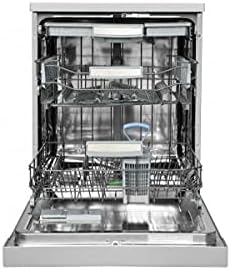
รูปที่ 3.2: ภายใน view of the Sharp QW-MA814-SS Dishwasher with the door open. This image highlights the three-layer cutlery drawer and the spacious racks designed for 14 place settings.
3.1 การจัดวาง
Place the dishwasher on a level, stable surface. Ensure there is adequate space for the door to open fully. The dimensions are approximately 59.8D x 84.5W x 61H centimeters.
3.2 การเชื่อมต่อน้ำและไฟฟ้า
Connect the water inlet hose to a cold water supply and the drain hose to a suitable drain. Ensure all connections are secure to prevent leaks. Connect the power cord to a grounded 240 Volt electrical outlet. It is recommended to have a qualified technician perform the initial installation.
4. คู่มือการใช้งาน
Your Sharp dishwasher is equipped with a user-friendly touch control panel and various features to simplify dishwashing.
4.1 การโหลดเครื่องล้างจาน
- ขูดเศษอาหารขนาดใหญ่ออกจากจานก่อนโหลด
- ควรวางสิ่งของชิ้นใหญ่ไว้ในตะกร้าด้านล่าง และสิ่งของชิ้นเล็ก แก้ว และถ้วยไว้ในตะกร้าด้านบน
- Utilize the three-layer cutlery drawer for forks, knives, and spoons, ensuring they do not block spray arms.
4.2 การเติมผงซักฟอกและน้ำยาช่วยล้าง
Fill the detergent dispenser with the appropriate amount of dishwasher detergent. Check the rinse aid indicator and refill the rinse aid dispenser as needed for spot-free drying.
4.3 การเลือกโปรแกรม
Use the touch controls to select one of the 8 available wash programs. The LED light inside illuminates the interior for better visibility during loading and unloading. The 'Auto wash' program automatically adjusts settings based on soil level.
4.4 การเริ่มรอบการซัก
Close the dishwasher door firmly. Press the Start button to begin the selected program. You can use the 'Delay Start' feature to postpone the start of a cycle by 1 to 24 hours.
4.5 ฟังก์ชั่นล็อคป้องกันเด็ก
Activate the Child Lock feature to prevent accidental program changes or operation by children. Refer to the control panel instructions for activating and deactivating this function.
5. การบำรุงรักษาและการทำความสะอาด
การบำรุงรักษาตามปกติจะช่วยให้เครื่องล้างจานของคุณมีอายุการใช้งานยาวนานและมีประสิทธิภาพ
5.1 การทำความสะอาดตัวกรอง
The dishwasher is equipped with an Anti-Bacterial Filter. Regularly clean the filter system (coarse filter, fine filter, and microfilter) to prevent food particles from recirculating and affecting wash performance. Twist and remove the filter assembly, rinse under running water, and brush if necessary.
5.2 การทำความสะอาดแขนฉีดพ่น
Check the spray arm nozzles for blockages. Remove the spray arms and clean any clogged holes with a thin wire or toothpick.
5.3 การทำความสะอาดภายนอกและภายใน
เช็ดภายนอกด้วยผ้านุ่มๆamp cloth. For the interior, periodically run a dishwasher cleaning cycle with a specialized dishwasher cleaner to remove grease and limescale buildup.
6 การแก้ไขปัญหา
ก่อนติดต่อฝ่ายบริการ โปรดดูปัญหาทั่วไปต่อไปนี้และวิธีแก้ไข
| ปัญหา | สาเหตุที่เป็นไปได้ | สารละลาย |
|---|---|---|
| เครื่องล้างจานไม่เริ่มทำงาน | Power supply issue, door not closed properly, child lock active. | Check power connection, ensure door is latched, deactivate child lock. |
| จานไม่สะอาด | Clogged spray arms, dirty filters, improper loading, insufficient detergent. | Clean spray arms and filters, reload dishes correctly, add more detergent. |
| น้ำไม่ระบายออก | ท่อระบายน้ำหรือตัวกรองอุดตัน ปัญหาปั๊มระบายน้ำ | Check and clear drain hose/filter, consult service if pump is faulty. |
| เสียงดังเกินไป | มีสิ่งของไปกระแทกกับแขนฉีดพ่น มีวัตถุแปลกปลอมในปั๊ม ติดตั้งไม่ถูกต้อง | จัดวางจานใหม่ ตรวจสอบสิ่งแปลกปลอม ตรวจสอบให้แน่ใจว่าเครื่องล้างจานอยู่ในแนวระดับ |
7. ข้อมูลจำเพาะ
| ชื่อรุ่น | QW-MA814-SS |
| ยี่ห้อ | คม |
| สี | Silver (Inox) |
| ฟอร์มแฟกเตอร์ | อิสระ |
| ขนาดสินค้า (ลึก x กว้าง x สูง) | 59.8 x 84.5 x 61 ซม. |
| น้ำหนักสินค้า | 25.2 กิโลกรัม |
| ความจุ | 14 การตั้งค่าสถานที่ |
| จำนวนโปรแกรม | 8 |
| ประเภทของการควบคุม | สัมผัส |
| ระดับเสียง | 53 เดซิเบล |
| เล่มที่tage | 240 โวลต์ |
| การบริโภคพลังงานรายปี | 290 กิโลวัตต์ชั่วโมง |
| ปริมาณการใช้น้ำ (ต่อรอบ) | 11 ลิตร |
| คุณสมบัติพิเศษ | Delay Start, Child Lock, LED light inside, Anti-Bacterial Filter |
8. การรับประกันและการสนับสนุน
Your Sharp QW-MA814-SS Dishwasher comes with a standard manufacturer's warranty. For specific warranty terms and conditions, please refer to the warranty card included with your purchase or contact Sharp customer service.
Extended warranty options may be available from third-party providers, such as Salama Care, offering 1-Year or 2-Year extended coverage. Please check with your retailer for details.
For technical support, spare parts, or service inquiries, please visit the official Sharp Store or contact their authorized service centers. You can find more information and support resources by visiting the Sharp Store on Amazon.ae.


