1. บทนำ
This manual provides detailed instructions for the installation, operation, and maintenance of your Avidsen THOMSON Rheita 100 Full HD Wireless WiFi Outdoor Camera Lamp. Please read this manual thoroughly before using the product to ensure proper function and safety.

Image 1.1: The Avidsen THOMSON Rheita 100 outdoor camera lamp, mounted on a wall.
2. ข้อมูลด้านความปลอดภัย
โปรดปฏิบัติตามข้อควรระวังด้านความปลอดภัยต่อไปนี้ เพื่อป้องกันความเสียหายต่อผลิตภัณฑ์ หรือการบาดเจ็บต่อตัวคุณเองและผู้อื่น:
- Ensure the power supply matches the product's requirements.
- อย่าพยายามถอดประกอบหรือดัดแปลงอุปกรณ์ แนะนำให้ส่งช่างผู้ชำนาญเข้ารับบริการทั้งหมด
- เก็บอุปกรณ์ให้ห่างจากน้ำ ความชื้น และอุณหภูมิที่สูงเกินไป
- Install the camera securely to prevent it from falling.
- Ensure all wiring is correctly connected and insulated to avoid electrical hazards.
3. เนื้อหาบรรจุภัณฑ์
ตรวจสอบว่ามีรายการทั้งหมดอยู่ในแพ็คเกจ:
- Avidsen THOMSON Rheita 100 IP video surveillance camera with lighting
- อุปกรณ์ติดตั้ง (สกรู, ปลั๊กผนัง)
- คู่มือการใช้งาน (เอกสารนี้)
4. การตั้งค่า
4.1 การติดตั้งทางกายภาพ
- เลือกสถานที่กลางแจ้งที่เหมาะสมสำหรับการติดตั้ง โดยต้องแน่ใจว่ามีทัศนวิสัยที่ชัดเจน view and access to power. The camera is designed for flush wall mounting.
- ใช้ขายึดเป็นแบบในการทำเครื่องหมายจุดที่จะเจาะบนผนัง
- เจาะรูและใส่พุกยึดผนังหากจำเป็น
- ยึดขายึดเข้ากับผนังด้วยสกรู
- Attach the camera lamp unit to the mounted bracket.

ภาพที่ 4.1: ด้านข้าง view of the camera, illustrating its wall-mounted design.
4.2 การเชื่อมต่อสายไฟ
Connect the camera to a suitable power source. The device operates on 3 Watts and requires a wall-mounted electrical plug type.
4.3 การดาวน์โหลดและการจับคู่แอป
- ดาวน์โหลด atHome Security ดาวน์โหลดแอปพลิเคชันจากแอปสโตร์ของสมาร์ทโฟนของคุณ (มีให้ใช้งานสำหรับ iOS และ Android)
- สร้างบัญชีหรือเข้าสู่ระบบหากคุณมีบัญชีอยู่แล้ว
- Follow the in-app instructions to add a new device. This typically involves scanning a QR code on the camera or manually selecting the model.
4.4 การเชื่อมต่อ Wi-Fi
During the app pairing process, you will be prompted to connect the camera to your home Wi-Fi network. Ensure your Wi-Fi network is 2.4GHz for optimal compatibility.

Image 4.2: The camera shown alongside a smartphone displaying the 'atHome Security' app interface, demonstrating remote control capabilities.
5. คู่มือการใช้งาน
5.1 สด View และการบันทึก
Once connected, open the atHome Security app to access the live video feed. You can initiate manual recordings or configure automatic recording settings.
5.2 การตรวจจับการเคลื่อนไหวและการแจ้งเตือน
The camera features motion detection and silhouette recognition. Configure alert settings within the app to receive notifications on your smartphone when activity is detected. The alert type is primarily motion-only.
5.3 Motorized Control (Pan/Tilt)
The Rheita 100 features a motorized camera for adjustable viewing angles. Use the controls within the atHome Security app to pan (left/right) the camera. This also enables auto-tracking of human silhouettes.

Image 5.1: A visual representation of the camera's motorized pan function, indicated by red arrows.
5.4 Night Vision and Lighting
The camera is equipped with infrared night vision, providing clear visibility up to 25 meters in low-light conditions. The integrated lamp can be controlled via the app, offering both comfort lighting and a deterrent when combined with the siren function.

Image 5.2: The camera lamp providing illumination in a dark outdoor setting.
5.5 เสียงสองทาง
The integrated microphone and speaker allow for two-way communication through the camera, enabling you to listen and speak to visitors or deter intruders.
5.6 การรวมระบบบ้านอัจฉริยะ
The camera is compatible with Google Home and Amazon Alexa. Follow the instructions in your respective smart home app to link your atHome Security account and control basic camera functions via voice commands.
5.7 พื้นที่จัดเก็บ
The camera supports local storage via a microSDXC card (not included), with a maximum capacity of 128 GB for recording video footage.
6. การบำรุงรักษา
- การทำความสะอาด: เช็ดเลนส์และตัวกล้องเบาๆ ด้วยผ้าแห้งเนื้อนุ่ม ห้ามใช้สารเคมีรุนแรงหรือน้ำยาทำความสะอาดที่มีฤทธิ์กัดกร่อน
- การอัปเดตซอฟต์แวร์: Regularly check the atHome Security app for firmware updates to ensure optimal performance and security.
- การปกป้องสิ่งแวดล้อม: The camera has an IP65 rating, indicating protection against dust and water jets. However, avoid direct high-pressure water exposure.
7 การแก้ไขปัญหา
- ไม่มีไฟฟ้า: ตรวจสอบการเชื่อมต่อไฟฟ้าและให้แน่ใจว่าเต้ารับสามารถใช้งานได้
- การตัดการเชื่อมต่อ Wi-Fi: Ensure the camera is within range of your Wi-Fi router. Restart the camera and your router if necessary. Verify your Wi-Fi network is 2.4GHz.
- ไม่สามารถจับคู่กับแอปได้: Ensure your smartphone is connected to the same Wi-Fi network as the camera during initial setup. Reset the camera if pairing fails repeatedly.
- คุณภาพวิดีโอไม่ดี: Check your Wi-Fi signal strength. Ensure the lens is clean and free from obstructions.
- การตรวจจับความเคลื่อนไหวไม่ทำงาน: Verify motion detection settings are enabled in the app and sensitivity is adjusted correctly.
8. ข้อมูลจำเพาะ
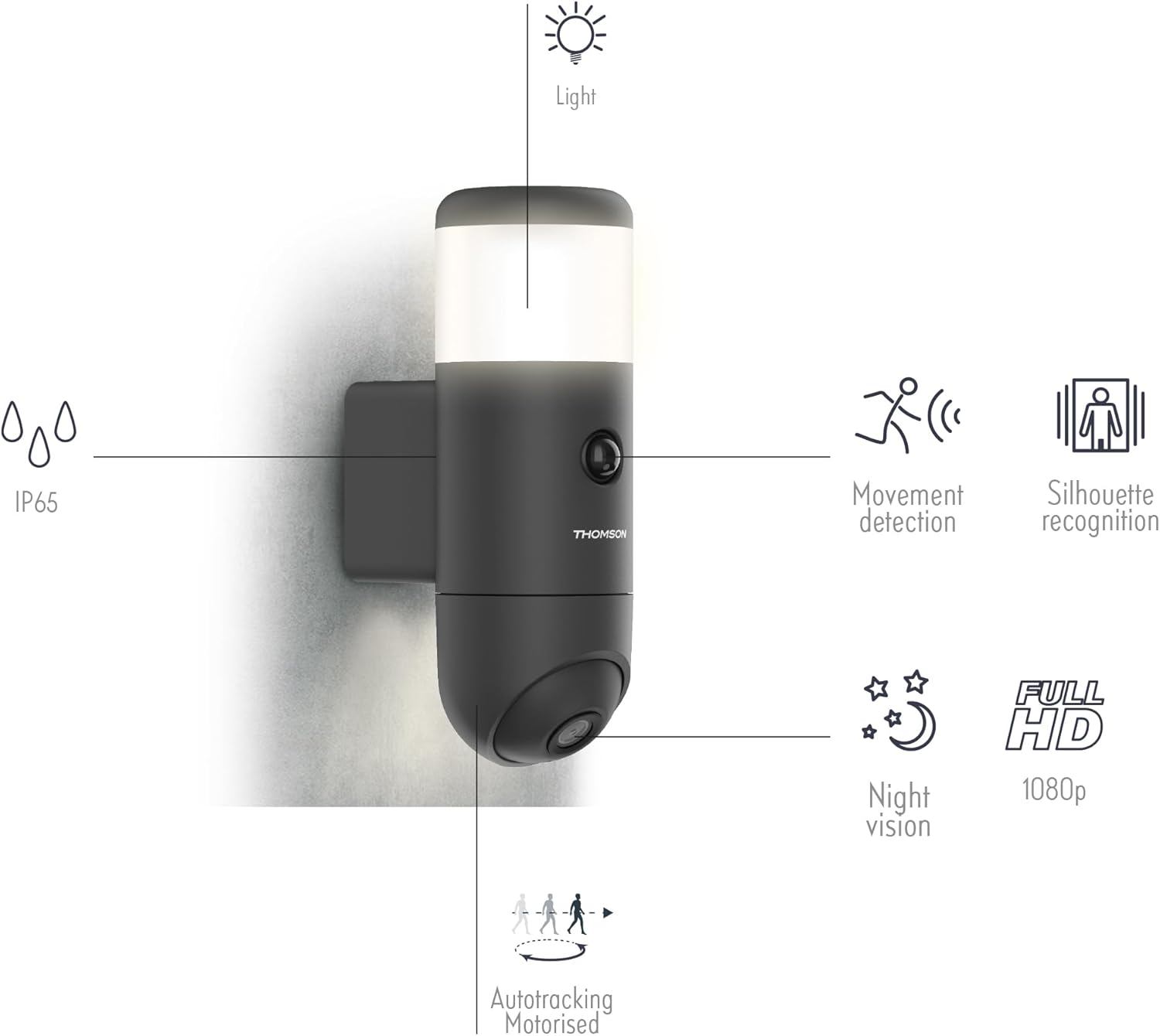
ภาพที่ 8.1: โอเวอร์view of the camera's features including IP65 rating, movement detection, silhouette recognition, night vision, Full HD 1080p resolution, and motorized auto-tracking.
- หมายเลขรุ่น: 512511
- คุณภาพวิดีโอ: 1080p เต็ม HD
- การเชื่อมต่อ: ไร้สาย (Wi-Fi)
- การมองเห็นตอนกลางคืน: Infrared, up to 25m
- ปฐมนิเทศ: Motorized (Pan)
- การบันทึก: ใช่
- เสียง: Integrated Microphone and Speaker
- พื้นที่จัดเก็บ: Max 128 GB microSDXC (not supplied)
- ความเข้ากันได้ของสมาร์ทโฮม: Google Home, Amazon Alexa
- แอปพลิเคชัน: atHome Security
- พลัง: 3 Watts, Manual Operation (wall-mounted plug)
- ขนาด (ยาว x กว้าง x สูง): 54.2 x 23 x 33 ซม.
- น้ำหนัก: 1100 กรัม
- สี: สีดำ
- วิธีการติดตั้ง: การติดตั้งแบบล้าง
- คุณสมบัติพิเศษ: HD Resolution, Movement Detection, Silhouette Recognition, Auto-tracking
- ระดับการป้องกันน้ำและฝุ่น: IP65

Image 8.2: Diagram showing the dimensions of the camera lamp: 8 cm width and 23 cm height.
9. การรับประกันและการสนับสนุน
For warranty information and technical support, please refer to the documentation provided with your purchase or visit the official Avidsen webไซต์นี้ โปรดเก็บหลักฐานการซื้อไว้เพื่อใช้ยืนยันการรับประกัน


