การแนะนำ
This manual provides detailed instructions for the setup, operation, and maintenance of your SIMOLIO SM824D1 Digital Wireless TV Headphones. Please read this manual thoroughly before using the product to ensure proper functionality and to maximize your listening experience.
The SIMOLIO SM824D1 system includes a wireless headset and a transmitter. It is designed to provide clear audio from your TV or other audio sources directly to your ears, featuring balance and tone controls for personalized sound, and a long-range 2.4GHz wireless connection.
เนื้อหาแพ็คเกจ
โปรดตรวจสอบว่าสินค้าทั้งหมดมีอยู่ในแพ็คเกจของคุณ:
- SIMOLIO SM824D1 Wireless Headset
- SIMOLIO SM824D1 Transmitter
- Audio Cables (Optical, RCA, 3.5mm)
- อะแดปเตอร์แปลงไฟ
- สายชาร์จ USB
- Extra Soft Ear Tips
- Decompression Hanger Loops
- คู่มือผู้ใช้ภาษาอังกฤษ (เอกสารฉบับนี้)
- Spare Lithium-Ion Battery

Image: Contents of the SIMOLIO SM824D1 package, showing the headset, transmitter, audio cables, power adapter, USB cable, extra ear tips, and hanger loops.
การตั้งค่า
1. การจ่ายไฟให้เครื่องส่งสัญญาณ
- Connect the power adapter to the transmitter's 'Power In' port.
- เสียบอะแดปเตอร์ไฟฟ้าเข้ากับเต้ารับไฟฟ้าที่ผนัง
2. Connecting to Your TV/Audio Source
The SIMOLIO SM824D1 supports Digital Optical, RCA, and 3.5mm audio outputs. Choose the appropriate cable based on your TV or audio source's available ports.

Image: Compatibility chart for TV audio outputs (Digital Optical, 3.5mm, RCA) with SIMOLIO models.
- การเชื่อมต่อแบบดิจิตอลออปติคอล: Use the optical cable. Connect one end to your TV's 'Digital Optical Audio Out' port and the other end to the 'OPTICAL IN' port on the transmitter. สำคัญ: For optical connections, you MUST set your TV's audio output format to PCM. Refer to your TV's settings menu.
- การเชื่อมต่ออาร์ซีเอ: Use the RCA audio cable (red and white plugs). Connect the red plug to the TV's 'Audio Out R' and the white plug to 'Audio Out L'. Connect the other end to the 'AUDIO IN' port on the transmitter.
- การเชื่อมต่อเสียง 3.5 มม.: Use the 3.5mm audio cable. Connect one end to your TV's headphone jack or 'Audio Out' port and the other end to the 'AUDIO IN' port on the transmitter.
Only one audio cable connection is required. For TVs with only coaxial or HDMI ARC ports, an additional audio converter/extractor may be needed (not included).

ภาพ: ด้านหลัง view of the transmitter, highlighting the input ports and audio mode switches.
3. การชาร์จชุดหูฟัง
The headset uses a rechargeable Lithium-Ion battery. A spare battery is also included and can be charged in the transmitter.
- ตรวจสอบให้แน่ใจว่าเครื่องส่งสัญญาณเปิดอยู่
- To charge the headset, place it into the charging slots on the transmitter. Ensure the front of the headset faces the front of the transmitter.
- To charge the spare battery, open the charging compartment on the transmitter and insert the battery.
- Charging typically takes about 3 hours. The indicator light on the headset will show charging status.

Image: Instructions for charging the headset and spare battery using the transmitter.
คำแนะนำการใช้งาน
การควบคุมชุดหูฟัง
ภาพ: เหนือview of the headset's controls and features.
- เปิด/ปิดเครื่อง: Slide the switch to turn the headset on or off.
- การควบคุมระดับเสียง: Use the 'VOL' dial to adjust the listening volume.
- การควบคุมสมดุล: Use the 'BAL' dial to adjust the volume balance between the left and right ears. This is useful for individuals with different hearing sensitivities in each ear.
- เสียงส่วนบุคคล Amplifier Button: Press this button to activate the ambient sound listener function, allowing you to hear nearby conversations without removing the headset. The indicator light will turn red when active.
การควบคุมเครื่องส่งสัญญาณ
- OFF/MONO/STEREO Switch: Select 'STEREO' for Hi-Fi sound quality or 'MONO' for clearer TV dialogue, especially beneficial for speech clarity.
- TONE Selector (TREBLE/NORMAL/BASS): Adjust the audio tone to your preference. 'TREBLE' enhances high frequencies, 'BASS' enhances low frequencies, and 'NORMAL' provides a balanced sound.
การสวมชุดหูฟัง
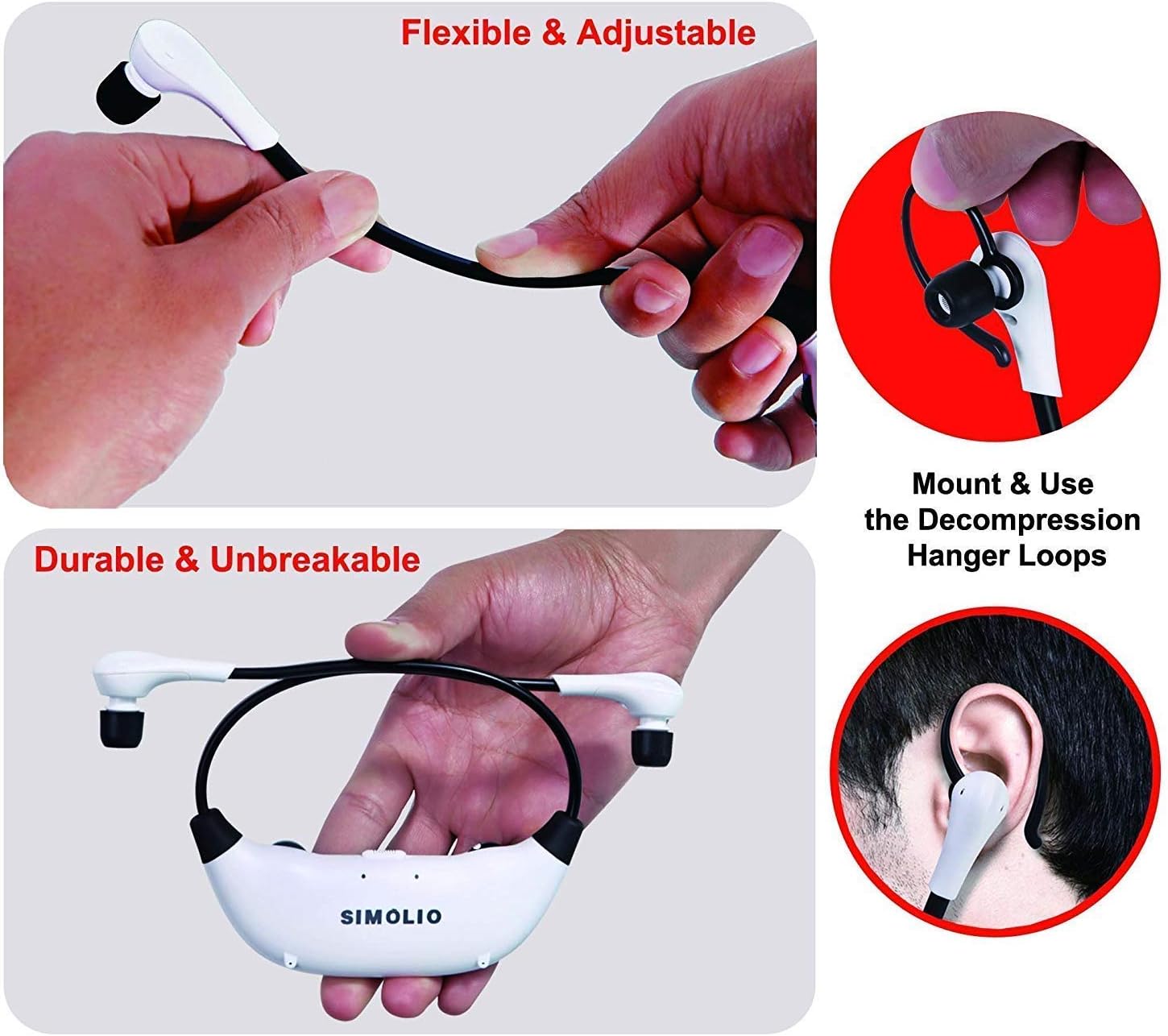
The headset features flexible and adjustable arms with memory stainless steel strips for a comfortable fit. Super-soft memory foam eartips and decompression hanger loops are included for enhanced comfort.

Image: Visual guide on adjusting the headset for comfort and using the hanger loops.
การซ่อมบำรุง
การดูแลแบตเตอรี่
- ควรชาร์จแบตเตอรี่ให้เต็มเสมอทุกครั้งก่อนใช้งานครั้งแรก
- When not in use, store the headset on the transmitter to keep it charged.
- The included spare battery can be swapped out for continuous use.
การทำความสะอาด
- Wipe the headset and transmitter with a soft, dry cloth.
- The ear-tips feature an anti-dust mesh. Clean gently if dust accumulates.
- หลีกเลี่ยงการใช้สารเคมีรุนแรงหรือน้ำยาทำความสะอาดที่มีฤทธิ์กัดกร่อน
พื้นที่จัดเก็บ
- เก็บอุปกรณ์ไว้ในที่แห้งและเย็น หลีกเลี่ยงแสงแดดโดยตรงและอุณหภูมิที่สูงหรือต่ำเกินไป
การแก้ไขปัญหา
| ปัญหา | สาเหตุที่เป็นไปได้ | สารละลาย |
|---|---|---|
| ไม่มีเสียงหรือเสียงเบา |
|
|
| เสียงผิดเพี้ยนหรือสัญญาณรบกวน |
|
|
| หูฟังไม่ชาร์จ |
|
|

Image: Recommended TV audio settings for optimal performance.

Image: Guidance on optimizing audio signal strength from TV and cable box.
ข้อมูลจำเพาะ
- ชื่อรุ่น : เอสเอ็ม-824D1
- เทคโนโลยีการเชื่อมต่อ: ไร้สาย (RF)
- เทคโนโลยีการสื่อสารไร้สาย: คลื่นความถี่วิทยุ (2.4GHz)
- แจ็คหูฟัง: แจ็ค 3.5 มม. (สำหรับเชื่อมต่อกับตัวส่งสัญญาณ)
- อุปกรณ์ที่รองรับ: TVs with Digital Optical, RCA, or 3.5mm Audio Outputs
- ประเภทการควบคุม: Button Control, Push Button, Dial
- เวลาในการชาร์จ: ประมาณ 3 ชั่วโมง
- อายุการใช้งานแบตเตอรี่: Up to 6 Hours (depending on usage)
- น้ำหนักสินค้า: 0.54 Kilograms (headset and transmitter)
- วัสดุ: พลาสติก
- Noise Control Features: ระบบตัดเสียงรบกวน
- คุณสมบัติพิเศษ: Microphone Included (for ambient sound ampการทำให้บริสุทธิ์)
- ผู้ผลิต: ซิโมลิโอ
ข้อมูลด้านความปลอดภัย
คำเตือน:
- These RF products are not recommended for individuals with pacemakers. Please consult your physician before use if you have a pacemaker.
- ควรหลีกเลี่ยงการฟังเพลงด้วยเสียงดังเป็นเวลานานเพื่อป้องกันความเสียหายต่อการได้ยิน
การรับประกันและการสนับสนุน
For warranty information or technical assistance, please refer to the warranty card included with your product or visit the official SIMOLIO website. You may also contact SIMOLIO customer support directly via the contact information provided on their webไซต์หรือในเอกสารผลิตภัณฑ์ของคุณ
For connectivity questions, you can send a picture of your TV's jack panel to support@simolio.com for confirmation.


