1. บทนำ
ขอบคุณสำหรับการซื้อasing the QFX BT-60-BK 4-inch Bluetooth Speaker. This manual provides essential information for setting up, operating, and maintaining your speaker. Please read these instructions carefully before use to ensure optimal performance and longevity of your device.

ภาพที่ 1.1: ด้านหน้า view of the QFX BT-60-BK Bluetooth Speaker with active LED lights.
2. เนื้อหาบรรจุภัณฑ์
กรุณาทำเครื่องหมายในช่องสำหรับรายการต่อไปนี้:
- QFX BT-60-BK Bluetooth Speaker
- สายไฟ
- คู่มือการใช้งาน (เอกสารนี้)
3. สินค้าหมดview
The QFX BT-60-BK is a portable Bluetooth speaker featuring a 4-inch woofer, LED party lights, and multiple input options for versatile audio playback.

Image 3.1: Diagram illustrating the various components and ports of the BT-60-BK speaker.
3.1 การควบคุมและพอร์ต

Image 3.2: Top panel controls of the BT-60-BK speaker.
- M/+ (Mode/LED Light): Press to switch between input modes (Bluetooth, USB, TF, AUX, FM Radio). Press and hold to change LED light patterns.
- - (ลดเสียง/ก่อนหน้า): Press to decrease volume. Press and hold to go to the previous track.
- ►▮ (Play/Pause/TWS): Press to play or pause audio. Press and hold to activate TWS pairing mode.
- + (Volume Up/Next): Press to increase volume. Press and hold to go to the next track.

Image 3.3: Rear panel ports of the BT-60-BK speaker.
- อินพุต AUX: 3.5mm jack for connecting external audio devices.
- อินพุต MIC: 6.35mm jack for connecting a microphone.
- พอร์ตชาร์จ Micro-USB: สำหรับชาร์จแบตเตอรี่ภายในของลำโพง
- สวิตซ์เปิด/ปิด: Power switch for the speaker.
- พอร์ต USB: สำหรับเล่นไฟล์เสียงจากแฟลชไดรฟ์ USB
- สล็อตบัตร TF: For playing audio from a TF (Micro-SD) card.
- ไฟแสดงสถานะแบตเตอรี่: Indicates charging status.
4. การตั้งค่า
4.1 การชาร์จลำโพง
- Connect the provided power cord to the Micro-USB charging port on the speaker.
- Plug the other end of the power cord into a compatible USB power adapter (not included) or a USB port on a computer.
- The battery light indicator will illuminate during charging. It will turn off or change color when fully charged.
- การชาร์จเต็มโดยทั่วไปจะใช้เวลา 2-3 ชั่วโมง
4.2 การเปิด/ปิดเครื่อง
- To power on the speaker, slide the ON/OFF switch to the 'ON' position.
- หากต้องการปิดลำโพง ให้เลื่อนสวิตช์เปิด/ปิดไปที่ตำแหน่ง 'ปิด'
5. คู่มือการใช้งาน
5.1 การจับคู่บลูทูธ
- Ensure the speaker is powered on and in Bluetooth mode. If not, press the 'M/+' button repeatedly until 'Bluetooth' mode is announced or indicated.
- เปิดใช้งานบลูทูธบนอุปกรณ์เคลื่อนที่ของคุณ (สมาร์ทโฟน แท็บเล็ต ฯลฯ)
- ค้นหา available Bluetooth devices. You should see 'QFX BT-60' in the list.
- Select 'QFX BT-60' to pair. Once paired, the speaker will emit a confirmation tone.
5.2 True Wireless System (TWS) Pairing
TWS allows two BT-60 speakers to connect wirelessly and play Bluetooth audio simultaneously for a stereo sound experience. This feature only works in Bluetooth mode.

Image 5.1: Illustration of two BT-60 speakers connected using True Wireless System (TWS).
- Ensure both BT-60 speakers are powered on and in Bluetooth mode.
- On one of the speakers (this will be the primary speaker), press and hold the '►▮' button for a few seconds until you hear a pairing tone.
- The two speakers will automatically connect to each other. A confirmation tone will sound once connected.
- Now, connect your mobile device to the primary speaker via Bluetooth as described in Section 5.1. The audio will play through both speakers in stereo.
การเล่นการ์ด USB/TF ขนาด 5.3 นิ้ว
- Insert a USB flash drive or TF (Micro-SD) card into the respective port on the speaker.
- ลำโพงจะสลับไปใช้โหมด USB หรือการ์ด TF โดยอัตโนมัติและเริ่มเล่นเสียง files. If not, press the 'M/+' button to select the correct mode.
- Use the '+', '-', and '►▮' buttons to control playback (next track, previous track, play/pause).
อินพุต AUX 5.4 ช่อง
- เชื่อมต่อปลายด้านหนึ่งของสายสัญญาณเสียงขนาด 3.5 มม. (ไม่ได้รวมอยู่ในชุด) เข้ากับพอร์ตอินพุต AUX บนลำโพง
- ต่อปลายอีกด้านของสายสัญญาณเสียงเข้ากับช่องเสียบหูฟังหรือช่องสัญญาณเสียงออกของอุปกรณ์ภายนอกของคุณ
- Press the 'M/+' button to switch the speaker to AUX mode.
- ควบคุมการเล่นและระดับเสียงจากอุปกรณ์ภายนอกของคุณ
5.5 อินพุตไมโครโฟน
- Plug a 6.35mm microphone into the MIC input port on the speaker.
- Adjust the microphone volume as needed.
5.6 โหมดไฟ LED
- Press and hold the 'M/+' button to cycle through different LED light patterns or to turn the lights off.
6. การบำรุงรักษา
- การทำความสะอาดใช้ผ้าแห้งนุ่มเช็ดทำความสะอาดภายนอกลำโพง ห้ามใช้สารทำความสะอาดที่มีฤทธิ์กัดกร่อนหรือตัวทำละลาย
- พื้นที่จัดเก็บ: When not in use for extended periods, store the speaker in a cool, dry place away from direct sunlight and extreme temperatures.
- การดูแลแบตเตอรี่เพื่อยืดอายุการใช้งานแบตเตอรี่ ควรหลีกเลี่ยงการปล่อยให้แบตเตอรี่หมดจนเกลี้ยงบ่อยๆ ควรชาร์จลำโพงเป็นประจำ แม้ว่าจะไม่ได้ใช้งานก็ตาม
- การสัมผัสน้ำ: This speaker is not waterproof. Avoid exposing it to water or moisture.
7 การแก้ไขปัญหา
| ปัญหา | วิธีแก้ปัญหาที่เป็นไปได้ |
|---|---|
| ลำโพงไม่เปิดเครื่อง | Ensure the battery is charged. Connect the speaker to a power source and try again. Check the ON/OFF switch position. |
| ไม่มีเสียง. | Check the volume level on both the speaker and your connected device. Ensure the correct input mode is selected. Verify audio cables are securely connected. |
| การจับคู่บลูทูธล้มเหลว | Ensure the speaker is in Bluetooth mode. Disable and re-enable Bluetooth on your device. Move your device closer to the speaker. Forget 'QFX BT-60' from your device's Bluetooth list and try pairing again. |
| การจับคู่ TWS ล้มเหลว | Ensure both speakers are in Bluetooth mode and not connected to any other device. Repeat the TWS pairing steps carefully. |
| การ์ด USB/TF ไม่สามารถเล่นได้ | Ensure the card/drive is inserted correctly. Verify that the audio files are in a compatible format (e.g., MP3). Check if the speaker is in the correct USB/TF mode. |
8. ข้อมูลจำเพาะ
| คุณสมบัติ | รายละเอียด |
|---|---|
| หมายเลขรุ่น | BT-60-BK |
| ประเภทลำโพง | โคแอกเซียล |
| เส้นผ่านศูนย์กลางวูฟเฟอร์ | 4 นิ้ว |
| เทคโนโลยีการเชื่อมต่อ | บลูทูธ |
| การสื่อสารแบบไร้สาย | บลูทูธ |
| แหล่งพลังงาน | ใช้พลังงานจากแบตเตอรี่ (รวมแบตเตอรี่ลิเธียมไอออน 1 ก้อน) |
| โหมดเอาต์พุตเสียง | สเตอริโอ (พร้อม TWS) |
| วิธีการควบคุม | Manual Buttons |
| ขนาดสินค้า | ลึก 5.59 นิ้ว x กว้าง 4.84 นิ้ว x สูง 7.64 นิ้ว |
| น้ำหนักสินค้า | 1.66 ปอนด์ |
| ส่วนประกอบที่รวมอยู่ | Speaker, power cord, user manual |
| ยูพีซี | 606540039748 |
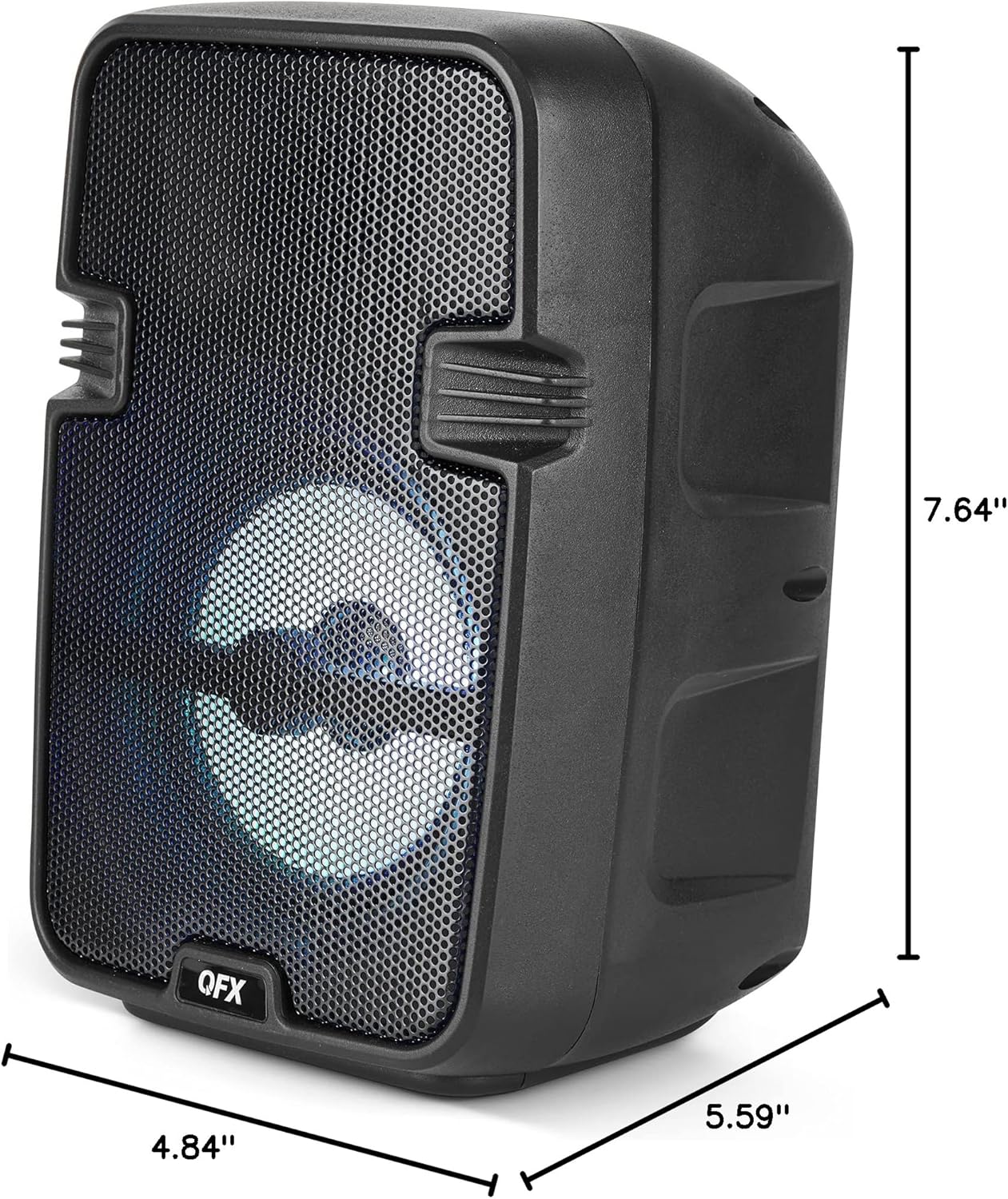
Image 8.1: Product dimensions of the BT-60-BK speaker.
9. การรับประกันและการสนับสนุน
The QFX BT-60-BK speaker comes with a limited warranty. For specific warranty details, please refer to the warranty card included with your purchase or visit the official QFX website. For technical support or customer service inquiries, please contact QFX customer support through their official channels.


