การแนะนำ
This manual provides detailed instructions for the setup, operation, and maintenance of your Retro-Bit Tribute 64 2.4 GHz Wireless Controller V2. This controller is designed for use with Nintendo 64, Nintendo Switch Online, PC, MacOS, RetroPie, Raspberry Pi, and other USB-enabled devices, offering a versatile gaming experience.
For optimal performance, please ensure your controller's firmware is updated to the latest version before use. Refer to the "Firmware Update" section for instructions.
เนื้อหาแพ็คเกจ
ตรวจสอบว่ามีรายการทั้งหมดอยู่ในแพ็คเกจของคุณ:
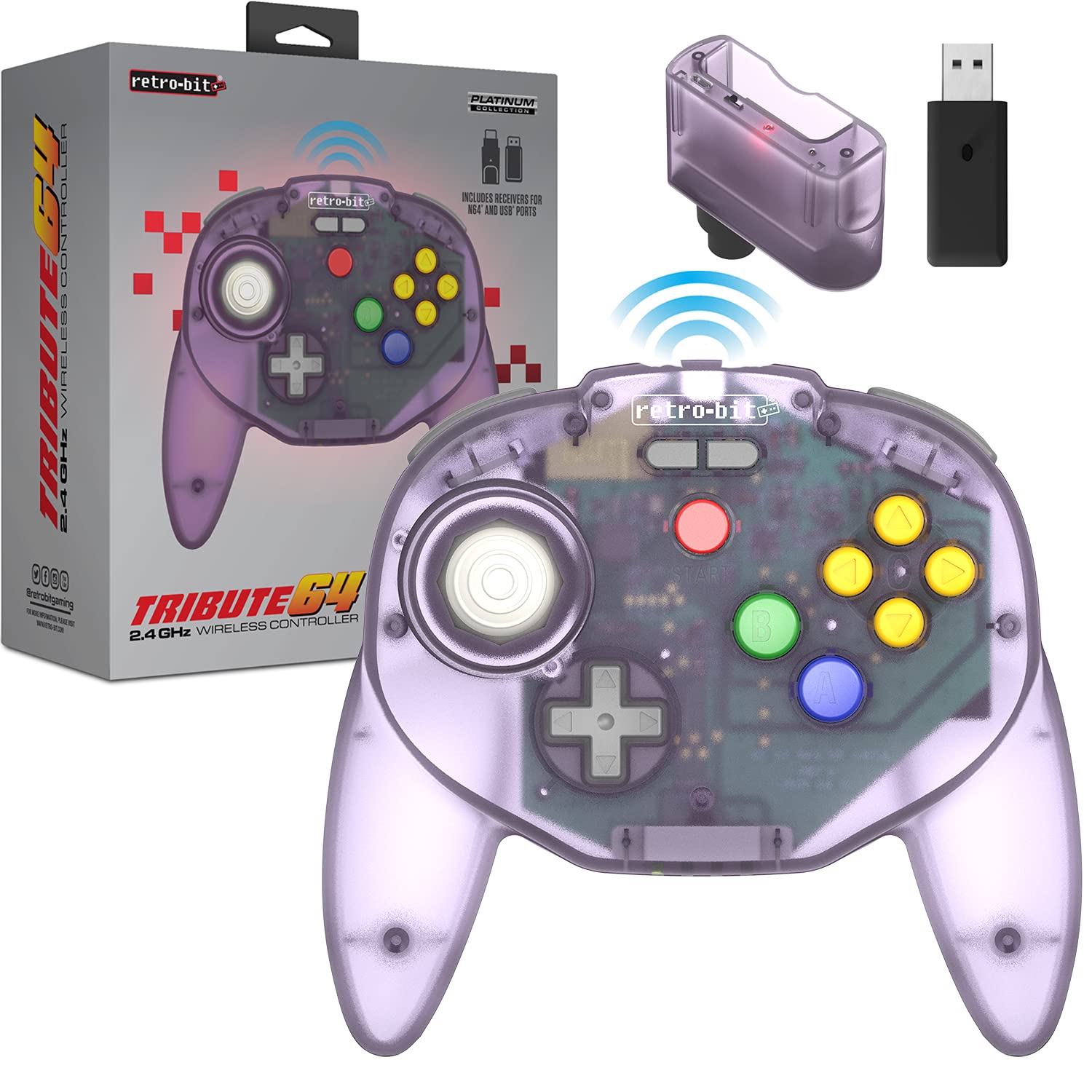
- Retro-Bit Tribute 64 2.4 GHz Wireless Controller V2 (Atomic Purple)
- N64 Original Port Receiver
- ตัวรับสัญญาณ USB
- USB-C Charging Cable (Micro-USB for receiver updates, not included)

Image: The Retro-Bit Tribute 64 Wireless Controller shown alongside its N64 and USB receivers, illustrating the included components for various compatibility options.
เค้าโครงคอนโทรลเลอร์
The Tribute 64 V2 controller features an ergonomic design with an ample button layout, including additional functions for USB devices. It incorporates dual Z shoulder pads for enhanced grip and control.
ภาพ: จากบนลงล่าง view of the Atomic Purple Retro-Bit Tribute 64 Wireless Controller, highlighting the analog stick, D-pad, A, B, and C buttons, and Start button.

Image: A detailed diagram illustrating the key features of the Tribute 64 controller, including the sensitive analog stick, dual Z triggers, and additional function buttons for USB compatibility.
คุณสมบัติหลัก:
- แท่งอนาล็อก: High-grade, sensitive, and accurate for precise control.
- ดี-แพด: Standard directional pad.
- ปุ่ม A, B, C: Classic N64 button layout.
- ปุ่มเริ่มต้น: For in-game menu and pause functions.
- ปุ่ม L/R: กระดุมไหล่
- ปุ่ม ZL/ZR: Dual Z triggers for enhanced control, especially with USB devices.
- Built-in Rumble Pak: Provides haptic feedback during gameplay.
- ช่องเสียบการ์ดหน่วยความจำ: For N64 memory card functionality.

ภาพ: ภาพระยะใกล้ view of the controller's underside, highlighting the ZL, ZR, L, and R triggers, designed for comfortable access during gameplay.
ตั้งค่าและจับคู่
การชาร์จคอนโทรลเลอร์:
The controller is equipped with a rechargeable Lithium Ion battery. Connect the included USB-C charging cable to the controller's charging port and to a USB power source (e.g., computer, USB wall adapter). The LED indicator will show charging status.
Pairing with Nintendo 64:
- Insert the N64 Original Port Receiver into a controller port on your Nintendo 64 console.
- Ensure the N64 console is powered on.
- Press and hold the SYNC button on the N64 receiver until its LED indicator begins to flash.
- On the Tribute 64 controller, press and hold the HOME/PAIR button until the controller's LED indicators begin to flash.
- Once both LEDs are solid, the controller is successfully paired with your N64 console.
การจับคู่กับสวิตช์ Nintendo:
- On your Nintendo Switch, navigate to System Settings > Controllers and Sensors.
- Enable "Pro Controller Wired Communication." This step is crucial for pairing.
- Insert the USB Receiver into an available USB port on the Nintendo Switch dock. If using in handheld mode, a USB-C to USB-A adapter (not included) may be required.
- Press and hold the SYNC button on the USB receiver until its LED indicator begins to flash.
- On the Tribute 64 controller, press and hold the HOME/PAIR button until the controller's LED indicators begin to flash.
- Once both LEDs are solid, the controller is successfully paired with your Nintendo Switch.

Image: The Retro-Bit Tribute 64 controller displayed next to a Nintendo Switch console, indicating its compatibility with Nintendo Switch Online services.
Pairing with PC, MacOS, RetroPie, Raspberry Pi, and Other USB Devices:
- Insert the USB Receiver into an available USB port on your device (PC, Mac, Raspberry Pi, etc.).
- Press and hold the SYNC button on the USB receiver until its LED indicator begins to flash.
- On the Tribute 64 controller, press and hold the HOME/PAIR button until the controller's LED indicators begin to flash.
- Once both LEDs are solid, the controller is successfully paired. Your operating system should recognize it as a gamepad.

Image: A graphic displaying various compatibility logos, including Nintendo 64, Windows, Nintendo Switch Online, MacOS, Steam, Android, and Raspberry Pi, highlighting the controller's broad device support.
การใช้งานคอนโทรลเลอร์
Once paired, the controller functions similarly to an original N64 controller, with added versatility for modern systems.
Rumble Feature:
The controller has a built-in rumble pak for haptic feedback. Note that rumble functionality and memory card port support may vary and may not be available on all games or platforms.

Image: An illustration depicting a controller with vibration waves, signifying the integrated rumble feature for immersive gameplay feedback.
Button Mapping (for USB Devices):
The Tribute 64 V2 includes additional function buttons for use with USB devices. The default button mapping is designed to be intuitive, but can often be customized within the settings of your game or emulator.
For Nintendo Switch, if you encounter issues with button mapping, some users have found that holding เริ่ม + ก for a few seconds can adjust the mapping. Refer to online resources or the Retro-Bit support page for specific button remapping instructions for different platforms.

Image: A close-up of the controller's central area, highlighting the "retro-bit" logo and the additional gray buttons positioned above the Start button, intended for expanded functionality with USB devices.
อัพเดตเฟิร์มแวร์
It is highly recommended to update your controller to the latest firmware version for the best experience and to resolve potential issues. Firmware updates are typically performed via a computer.
- Visit the official Retro-Bit support webเว็บไซต์.
- Locate the support page for the Tribute 64 2.4 GHz Wireless Controller V2.
- Download the latest firmware update tool and instructions.
- Follow the on-screen instructions provided by the update tool. This usually involves connecting the controller to your computer via a Micro-USB cable (not included for receiver updates) and running the software.
บันทึก: Video tutorials for firmware updates are often available online and can be helpful if you are not familiar with the process.
การซ่อมบำรุง
- การทำความสะอาด: ใช้ผ้านุ่มและแห้งเช็ดทำความสะอาดคอนโทรลเลอร์ สำหรับสิ่งสกปรกฝังแน่น ให้เช็ดเบาๆamp สามารถใช้ผ้าเช็ดได้ แต่ต้องระวังอย่าให้ความชื้นเข้าไปในช่องเปิด
- พื้นที่จัดเก็บ: เก็บตัวควบคุมไว้ในที่แห้งและเย็น ห่างจากแสงแดดโดยตรงและอุณหภูมิที่สูงหรือต่ำมาก
- การดูแลแบตเตอรี่ เพื่อยืดอายุการใช้งานแบตเตอรี่ ควรหลีกเลี่ยงการปล่อยประจุแบตเตอรี่จนหมดบ่อยๆ ควรชาร์จเป็นประจำ แม้จะไม่ได้ใช้งานเป็นเวลานานก็ตาม
- แท่งอนาล็อก: The analog stick is designed for durability. Avoid excessive force or twisting, as this can cause wear over time.
การแก้ไขปัญหา
| ปัญหา | วิธีแก้ปัญหาที่เป็นไปได้ |
|---|---|
| Controller does not pair. |
|
| Rumble feature not working. |
|
| Incorrect button mapping on Switch. |
|
| ตัวควบคุมตัดการเชื่อมต่อบ่อยครั้ง |
|
ข้อมูลจำเพาะ
| คุณสมบัติ | รายละเอียด |
|---|---|
| หมายเลขรุ่น | รีท00175 |
| การเชื่อมต่อ | ไร้สาย 2.4 GHz |
| ความเข้ากันได้ | Nintendo 64, Nintendo Switch Online, PC, MacOS, RetroPie, Raspberry Pi, other USB devices |
| ประเภทแบตเตอรี่ | ลิเธียมไอออน (รวมอยู่ด้วย) |
| ขนาด | 6.34 x 1.97 x 3.98 นิ้ว |
| น้ำหนัก | 8.8 ออนซ์ |
| Included Receivers | N64 Original Port Receiver, USB Receiver |
การรับประกันและการสนับสนุน
สำหรับข้อมูลการรับประกัน การสนับสนุนทางเทคนิค หรือความช่วยเหลือเพิ่มเติม โปรดเยี่ยมชมเว็บไซต์อย่างเป็นทางการของ Retro-Bit webหรือติดต่อฝ่ายบริการลูกค้า โปรดเก็บหลักฐานการซื้อไว้เพื่อใช้ในการเคลมประกัน
เรโทร-บิต อย่างเป็นทางการ Webเว็บไซต์: www.retro-bit.com


