การแนะนำ
This manual provides comprehensive instructions for the setup, operation, and maintenance of your Gen Game S6 Wireless Bluetooth Gamepad. This device is designed to enhance your gaming experience on compatible Android smartphones, tablets, PCs, and TV boxes.
สินค้าเกินview
เนื้อหาแพ็คเกจ
- Gen Game S6 Wireless Bluetooth Gamepad
- สายชาร์จ USB
- คู่มือการใช้งาน (เอกสารนี้)
การระบุส่วนประกอบ
Familiarize yourself with the various buttons and features of your gamepad:

ภาพ: ด้านหน้า view of the Gen Game S6 Wireless Bluetooth Gamepad, showing the D-pad, left and right analog joysticks, action buttons (A, B, X, Y), Start, Select, and Home buttons, and the 'GEN GAME' logo.
- จอยสติ๊กอนาล็อกด้านซ้าย: สำหรับการควบคุมทิศทาง
- จอยสติ๊กอนาล็อกด้านขวา: For camera control or additional directional input.
- ดี-แพด: Digital directional pad for precise movements.
- ปุ่มการกระทำ (A, B, X, Y): สำหรับการกระทำในเกม
- กระดุมไหล่ (ซ้าย 1, ขวา 1): ปุ่มที่อยู่ด้านบน
- ปุ่มทริกเกอร์ (L2, R2): ปุ่มติดตั้งอยู่ด้านล่าง
- ปุ่มเริ่มต้น: Typically for pausing or menu access.
- ปุ่มเลือก: For various in-game functions.
- ปุ่มหน้าแรก: To power on/off or return to the main menu.
- ที่วางโทรศัพท์: Integrated adjustable clip for mounting smartphones.
- พอร์ตชาร์จ: สำหรับเชื่อมต่อสายชาร์จ USB
- ไฟแสดงสถานะ: To show connection status, charging status, or mode.
การตั้งค่า
1. การชาร์จเกมแพด
- เสียบปลายสายชาร์จ USB ด้านเล็กเข้ากับพอร์ตชาร์จบนจอยเกม
- Connect the larger end of the USB charging cable to a USB power source (e.g., computer, USB wall adapter).
- โดยปกติไฟแสดงสถานะจะแสดงเป็นสีแดงขณะชาร์จ และจะดับลงหรือเปลี่ยนสีเมื่อชาร์จเต็มแล้ว
- ควรชาร์จแบตเตอรี่จนเต็มประมาณ 2-3 ชั่วโมงก่อนใช้งานครั้งแรก
2. การจับคู่บลูทู ธ
The Gen Game S6 supports various pairing modes for different devices. Refer to your device's specific requirements for optimal connection.
- เปิดเครื่อง: กดปุ่มค้างไว้ บ้าน button for 3 seconds to power on the gamepad. The indicator lights will flash.
- เข้าสู่โหมดจับคู่: Depending on your device, you may need to press a specific button combination while powering on (e.g., บ้าน + X สำหรับ Android, บ้าน + เอ for PC). Refer to the quick start guide included with your gamepad for specific mode instructions. The indicator lights will flash rapidly, indicating it's searching for a device.
- เปิดใช้งานบลูทูธบนอุปกรณ์ของคุณ: On your Android smartphone, tablet, PC, or TV Box, go to the Bluetooth settings and ensure Bluetooth is enabled.
- สแกนหาอุปกรณ์: Your device will scan for available Bluetooth devices. Look for "Gen Game S6" or a similar name in the list.
- เชื่อมต่อ: Select the gamepad from the list to initiate pairing. Once successfully paired, the indicator light on the gamepad will typically become solid.
- ทดสอบการเชื่อมต่อ: Open a compatible game or a gamepad testing application to verify the connection and button functionality.
คำแนะนำการใช้งาน
การทำงานพื้นฐาน
- เปิดเครื่อง: กดปุ่มค้างไว้ บ้าน กดปุ่มนี้เป็นเวลา 3 วินาที
- หมดแรง: กดปุ่มค้างไว้ บ้าน button for 5 seconds until the indicator lights turn off. The gamepad will also automatically power off after a period of inactivity to conserve battery.
- กำลังเชื่อมต่อใหม่: Once paired, the gamepad should automatically reconnect to the last paired device when powered on and Bluetooth is active on the device. If not, manually select it from your device's Bluetooth settings.
การใช้ที่วางโทรศัพท์
- Gently extend the integrated phone holder upwards.
- Carefully place your smartphone into the holder, ensuring it is securely gripped without obstructing any buttons or ports.
- ปรับมุมให้เหมาะสมที่สุด viewระหว่างการเล่นเกม
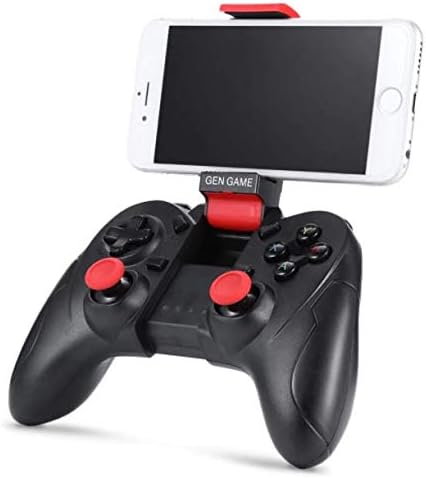
Image: The Gen Game S6 Gamepad with a smartphone securely mounted in the integrated holder, demonstrating its use for mobile gaming.
การซ่อมบำรุง
- การทำความสะอาด: Use a soft, dry cloth to wipe the surface of the gamepad. Avoid using harsh chemicals or abrasive materials.
- พื้นที่จัดเก็บ: เก็บเกมแพดไว้ในที่แห้งและเย็น หลีกเลี่ยงแสงแดดโดยตรงและอุณหภูมิที่สูงหรือต่ำเกินไป
- การดูแลแบตเตอรี่ เพื่อยืดอายุการใช้งานแบตเตอรี่ ควรหลีกเลี่ยงการปล่อยให้แบตเตอรี่หมดจนเกลี้ยงบ่อยๆ ควรชาร์จแบตเตอรี่เป็นประจำ แม้ว่าจะไม่ได้ใช้งานเป็นเวลานานก็ตาม
- หลีกเลี่ยงการหยด: ควรปกป้องจอยเกมจากการตกหล่นและการกระแทก เพราะอาจทำให้ชิ้นส่วนภายในเสียหายได้
การแก้ไขปัญหา
| ปัญหา | สาเหตุที่เป็นไปได้ | สารละลาย |
|---|---|---|
| ไม่สามารถเปิดเกมแพดได้ | แบตเตอรี่อ่อน | ชาร์จเกมแพดให้เต็ม |
| ไม่สามารถจับคู่กับอุปกรณ์ได้ | Bluetooth not enabled on device; Gamepad not in pairing mode; Device out of range. | Ensure Bluetooth is on; Put gamepad in pairing mode (refer to Setup); Move gamepad closer to device (within 8 meters). |
| เกมแพดหลุดบ่อยมาก | Low battery; Interference; Device out of range. | Charge the gamepad; Avoid strong electromagnetic interference; Stay within Bluetooth range. |
| Buttons are unresponsive or incorrect. | Incorrect pairing mode; Game not compatible; Software glitch. | Ensure correct pairing mode for your device; Verify game compatibility; Restart gamepad and device. |
ข้อมูลจำเพาะ
- แบบอย่าง: S6
- ยี่ห้อ: เกมเจน
- การเชื่อมต่อ: บลูทู ธ ไร้สาย 3.0
- อุปกรณ์ที่รองรับ: Android Smartphones, Tablets, PCs, TV Boxes
- น้ำหนักสินค้า: 240 กรัม
- ขนาดแพ็คเกจ: 20 x 14.2 x 7.2 ซม.
- สี: สีดำ
การรับประกันและการสนับสนุน
สำหรับข้อมูลการรับประกันหรือการสนับสนุนทางเทคนิค โปรดดูเอกสารประกอบที่ให้มา ณ เวลาที่ซื้อ หรือติดต่อตัวแทนจำหน่ายของคุณ โปรดเก็บหลักฐานการซื้อไว้เพื่อใช้ในกรณีที่ต้องการเคลมประกัน


