1. บทนำ
This manual provides comprehensive instructions for the installation, operation, and maintenance of your Comelit Quadra Mini Wi-Fi 2-Wire Video Intercom Kit. This system is designed to enhance home security and communication by allowing visitors to ring the doorbell and communicate with occupants, with the added convenience of hands-free operation and Wi-Fi connectivity.
Please read this manual thoroughly before installation and use to ensure proper functioning and to prevent damage to the device.
2. ข้อมูลด้านความปลอดภัย
Observe the following safety precautions to prevent injury and damage to the product:
- การติดตั้งต้องดำเนินการโดยบุคลากรที่มีคุณสมบัติเหมาะสม โดยเป็นไปตามข้อกำหนดและระเบียบข้อบังคับด้านไฟฟ้าในท้องถิ่น
- Disconnect power before performing any installation, wiring, or maintenance procedures.
- ห้ามนำตัวเครื่องภายนอกไปโดนน้ำโดยตรง หรือจุ่มลงในน้ำ
- อย่าเปิดอุปกรณ์casings unless instructed to do so by this manual or Comelit technical support.
- Use only original Comelit accessories and spare parts.
- เก็บวัสดุบรรจุภัณฑ์ให้พ้นมือเด็ก
3. เนื้อหาบรรจุภัณฑ์
The Comelit Quadra Mini Wi-Fi 2-Wire Video Intercom Kit includes the following components:
- 1x Quadra Outdoor Unit (Doorbell Panel)
- 1x Mini Hands-Free Wi-Fi Monitor (Indoor Unit)
- หน่วยจ่ายไฟ 1x
- 1x Line Termination Board
- อุปกรณ์ติดตั้ง (สกรู, ปลั๊กผนัง)
- คู่มือการใช้งาน (เอกสารนี้)
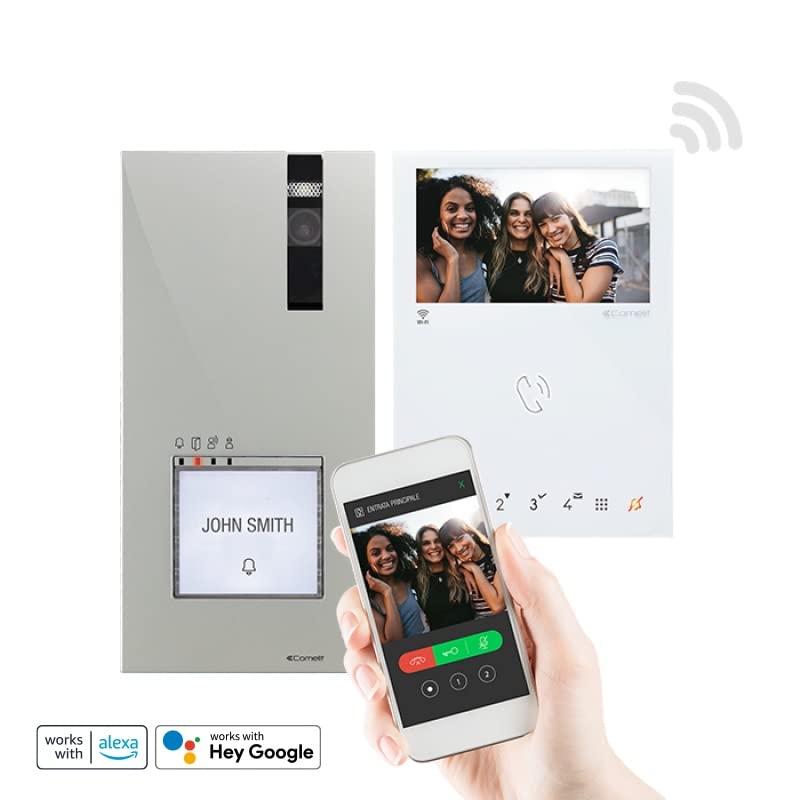
รูปที่ 1: เกินview of the Comelit Quadra Mini Wi-Fi 2-Wire Video Intercom Kit components.
4. สินค้าหมดview
4.1. Quadra Outdoor Unit
The Quadra outdoor unit features an HD color wide-angle camera for clear visitor identification. It can be configured with 1 to 4 call buttons, allowing for multiple apartment or user calls. Four signaling LEDs indicate the status: call sent, door open activated, audio activated, and line busy. It incorporates a 1/4" CMOS detector and is powered via the bus line. Its robust design (IP54-IK08 rated) ensures durability against environmental factors. Dimensions: 95x195x28 mm.
4.2. Mini Hands-Free Wi-Fi Monitor
The indoor Mini monitor is a hands-free color unit with a 4.3-inch (16:9) LCD screen, offering a resolution of 480x272 pixels. It features 8 sensitive keys and 4 programmable buttons for various functions. Users can adjust brightness, audio volume, and ringtone volume directly from the monitor. Its Wi-Fi capability allows for remote interaction via a compatible smartphone application.
4.3. หน่วยจ่ายไฟ
The power supply unit is designed to power the outdoor unit, the electric strike (door lock release), and the indoor monitor. It accepts an input voltage of 110-240 V AC and provides a 33 V DC output. This unit occupies 6 DIN modules in an electrical panel.
5. การตั้งค่าและการติดตั้ง
The Comelit Quadra Mini Wi-Fi kit is pre-programmed and ready for use, simplifying the installation process. This system uses a 2-wire bus connection for communication and power.
5.1. แผนภาพการเดินสายไฟ
Refer to the detailed wiring diagram provided in the separate installation guide for specific connections. Ensure all connections are secure and correctly polarized. The 2-wire bus connects the outdoor unit, indoor monitor, and power supply.
5.2. Mounting the Outdoor Unit
- Choose a suitable mounting location at eye level, protected from direct heavy rain if possible, though the unit is IP54-IK08 rated.
- Mark drilling points using the mounting template (if provided).
- เจาะรูและใส่ปลั๊กผนัง
- Connect the 2-wire bus cable and any electric strike wiring to the outdoor unit terminals.
- ยึดชุดภายนอกเข้ากับผนังโดยใช้สกรูที่ให้มา
5.3. Mounting the Indoor Monitor
- Select an indoor location for the monitor, typically near the main entrance or in a central area.
- ติดตั้งขาตั้งจอภาพเข้ากับผนัง
- Connect the 2-wire bus cable to the monitor terminals.
- Attach the monitor to its bracket.
5.4. การติดตั้งพาวเวอร์ซัพพลาย
Install the power supply unit in your electrical panel (6 DIN modules). Connect the 110-240 V AC input and the 33 V DC output to the 2-wire bus system as per the wiring diagram.
5.5. การเปิดเครื่องและการตั้งค่าเริ่มต้น
- Once all components are wired and mounted, apply power to the system.
- The system is pre-programmed for basic operation. Test the call function from the outdoor unit to the indoor monitor.
- For Wi-Fi connectivity, download the Comelit app on your smartphone and follow the in-app instructions to pair your monitor.
- Configure call buttons on the outdoor unit if more than one is used, referring to the detailed programming guide.
6. คู่มือการใช้งาน
6.1. รับสาย
- เมื่อผู้มาเยี่ยมกดปุ่มเรียกบนเครื่องภายนอก จอภาพภายในจะดังและแสดงภาพของผู้มาเยี่ยม
- กดปุ่ม คำตอบ button (typically a phone icon) on the monitor to establish two-way hands-free communication.
- หากต้องการวางสาย ให้กดปุ่ม วางสาย ปุ่ม (โดยทั่วไปจะเป็นไอคอนรูปโทรศัพท์สีแดง)
6.2. ปลดล็อคประตู
- ระหว่างการโทร หรือเมื่อ viewing the outdoor unit camera, press the ปล่อยประตู button (typically a key icon) to activate the electric strike and open the door/gate.
- The door open activated LED on the outdoor unit will illuminate.
6.3. การตั้งค่าจอภาพ
Use the sensitive keys and programmable buttons on the Mini monitor to access and adjust settings:
- ความสว่าง: ปรับความสว่างหน้าจอให้เหมาะสมที่สุด viewการไอเอ็นจี
- ระดับเสียง: Control the volume of the two-way communication.
- ระดับความดังของเสียงเรียกเข้า: Set the desired volume for incoming calls.
- ปุ่มที่สามารถตั้งโปรแกรมได้: Refer to the advanced settings guide for customizing the 4 programmable buttons (e.g., for additional camera views, intercommunication, or auxiliary functions).
6.4. Wi-Fi Connectivity and Smartphone App
- Ensure your Mini monitor is connected to your home Wi-Fi network as per the setup instructions.
- ดาวน์โหลดแอป Comelit อย่างเป็นทางการจาก App Store บนสมาร์ทโฟนของคุณ
- Follow the app's instructions to pair your monitor. This typically involves scanning a QR code displayed on the monitor or entering a pairing code.
- Once paired, you can receive calls, view the outdoor unit camera, and open the door remotely from your smartphone.
7. การบำรุงรักษา
Regular maintenance ensures the longevity and optimal performance of your video intercom system:
- การทำความสะอาด: ใช้แบบนุ่มๆamp cloth to clean the outdoor unit camera lens and the indoor monitor screen. Do not use abrasive cleaners or solvents.
- การเชื่อมต่อ: Periodically check all wiring connections for tightness and signs of corrosion. Ensure the 2-wire bus connections are secure.
- การอัปเดตซอฟต์แวร์: Check the Comelit app or website for any available firmware updates for your monitor to ensure you have the latest features and security enhancements.
- การปกป้องสิ่งแวดล้อม: While the outdoor unit is robust, ensure it is not subjected to extreme physical impact or prolonged exposure to harsh chemicals.
8 การแก้ไขปัญหา
If you encounter issues with your Comelit video intercom kit, refer to the table below for common problems and solutions:
| ปัญหา | สาเหตุที่เป็นไปได้ | สารละลาย |
|---|---|---|
| ไม่มีภาพปรากฏบนจอภาพภายในอาคาร | No power to the system; Loose wiring connection; Faulty outdoor unit camera. | Check power supply and circuit breaker. Verify 2-wire bus connections. Contact technical support if problem persists. |
| ไม่มีเสียงระหว่างการโทร | Audio volume too low; Loose wiring; Faulty microphone/speaker. | Adjust audio volume on the monitor. Check 2-wire bus connections. |
| ตัวเปิดประตูไม่ทำงาน | Incorrect wiring to electric strike; Faulty electric strike; Insufficient power from power supply. | Verify electric strike wiring. Test electric strike independently. Ensure power supply is functioning correctly. |
| Wi-Fi connection unstable or not connecting | สัญญาณ Wi-Fi อ่อน; รหัสผ่าน Wi-Fi ไม่ถูกต้อง; ปัญหาเกี่ยวกับเราเตอร์ | Ensure monitor is within Wi-Fi range. Re-enter Wi-Fi password. Restart your home router. |
If the problem persists after attempting these solutions, please contact Comelit technical support.
9. ข้อมูลจำเพาะ
| คุณสมบัติ | รายละเอียด |
|---|---|
| ผู้ผลิต | Comelit Immotec |
| อ้างอิงโมเดล | 8451V/BM |
| ยี่ห้อ | คัมไลท์ |
| เทคโนโลยีการเชื่อมต่อ | ไร้สาย (Wi-Fi) |
| อุปกรณ์ที่รองรับ | สมาร์ทโฟน |
| แหล่งพลังงาน | Electric Cable (110-240 V AC input, 33 V DC output) |
| ประเภทการติดตั้ง | ติดผนัง |
| ความละเอียดในการบันทึกวิดีโอ | 720p (เอชดี) |
| ขนาดหน่วยกลางแจ้ง | 95x195x28 มม. |
| Outdoor Unit IP Rating | IP54-IK08 |
| Indoor Monitor Screen | 4.3 inch / 16:9 LCD (480x272 pixels) |
| การใช้ที่แนะนำ | การเฝ้าระวัง |
| น้ำหนัก | 1 กิโลกรัม |
| จำนวนสินค้า | 1 |
| ความพร้อมของอะไหล่ | ไม่มีข้อมูลเกี่ยวกับอะไหล่ |
10. การรับประกันและการสนับสนุน
Comelit products are manufactured to high-quality standards. For specific warranty terms and conditions, please refer to the warranty card included with your product or visit the official Comelit webไซต์นี้ โปรดเก็บหลักฐานการซื้อไว้เพื่อใช้ยืนยันการรับประกัน
For technical assistance, troubleshooting beyond this manual, or spare parts inquiries, please contact Comelit customer support through their official webไซต์หรือข้อมูลการติดต่อที่ระบุไว้ในเอกสารผลิตภัณฑ์ของคุณ