1. บทนำ
Thank you for choosing the KALINCO P96 Smartwatch. This device is designed to help you monitor your health, track your fitness activities, and stay connected. This manual provides essential information for setting up, operating, and maintaining your smartwatch to ensure optimal performance and longevity.
2. สินค้าหมดview
The KALINCO P96 Smartwatch features a 1.69-inch TFT display and offers a wide range of functionalities:
- การติดตามสุขภาพ: Continuous monitoring of heart rate, blood oxygen (SpO2), blood pressure, and sleep patterns. Includes a menstrual cycle tracking function for women.
- การปรับแต่ง: Split-screen mode for quick access to frequently used functions and over 100 stylish watch faces available via the GloryFit app. You can also upload personal photos as watch faces.
- โหมดกีฬา: Over 100 sports modes (running, cycling, rope skipping, dancing, yoga, etc.) with activity tracking for steps, calories burned, distance, heart rate, and blood oxygen during exercise.
- การแจ้งเตือนอัจฉริยะ: Receive text messages and notifications from apps like WhatsApp, Messenger, Facebook, and Instagram directly on your watch. Notifications can be individually deleted from the watch.
- Durability & Battery Life: IP67 water resistance for daily use (hand washing, rain). Equipped with a 260 mAh battery, providing 5-7 days of active use and 15-20 days of standby time with a 2-hour charge.
- ฟังก์ชั่นเพิ่มเติม: Features include phone/watch finder, screen brightness adjustment, breathing training, remote photography, music control, sedentary reminder, alarm clock, timer, stopwatch, and weather forecasts.

Image: The KALINCO P96 Smartwatch displaying its 1.69-inch screen with multiple customizable watch faces and user interface elements.
3. การตั้งค่า
3.1. การชาร์จสมาร์ทวอทช์
Before initial use, fully charge your smartwatch. Connect the magnetic charging cable to the charging contacts on the back of the watch and plug the USB end into a standard USB power adapter (not included). A full charge typically takes approximately 2 hours.
3.2. การดาวน์โหลดและติดตั้งแอป
The KALINCO P96 Smartwatch requires the กลอรี่ฟิต application for full functionality and data synchronization. You can download the app from:
- The Apple App Store (for iOS devices)
- Google Play Store (สำหรับอุปกรณ์ Android)
- Scan the QR code provided in the quick start guide (if available).
The GloryFit app is compatible with smartphones running Android 5.0 or iOS 9.0 and above.
3.3. การจับคู่กับสมาร์ทโฟนของคุณ
- ตรวจสอบให้แน่ใจว่าได้เปิดใช้งานบลูทูธของสมาร์ทโฟนของคุณแล้ว
- เปิดแอป GloryFit บนสมาร์ทโฟนของคุณ
- Follow the in-app instructions to search for and connect to your KALINCO P96 Smartwatch. The watch will typically appear as 'P96' or a similar device name.
- ยืนยันคำขอจับคู่บนสมาร์ทโฟนและสมาร์ทวอทช์ของคุณหากได้รับแจ้ง
เมื่อจับคู่แล้ว นาฬิกาจะซิงโครไนซ์เวลาและข้อมูลกับโทรศัพท์ของคุณ
4. คู่มือการใช้งาน
4.1. การนำทางพื้นฐาน
- ปัดขึ้น/ลง: นำทางผ่านเมนูและการแจ้งเตือน
- ปัดไปทางซ้าย/ขวา: เข้าถึงฟังก์ชันด่วนหรือหน้าจอแสดงข้อมูลต่างๆ ได้อย่างรวดเร็ว
- แตะ: เลือกสินค้าหรือยืนยันการดำเนินการ
- ปุ่มด้านข้าง: กดเพื่อปลุกหน้าจอ กลับไปยังหน้าจอหลัก หรือเข้าถึงเมนูหลัก
4.2. การติดตามสุขภาพ
The smartwatch continuously monitors several health metrics:
- อัตราการเต้นของหัวใจ: มีระบบตรวจสอบอัตราการเต้นของหัวใจตลอด 24 ชั่วโมง View real-time data on the watch or detailed trends in the GloryFit app.
- ออกซิเจนในเลือด (SpO2): Monitors blood oxygen levels using infrared technology. Access readings on the watch or app.
- ความดันโลหิต: Measures blood pressure. For accurate readings, ensure the watch is worn correctly and remain still during measurement. Consult a medical professional for precise medical data.
- การติดตามการนอนหลับ: Automatically tracks your sleep patterns, including deep sleep, light sleep, and awake times. Review your sleep quality analysis in the GloryFit app.
- การติดตามรอบเดือน: A dedicated feature for women to record and track menstrual cycles within the GloryFit app.

Image: The smartwatch interface showing health monitoring features such as blood oxygen, blood pressure, heart rate, and a visual representation of sleep tracking data.
4.3. โหมดกีฬาและการติดตามกิจกรรม
The P96 Smartwatch supports over 100 sports modes. To use:
- Navigate to the 'Sports' section on your watch.
- เลือกกิจกรรมที่คุณต้องการ (เช่น วิ่ง ปั่นจักรยาน โยคะ)
- Start the activity. The watch will track metrics like steps, calories, distance, and heart rate.
- End the activity to save your data. Detailed reports are available in the GloryFit app.

Image: A visual representation of the smartwatch's 100+ sports modes icons and a smartphone screen displaying detailed daily activity tracking data including steps, distance, and calories.
4.4. การแจ้งเตือนอัจฉริยะ
Once paired with your phone, the watch can display notifications:
- Ensure app notifications are enabled in the GloryFit app settings.
- Incoming calls, text messages, and app alerts will vibrate the watch and display content on the screen.
- You can dismiss or delete notifications directly from the watch.

Image: The smartwatch showing icons for various smart notifications (calls, Facebook, Line, Instagram, etc.) and illustrations of vibration reminders for calls, sedentary alerts, and alarms.
4.5. การปรับแต่ง
- หน้าปัดนาฬิกา: In the GloryFit app, browse and select from over 100 watch faces. You can also upload your own photos to personalize the watch face.
- โหมดแบ่งหน้าจอ: Swipe right on the main screen to access the split-screen area, allowing quick selection of frequently used functions.
4.6. ฟังก์ชั่นเพิ่มเติม
Explore other useful features:
- นาฬิกาจับเวลา Use the built-in stopwatch for timing activities.
- พยากรณ์อากาศ: View สภาพอากาศปัจจุบันและการพยากรณ์อากาศ (ต้องซิงค์ข้อมูลกับแอป)
- การควบคุมเพลง: ควบคุมการเล่นเพลงบนสมาร์ทโฟนของคุณ (เล่น หยุดชั่วคราว ข้ามเพลง)
- การปรับความสว่าง: Adjust screen brightness for optimal visibility in different lighting conditions.
- ค้นหาโทรศัพท์/นาฬิกา: Locate your paired phone or watch if misplaced.
- การฝึกหายใจ: การฝึกหายใจแบบมีคำแนะนำเพื่อการผ่อนคลาย
- การถ่ายภาพระยะไกล: ใช้นาฬิกาของคุณเป็นชัตเตอร์ระยะไกลสำหรับกล้องโทรศัพท์ของคุณ
- เตือนการนั่งเฉยๆ: รับการแจ้งเตือนเพื่อย้ายที่อยู่หากคุณไม่ได้ใช้งานนานเกินไป
- นาฬิกาปลุกและจับเวลา: Set alarms and timers directly from your watch.
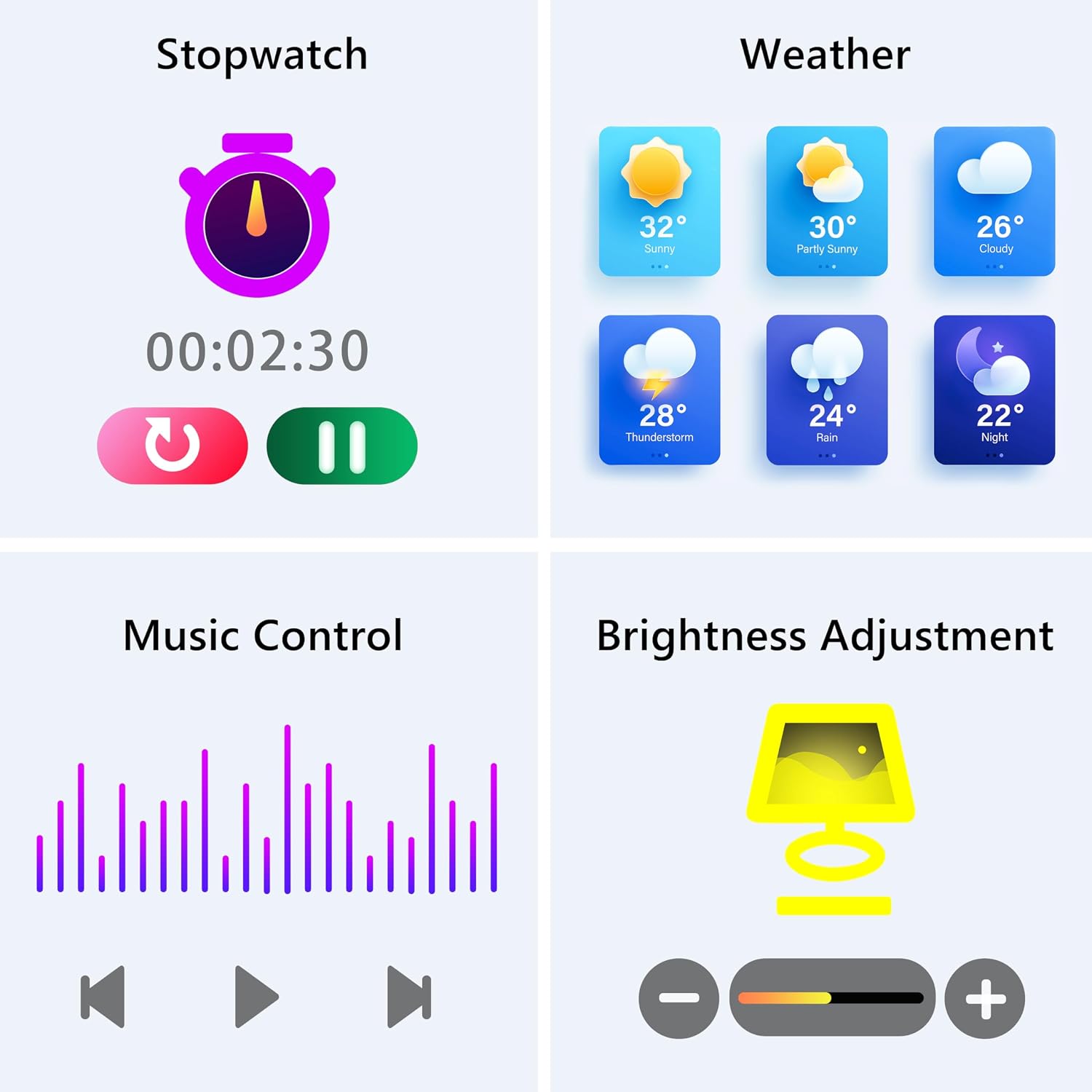
Image: The smartwatch screen showing various utility functions including a stopwatch, weather forecast, music control interface, and brightness adjustment slider.
5. การบำรุงรักษา
- การทำความสะอาด: ทำความสะอาดสมาร์ทวอทช์และสายนาฬิกาเป็นประจำด้วยผ้านุ่มและแห้ง หลีกเลี่ยงการใช้สารเคมีรุนแรงหรือวัสดุที่มีฤทธิ์กัดกร่อน
- ความต้านทานต่อน้ำ (IP67): The watch is IP67 water-resistant, meaning it can withstand splashes, hand washing, and rain. It is ไม่ suitable for swimming, showering with hot water, or diving. Avoid prolonged exposure to water.
- การดูแลแบตเตอรี่ Charge the battery fully when indicated. Avoid completely draining the battery frequently to prolong its lifespan. Store the watch in a cool, dry place when not in use for extended periods.
- การอัปเดตซอฟต์แวร์: Keep the GloryFit app updated to ensure your smartwatch has the latest features and performance improvements.
6 การแก้ไขปัญหา
If you encounter issues with your KALINCO P96 Smartwatch, try the following solutions:
- นาฬิกาไม่เปิด: ตรวจสอบให้แน่ใจว่านาฬิกาชาร์จเต็มแล้ว เสียบนาฬิกาเข้ากับที่ชาร์จอย่างน้อย 10-15 นาที
- ไม่สามารถจับคู่กับโทรศัพท์ได้:
- ตรวจสอบให้แน่ใจว่าเปิดใช้งาน Bluetooth บนโทรศัพท์ของคุณแล้ว
- ตรวจสอบให้แน่ใจว่านาฬิกาอยู่ในระยะบลูทูธ (โดยทั่วไปคือ 10 เมตร)
- รีสตาร์ททั้งโทรศัพท์และสมาร์ทวอทช์ของคุณ
- ตรวจสอบว่าแอป GloryFit ได้รับการอัปเดตเป็นเวอร์ชันล่าสุดแล้ว
- หากเคยจับคู่ไว้แล้ว ให้ลองยกเลิกการจับคู่และจับคู่ใหม่อีกครั้งผ่านแอป GloryFit
- ไม่ได้รับการแจ้งเตือน:
- Verify that notifications are enabled for specific apps in the GloryFit app settings.
- Ensure your phone's notification settings allow the GloryFit app to display alerts.
- Check if the watch is properly connected via Bluetooth.
- ข้อมูลสุขภาพที่ไม่ถูกต้อง:
- ตรวจสอบให้แน่ใจว่าสวมนาฬิกาให้พอดีกับข้อมือ ไม่แน่นหรือหลวมเกินไป
- For blood pressure readings, remain still and follow instructions. Note that smartwatch blood pressure measurements are for reference only and should not replace professional medical equipment.
- ทำความสะอาดเซ็นเซอร์ที่ด้านหลังของนาฬิกา
- อายุการใช้งานแบตเตอรี่สั้น:
- ลดความสว่างหน้าจอ
- ปิดใช้งานการตรวจสอบอัตราการเต้นของหัวใจอย่างต่อเนื่องหากไม่จำเป็นต้องใช้งานตลอด 24 ชั่วโมง
- จำกัดจำนวนแอปที่ส่งการแจ้งเตือนไปยังนาฬิกา
หากปัญหายังคงอยู่ โปรดดูข้อมูลการติดต่อได้ในส่วนการสนับสนุน
7. ข้อมูลจำเพาะ
| คุณสมบัติ | รายละเอียด |
|---|---|
| ยี่ห้อ | คาลินโค |
| หมายเลขรุ่น | P96 |
| ขนาดหน้าจอ | 1.69 นิ้ว |
| ระบบปฏิบัติการ | Multiple Versions of Both iOS and Android |
| เทคโนโลยีการเชื่อมต่อ | บลูทูธ 4.0 |
| ความจุของแบตเตอรี่ | 260 mAh (ลิเธียมโพลิเมอร์) |
| ความต้านทานต่อน้ำ | IP67 |
| อุปกรณ์ที่รองรับ | สมาร์ทโฟน (Android 5.0 ขึ้นไป / iOS 9.0 ขึ้นไป) |
| คุณสมบัติพิเศษ | Text Messaging, Notification, Health Monitoring |
| จีพีเอส | GPS ผ่านสมาร์ทโฟน |
8. การรับประกันและการสนับสนุน
KALINCO is committed to providing exceptional products. Your KALINCO P96 Smartwatch comes with a รับประกัน 12 เดือน ตั้งแต่วันที่ซื้อสินค้า
If you encounter any problems, have suggestions, or require assistance, please do not hesitate to contact KALINCO customer support. We are dedicated to providing you with satisfactory solutions at all times.
For support, please refer to the contact information provided with your product packaging or visit the official KALINCO webเว็บไซต์.


