1. บทนำ
The Waveshare SIM7600G-H 4G HAT Module is designed to provide LTE Cat-4 4G, 3G, and 2G communication capabilities, along with GNSS positioning, for Raspberry Pi boards and PCs. This module is based on the SIM7600G-H chip, offering global band support for versatile connectivity. It integrates a USB HUB feature, allowing for extended USB connectivity.
คุณสมบัติที่สำคัญ ได้แก่:
- Global band 4G/3G/2G network compatibility.
- Integrated USB HUB with two USB-A connectors and one USB solder pad.
- รองรับการวางตำแหน่งสถานีฐาน GPS, BeiDou, Glonass และ LBS
- Capable of telephoto calls and SMS via AT commands, with an onboard audio jack.
- Dedicated pogo pins for Raspberry Pi Zero/Zero W and a MicroUSB connector for other Raspberry Pi boards or PCs.
- Two LED indicators for monitoring operational status.

Figure 1: SIM7600G-H 4G HAT Module and included components.
2. เนื้อหาบรรจุภัณฑ์
ตรวจสอบว่ารายการทั้งหมดที่ระบุไว้ด้านล่างนี้รวมอยู่ในแพ็คเกจของคุณ:
- SIM7600G-H 4G HAT (B) x1
- เสาอากาศ LTE x1
- เสาอากาศ GPS x1
- USB-A to micro-B cable x1
- ชุดสกรู x1
บันทึก: Raspberry Pi boards and expansion modules are not included and must be acquired separately.
3. การตั้งค่าและการติดตั้ง
The SIM7600G-H 4G HAT Module offers flexible connection options for various host devices.
3.1 Connecting to Raspberry Pi Zero/Zero W
For Raspberry Pi Zero and Zero W models, the module can be directly connected using its dedicated pogo pins. This method eliminates the need for an additional USB cable for data communication. Ensure proper alignment of the pogo pins with the Raspberry Pi's GPIO header.
- Align the module's pogo pins with the corresponding pins on the Raspberry Pi Zero/Zero W.
- Gently press the module onto the Raspberry Pi until the pogo pins make secure contact.
- Secure the module using the provided screws and standoffs if necessary.
- Ensure the 5V pogo pin connects to the 5V pin of the Zero/Zero W, and the GND pogo pin connects to the GND pin. This provides power to the module.
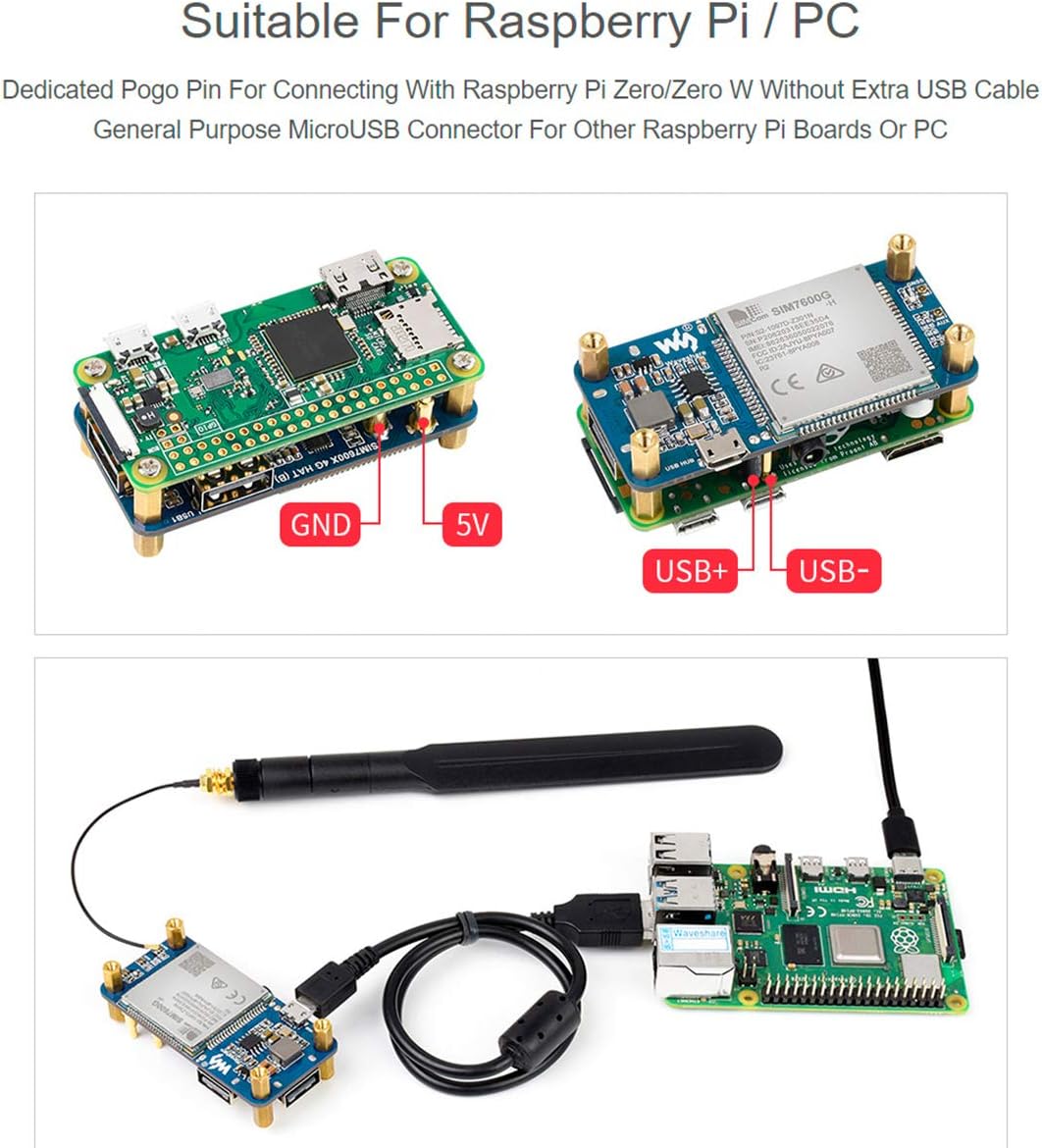
Figure 2: Connection of the SIM7600G-H module to a Raspberry Pi Zero using pogo pins.
3.2 Connecting to Other Raspberry Pi Boards or PC
For other Raspberry Pi models (e.g., Raspberry Pi 3B/4B) or a PC, use the provided MicroUSB cable to connect the module.
- Connect one end of the USB-A to micro-B cable to the MicroUSB port on the SIM7600G-H module.
- Connect the other end (USB-A) to an available USB port on your Raspberry Pi or PC.
- Ensure the host device provides sufficient power to the module.

Figure 3: Connection of the SIM7600G-H module to a Raspberry Pi via USB.
3.3 การติดตั้งเสาอากาศ
Proper antenna connection is crucial for optimal performance.
- Connect the LTE Antenna to the หลัก antenna connector on the module.
- Connect the GPS Antenna to the GNSS antenna connector on the module.
- Ensure the antenna connectors are securely fastened. Loose connections can lead to poor signal reception.
สำคัญ: The small antenna connectors require careful handling. Ensure they are firmly attached to prevent disconnections. If experiencing issues, consider securing them with a non-conductive adhesive after connection.
3.4 การใส่ซิมการ์ด
Insert a 1.8V or 3V SIM card into the designated SIM card slot on the module. Ensure the SIM card is correctly oriented as indicated on the module.
4. คู่มือการใช้งาน
The SIM7600G-H module is primarily controlled via AT commands. Detailed documentation and examples for Raspberry Pi are typically provided by the manufacturer.
4.1 Initializing Communication
- After connecting the module to your Raspberry Pi or PC, the operating system should detect the device.
- On Linux systems (like Raspberry Pi OS), the module typically enumerates as a serial port (e.g.,
/dev/ttyUSB0,/dev/ttyUSB1ฯลฯ). - Use a serial terminal program (e.g., Minicom, CuteCom) to send AT commands to the module.
- Ensure hardware flow control is disabled on your controller board if you encounter communication issues.
4.2 Network Connectivity (4G/3G/2G)
The module supports LTE Cat-4 4G, 3G, and 2G networks globally, with uplink speeds up to 50Mbps and downlink speeds up to 150Mbps on 4G.
- Use AT commands to configure network settings, connect to the cellular network, and establish data connections (e.g., dial-up, TCP, UDP, HTTP, FTP).
- Refer to the SIM7600G-H AT Command Manual for specific commands related to network registration and data services.
รูปที่ 4: อดีตample of network performance and USB HUB functionality.
4.3 GNSS Positioning
The module supports multiple Global Navigation Satellite Systems (GNSS), including GPS, BeiDou, Glonass, as well as LBS (Location Based Service) base station positioning.
- Ensure the GPS antenna is connected and placed in an area with a clear view ของท้องฟ้าเพื่อการรับสัญญาณที่ดีที่สุด
- Use specific AT commands to enable GNSS, query position data, and configure GNSS settings.

Figure 5: GNSS positioning in action, displaying location data on a map.
4.4 Telephoto Call and SMS
The module allows for making telephoto calls and sending/receiving SMS messages using AT commands. It features an onboard audio jack for connecting a headset.
- Connect a headset to the 3.5mm audio jack for audio input/output during calls.
- Refer to the AT Command Manual for commands related to call initiation, answering, termination, and SMS sending/receiving.
Figure 6: Illustration of telephoto call and SMS functionality via AT commands.
4.5 USB HUB Feature
The integrated USB HUB chip (FE1.1S) provides additional USB 2.0/1.1 compliant ports.
- Two USB-A connectors are available for connecting external USB devices.
- An additional USB solder pad is provided for custom integrations.
5. ใบสมัคร Example: 4G/3G Wireless Router
The SIM7600G-H module can be combined with a Raspberry Pi running operating systems like Raspbian or OpenWrt to create a 4G/3G wireless router. This setup allows the Raspberry Pi to act as a Wi-Fi hotspot, enabling other devices to access the mobile cellular network.
- Install the necessary software and drivers on your Raspberry Pi.
- Configure the Raspberry Pi to share the cellular internet connection via its Wi-Fi interface.
- Detailed configuration steps are typically available in the manufacturer's development resources.

Figure 7: The SIM7600G-H module configured as a 4G/3G wireless router.
6. สินค้าหมดview
6.1 ขนาดเค้าร่าง
The physical dimensions of the SIM7600G-H 4G HAT Module are provided below (all units in millimeters).

Figure 8: Outline dimensions of the SIM7600G-H 4G HAT Module.
6.2 What's On Board
This section details the main components and interfaces present on the SIM7600G-H 4G HAT Module.
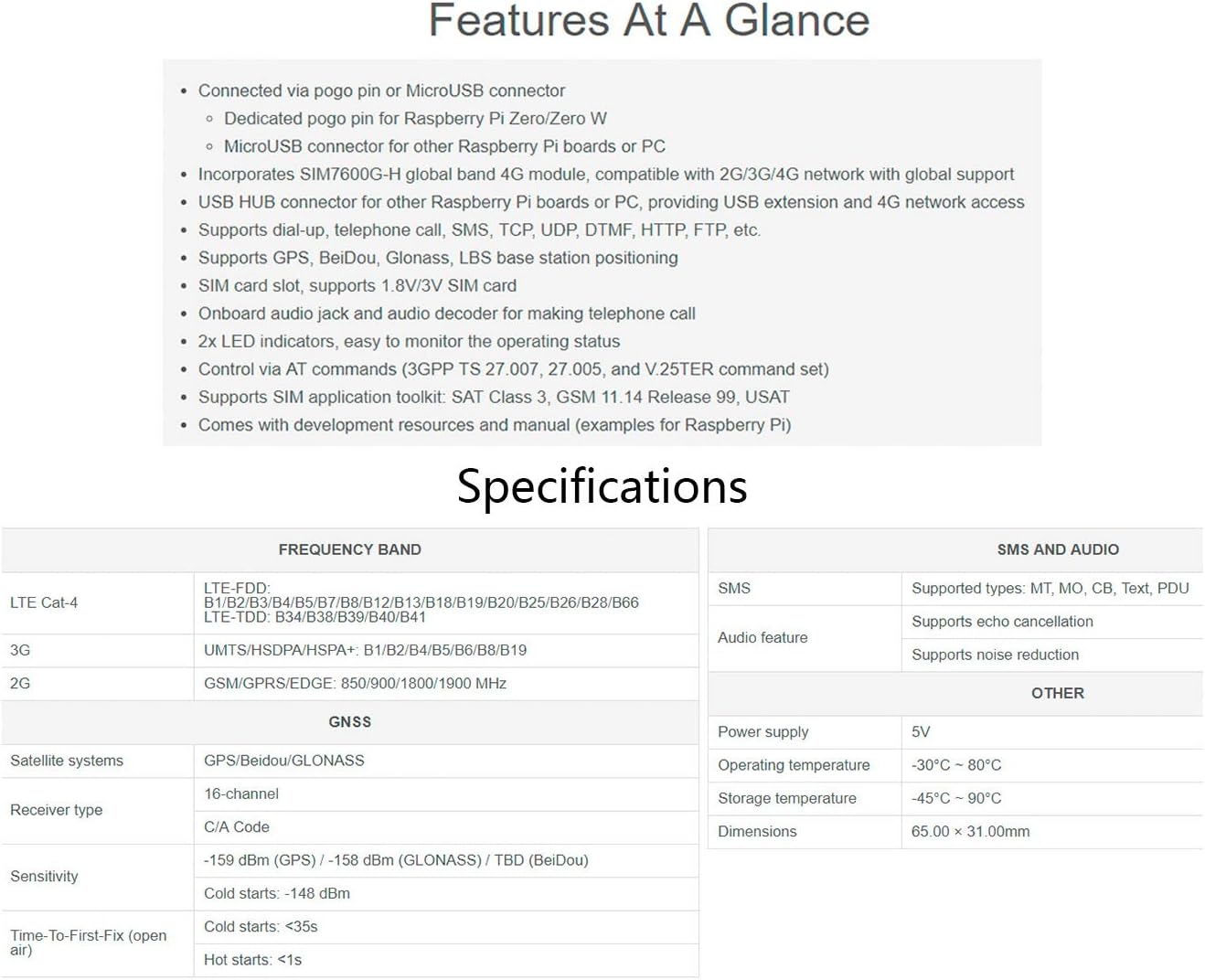
Figure 9: Component layout and identification on the SIM7600G-H 4G HAT Module.
- SIM7600G-H module
- FE1.1S USB HUB chip
- NAU8810 audio decoder
- MP1482 power chip
- RT9193-33 voltagนักแปล
- USB HUB input (D+/D- pogo pin for Raspberry Pi Zero/Zero W; MicroUSB connector for other Raspberry Pi boards or PC)
- Pogo pin power supply (5V: connects to 5V pin of Zero/Zero W, up to 2A current; GND: connects to GND pin of Zero/Zero W)
- USB extended ports (USB1-USB2: USB-A connectors; USB3: solder pad)
- SIM card slot (supports 1.8V/3V SIM card)
- 3.5mm earphone/mic jack
- MAIN antenna connector
- AUX auxiliary antenna connector
- ขั้วต่อเสาอากาศ GNSS
- ไฟแสดงสถานะพลังงาน
- ตัวระบุสถานะเครือข่าย
7. ข้อมูลจำเพาะ
Detailed technical specifications for the SIM7600G-H 4G HAT Module are provided in the table below.
| คุณสมบัติ | รายละเอียด |
|---|---|
| ชื่อรุ่น | ซิม7600G-H |
| เทคโนโลยีการเชื่อมต่อ | ยูเอสบี |
| การสนับสนุนเครือข่าย | LTE Cat-4 (4G), 3G, 2G (Global Band) |
| Uplink Speed (4G) | สูงสุดถึง 50Mbps |
| Downlink Speed (4G) | สูงสุดถึง 150Mbps |
| การสนับสนุน GNSS | GPS, BeiDou, Glonass, LBS base station positioning |
| ช่องใส่ซิมการ์ด | Supports 1.8V/3V SIM card |
| คุณสมบัติด้านเสียง | Onboard audio jack, audio decoder for calls |
| อินเทอร์เฟซการควบคุม | AT commands (3GPP TS 27.007, 27.005, V.25TER) |
| USB HUB Chip | FE1.1S (USB2.0/1.1 compliant) |
| พอร์ต USB | 2x USB-A, 1x USB solder pad |
| ไฟ LED แสดงสถานะ | 2 (Power, Network Status) |
| ขนาด | 65.00 x 31.00 มม. (ประมาณ 2.56 x 1.22 นิ้ว) |
| อุณหภูมิในการทำงาน | -30°C ถึง 80°C |
| อุณหภูมิในการจัดเก็บ | -45°C ถึง 90°C |
| แหล่งจ่ายไฟ | 5V |
8 การแก้ไขปัญหา
This section provides solutions to common issues encountered during the use of the SIM7600G-H 4G HAT Module.
- Module not detected by Raspberry Pi/PC:
- Ensure the module is properly powered. Check the power indicator LED.
- If using pogo pins, verify secure contact and correct 5V/GND connections.
- หากใช้ USB ให้ลองใช้พอร์ต USB หรือสาย USB อื่นดู
- On Raspberry Pi, ensure the necessary drivers are installed and the kernel recognizes USB serial devices.
- ไม่มีการเชื่อมต่อเครือข่าย:
- Verify that the SIM card is correctly inserted and active with a valid data plan.
- Ensure the LTE antenna is securely connected to the MAIN port.
- Check the network status indicator LED for activity.
- Confirm that the correct APN settings are configured via AT commands.
- Test the module in an area with good cellular coverage.
- GNSS positioning not working:
- Ensure the GPS antenna is securely connected to the GNSS port.
- Place the GPS antenna in an open area with a clear view ของท้องฟ้า
- Verify GNSS is enabled and configured correctly via AT commands.
- Communication issues with AT commands (e.g., no response, garbled text):
- Check the serial port settings (baud rate, data bits, parity, stop bits) in your terminal program.
- Crucially, ensure hardware flow control is disabled on your host controller board or in your serial communication software. This is a common cause of issues.
- Verify the correct serial port device is selected (e.g.,
/dev/ttyUSBn).
- Antenna connectors frequently detach:
- These are small connectors and can be delicate. Ensure they are fully seated.
- For permanent installations, a small amount of non-conductive adhesive (e.g., hot glue) can be used to secure the connectors after they are properly attached.
9. การสนับสนุนและการรับประกัน
For technical support, additional development resources, or warranty inquiries, please contact Waveshare directly through their official website or the platform where the product was purchased. Development resources and manuals with examples for Raspberry Pi are typically provided by the manufacturer.
ผู้ผลิต: เวฟแชร์
Webเว็บไซต์: www.waveshare.com


