การแนะนำ
This manual provides detailed instructions for the setup, operation, maintenance, and troubleshooting of your Perixx PERIDUO-606 Wireless Mini Ergonomic Keyboard and Vertical Mouse combo. Please read this manual thoroughly before use to ensure optimal performance and longevity of your devices.
เนื้อหาแพ็คเกจ
- 1 x Perixx PERIDUO-606 Wireless Mini Ergonomic Keyboard
- 1 x Perixx Wireless Vertical Mouse
- 1 x Adjustable Palm Rest Stand
- 1 x Movable Magnet (for height adjustment)
- 1 x Nano USB Receiver (located in the keyboard's battery compartment)
- 1 x คู่มือผู้ใช้

สินค้าเกินview
The Perixx PERIDUO-606 is a compact wireless ergonomic keyboard and vertical mouse combination designed for comfort and efficiency. It features a split-key design and a vertical mouse to promote natural wrist and hand positions.
คุณสมบัติแป้นพิมพ์:
- Split-Key Design: Separates keys into two groups to reduce wrist deviation.
- ขนาดกระทัดรัด: Measures approximately 13.82 x 8.94 x 2.56 inches, suitable for smaller workspaces.
- Adjustable Palm Rest: Integrated palm rest with an adjustable stand for varied wrist positions.
- Membrane Low Profile คีย์: มอบประสบการณ์การพิมพ์ที่สะดวกสบาย
- 4-Way Scroll Navigation: Integrated scroll wheel for enhanced navigation.


คุณสมบัติเมาส์:
- การออกแบบตามหลักสรีรศาสตร์แนวตั้ง: Positions the hand in a natural handshake posture to reduce wrist strain.
- คลิกเงียบ: Reduces operational noise.
- DPI ที่ปรับได้: Offers 800 / 1200 / 1600 DPI settings for customizable cursor speed.
- ดีไซน์แบบ 5 ปุ่ม: Standard left/right click, scroll wheel, and two thumb buttons.
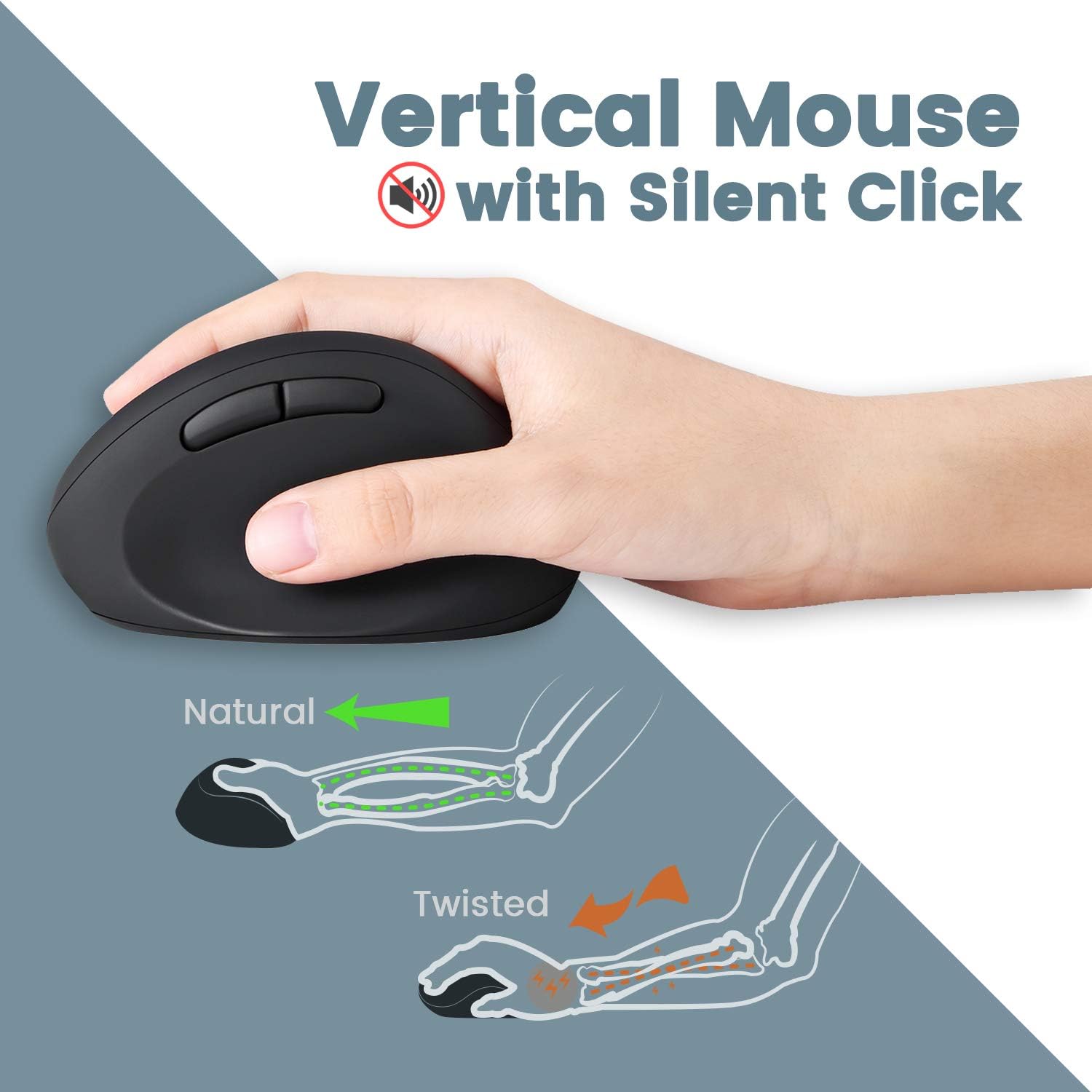
การเชื่อมต่อไร้สาย:
- เทคโนโลยีไร้สาย 2.4 GHz: Provides a stable connection up to 33 feet (10 meters).
- Single Nano USB Receiver: One receiver connects both the keyboard and mouse.
คำแนะนำการตั้งค่า
- ติดตั้งแบตเตอรี่:
- For the keyboard: Open the battery compartment on the underside of the keyboard and insert two AAA batteries (not included).
- For the mouse: Open the battery compartment on the underside of the mouse and insert one AA battery (not included).
- ค้นหาตัวรับ USB: The Nano USB receiver is stored in a dedicated compartment on the backside of the keyboard. Carefully remove it.
- เชื่อมต่อเครื่องรับ: เสียบตัวรับสัญญาณ Nano USB เข้ากับพอร์ต USB ที่ว่างอยู่บนคอมพิวเตอร์ของคุณ
- เปิดเครื่อง: Ensure both the keyboard and mouse are powered on (check for an ON/OFF switch, usually on the underside). The devices should connect automatically via Plug and Play.
- ติดตั้งที่พักฝ่ามือ (ไม่จำเป็น): The adjustable palm rest stand attaches magnetically to the front of the keyboard. Use the movable magnet for height adjustment as desired.

คำแนะนำการใช้งาน
การใช้แป้นพิมพ์:
- การพิมพ์: Position your hands naturally over the split-key layout. The design is intended to reduce wrist bending.
- ปุ่มฟังก์ชัน: Use the F1-F12 keys for standard functions. Some keys may have secondary functions accessible via the 'Fn' key (refer to keycap legends).
- ล้อเลื่อน: Utilize the central scroll wheel for vertical and horizontal scrolling in compatible applications.
การใช้เมาส์:
- การจับ: Hold the mouse in a natural handshake position.
- การปรับ DPI: Press the DPI button (usually located near the scroll wheel or on the top) to cycle through 800, 1200, and 1600 DPI settings. Select the sensitivity that best suits your preference.
- คลิกเงียบ: The main left and right click buttons are designed for quiet operation.
การซ่อมบำรุง
- การทำความสะอาด: ใช้ผ้านุ่มและแห้งเช็ดทำความสะอาดพื้นผิวของแป้นพิมพ์และเมาส์ สำหรับคราบสกปรกฝังแน่น ให้เช็ดเบาๆamp สามารถใช้ผ้าชุบน้ำสบู่ชนิดอ่อนๆ เช็ดได้ โดยให้แน่ใจว่าไม่มีของเหลวเข้าไปในอุปกรณ์
- การเปลี่ยนแบตเตอรี่: Replace batteries when performance degrades or devices stop responding. Ensure correct polarity when inserting new batteries.
- พื้นที่จัดเก็บ: When not in use for extended periods, turn off the devices to conserve battery life. Store the USB receiver in the keyboard's compartment to prevent loss.
การแก้ไขปัญหา
| ปัญหา | สารละลาย |
|---|---|
| คีย์บอร์ด/เมาส์ไม่ตอบสนอง |
|
| Keys are sticky or not registering consistently |
|
| Mouse cursor freezes or moves erratically |
|
| การเชื่อมต่อไร้สายหลุดบ่อยครั้ง |
|
ข้อมูลจำเพาะ
| คุณสมบัติ | รายละเอียด |
|---|---|
| หมายเลขรุ่น | 11660 |
| การเชื่อมต่อ | 2.4 GHz Wireless (Nano USB Receiver) |
| ระยะการทำงาน | สูงถึง 33 ฟุต (10 เมตร) |
| ขนาดของแป้นพิมพ์ (ยาวxกว้างxสูง) | 13.82 x 8.94 x 2.56 นิ้ว |
| ขนาดของเมาส์ (ยาวxกว้างxสูง) | 4.5 x 2.64 x 2.28 นิ้ว |
| น้ำหนักคีย์บอร์ด | ประมาณ 1.6 ปอนด์ |
| การตั้งค่า DPI ของเมาส์ | 800 / 1200 / 1600 |
| แบตเตอรี่คีย์บอร์ด | 2 x AAA (ไม่รวม) |
| แบตเตอรี่เมาส์ | 1 x AA (ไม่รวม) |
| ระบบปฏิบัติการที่รองรับ | วินโดวส์ 7, 8, 10, 11 |
การรับประกันและการสนับสนุน
Your Perixx PERIDUO-606 comes with a รับประกันจำกัด 12 เดือน นับจากวันที่ซื้อ การรับประกันนี้ครอบคลุมถึงข้อบกพร่องจากการผลิตและรับรองว่าผลิตภัณฑ์ทำงานได้ตามที่ตั้งใจไว้ภายใต้การใช้งานปกติ
สำหรับการขอรับการสนับสนุนทางเทคนิค การเรียกร้องการรับประกัน หรือความช่วยเหลือเพิ่มเติม โปรดเยี่ยมชมเว็บไซต์อย่างเป็นทางการของ Perixx website or contact their customer service department. Contact information can typically be found on the Perixx brand store page or included documentation.
แหล่งข้อมูลออนไลน์: Perixx Brand Store on Amazon


