1. บทนำ
ขอบคุณสำหรับการซื้อasing the Blackstar ID:Core Stereo 10 Sugar Skull V2 Limited Edition amplifier. This 10-watt (2x5W) stereo combo amplifier is designed to provide a versatile and high-quality sound experience for electric guitarists. It features Blackstar's patented ISF (Infinite Shape Feature) control, a range of voices, and built-in effects, making it ideal for practice, recording, and small performances. This manual provides essential information for safe and effective use of your ampชีวิต.
2. คำแนะนำด้านความปลอดภัยที่สำคัญ
- อ่านคำแนะนำ: อ่านคำแนะนำด้านความปลอดภัยและการใช้งานทั้งหมดก่อนใช้ผลิตภัณฑ์นี้
- เก็บรักษาคำแนะนำ: เก็บคำแนะนำเหล่านี้ไว้เพื่อใช้อ้างอิงในอนาคต
- คำเตือน: ปฏิบัติตามคำเตือนทั้งหมดเกี่ยวกับผลิตภัณฑ์และในคู่มือการใช้งาน
- น้ำและความชื้น: ห้ามใช้อุปกรณ์นี้ใกล้น้ำ
- การทำความสะอาด: ทำความสะอาดด้วยผ้าแห้งเท่านั้น
- การระบายอากาศ : อย่าปิดกั้นช่องระบายอากาศใดๆ ติดตั้งตามคำแนะนำของผู้ผลิต
- ความร้อน: ห้ามติดตั้งใกล้แหล่งความร้อน เช่น หม้อน้ำ เครื่องทำความร้อน เตา หรืออุปกรณ์อื่น ๆ (รวมถึง ampเครื่องให้ความร้อน) ที่ผลิตความร้อน
- การป้องกันสายไฟ: ปกป้องสายไฟไม่ให้ถูกเหยียบหรือถูกหนีบ โดยเฉพาะที่ปลั๊ก เต้ารับไฟฟ้า และจุดที่สายไฟออกจากเครื่อง
- ถอดปลั๊กระหว่างเกิดพายุ: ถอดปลั๊กอุปกรณ์นี้ในระหว่างพายุฝนฟ้าคะนองหรือเมื่อไม่ได้ใช้งานเป็นเวลานาน
- การบริการ: แจ้งบริการทั้งหมดให้ช่างที่ผ่านการรับรองทราบ จำเป็นต้องให้บริการเมื่ออุปกรณ์ได้รับความเสียหายในลักษณะใดก็ตาม เช่น สายไฟหรือปลั๊กชำรุด ของเหลวหกหรือมีวัตถุตกลงไปในอุปกรณ์ อุปกรณ์โดนฝนหรือความชื้น ไม่สามารถทำงานได้ตามปกติ หรือตกหล่น
3. เนื้อหาบรรจุภัณฑ์
กรุณาทำเครื่องหมายในช่องสำหรับรายการต่อไปนี้:
- Blackstar ID:Core Stereo 10 Sugar Skull V2 Limited Edition Ampชีวิต
- หน่วยจ่ายไฟ
- สาย USB
- คู่มือการใช้งาน (เอกสารนี้)
4. การควบคุมและคุณสมบัติ
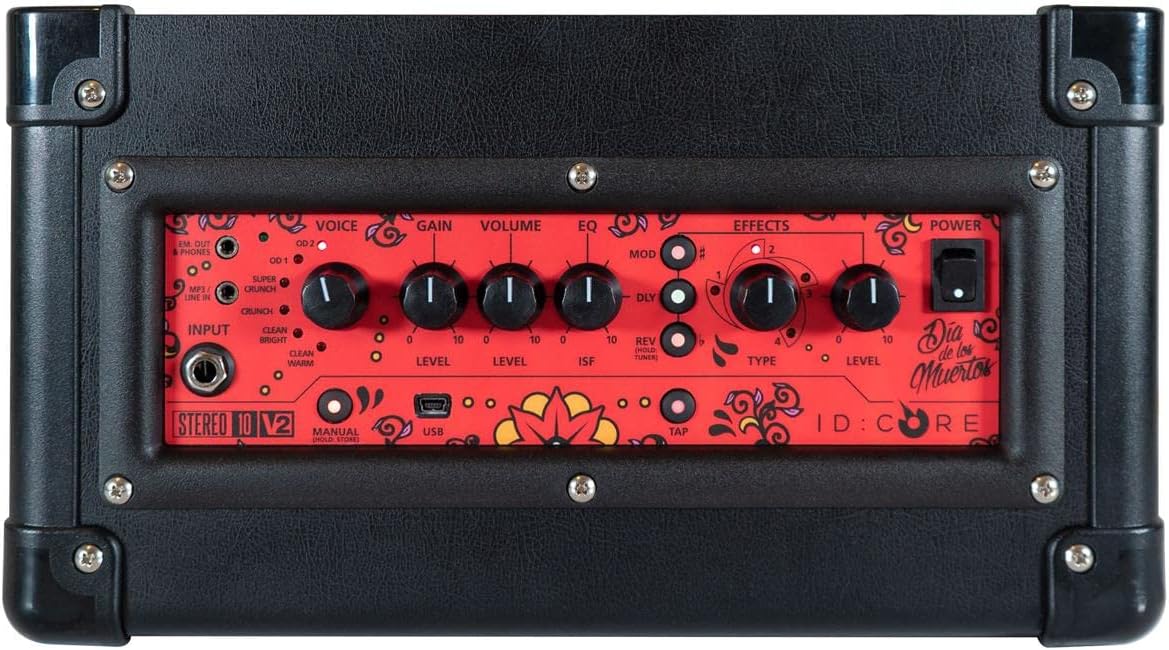
ภาพ: ด้านบน view ของ amplifier's control panel, showing all knobs, buttons, and input/output jacks.
แผงควบคุมด้านหน้า:
- ป้อนข้อมูล: 6.35mm (1/4") jack for connecting your guitar.
- เสียง: Rotary switch to select one of six Blackstar voices: Clean Warm, Clean Bright, Crunch, Super Crunch, OD 1, OD 2.
- ได้รับ: ควบคุมปริมาณเสียงโอเวอร์ไดรฟ์หรือเสียงผิดเพี้ยน
- ปริมาณ: ปรับระดับเอาต์พุตโดยรวมของ ampชีวิต.
- EQ: การควบคุมโทนเสียง
- ISF (คุณสมบัติรูปทรงไร้ขีดจำกัด): Patented control that shifts the tone stack response between a USA-style (counter-clockwise) and a UK-style (clockwise) ampชีวิต.
- ม็อด (การมอดูเลต): Rotary switch to select and adjust the level of modulation effects (Chorus, Flanger, Phaser, Tremolo).
- Dly (Delay): Rotary switch to select and adjust the level of delay effects (Linear, Analogue, Tape, Multi).
- Rev (Reverb): Rotary switch to select and adjust the level of reverb effects (Room, Hall, Spring, Plate).
- พิมพ์: Selects the specific effect type within the Mod, Dly, or Rev categories.
- ระดับ: Adjusts the overall level of the selected effect.
- แตะ: Button to set the tempo for time-based effects (Delay, Tremolo).
- พลัง: สวิตช์เปิด/ปิดสำหรับ ampชีวิต.
- ยูเอสบี: USB-B port for connecting to a computer for recording and using Blackstar's Architect software.
- Em. Out / Phones: 6.35mm (1/4") jack for headphones or direct recording output with speaker emulation.
- MP3 / Line In: 3.5mm (1/8") stereo jack for connecting external audio devices like MP3 players or phones.

ภาพ: ด้านหน้า view of the Blackstar ID:Core Stereo 10 ampเครื่องแสดงasing the unique Sugar Skull V2 design on the speaker grille.
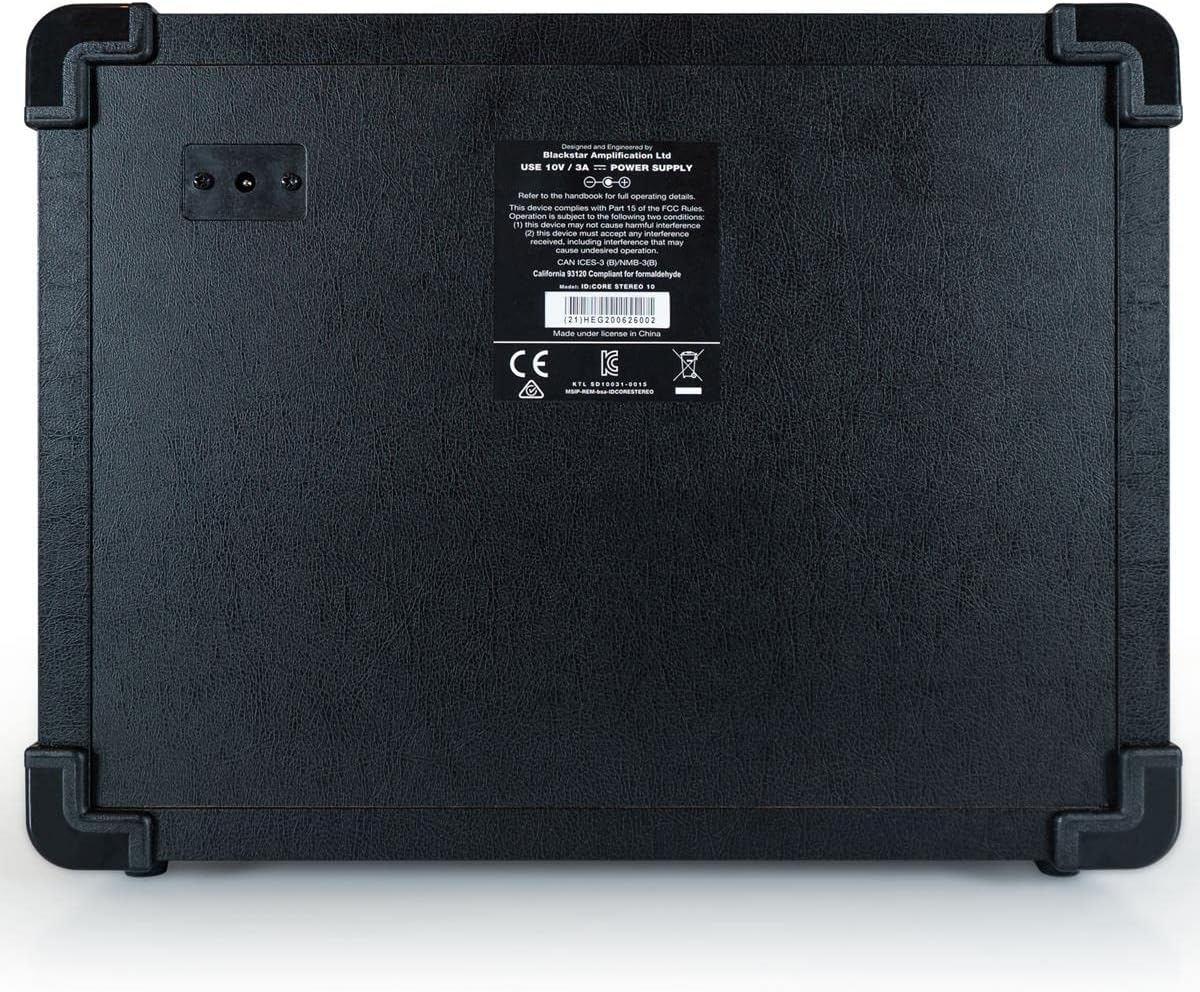
ภาพ: ด้านหลัง view of the Blackstar ID:Core Stereo 10 amplifier, displaying the product information label and power input.
5. การตั้งค่า
- การแกะกล่อง: นำไฟล์ ampเครื่องขยายเสียงและอุปกรณ์เสริมทั้งหมดจากบรรจุภัณฑ์ เก็บรักษาบรรจุภัณฑ์ไว้สำหรับการขนส่งหรือจัดเก็บในอนาคต
- การจัดวาง: วาง amplifier on a stable, flat surface. Ensure adequate ventilation around the unit. Avoid placing it near heat sources or in direct sunlight.
- การเชื่อมต่อไฟฟ้า: Connect the supplied power supply unit to the DC input jack on the rear of the amplifier. Plug the power supply into a suitable mains outlet. Ensure the ampตรวจสอบให้แน่ใจว่าสวิตช์เปิดปิดของเครื่องขยายเสียงอยู่ในตำแหน่ง OFF ก่อนทำการเชื่อมต่อ
- การเชื่อมต่อกีตาร์: เชื่อมต่อกีตาร์ไฟฟ้าของคุณเข้ากับ... ป้อนข้อมูล jack on the front panel using a standard 6.35mm (1/4") instrument cable.
- อุปกรณ์เสียงภายนอก (ไม่บังคับ): To play along with music, connect an MP3 player, phone, or other audio source to the MP3/ไลน์อิน jack using a 3.5mm stereo cable.
- การเชื่อมต่อ USB (ทางเลือก): For recording or using the Blackstar Architect software, connect the amplifier to your computer using the supplied USB cable.
6. คู่มือการใช้งาน
- เปิดเครื่อง: Ensure all connections are secure, then switch the พลัง button to the ON position. The power indicator light will illuminate.
- ตั้งระดับเสียง: เริ่มต้นด้วยการ ปริมาณ knob at a low setting to avoid sudden loud sounds.
- เลือกเสียง: หมุน เสียง switch to choose your desired amplifier type (e.g., Clean Warm, Crunch, OD 1).
- ปรับกำไร: ใช้ ได้รับ knob to control the amount of drive. Lower settings provide cleaner tones, while higher settings introduce more distortion.
- Shape Tone with EQ and ISF: ปรับแต่ง EQ knob for general tone shaping. Experiment with the ISF control to blend between American (tight low-end, aggressive mids) and British (woodier, less aggressive) amplifier characteristics.
- ใช้เอฟเฟ็กต์:
- Select a modulation, delay, or reverb effect using the ม็อด, ดีลี่, หรือ เรฟ rotary switches.
- ใช้ พิมพ์ knob to select a specific effect within that category (e.g., Chorus, Flanger for Mod).
- Adjust the effect's intensity with the ระดับ ลูกบิด
- For time-based effects (Delay, Tremolo), press the แตะ button repeatedly at your desired tempo to synchronize the effect.
- Headphone/Recording Output: เชื่อมต่อหูฟังกับ Em. Out / Phones jack for silent practice. This output also provides a speaker-emulated signal for direct recording.
- ยูเอสบีเสียง: When connected to a computer via USB, the amplifier acts as an audio interface, allowing you to record your guitar directly into a DAW or use the Blackstar Architect software for deeper editing and patch management.
- หมดแรง: When finished, turn the ปริมาณ down, then switch the พลัง กดปุ่มไปที่ตำแหน่งปิด
7. การบำรุงรักษา
- การทำความสะอาด: ทำความสะอาด amplifier's exterior with a soft, dry cloth. Do not use abrasive cleaners, solvents, or waxes.
- พื้นที่จัดเก็บ: เมื่อไม่ได้ใช้งานเป็นเวลานาน ให้เก็บ ampควรเก็บเครื่องขยายเสียงไว้ในที่แห้งและเย็น หลีกเลี่ยงแสงแดดโดยตรงและอุณหภูมิที่สูงหรือต่ำเกินไป
- การระบายอากาศ : Ensure that the ventilation openings are always clear to prevent overheating.
- การดูแลสายเคเบิล: Always handle power and instrument cables carefully. Avoid bending or kinking them sharply.
8 การแก้ไขปัญหา
| ปัญหา | สาเหตุที่เป็นไปได้ | สารละลาย |
|---|---|---|
| ไม่มีเสียงจาก ampชีวิต |
|
|
| Poor sound quality / Buzzing noise |
|
|
| เอฟเฟกต์ไม่ทำงาน |
|
|
9. ข้อมูลจำเพาะ
- แบบอย่าง: IDCORE10 V3
- เอาท์พุต วัดtage: 10 Watts (2 x 5W Stereo)
- วิทยากร: 2 x 3" Blackstar Speakers
- เสียง: 6 (Clean Warm, Clean Bright, Crunch, Super Crunch, OD 1, OD 2)
- ผลกระทบ: Modulation (Chorus, Flanger, Phaser, Tremolo), Delay (Linear, Analogue, Tape, Multi), Reverb (Room, Hall, Spring, Plate)
- การควบคุม: Voice, Gain, Volume, EQ, ISF, Mod, Dly, Rev, Type, Level, Tap, Power
- ข้อมูลอินพุต: Guitar Input (6.35mm jack), MP3/Line In (3.5mm stereo jack), USB-B
- เอาท์พุต: Emulated Out/Headphones (6.35mm jack)
- แหล่งพลังงาน: สายไฟ
- อุปกรณ์ที่รองรับ: กีตาร์ไฟฟ้า
- น้ำหนักสินค้า: 10 ปอนด์ (4.54 กก.)
- ขนาดสินค้า : 16 x 18 x 14 นิ้ว (40.6 x 45.7 x 35.6 ซม.)
- ASIN: B08Z88WN8T
10. การรับประกันและการสนับสนุน
แบล็กสตาร์ Amplification products are designed and manufactured to the highest standards. For detailed warranty information specific to your region and product, please refer to the warranty card included with your purchase or visit the official Blackstar Ampการทำให้บริสุทธิ์ website. For technical support or service inquiries, please contact your authorized Blackstar dealer or Blackstar customer support directly.
แหล่งข้อมูลออนไลน์:
- แบล็กสตาร์ Ampการประกาศอย่างเป็นทางการ Webเว็บไซต์: www.แบล็คสตาร์ampส.คอม
- Blackstar Architect Software: www.แบล็คสตาร์amps.com/Architect


