การแนะนำ
This manual provides comprehensive instructions for the safe and effective use of your BlissLights Sky Lite 2.0 RGB LED Laser Star Projector. Please read this manual thoroughly before operating the device and retain it for future reference.
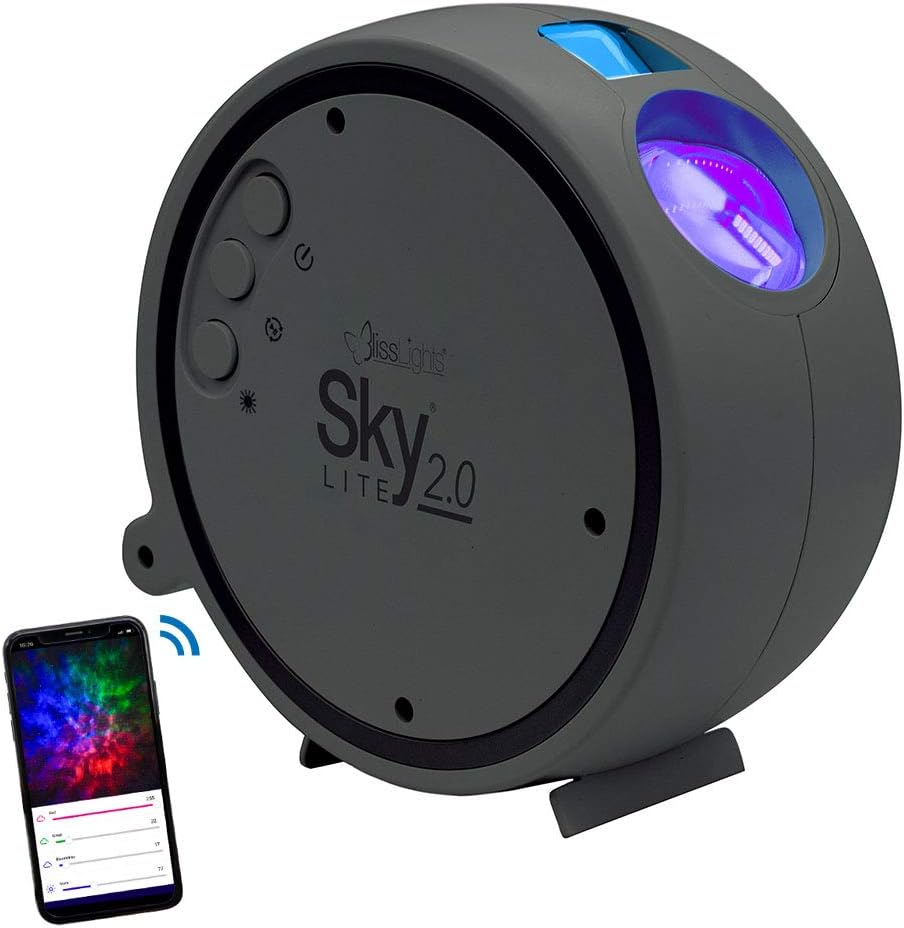
Image: The BlissLights Sky Lite 2.0 projector, a compact gray device, shown alongside a smartphone illustrating its app control interface. The projector features control buttons on its side and projects light from its front lens.
การตั้งค่า
1. การเปิดออกและการตรวจสอบ
- นำส่วนประกอบทั้งหมดออกจากบรรจุภัณฑ์อย่างระมัดระวัง
- Inspect the device and included accessories for any signs of damage. If any damage is found, do not use the product and contact customer support.
- Ensure all components are present: Sky Lite 2.0 projector, AC Power Adapter.
2 การวาง
Optimal placement is crucial for achieving the desired projection effect. Consider the following:
- For a wider projection spread, place the projector further away from the projection surface (e.g., floor or low surface, angled upwards).
- Avoid placing the projector where the laser beam could directly shine into eyes.
- ตรวจสอบให้แน่ใจว่าโปรเจ็กเตอร์วางอยู่บนพื้นผิวเรียบและมั่นคง

Image: A dining table set for two, surrounded by walls and ceiling illuminated with a dynamic, colorful nebula and scattered stars from the Sky Lite 2.0 projector, demonstrating its atmospheric effect.
3. การเชื่อมต่อไฟฟ้า
- เสียบอะแดปเตอร์ไฟ AC เข้ากับพอร์ตจ่ายไฟของโปรเจ็กเตอร์
- Plug the AC power adapter into a standard electrical outlet (100-240V AC, 50/60 Hz).
- The device will power on automatically or enter standby mode.
4. การดาวน์โหลดแอปและการเชื่อมต่อบลูทูธ
For full control and customization, download the official BlissLights app.
- ค้นหา "BlissLights" in your device's app store (iOS or Android).
- ดาวน์โหลดและติดตั้งแอปพลิเคชัน
- Open the app and follow the on-screen instructions to pair your Sky Lite 2.0 via Bluetooth. Ensure Bluetooth is enabled on your mobile device.
- The app does not require location or storage data for operation.

Image: A hand holding a smartphone displaying the BlissLights app. The app interface shows controls for multicolor cloud effects, a timer function, and options to customize light shows, demonstrating the device's smart capabilities.
การดำเนินการ
1. การควบคุมอุปกรณ์
The Sky Lite 2.0 features simple button controls on the unit:
- ปุ่มเปิด/ปิด: เปิดหรือปิดอุปกรณ์
- Cycle Effects Button: Cycles through various light effects and color combinations.
- ปุ่มปรับความสว่าง: Adjusts the projection brightness.
- ปุ่มหมุน: Starts or stops the rotating motion of the nebula.
2. คุณสมบัติการควบคุมแอป
The BlissLights app provides enhanced control and customization options:
- โหมดเอฟเฟกต์: Select from a variety of preset light effects for stars and nebula.
- การปรับแต่งสี: Create and save your own unique color combinations using the RGB cloud feature.
- การปรับความสว่าง: Fine-tune the brightness levels of both stars and nebula.
- การควบคุมการหมุน: Start or stop the rotation of the nebula. Note that rotation speed is not adjustable.
- ฟังก์ชั่นจับเวลา: Set an automatic shut-off timer for convenience.

Image: A gaming room featuring a high-back gaming chair, desk with computer, and wall art, all bathed in the immersive galaxy projection from the Sky Lite 2.0, highlighting its use in creating an ambient environment.
การซ่อมบำรุง
1. การทำความสะอาด
- ตรวจสอบให้แน่ใจว่าได้ถอดปลั๊กอุปกรณ์ออกก่อนทำความสะอาด
- ใช้ผ้าแห้งเนื้อนุ่มเช็ดทำความสะอาดภายนอกของโปรเจ็กเตอร์
- Do not use abrasive cleaners, solvents, or harsh chemicals, as these may damage the finish or optical components.
- Gently clean the projection lens with a microfiber cloth if dust or smudges affect projection quality.
2. การจัดเก็บ
- เมื่อไม่ได้ใช้งาน ให้เก็บโปรเจ็กเตอร์ไว้ในที่แห้งและเย็น หลีกเลี่ยงแสงแดดโดยตรงและอุณหภูมิที่สูงหรือต่ำเกินไป
- Keep the device in its original packaging or a protective case to prevent dust accumulation and damage.
การแก้ไขปัญหา
If you encounter issues with your Sky Lite 2.0, refer to the following common problems and solutions:
| ปัญหา | สาเหตุที่เป็นไปได้ | สารละลาย |
|---|---|---|
| อุปกรณ์ไม่เปิดเครื่อง | No power, faulty adapter, or device malfunction. |
|
| App cannot connect to the projector. | Bluetooth is off, projector is out of range, or app issue. |
|
| ภาพฉายไม่ชัดหรือไม่ชัดเจน | Incorrect placement, ambient light, or dirty lens. |
|
| Nebula rotation speed is not adjustable. | นี่คือลักษณะการออกแบบของผลิตภัณฑ์ | The Sky Lite 2.0 does not offer adjustable rotation speed for the nebula effect. You can only toggle rotation on or off. |
| Specific colors are missing from the nebula. | Color selection in app or device limitations. | When certain colors are deselected in the app, those areas will not be illuminated by the nebula. The remaining colors will not expand to fill the entire projection area. |
ข้อมูลจำเพาะ
The following are the technical specifications for the BlissLights Sky Lite 2.0:
- หมายเลขรุ่น: 900-00057_อ
- ยี่ห้อ: บลิสไลท์
- สี: Blue (Stars), RGB (Nebula)
- รูปร่าง: กลม
- วัสดุ: Glass (Shade), ABS Plastic (Housing)
- เสร็จสิ้นประเภท: เคลือบแล็คเกอร์
- ประเภทแหล่งกำเนิดแสง: ไดโอดเปล่งแสง (LED)
- แหล่งพลังงาน: สายไฟ
- กำลังไฟเข้า: กระแสไฟสลับ 100-240 โวลต์, 50/60 เฮิรตซ์, 0.2 แอมป์
- กำลังขับ USB: 5V === 2A
- วัดtage: 5 วัตต์
- เล่มที่tage: 120 โวลต์ (AC)
- วัดแหล่งกำเนิดแสงที่เข้ากันได้สูงสุดtage: 100 วัตต์
- น้ำหนักสินค้า: 1.1 ปอนด์ (ประมาณ 0.5 กก.)
- ขนาดสินค้า : 6.25" ยาว x 2.75" กว้าง x 6.25" สูง (15.88 ซม. ยาว x 6.99 ซม. กว้าง x 15.88 ซม. สูง)
- ความยาวสายไฟ: 5 ฟุต / 1.5 เมตร
- การดำเนินการ: ใช้ภายในอาคารเท่านั้น
- การจัดประเภทด้วยเลเซอร์: ชั้นประถมศึกษาปีที่ 2
- การครอบคลุมการฉายภาพ:
- Laser: 30x30 ft
- Nebula: 15x15 ft
- คุณสมบัติพิเศษ: App Control, Blue Laser, Bluetooth, RGB Cloud, Dimmable, Adjustable Light Direction, Push Button Switch Style
- ส่วนประกอบที่รวมอยู่: อะแดปเตอร์ AC
- ใบรับรอง: ได้รับการรับรองจาก UL

Image: A technical diagram illustrating the dimensions (6.5 inches / 16.51 cm in height and width, 2.5 inches / 6.35 cm in depth) and key specifications of the Sky Lite 2.0 projector, including power input, operation, and projection coverage.

Image: A visual representation of the Sky Lite 2.0's features, highlighting its moving stars and nebula, multicolor cloud, adjustable brightness, tilting base, app control, customizable effect modes, and USB power with plug adapter.
การรับประกันและการสนับสนุน
ข้อมูลการรับประกัน
Specific warranty details for the BlissLights Sky Lite 2.0 are provided by the manufacturer. Please refer to the product packaging or the official BlissLights webโปรดเยี่ยมชมเว็บไซต์นี้เพื่อดูนโยบายการรับประกันและข้อมูลการลงทะเบียนล่าสุด
การสนับสนุนลูกค้า
For technical assistance, troubleshooting beyond this manual, or warranty claims, please contact BlissLights customer support. Contact information can typically be found on the manufacturer's webบรรจุภัณฑ์ไซต์หรือผลิตภัณฑ์
You can also visit the official BlissLights store on Amazon for additional product information and support resources: BlissLights Amazon Store


